

編輯:關於 Android 程式設計
Android 內建了不少現成的主題樣式,透過 android:theme 屬性即可快速套用,省去自行定義的麻煩。以下整理常用的幾種:
android:theme="@android:style/Theme.Dialog":讓 Activity 以對話框模式顯示。
android:theme="@android:style/Theme.NoTitleBar":不顯示應用程式標題欄。
android:theme="@android:style/Theme.NoTitleBar.Fullscreen":不顯示標題欄並全螢幕。
android:theme="Theme.Light":白色背景。
android:theme="Theme.Light.NoTitleBar":白色背景且無標題欄。
android:theme="Theme.Light.NoTitleBar.Fullscreen":白色背景、無標題欄、全螢幕。
android:theme="Theme.Black":黑色背景。
android:theme="Theme.Black.NoTitleBar":黑色背景且無標題欄。
android:theme="Theme.Black.NoTitleBar.Fullscreen":黑色背景、無標題欄、全螢幕。
android:theme="Theme.Wallpaper":以系統桌面作為應用程式背景。
android:theme="Theme.Wallpaper.NoTitleBar":以系統桌面為背景且無標題欄。
android:theme="Theme.Wallpaper.NoTitleBar.Fullscreen":以系統桌面為背景、無標題欄、全螢幕。
android:theme="Theme.Translucent":透明背景。
android:theme="Theme.Translucent.NoTitleBar":透明背景且無標題。
android:theme="Theme.Translucent.NoTitleBar.Fullscreen":透明背景、無標題、全螢幕。
android:theme="Theme.Panel":面板風格顯示。
android:theme="Theme.Light.Panel":淺色面板風格顯示。
這些主題涵蓋了對話框、全螢幕、透明、壁紙背景等常見需求,開發時可依畫面設計直接套用。
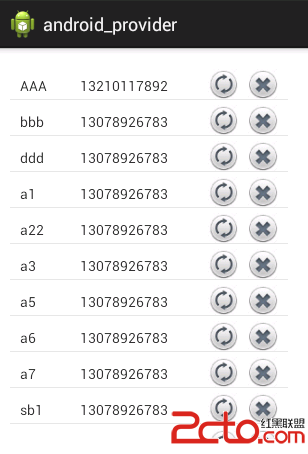 Android ContentProvider 電話簿案例:列表顯示、更新與刪除
需求說明 本案例透過 ContentResolver 操作 ContentProvider 的資料,將姓名與電話顯示在 ListView 中,並提供更新與刪除功能。 列
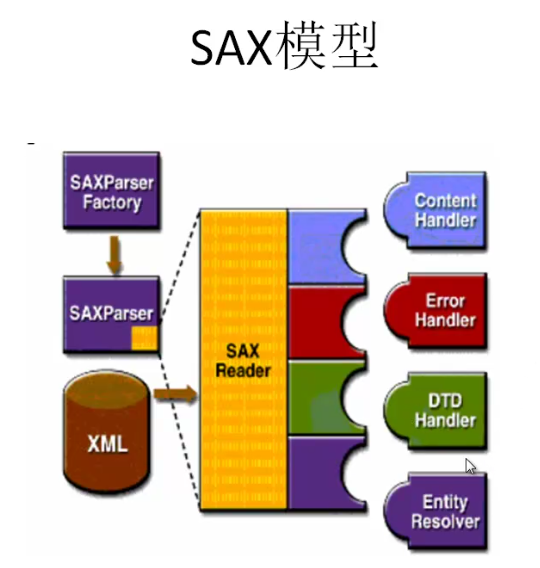 Android 中使用 SAX 機制解析 XML 文件详解
前言 本文主要介紹在 Android 中如何解析 XML 文件,核心採用的是 SAX 機制。SAX 全稱為 Simple API for XML,它既是一套接口,也是一個
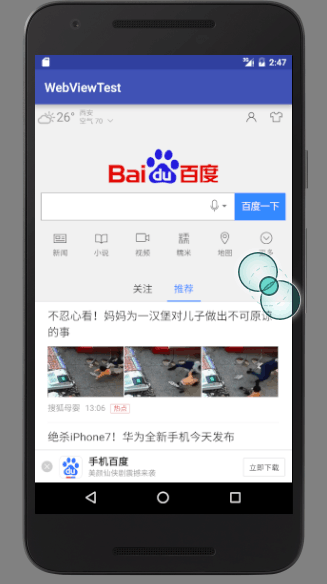 Android 網絡開發實戰:WebView、HttpURLConnection 與 HttpClient
在 Android 應用中,網絡通信幾乎是必不可少的能力。無論是加載網頁、請求接口,還是上傳與下載數據,都需要合適的網絡組件來完成。本文以實用為導向,梳理 Android
 Android 蒙板效果兩種做法:改寫窗體透明度與自訂遮罩層
彈窗時讓背景變暗、關閉後恢復,是常見的視覺手法。以下整理兩種實作方式,差別在於是否保留標題欄。 做法一:調整窗體透明度(不保留標題欄) 效果如下,整個畫面連標題欄一起變