

編輯:關於 Android 程式設計
Android 系統預設的 Toast 十分簡潔,使用也非常簡單。但有時候預設樣式與整體介面風格格格不入,這時就需要自訂 Toast,讓它與你的應用更為融合。
自訂 Toast 的第一步是新增一個版面配置檔,其結構與 Activity 使用的版面檔完全一致,差別只在內容是你要呈現在提示訊息裡的元件。以下範例做了一個「圖示 + 文字」的橫向排列:
<?xml version="1.0" encoding="utf-8"?>
<LinearLayout xmlns:android="https://schemas.android.com/apk/res/android"
    android:id="@+id/toast_layout_root"
    android:orientation="horizontal"
    android:layout_width="fill_parent"
    android:layout_height="fill_parent"
    android:padding="10dp"
    android:background="#DAAA" >

    <ImageView android:id="@+id/image"
        android:layout_width="wrap_content"
        android:layout_height="fill_parent"
        android:layout_marginRight="10dp" />

    <TextView android:id="@+id/text"
        android:layout_width="wrap_content"
        android:layout_height="fill_parent"
        android:textColor="#FFF" />
</LinearLayout>
這裡要特別注意:最外層 LinearLayout 的 id(toast_layout_root)後續程式碼會用到,不能省略。
public class MainActivity extends Activity {

    private Button btn;

    @Override
    public void onCreate(Bundle savedInstanceState) {
        super.onCreate(savedInstanceState);
        setContentView(R.layout.main);
        btn = (Button) findViewById(R.id.btn);

        btn.setOnClickListener(new OnClickListener() {
            @Override
            public void onClick(View v) {
                // LayoutInflater 能把 XML 轉成對應的 View 物件
                LayoutInflater inflater = getLayoutInflater();

                // 依指定版面建立具備層級關係的 View,
                // 第二個參數是根節點,即 toast_layout_root 的 id
                View layout = inflater.inflate(R.layout.toast_layout,
                        (ViewGroup) findViewById(R.id.toast_layout_root));

                // 注意:以下兩個 findViewById 都是在 layout 中查找
                ImageView image = (ImageView) layout.findViewById(R.id.image);
                image.setImageResource(R.drawable.head);

                TextView text = (TextView) layout.findViewById(R.id.text);
                text.setText("自定義Toast演示程序");

                Toast toast = new Toast(getApplicationContext());
                toast.setGravity(Gravity.CENTER_VERTICAL, 0, 0); // 設定顯示位置
                toast.setDuration(Toast.LENGTH_LONG);            // 設定顯示時間
                toast.setView(layout);                           // 套用自訂版面
                toast.show();
            }
        });
    }
}
幾個容易寫錯的地方:
inflate() 的第二個參數必須是版面檔中的根 View id,這樣回傳的 View 才帶有正確的父層結構。findViewById() 一定要在 layout 上呼叫,而不是在 Activity 上呼叫,否則找不到 Toast 內部的元件。setGravity() 的第二、三個參數是 x、y 偏移量,可用來微調位置。Toast.LENGTH_SHORT 與 Toast.LENGTH_LONG 兩種可選,無法自訂任意秒數。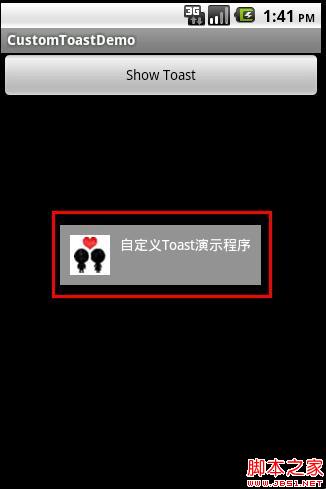
 Android drawable 資源完整整理:從 bitmap 到 animation-list
Drawable 資源總覽 Android 的 drawable 資源種類很多,除了常見的 shape、selector、layer-list,還有 bitmap、cli
 Material Design 實戰:CoordinatorLayout 三大滾動效果詳解
先搞清楚 Material Design 到底是什麼 Google 在官方設計文件裡這樣自我介紹: 我們希望為使用者打造一套視覺語言,把經典設計原則與科技帶來的可能性結
 Android ART 加載 OAT 文件的過程與結構解析
OAT 文件定位 ART 的核心是 OAT 文件。OAT 本質上是 Android 私有的 ELF 檔案,除了包含從 DEX 翻譯而來的本機機器指令,也保留原始 DEX
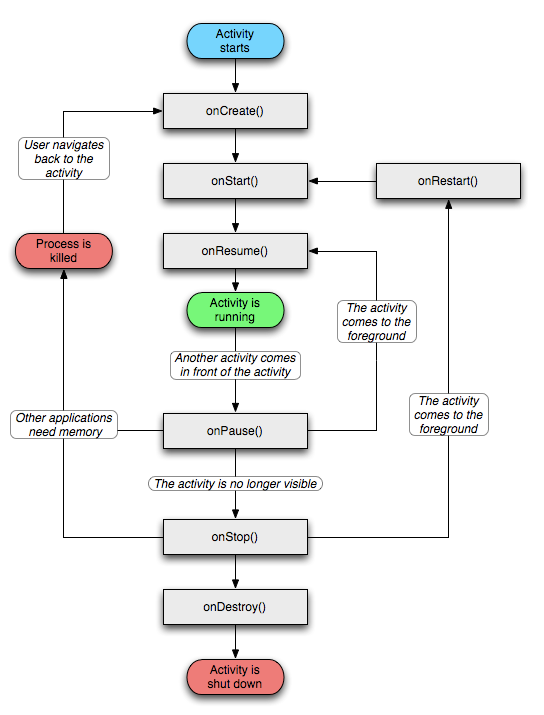 圖解 Android Activity 應用程式的生命週期
理解 Activity 的生命週期,是寫好 Android 應用的基礎。每一次頁面的開啟、切換、返回,背後都是一連串生命週期方法的依序呼叫。掌握它們的觸發時機,才能妥善管