

編輯:關於 Android 程式設計
有些功能非得要 root 才能動,例如自動安裝、系統層級的檔案操作等等。既然功能依賴 root,那在呼叫之前就得先確認環境是否具備條件,否則只會拿到一堆例外。以下整理幾種實務上常見的判斷思路。

方法一:多重條件輪流檢查
/**
* @author Kevin Kowalewski
*
*/
public class Root {private static String LOG_TAG = Root.class.getName();
public boolean isDeviceRooted() {
if (checkRootMethod1()){return true;}
if (checkRootMethod2()){return true;}
if (checkRootMethoD3()){return true;}
return false;
}public boolean checkRootMethod1(){
String buildTags = android.os.Build.TAGS;if (buildTags != null && buildTags.contains("test-keys")) {
return true;
}
return false;
}public boolean checkRootMethod2(){
try {
File file = new File("/system/app/Superuser.apk");
if (file.exists()) {
return true;
}
} catch (Exception e) { }return false;
}public boolean checkRootMethod3() {
if (new ExecShell().executeCommand(SHELL_CMD.check_su_binary) != null){
return true;
}else{
return false;
}
}
}
/**
* @author Kevin Kowalewski
*
*/
public class ExecShell {private static String LOG_TAG = ExecShell.class.getName();
public static enum SHELL_CMD {
check_su_binary(new String[] {"/system/xbin/which","su"}),
;String[] command;
SHELL_CMD(String[] command){
this.command = command;
}
}public ArrayList<String> executeCommand(SHELL_CMD shellCmd){
String line = null;
ArrayList<String> fullResponse = new ArrayList<String>();
Process localProcess = null;try {
localProcess = Runtime.getRuntime().exec(shellCmd.command);
} catch (Exception e) {
return null;
//e.printStackTrace();
}BufferedWriter out = new BufferedWriter(new OutputStreamWriter(localProcess.getOutputStream()));
BufferedReader in = new BufferedReader(new InputStreamReader(localProcess.getInputStream()));try {
while ((line = in.readLine()) != null) {
Log.d(LOG_TAG, "--> Line received: " + line);
fullResponse.add(line);
}
} catch (Exception e) {
e.printStackTrace();
}Log.d(LOG_TAG, "--> Full response was: " + fullResponse);
return fullResponse;
}}
三個判斷點各有所長:Build.TAGS 裡是否帶有 test-keys、系統目錄下是否存在 Superuser.apk、以及執行 which su 能不能找到 su 二進位檔。任一個成立就視為已 root。這份範例出自 Stack Overflow,向原作者致敬。
方法二:借助 RootTools 這類現成函式庫
開源專案 RootTools 把這些細節都包好了:
RootTools.isRootAvailable() 用來判斷環境是否已 root;RootTools.isAccessGiven() 則更进一步,回傳 true 代表手機已 root,而且你的 App 也確實拿到了授權。
String commandToExecute = "su";
executeShellCommand(commandToExecute);
private boolean executeShellCommand(String command){
Process process = null;
try{
process = Runtime.getRuntime().exec(command);
return true;
} catch (Exception e) {
return false;
} finally{
if(process != null){
try{
process.destroy();
}catch (Exception e) {
}
}
}
}
最後提醒一個實務上的坑:有回覆指出,直接 exec("su") 這種探測方式在某些機型上會帶來嚴重的效能副作用——每啟動一次就多留一個僵死行程佔著記憶體,手機會越用越慢。若只是要判斷環境,建議優先採用讀取 Build 標籤或查檔案這類不產生行程的做法,並把結果快取起來,別在每次呼叫功能時都重跑一遍。
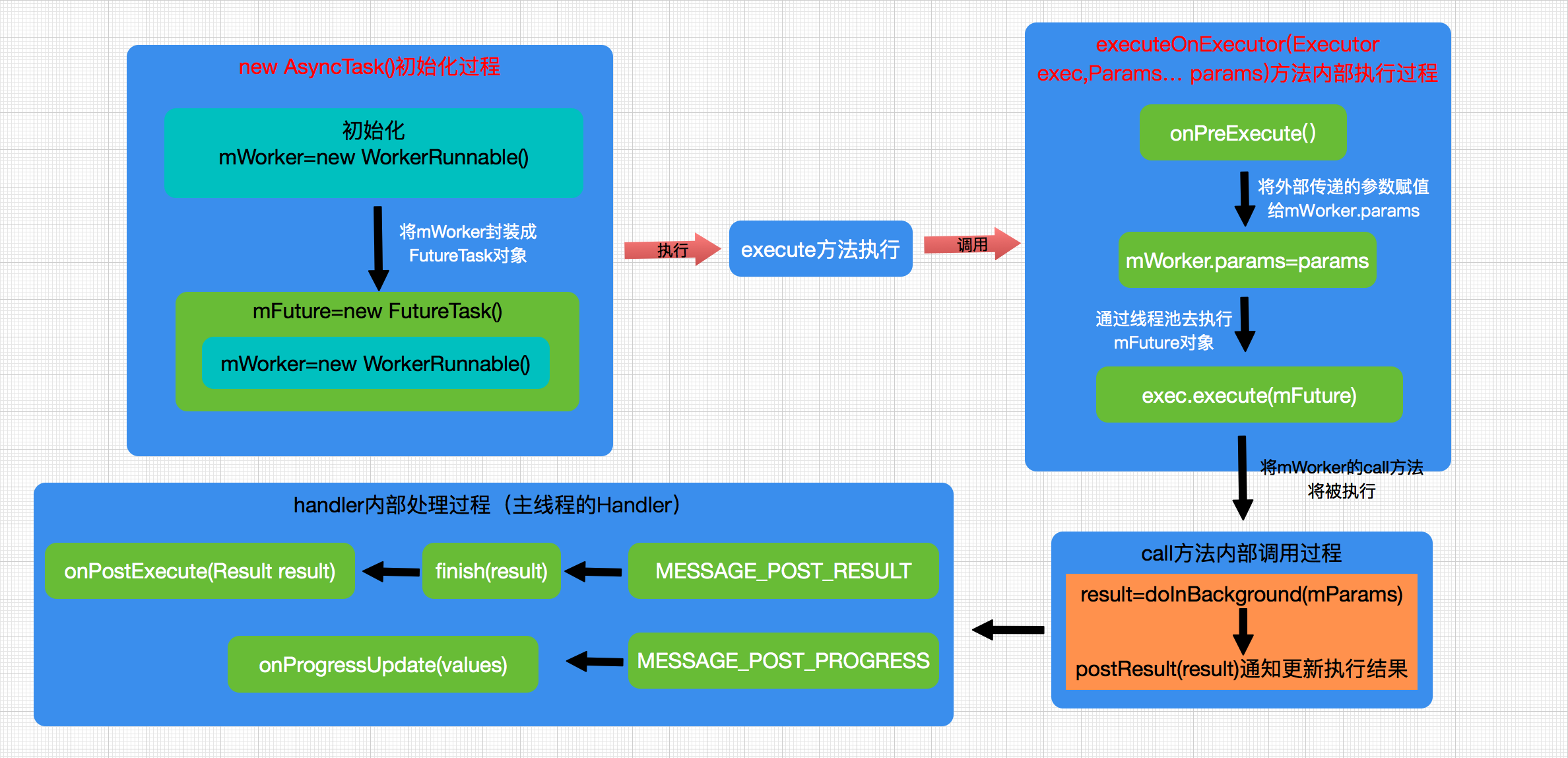 Android 多線程之 AsyncTask 工作原理深度解析(下):源碼全剖析
上一篇我們梳理了 AsyncTask 的基本用法以及不同 Android 版本下的區別,本篇則要徹底拆解 AsyncTask 的內部工作原理。正式開始前,先補充一個多線程
 Android 實戰:手把手做一個簡易模糊查詢
這篇小案例來做一個最樸素的模糊查詢:在輸入框裡敲入一段關鍵字,點擊搜索,就把手機裡路徑包含該關鍵字的結果列出來。 一、佈局 界面很簡單:一個提示文本、一個輸入框、一個搜
 微信與飛信差別比較:功能、費用與使用情境
微信與飛信都屬於行動通訊工具,但兩者在生態、功能與使用族群上有明顯差異。微信特色微信支援跨平台傳送文字、語音、圖片與影片,並提供朋友圈、公眾平台、搖一搖、漂流瓶等功能,使
 動手玩轉Android AbsoluteLayout 絕對布局的座標定位用法
在Android的諸多布局容器中,AbsoluteLayout 是相當有個性的一位。它採用的定位邏輯非常直白:直接依據每個子元件左上角的絕對座標,來決定元件在畫面上的落點