

編輯:關於 Android 程式設計
開發時常會遇到表格式的版面配置,這時候邊框怎麼處理?
如果只需要一條線,做法很單純:丟一個 TextView,把寬或高固定為 1dp~2dp,另一維度設成 match_parent,再給個背景色即可。線的粗細由寬高決定,顏色就是設定的背景色。
但若是四邊都要線,一條一條拼接未免太費工。有兩種解法:一是準備一張帶邊線的 9-patch 圖片;二是自己寫一個 shape 版面,需要時透過 background 屬性引用。以下說明第二種。
新增 res/drawable/shape_textview_cart.xml:
<?xml version="1.0" encoding="utf-8"?>
<shape xmlns:android="https://schemas.android.com/apk/res/android">

    <!-- 四邊邊框 -->
    <stroke
        android:width="1dp"
        android:color="#ebebeb" />

    <!-- 若要指定各邊不同粗細,改用 inset 或拆成多層 drawable -->

</shape>
若需要上下左右各自獨立控制,可在 stroke 之外搭配 padding,或改用 layer-list 堆疊多組 shape,各自只畫單邊:
<?xml version="1.0" encoding="utf-8"?>
<layer-list xmlns:android="https://schemas.android.com/apk/res/android">

    <item android:left="1dp">
        <shape android:shape="rectangle">
            <solid android:color="#ebebeb" />
        </shape>
    </item>

    <item
        android:left="1dp"
        android:right="1dp"
        android:top="1dp">
        <shape android:shape="rectangle">
            <solid android:color="#ebebeb" />
        </shape>
    </item>

</layer-list>
<LinearLayout
    xmlns:android="https://schemas.android.com/apk/res/android"
    android:layout_width="match_parent"
    android:layout_height="120dp"
    android:layout_marginLeft="2dp"
    android:layout_marginRight="2dp"
    android:background="@drawable/shape_textview_cart"
    android:orientation="horizontal">

    <ImageView
        android:id="@+id/cart_image"
        android:layout_width="120dp"
        android:layout_height="120dp"
        android:layout_marginRight="1dp"
        android:src="@drawable/qzone" />

    <LinearLayout
        android:layout_width="match_parent"
        android:layout_height="match_parent"
        android:orientation="vertical">
    </LinearLayout>

</LinearLayout>
shape 方案的好處是可調、可 reuse、不受螢幕密度影響,邊框永遠保持 1dp 的視覺粗細;缺點是無法做出單邊粗細不同的效果,那種情況得走 layer-list 或 9-patch。
另外,若版面會大量重複使用(例如列表項),建議把邊框與圓角、內距一起定義在同一個 drawable 中,並透過樣式統一管理,避免每個版面各寫一份。
 Android 7 新特性实战:通知直接回复(Direct Reply)
这是「是时候了解 Android 7」系列的第三篇。前两篇聊了多窗口模式和 Shortcut,这次说个轻量但很实用的功能——通知直接回复。 它解决什么问题 以前收到一条短
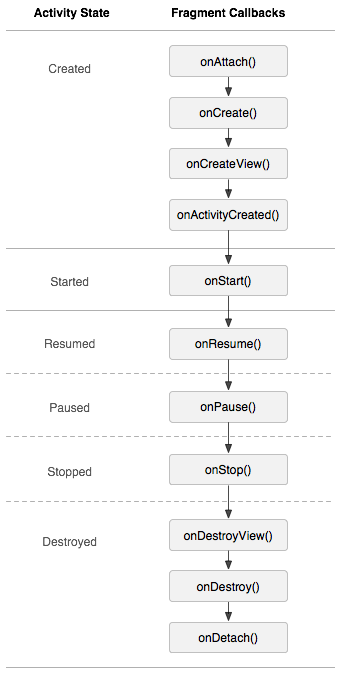 深入解析 Android Fragment 的生命周期與使用
前言 Fragment 的生命周期與 Activity 相似,但實際開發中往往還會牽涉到數據傳遞、onSaveInstanceState 的狀態保存、FragmentMa
 Android 頭像上傳實戰:從裁剪、壓縮到伺服器接收
現在幾乎每個 App 都有頭像功能,我的專案也不例外。頭像上傳大致可以拆成四個步驟:獲取頭像、裁剪頭像、檔案上傳、伺服器接收並保存。下面逐一說明。 一、獲取頭像 無非兩種
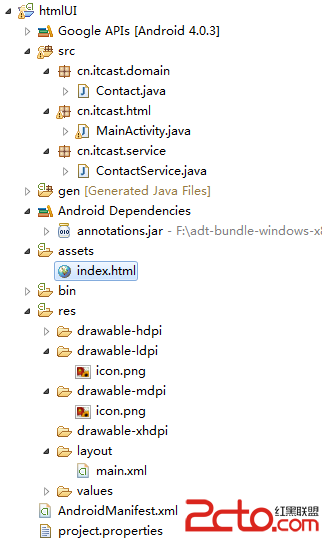 用 HTML 寫 Android 界面:WebView 與 Java 雙向通信實作
目前 Android 開發的分工還不夠細緻,程序員往往得兼顧界面。美工把視圖切圖交付過來,可真要用 layout 一層層拼出還原度高的界面,既費時又容易走樣。 其實還有一