

編輯:關於 Android 程式設計
界面中有一個 EditText 和一個 Button,如何做到點擊 Button 時讓 EditText 失去焦點?直接看程式碼。
XML 佈局:
<RelativeLayout
    android:layout_width="match_parent"
    android:layout_height="match_parent"
    xmlns:android="https://schemas.android.com/apk/res/android"
    xmlns:tools="https://schemas.android.com/tools"
    tools:context=".MainActivity">

    <EditText
        android:id="@+id/editext"
        android:layout_width="match_parent"
        android:layout_height="wrap_content" />

    <Button
        android:id="@+id/button"
        android:layout_width="match_parent"
        android:layout_height="wrap_content"
        android:layout_centerVertical="true"
        android:text="點擊Button讓Editext失去焦點" />
</RelativeLayout>
Activity 程式碼:
protected void onCreate(Bundle savedInstanceState) {
    super.onCreate(savedInstanceState);
    setContentView(R.layout.activity_main);
    mButton = (Button) findViewById(R.id.button);
    mEditText = (EditText) findViewById(R.id.editext);

    mEditText.setOnFocusChangeListener(new View.OnFocusChangeListener() {
        @Override
        public void onFocusChange(View view, boolean b) {
            if (!b) {
                Toast.makeText(MainActivity.this, "Editext失去焦點了", Toast.LENGTH_SHORT).show();
            } else {
                Toast.makeText(MainActivity.this, "Editext獲取焦點了", Toast.LENGTH_SHORT).show();
            }
        }
    });

    mButton.setOnClickListener(new View.OnClickListener() {
        @Override
        public void onClick(View view) {
            mButton.setFocusable(true);
            mButton.setFocusableInTouchMode(true);
            mButton.requestFocus();
        }
    });
}
記得 Button 一定要設定那三行程式碼才會生效。當然,你也可以用下面兩行取代:
mButton.setFocusable(true);
mButton.requestFocusFromTouch();
另外,在 Button 監聽中也可以只寫一行 mButton.requestFocus();,但需在對應的 Button XML 中加上兩個參數 focusable 和 focusableInTouchMode:
<Button
    android:id="@+id/button"
    android:layout_width="match_parent"
    android:layout_height="wrap_content"
    android:layout_centerVertical="true"
    android:focusable="true"
    android:focusableInTouchMode="true"
    android:text="點擊Button讓Editext失去焦點" />
 Android init 進程原始碼解析(一):配置檔解析與 zygote 啟動
init 是 Android 使用者空間的第一個進程,PID 固定為 1,相當於 Linux 世界的 systemd 角色。它主要負責三件事:解析配置檔、依配置執行各階段
 Android 多線程斷點續傳下載的完整實現(附源碼)
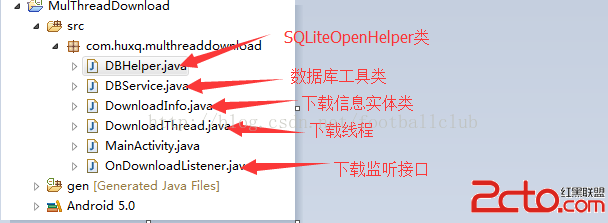
多線程 + 斷點續傳是下載功能的標準答案。它把一個大文件切成若干塊,交給多個線程並行拉取,同時把每條線程的進度持久化,這樣即使中途退出、斷網、進程被殺,重新開始時也能從上
 重新認識 Android 中的 MVP 架構
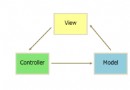
前言 為什麼要談 MVP?網路上的討論已經很多,但核心理由其實一句話就能說清:MVC 裡的 Activity 揹了太多不屬於它的責任。當一個類同時負責版面、資料、網路請求
 Android 圖片輪播廣告:滑動切換標題與焦點小圓點的實現
在許多應用的首頁,都會看到可以左右滑動、自動循環的圖片輪播效果,底部往往還帶有隨頁面切換而變化的標題與指示小圓點。本文以谷歌 v4 包中的 ViewPager 為基礎,一