

編輯:關於 Android 程式設計
多線程 + 斷點續傳是下載功能的標準答案。它把一個大文件切成若干塊,交給多個線程並行拉取,同時把每條線程的進度持久化,這樣即使中途退出、斷網、進程被殺,重新開始時也能從上次的位置接著下。
涉及的模塊不多:HTTP 請求、RandomAccessFile 隨機寫、SQLite 進度持久化、線程池。下面逐層拆開。
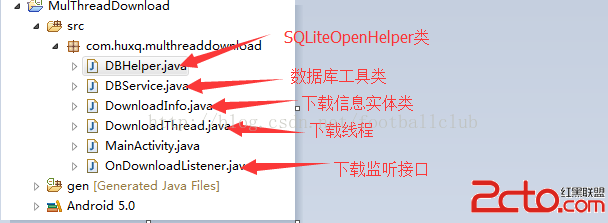
private String path = "https://192.168.1.3:8080/wanmei/yama.apk";
private String sdcardPath;

private int threadNum = 5;
ProgressDialog dialog;

private int process;      // 累計下載字節數
private int done;         // 完成百分比
private int filelength;   // 文件總長度
private int completed;    // 本次開始前已完成的下載量

// 用線程池是為了能夠優雅地中斷
ExecutorService pool;

@SuppressLint("HandlerLeak")
private Handler handler = new Handler() {
    public void handleMessage(android.os.Message msg) {
        process += msg.arg1;
        done = (int) ((1.0 * process / filelength) * 100);
        dialog.setProgress(done);

        if (done == 100) {
            // 下載完成後清理數據庫中的臨時記錄
            DBService.getInstance(getApplicationContext()).delete(path);

            // 延遲 1 秒關閉,讓用戶看清 100%
            Timer timer = new Timer();
            timer.schedule(new TimerTask() {
                @Override
                public void run() {
                    dialog.dismiss();
                }
            }, 1000);
        }
    }
};
用 msg.arg1 傳遞增量而非絕對值,是為了避免多線程下 Handler 消息亂序導致進度倒退。這是一個很容易被忽略的細節。
public void download(View v) {
    completed = 0;
    process = 0;
    done = 0;
    pool = Executors.newFixedThreadPool(threadNum);
    initProgressDialog();

    new Thread() {
        public void run() {
            try {
                if (Environment.getExternalStorageState().equals(Environment.MEDIA_MOUNTED)) {
                    sdcardPath = Environment.getExternalStorageDirectory().getAbsolutePath();
                } else {
                    toast("沒有內存卡");
                    return;
                }
                download(path, threadNum);
            } catch (Exception e) {
                e.printStackTrace();
            }
        }
    }.start();
}真正開工前,先發一次 HEAD 請求拿到文件大小與文件名,才能預先創建好本地文件、規劃每條線程的負責區間。
public void download(String path, int threadsize) throws Exception {
    URL url = new URL(path);
    HttpURLConnection conn = (HttpURLConnection) url.openConnection();

    // 只取響應頭,不要 body:既縮短響應時間,也節省流量
    conn.setRequestMethod("HEAD");
    conn.setConnectTimeout(5 * 1000);

    filelength = conn.getContentLength();
    String filename = getFilename(path);

    // 預先創建與目標等大的本地文件
    File dir = new File(sdcardPath + "/download/");
    if (!dir.exists()) {
        dir.mkdirs();
    }
    File saveFile = new File(sdcardPath + "/download/" + filename);
    RandomAccessFile accessFile = new RandomAccessFile(saveFile, "rwd");
    accessFile.setLength(filelength);
    accessFile.close();

    // 計算每條線程負責的數據長度(不能整除時向上取整)
    int block = filelength % threadsize == 0
            ? filelength / threadsize
            : filelength / threadsize + 1;

    // 非首次下載時,累加各線程已完成的進度
    if (!DBService.getInstance(getApplicationContext()).isHasInfors(path)) {
        for (int threadid = 0; threadid < threadNum; threadid++) {
            completed += DBService.getInstance(getApplicationContext())
                    .getInfoByIdAndUrl(threadid, path);
        }
    }

    Message msg = handler.obtainMessage();
    msg.arg1 = completed;
    handler.sendMessage(msg);

    // 提交任務到線程池
    for (int threadid = 0; threadid < threadsize; threadid++) {
        pool.execute(new DownloadThread(
                getApplicationContext(), path, saveFile, block, threadid, threadNum)
                .setOnDownloadListener(this));
    }
}
setLength(filelength) 這一步很關鍵:RandomAccessFile 允許我們直接跳到文件的任意偏移量去寫,前提是文件已經足夠大。預先「打洞」佔好空間,多個線程就能各寫各的而不互相覆蓋。
@Override
public void run() {
    // 起始位置 = 線程id × 每塊長度 + 該線程已完成量(斷點續傳的精髓)
    completed = DBService.getInstance(context).getInfoByIdAndUrl(threadid, url);
    int startposition = threadid * block + completed;
    int endposition = (threadid + 1) * block - 1;

    try {
        RandomAccessFile accessFile = new RandomAccessFile(saveFile, "rwd");
        accessFile.seek(startposition);

        HttpURLConnection conn = (HttpURLConnection) new URL(url).openConnection();
        conn.setRequestMethod("GET");
        conn.setConnectTimeout(5 * 1000);
        conn.setRequestProperty("Accept", "*/*");
        conn.setRequestProperty("Connection", "Keep-Alive");
        // 核心:通過 Range 頭只取自己負責的區間
        conn.setRequestProperty("RANGE", "bytes=" + startposition + "-" + endposition);

        InputStream inStream = conn.getInputStream();

        // 緩衝區大小的取捨:太小則等同限速,太大則可能 OOM
        // 這裡按剩餘可用內存在各線程間平分,動態確定
        int freeMemory = (int) Runtime.getRuntime().freeMemory();
        byte[] buffer = new byte[freeMemory / threadNum];

        int len, total = 0;
        boolean isInterrupted = false;

        while ((len = inStream.read(buffer)) != -1) {
            accessFile.write(buffer, 0, len);
            total += len;
            listener.onDownload(threadid, len, total, url);

            // 線程被中斷標記後退出循環
            if (Thread.interrupted()) {
                isInterrupted = true;
                break;
            }
        }
        inStream.close();
        accessFile.close();
    } catch (Exception e) {
        e.printStackTrace();
    }
}
兩個實踐要點:
freeMemory / threadNum 動態分配是一個比較平衡的折中。@Override
protected void onStop() {
super.onStop();
// 應用了退到後台就暫停下載
pool.shutdownNow();
dialog.dismiss();
}shutdownNow() 並不是殘忍地殺掉線程,它做的是給所有線程打上中斷標記。於是我們在循環裡用 Thread.interrupted() 檢測,主動 break 退出,讓每條線程有機會把當前進度寫入數據庫。這才是「優雅」的含義。
@Override
public void onDownload(int threadId, int process, int completed, String url) {
    DBService.getInstance(getApplicationContext())
             .updataInfos(threadId, completed, url);

    Message msg = handler.obtainMessage();
    msg.arg1 = process;
    handler.sendMessage(msg);
}但這裡有個明顯的性能問題:不該每次讀寫都更新數據庫。SQLite 本質上是一個文件,頻繁打開關閉的開銷極大,會把下載速度拖垮。生產環境中的正確做法是:
onStop)才觸發一次持久化。public class DBService {
private DBHelper dbHelper;
private static DBService instance;
private DBService(Context context) {
dbHelper = new DBHelper(context);
}
/** 單例,避免反覆 new 與反覆開庫 */
public static DBService getInstance(Context context) {
if (instance == null) {
synchronized (DBService.class) {
if (instance == null) {
instance = new DBService(context);
return instance;
}
}
}
return instance;
}
/** 判斷數據庫中是否已有該 url 的記錄 */
public boolean isHasInfors(String urlstr) {
SQLiteDatabase database = dbHelper.getReadableDatabase();
Cursor cursor = database.rawQuery(
"select count(*) from download_info where url=?",
new String[] { urlstr });
cursor.moveToFirst();
int count = cursor.getInt(0);
cursor.close();
return count == 0;
}
/** 獲取指定線程已下載的進度 */
public synchronized int getInfoByIdAndUrl(int id, String url) {
SQLiteDatabase database = dbHelper.getReadableDatabase();
Cursor cursor = database.rawQuery(
"select compelete_size from download_info where thread_id=? and url=?",
new String[] { id + "", url });
if (cursor != null && cursor.moveToFirst()) {
return cursor.getInt(0);
}
return 0;
}
/** 更新進度:存在則更新,不存在則插入 */
public synchronized void updataInfos(int threadId, int compeleteSize, String urlstr) {
SQLiteDatabase database = dbHelper.getReadableDatabase();
String sql = "replace into download_info" +
"(compelete_size,thread_id,url) values(?,?,?)";
Object[] bindArgs = { compeleteSize, threadId, urlstr };
database.execSQL(sql, bindArgs);
}
/** 下載完成後清理記錄 */
public void delete(String url) {
SQLiteDatabase database = dbHelper.getReadableDatabase();
int count = database.delete("download_info", "url=?", new String[] { url });
database.close();
}
}replace into 這一句很巧妙,它把「查詢是否存在再決定 insert 或 update」兩步合成一步,前提是 (thread_id, url) 上建了唯一索引。
Content-Length 之外的信息校驗完整性,下載結束後應做一次 MD5 比對;206 Partial Content 狀態碼判斷,服務器不支持 Range 時要能自動降級為單線程;OkHttp 或 WorkManager + DownloadManager,能免費獲得連接池、攔截器和系統級的後台下載能力。整體實現下來,代碼量並不大,但每個環節都有值得反復琢磨的取捨——這也正是下載功能雖然「爛大街」卻始終考驗工程能力的原因。
 Android 自訂控件分享:讓數字動起來的 DancingNumberView
簡介 DancingNumberView 是一個專門用來「跳動顯示數字」的控件,直接繼承自 TextView。這類效果常用在金額這類使用者比較敏感的數字上,讓 UI 互動
 Android 4.4 Launcher 源碼剖析:WorkSpace 結構與桌面滑動機制
Launcher 是 Android 上最容易被忽略、卻又最常被拿來改造的模組。本文以 Android 4.4 的 Launcher3 為例,從 WorkSpace 這個
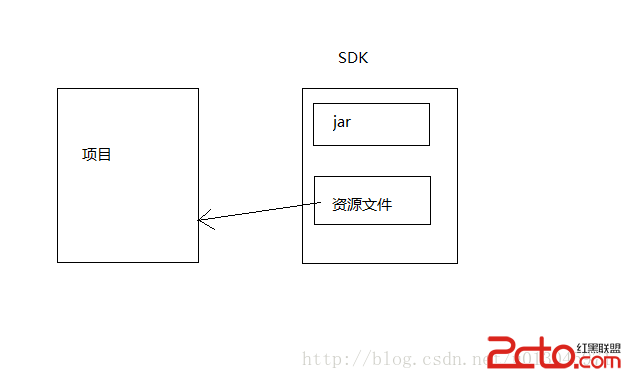 Android 反射機制:動態載入資源與 View ID
本文要探討的是如何利用 Java 反射機制,在執行期動態取得 Android 的資源與控制項 ID。 問題的起點 市面上常見一種稱為「應用牆」的廣告形式,例如豌豆、廣點通
 Android 用 PopupWindow 實現新浪微博的分組信息菜單
前陣子看到新浪微博頂部的微博分組效果,覺得很不錯,查了資料才知道是 PopupWindow 做的。於是照着寫了一個例子,記錄在這裡。 PopupWindow 顧名思義就是