

編輯:關於 Android 程式設計
SharedPreferences 是 Android 提供的輕量級鍵值對儲存機制,適合保存設定值、標記位這類小量資料,底層以 XML 檔形式存在 App 的私有目錄中。以下依序說明取得物件、寫入、讀取與跨進程存取。
SharedPreferences mSharedPreferences =
        context.getSharedPreferences(SP_NAME, Activity.MODE_PRIVATE);
第一個參數是檔案名稱,第二個是存取模式。MODE_PRIVATE 表示只有本 App 可讀寫,這也是絕大多數情況該用的設定。
SharedPreferences 本身不提供寫入方法,必須先取得 Editor:
SharedPreferences.Editor editor = mSharedPreferences.edit();

editor.putInt("intKey", 100);
editor.putFloat("floatKey", 1.5f);
editor.putString("stringKey", "value");
editor.putBoolean("boolKey", true);

// 記得要 commit 或 apply 才會真正落地
editor.commit();
commit() 是同步寫入並回傳 boolean;apply() 則是先在記憶體更新、稍後非同步寫檔,不阻塞主執行緒,在 API 9 之後建議優先採用。
int defValue = 0;
int value = mSharedPreferences.getInt("intKey", defValue);
每個 getXxx 方法都需要帶入一個預設值。當指定的 key 不存在時,就會回傳這個預設值,因此千萬別忘了給合理的中繼值。
早期版本可以透過 createPackageContext() 搭配世界可讀寫模式來存取其他 App 的 SharedPreferences:
Context context = null;
try {
    context = this.createPackageContext("com.other.app",
            Context.CONTEXT_IGNORE_SECURITY);
} catch (NameNotFoundException e) {
    e.printStackTrace();
}

SharedPreferences sp = context.getSharedPreferences("com.other.app",
        Context.MODE_WORLD_READABLE + Context.MODE_WORLD_WRITEABLE);

int version = sp.getInt("ota_version", -1);

SharedPreferences.Editor editor = sp.edit();
editor.putInt("ota_version", 0);
editor.commit();

int version1 = sp.getInt("ota_version", -1);
需要特別注意的是,MODE_WORLD_READABLE 與 MODE_WORLD_WRITEABLE 從 API 17 起已被標記為不建議使用,API 24 以上呼叫時甚至會直接拋出 SecurityException。基於安全考量,跨 App 分享資料的正確做法應該改用 ContentProvider。
 SharedPreferences 用法詳解:輕量級參數存儲與跨應用訪問
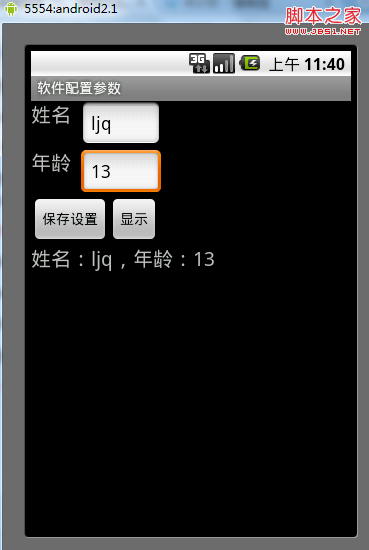
很多應用都需要提供參數設置功能,比如 QQ 裡「是否允許陌生人加我為好友」。保存這類配置參數,Windows 軟體通常用 ini 檔,J2SE 應用常用 properti
 Android 中原生 JSON 與 Fastjson 的使用對比詳解
一、Android 原生操作 JSON核心就兩個類:JSONObject 處理對象,JSONArray 處理數組。對象轉 JSON //創建學生對象 Student st
 Android SQLite 基本操作:建立資料庫與增刪改查
SQLite 是 Android 內建的輕量級關聯式資料庫,適合儲存結構化資料。即使不熟 SQL,也可透過 SQLiteOpenHelper 與 SQLiteDataba
 Android SQLite 資料庫到底該不該每次操作後就關閉?
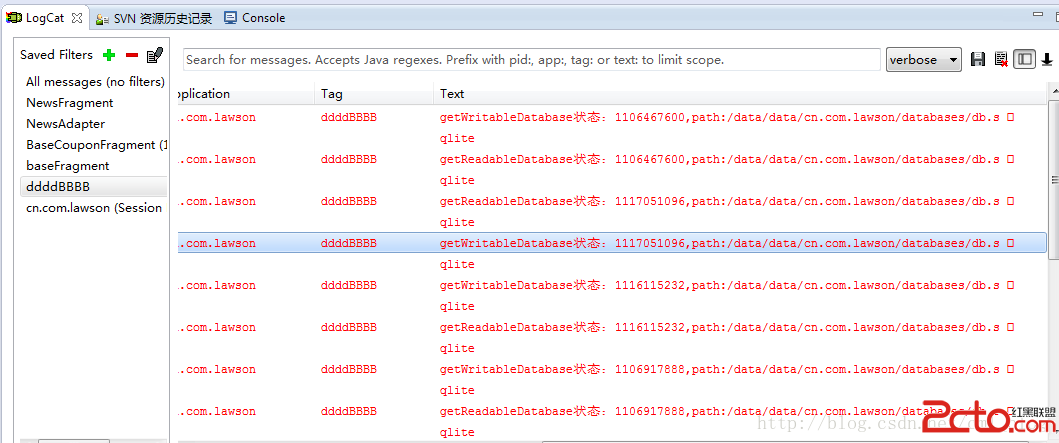
關於 Android 多執行緒的資料庫讀寫,可以另外參考相關探討。本文想釐清的,是一個許多開發者都曾糾結的問題:每次取得 SQLiteDatabase 並操作完畢後,究竟