

編輯:關於 Android 程式設計
這是 Android 開源項目系列的第一篇,主題是個性化 View。你在那些設計精美的 App 裡看到的效果——Gmail 的左滑選單、Google+ 的卡片式列表、Pinterest 的瀑布流、微信的左滑刪除、微博的頁面下拉刷新——背後大多都有對應的開源實現。本文按控件類型分類整理,長期更新,歡迎補充推薦。
1. android-pulltorefresh —— 功能最完整的下拉刷新庫,支援 ListView、ViewPager、WebView、ExpandableListView、GridView、(Horizontal) ScrollView、Fragment 的上下左右拉動刷新,比下面 johannilsson 那個只支援 ListView 的版本強大得多。它在 item 不足一屏時不會顯示刷新提示,細節體驗更好。
https://github.com/chrisbanes/Android-PullToRefresh
Demo:https://github.com/Trinea/TrineaDownload/blob/master/pull-to-refreshview-demo.apk?raw=true
應用實例:新浪微博各頁面
2. android-pulltorefresh-listview —— 下拉刷新 ListView。
https://github.com/johannilsson/android-pulltorefresh
補充:這個被大量引用的專案實際上有不少 bug,建議改用上面那個。
Demo:https://github.com/Trinea/TrineaDownload/blob/master/pull-to-refresh-listview-demo.apk?raw=true
3. DropDownListView —— 下拉刷新 + 滑到底部加載更多。
https://github.com/Trinea/AndroidCommon
Demo:https://github.com/Trinea/TrineaDownload/blob/master/TrineaAndroidDemo.apk?raw=true
說明:https://www.trinea.cn/?p=523
4. DragSortListView —— 支援拖動排序,同時支援滑動刪除、item 高度不一、單選、復選、CursorAdapter、拖動時背景變化等。
https://github.com/bauerca/drag-sort-listview
Demo:https://play.google.com/store/apps/details?id=com.mobeta.android.demodslv
應用實例:Wordpress Android
5. SwipeListView —— 自訂左右滑動事件與位移,可設定動畫時長。
https://github.com/47deg/android-swipelistview
Demo:https://play.google.com/store/apps/details?id=com.fortysevendeg.android.swipelistview
應用實例:微信
6. Android-SwipeToDismiss —— 滑動讓 item 消失。
https://github.com/romannurik/Android-SwipeToDismiss
支援 3.0 以下版本:https://github.com/JakeWharton/SwipeToDismissNOA
Demo:https://github.com/JakeWharton/SwipeToDismissNOA/SwipeToDismissNOA.apk/qr_code
7. StickyListHeaders —— 分組標題滑到頂端後固定,直到下一個分組標題到達;支援快速滑動,Android 2.3 以上。
https://github.com/emilsjolander/StickyListHeaders
應用實例:Android 4.0 聯絡人
8. pinned-section-listview —— 同樣是頂端固定的分組列表。
https://github.com/beworker/pinned-section-listview
9. PinnedHeaderListView —— 分組標題吸頂。
https://github.com/JimiSmith/PinnedHeaderListView
10. QuickReturnHeader —— header/footer 向下滾動時消失、向上時出現。
https://github.com/ManuelPeinado/QuickReturnHeader
Demo:https://github.com/Trinea/TrineaDownload/blob/master/quick-return-header-demo.apk?raw=true
應用實例:Google+
11. IndexableListView —— 右側顯示首字母索引,點擊快速定位。
https://github.com/woozzu/IndexableListView
Demo:https://github.com/Trinea/TrineaDownload/blob/master/indexable-listview.apk?raw=true
應用實例:微信通訊錄、小米聯絡人
12. CustomFastScrollView —— 快速滑動時螢幕中央彈出目前所在 item 的內容或首字母。
https://github.com/nolanlawson/CustomFastScrollViewDemo
13. Android-ScrollBarPanel —— 滑動時在 scrollbar 旁顯示指示面板。
https://github.com/rno/Android-ScrollBarPanel
14. SlideExpandableListView —— 點擊 item 展開固定區域,其他 item 收縮。
https://github.com/tjerkw/Android-SlideExpandableListView
Demo:https://github.com/Trinea/TrineaDownload/blob/master/slide-expandable-listView-demo.apk?raw=true
15. JazzyListView —— item 以 grow、cards、curl、wave、flip、fly 等特殊動畫進場,ListView 與 GridView 皆可。
https://github.com/twotoasters/JazzyListView
Demo:https://play.google.com/store/apps/details?id=com.twotoasters.jazzylistview.sample
效果展示:https://lab.hakim.se/scroll-effects/
16. ListViewAnimations —— 帶入場動畫的 ListView,包含底部飛入、斜向飛入、漸變消失、滑動刪除等。
https://github.com/nhaarman/ListViewAnimations
Demo:https://play.google.com/store/apps/details?id=com.haarman.listviewanimations
應用實例:Google+、Google Now、小米商店/聯絡人/遊戲中心/音樂/檔案管理器、Light Flow Lite、Running Coach 等
17. DevsmartLib-Android —— 橫向 ListView。
https://github.com/dinocore1/DevsmartLib-Android
Demo:https://github.com/Trinea/TrineaDownload/blob/master/horizontal-listview-demo.apk?raw=true
1. ActionBarSherlock —— 為所有 Android 版本提供一致的 ActionBar,解決 4.0 以下的相容問題。曾經的事實標準,Google 自家 App 也在用。
https://github.com/JakeWharton/ActionBarSherlock
Demo:https://play.google.com/store/apps/details?id=com.actionbarsherlock.sample.demos
2. ActionBar-PullToRefresh —— 下拉刷新時 ActionBar 上顯示加載進度。
https://github.com/chrisbanes/ActionBar-PullToRefresh
Demo:https://play.google.com/store/apps/details?id=uk.co.senab.actionbarpulltorefresh.samples.stock
應用實例:Gmail、Google+、知乎
3. FadingActionBar —— 列表向下滾動時 ActionBar 逐漸顯現。
https://github.com/ManuelPeinado/FadingActionBar
Demo:https://play.google.com/store/apps/details?id=com.manuelpeinado.fadingactionbar.demo
應用實例:Google Music、知乎
4. NotBoringActionBar —— 下拉時收縮的 ActionBar,Google Music 的那種效果。
https://github.com/flavienlaurent/NotBoringActionBar
說明:https://flavienlaurent.com/blog/2013/11/20/making-your-action-bar-not-boring/
5. RefreshActionItem —— 自帶進度顯示與刷新按鈕的 ActionBar item。
https://github.com/ManuelPeinado/RefreshActionItem
Demo:https://play.google.com/store/apps/details?id=com.manuelpeinado.refreshactionitem.demo
應用實例:The New York Times、DevAppsDirect
6. GlassActionBar —— 半透明玻璃質感的 ActionBar。
https://github.com/ManuelPeinado/GlassActionBar
Demo:https://play.google.com/store/apps/details?id=com.manuelpeinado.glassactionbardemo
應用實例:Google Music
1. MenuDrawer —— 從螢幕邊緣拖出的側滑選單,支援上下左右四個方向、可控制選單在內容的上層或下層,也支援在 Window 邊緣、ListView 邊緣、ViewPager 變化時劃出。
https://github.com/SimonVT/android-menudrawer
Demo:https://simonvt.github.io/android-menudrawer/
應用實例:Gmail 與多數 Google App
2. SlidingMenu —— 側滑選單,支援左右劃出,提供 zoom、scale、slide up 三種動畫樣式。
https://github.com/jfeinstein10/SlidingMenu
Demo:https://play.google.com/store/apps/details?id=com.slidingmenu.example
應用實例:Foursquare、LinkedIn、Rdio、VLC for Android、9GAG、Wunderlist 2、The Verge 等
與 MenuDrawer 的差異:SlidingMenu 支援選單以動畫樣式出現,MenuDrawer 支援選單位於內容的上下層。
3. ArcMenu —— 類似 Path 的左下角落扇形旋轉選單,也支援橫向劃出與圓心彈出。
https://github.com/daCapricorn/ArcMenu
應用實例:Path


4. android-satellite-menu —— 同樣是 Path 風格的左下角旋轉選單。
https://github.com/siyamed/android-satellite-menu
Demo:https://github.com/Trinea/TrineaDownload/blob/master/satellite-menu-demo.apk?raw=true
5. radial-menu-widget —— 圓形選單,支援二級選單。
https://code.google.com/p/radial-menu-widget/
6. Android Wheel Menu —— 圓形旋轉選取選單。
https://github.com/anupcowkur/Android-Wheel-Menu
7. FoldingNavigationDrawer —— 以折疊動畫方式展開的抽屜。
https://github.com/tibi1712/FoldingNavigationDrawer-Android
Demo:https://play.google.com/store/apps/details?id=com.ptr.folding.sample
https://lh6.ggpht.com/VnKUZenAozQ0KFAm5blFTGqMaKFjvX-BK2JH-jrX1sIXVTqciACqRhqFH48hc4pm2Q=h310-rw
1. Android-ViewPagerIndicator —— 搭配 ViewPager 的 Indicator,支援多種位置與樣式,幾乎是標配。
https://github.com/JakeWharton/Android-ViewPagerIndicator
Demo:https://play.google.com/store/apps/details?id=com.viewpagerindicator.sample
2. JazzyViewPager —— 支援 Fragment 切換動畫的 ViewPager,包含轉盤、淡入淡出、翻頁、層疊、旋轉、方塊、翻轉、縮放等。
https://github.com/jfeinstein10/JazzyViewPager
Demo:https://github.com/jfeinstein10/JazzyViewPager/blob/master/JazzyViewPager.apk?raw=true
3. Android-DirectionalViewPager —— 同時支援橫向與縱向的 ViewPager。
https://github.com/JakeWharton/Android-DirectionalViewPager
Demo:https://market.android.com/details?id=com.directionalviewpager.sample
4. android-pulltorefresh —— 支援下拉刷新的 ViewPager。
https://github.com/chrisbanes/Android-PullToRefresh
Demo:https://github.com/Trinea/TrineaDownload/blob/master/pull-to-refreshview-demo.apk?raw=true
5. FancyCoverFlow —— 帶切換動畫、類似 Gallery 的覆蓋流控件。
https://github.com/davidschreiber/FancyCoverFlow
Demo:https://play.google.com/store/apps/details?id=at.technikum.mti.fancycoverflow.samples
https://github-camo.global.ssl.fastly.net/ef5ced52b7b54652b50499521ed797c0188c7a6b/687474703a2f2f64617669647363687265696265722e6769746875622e696f2f46616e6379436f766572466c6f772f73637265656e73686f74322e706e67
6. AndroidTouchGallery —— 以 ViewPager 實現、支援雙擊或雙指縮放的 Gallery。相比下面的 PhotoView,它放大後仍能滑到下一個 item,並可直接從 URL 或檔案載入圖片。
https://github.com/Dreddik/AndroidTouchGallery
Demo:https://github.com/Trinea/TrineaDownload/blob/master/touch-gallery-demo.apk?raw=true
應用實例:微信查看聊天圖片時的雙擊放大與放大後左右滑動
7. Salvage —— 帶 View 緩存的 PagerAdapter,用起来很方便。
https://github.com/JakeWharton/salvage
1. StaggeredGridView —— 允許非對齊列(瀑布流),自帶 View 緩存,繼承自 ViewGroup。
https://github.com/maurycyw/StaggeredGridView
Demo:https://github.com/Trinea/TrineaDownload/blob/master/staggered-gridview-demo.apk?raw=true
應用實例:Pinterest
2. AndroidStaggeredGrid —— 瀑布流,繼承自 AbsListView。
https://github.com/etsy/AndroidStaggeredGrid
應用實例:Pinterest
3. PinterestLikeAdapterView —— 瀑布流且支援下拉刷新。
https://github.com/huewu/PinterestLikeAdapterView
應用實例:Pinterest
4. DraggableGridView —— item 可拖動交換位置,類似桌面的單屏效果。
https://github.com/thquinn/DraggableGridView
Demo:https://github.com/thquinn/DraggableGridView/blob/master/bin/DraggableGridViewSample.apk?raw=true
1. PhotoView —— 支援雙擊或雙指縮放,可在 ViewPager 等 scrolling 容器中正常使用。相比 AndroidTouchGallery,它既支援 ViewPager 也支援單個 ImageView。
https://github.com/chrisbanes/PhotoView
Demo:https://play.google.com/store/apps/details?id=uk.co.senab.photoview.sample
2. android-gif-drawable —— 支援 GIF 顯示的 View。用 JNI 實現,編譯出 so 之後直接在 xml 裡定義即可,不依賴其他開源庫,比下面的 ImageViewEx 輕量得多。
https://github.com/koral--/android-gif-drawable
3. ImageViewEx —— 支援 GIF 的 ImageView。依賴較多,編譯流程繁瑣。
https://github.com/frapontillo/ImageViewEx
Demo:https://github.com/Trinea/TrineaDownload/blob/master/imageviewex-demo.apk?raw=true
4. RoundedImageView —— 帶圓角的 ImageView。
https://github.com/vinc3m1/RoundedImageView
1. SmoothProgressBar —— 水平進度條。
https://github.com/castorflex/SmoothProgressBar
Demo:https://play.google.com/store/apps/details?id=fr.castorflex.android.smoothprogressbar.sample
2. ProgressWheel —— 可顯示進度的圓形 ProgressBar。
https://github.com/Todd-Davies/ProgressWheel
Demo:https://github.com/Trinea/TrineaDownload/blob/master/progress-wheel-demo.apk?raw=true
3. android-square-progressbar —— 沿著圖片邊緣顯示進度。
https://github.com/mrwonderman/android-square-progressbar
Demo:https://play.google.com/store/apps/details?id=net.yscs.android.square_progressbar_example
4. HoloCircularProgressBar —— Android 4.1 時鐘 App 的環形進度樣式。
https://github.com/passsy/android-HoloCircularProgressBar
應用實例:Android 4.1 時鐘
1. achartengine —— 強大的圖表繪製引擎,支援折線圖、面積圖、散點圖、時間圖、柱狀圖、條圖、餅圖、氣泡圖、圓環圖、區間條形圖、撥號圖、立方線圖及各種組合。
https://code.google.com/p/achartengine/
官網:https://www.achartengine.org/
應用實例:Wordpress Android、Google Analytics


2. GraphView —— 繪製曲線圖與柱狀圖的 View,適合波浪圖等展示場景。
https://github.com/jjoe64/GraphView
Demo 工程:https://github.com/jjoe64/GraphView-Demos
Demo:https://play.google.com/store/apps/details?id=com.sothree.umano
應用實例:Wordpress Android、Google Analytics
3. android-flip —— 類似 Flipboard 的翻轉動畫。
https://github.com/openaphid/android-flip
Demo:https://github.com/openaphid/android-flip/blob/master/FlipView/Demo/APK/Aphid-FlipView-Demo.apk?raw=true
應用實例:Flipboard
4. FlipImageView —— 可選擇 x、y、z 軸與動畫的翻轉實現。
https://github.com/castorflex/FlipImageView
Demo:https://play.google.com/store/apps/details?id=fr.castorflex.android.flipimageview
5. SwipeBackLayout —— 左右或向上滑動返回上一頁的 Activity。
https://github.com/Issacw0ng/SwipeBackLayout
Demo:https://play.google.com/store/apps/details?id=me.imid.swipebacklayout.demo
應用實例:知乎
6. Cards-UI —— 卡片式 View,支援單張卡片與卡片式 ListView。
https://github.com/afollestad/Cards-UI
Demo:https://github.com/Trinea/TrineaDownload/blob/master/cards-ui-demo.apk?raw=true
7. cardslib —— 卡片式 View,支援單張卡片、卡片式 ListView 與 GridView。
https://github.com/gabrielemariotti/cardslib
Demo:https://play.google.com/store/apps/details?id=it.gmariotti.cardslib.demo
8. android-styled-dialogs —— 樣式可自訂的 Dialog,預設與 Holo 主題一致,在 2.2 以上維持相同外觀。
https://github.com/inmite/android-styled-dialogs
Demo:https://github.com/Trinea/TrineaDownload/blob/master/styled-dialogs-demo.apk?raw=true
9. Crouton —— 樣式豐富的 Toast,支援 alert、confirm、info 樣式與點擊消失,可設定顯示時長、可自訂 View。
https://github.com/keyboardsurfer/Crouton
Demo:https://play.google.com/store/apps/details?id=de.keyboardsurfer.app.demo.crouton
10. supertooltips —— 帶動畫效果的 Tips 提示。
https://github.com/nhaarman/supertooltips
Demo:https://play.google.com/store/apps/details?id=com.haarman.supertooltips
11. Android ViewBadger —— 為其他 View 加上角標(未讀數、紅點等)。
https://github.com/jgilfelt/android-viewbadger
Demo:https://github.com/Trinea/TrineaDownload/blob/master/android-viewbadger.apk?raw=true
https://github-camo.global.ssl.fastly.net/a705a3e88c75ae2394943bd7c56f725697616ea8/687474703a2f2f7777772e6a65666667696c66656c742e636f6d2f766965776261646765722f76622d31612e706e67
12. Android Sliding Up Panel —— 可在當前 Activity 上拉起一個可拖動的面板。
https://github.com/umano/AndroidSlidingUpPanel
Demo:https://play.google.com/store/apps/details?id=com.sothree.umano
應用實例:Google Music 的精簡播放欄
13. android-times-square —— 日曆控件,支援單選日期、多選日期、區間選擇,以及對話框形式顯示。
https://github.com/square/android-times-square
Demo:https://github.com/Trinea/TrineaDownload/blob/master/times-square-demo.apk?raw=true
14. android-calendar-card —— 日曆卡片。
https://github.com/kenumir/android-calendar-card
Demo:https://play.google.com/store/apps/details?id=com.wt.calendarcardsample
15. ColorPickerView —— 顏色選擇器,可在 PopupWindow 或獨立 Activity 中開啟。
https://code.google.com/p/color-picker-view/
16. HoloColorPicker —— Holo 風格顏色選擇器。
https://github.com/LarsWerkman/HoloColorPicker
Demo:https://docs.google.com/file/d/0BwclyDTlLrdXRzVnTGJvTlRfU2s/edit
17. AndroidWheel —— 滾輪控件,支援城市、多種日期時間、密碼、圖片。
https://github.com/sephiroth74/AndroidWheel
18. android-flowtextview —— 讓文字自動環繞其他 View 的 Layout。
https://code.google.com/p/android-flowtextview/
19. Segmented Radio Buttons —— iOS segmented controls 的 Android 實現。
https://github.com/vinc3m1/android-segmentedradiobutton
Demo:https://github.com/thquinn/DraggableGridView/blob/master/bin/DraggableGridViewSample.apk?raw=true
20. TableFixHeaders —— 首列固定、可橫向滾動的表格。
https://github.com/InQBarna/TableFixHeaders
Demo:https://bit.ly/13buAIq
21. Android Form EditText —— 可驗證輸入合法性的編輯框,支援郵件、英文、IP、URL 等多種正則。
https://github.com/vekexasia/android-edittext-validator
Demo:https://play.google.com/store/apps/details?id=com.andreabaccega.edittextformexample
22. UITableView —— iOS 風格控件,包含 Button、ListView、TableView。
https://github.com/thiagolocatelli/android-uitableview
Demo:https://github.com/Trinea/TrineaDownload/blob/master/ui-tableview-demo.apk?raw=true
23. ATableView —— 另一套 iOS 風格控件。
https://github.com/dmacosta/ATableView
Demo:https://play.google.com/store/apps/details?id=com.nakardo.atableview.demo
24. UndoBar —— 在螢幕底部顯示取消或確認的 PopupWindow。
https://github.com/soarcn/UndoBar
https://github.com/soarcn/UndoBar/blob/master/art/redo.png?raw=true
25. Inscription —— 展示應用更新內容與新功能介紹。
https://github.com/MartinvanZ/Inscription
26. ActivityTransition —— Activity 切換動畫,包含漸變、flip、從指定位置進入等。
https://github.com/ophilbert/ActivityTransition
27. Cropper —— 圖片局部裁切工具,可觸摸選擇區域或旋轉。
https://github.com/edmodo/cropper
說明:https://github.com/edmodo/cropper/wiki
https://github-camo.global.ssl.fastly.net/e4fde77bf41d4a60b234b4e268e5cfa8c17d9b6f/687474703a2f2f692e696d6775722e636f6d2f334668735467666c2e6a7067
28. GlowPadBackport —— 把 Android 4.2 的鎖屏解鎖樣式移植到 1.6 及以上。
https://github.com/rock3r/GlowPadBackport
Demo:https://play.google.com/store/apps/details?id=net.sebastianopoggi.samples.ui.GlowPadSample
https://lh6.ggpht.com/U070b6Lh6cVsVwx4jN-5nq0xqiB1PBzrYABPeJIEe2hZQ5UWOxc-FDUG77wADelToHA=h310-rw
29. GlowPadView —— Android 4 鎖屏介面的解鎖控件。
https://github.com/nadavfima/GlowPadView
30. android-lockpattern —— Android 圖案密碼解鎖。
https://code.google.com/p/android-lockpattern/
Demo:https://play.google.com/store/apps/details?id=group.pals.android.lib.ui.lockpattern.demo
說明:https://code.google.com/p/android-lockpattern/wiki/QuickUse
應用實例:Android 開機圖案解鎖、支付類應用的密碼解鎖
這些庫的維護狀態差異很大,有些(如 ActionBarSherlock)已經被官方 Support Library / AndroidX 取代,選型時優先考慮仍在維護的方案。另外,直接引入整個庫之前,不妨先讀一遍源碼——很多效果其實只有幾百行,理解原理之後自己實現反而更好控制,也少了依賴衝突的困擾。
 fastlane 入門教程:一條命令搞定 App 上架
激動人心的時刻到了:熬了幾天、幾週甚至幾個月,你終於做出一個自己滿意的 App,準備推向全世界。可真正到了提交 App Store 這一步,很多人會突然發現——這事兒怎麼
 Andrew Stankevich's Contest 題解彙編
本文整理自 Andrew Stankevichs Contest 的一系列補題題解,涵蓋數學規律、上下界網絡流、LIS、線段樹與 DFS 剪枝等經典算法,每題附上思路與參
 Android 圖片解析造成 OOM 的優化思路
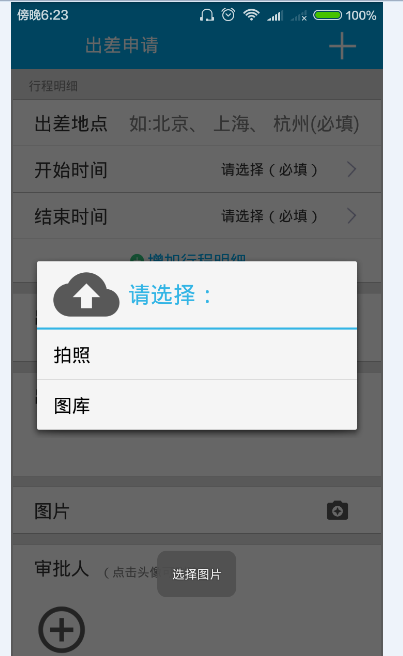
在需要拍照或從相簿選擇圖片的應用中,最常見的問題之一,就是圖片解析時引發 OutOfMemoryError。問題通常不是功能本身難寫,而是圖片尺寸與記憶體管理沒有做好。
 動手實作 Gradle 自定義插件:從 buildSrc 到獨立模組
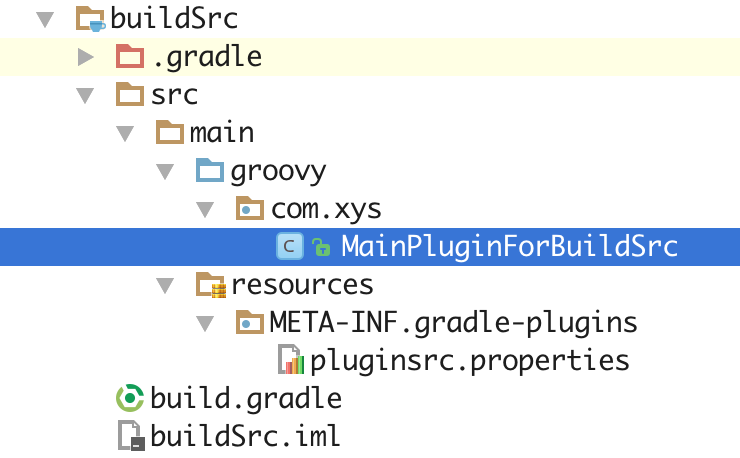
動手實作 Gradle 自定義插件 在日常的 Android 建置流程裡,難免會遇到需要把某段重複的建置邏輯抽取出來的需求。這時候,自定義 Gradle 插件就是最好的幫