

編輯:關於 Android 程式設計
也就是 Handler 的運行機制。它搭配底層的 Looper 與 MessageQueue,共同完成消息的發送與接收。Handler 把 Message 交給 Looper 輪循器,Looper 被喚醒後開始遍歷 MessageQueue,輪詢取出消息並交由 Handler 分發,最終完成消息的傳遞與處理。
Looper:消息輪循器。
MessageQueue:消息隊列,底層由鏈表實現。
Message:消息物件。
Handler:負責消息的發送、接收與處理。
1、handler.sendMessage(msg);
2、msg.setTarget(target)(設定發送給哪個 Handler),再 msg.sendToTarget();
1、handler.obtainMessage();(內部實際呼叫了 Message.obtain 方法)
2、Message msg = Message.obtain(handler); 或 Message msg = Message.obtain(); 再 msg.setTarget(target)
3、Message message = new Message();
Message.obtain() 方法的實現如下,可見它會優先從消息池中取用,避免頻繁建立物件:
public static Message obtain() { synchronized (sPoolSync) { if (sPool != null) { Message m = sPool; sPool = m.next; m.next = null; sPoolSize--; return m; } } return new Message(); }
ActivityThread(即 UI 線程)的 main 方法中初始化並啟動了 Looper:
public static void main(String[] args) { SamplingProfilerIntegration.start(); ... // 初始化Looper Looper.prepareMainLooper(); ActivityThread thread = new ActivityThread(); thread.attach(false); if (sMainThreadHandler == null) { sMainThreadHandler = thread.getHandler(); } ... // 開啟輪循 Looper.loop(); throw new RuntimeException("Main thread loop unexpectedly exited"); }
Looper 的初始化透過 prepareMainLooper 完成:
public static void prepareMainLooper() { prepare(false); synchronized (Looper.class) { if (sMainLooper != null) { throw new IllegalStateException("The main Looper has already been prepared."); } sMainLooper = myLooper(); } }
private static void prepare(boolean quitAllowed) { if (sThreadLocal.get() != null) { throw new RuntimeException("Only one Looper may be created per thread"); } sThreadLocal.set(new Looper(quitAllowed)); }
而 myLooper() 則是從 sThreadLocal 中取出 Looper 物件:
public static Looper myLooper() { return sThreadLocal.get(); }
至於 loop() 方法,它開啟輪循、等待處理消息:透過 queue.next() 取出消息,透過 queue.enqueueMessage 插入消息。
public static void loop() { final Looper me = myLooper(); if (me == null) { throw new RuntimeException("No Looper; Looper.prepare() wasn't called on this thread."); } final MessageQueue queue = me.mQueue; Binder.clearCallingIdentity(); final long ident = Binder.clearCallingIdentity(); // 取出消息,若無消息則阻塞 for (;;) { Message msg = queue.next(); // might block if (msg == null) { return; } Printer logging = me.mLogging; if (logging != null) { logging.println(">>>>> Dispatching to " + msg.target + " " + msg.callback + ": " + msg.what); } // 分發消息 msg.target.dispatchMessage(msg); if (logging != null) { logging.println("<<<<< Finished to " + msg.target + " " + msg.callback); } final long newIdent = Binder.clearCallingIdentity(); if (ident != newIdent) { Log.wtf(TAG, "Thread identity changed from 0x" + Long.toHexString(ident) + " to 0x" + Long.toHexString(newIdent) + " while dispatching to " + msg.target.getClass().getName() + " " + msg.callback + " what=" + msg.what); } // 回收消息 msg.recycle(); } }
在建構 Handler 時,會先取得 Looper 物件,若為空則拋出異常,同時取得其消息隊列:
public Handler(Callback callback, boolean async) { ... mLooper = Looper.myLooper(); if (mLooper == null) { throw new RuntimeException( "Can't create handler inside thread that has not called Looper.prepare()"); } mQueue = mLooper.mQueue; mCallback = callback; mAsynchronous = async; }
各種發送消息的方法最終都會彙集到 sendMessageDelayed:
public final boolean sendMessageDelayed(Message msg, long delayMillis) { if (delayMillis < 0) { delayMillis = 0; } return sendMessageAtTime(msg, SystemClock.uptimeMillis() + delayMillis); }
它又呼叫 sendMessageAtTime:
public boolean sendMessageAtTime(Message msg, long uptimeMillis) { MessageQueue queue = mQueue; if (queue == null) { RuntimeException e = new RuntimeException( this + " sendMessageAtTime() called with no mQueue"); Log.w("Looper", e.getMessage(), e); return false; } return enqueueMessage(queue, msg, uptimeMillis); }
enqueueMessage 中設定目標 handler 並插入消息:
private boolean enqueueMessage(MessageQueue queue, Message msg, long uptimeMillis) { msg.target = this; if (mAsynchronous) { msg.setAsynchronous(true); } return queue.enqueueMessage(msg, uptimeMillis); }
最終由 queue.enqueueMessage 依時間順序把消息插入鏈表:
boolean enqueueMessage(Message msg, long when) { if (msg.isInUse()) { throw new AndroidRuntimeException(msg + " This message is already in use."); } if (msg.target == null) { throw new AndroidRuntimeException("Message must have a target."); } synchronized (this) { if (mQuitting) { RuntimeException e = new RuntimeException( msg.target + " sending message to a Handler on a dead thread"); Log.w("MessageQueue", e.getMessage(), e); return false; } msg.when = when; Message p = mMessages; boolean needWake; if (p == null || when == 0 || when < p.when) { msg.next = p; mMessages = msg; needWake = mBlocked; } else { needWake = mBlocked && p.target == null && msg.isAsynchronous(); Message prev; for (;;) { prev = p; p = p.next; if (p == null || when < p.when) { break; } if (needWake && p.isAsynchronous()) { needWake = false; } } msg.next = p; prev.next = msg; } if (needWake) { nativeWake(mPtr); } } return true; }
Looper 的 loop 方法取出消息後,交給 Handler 分發,即 msg.target.dispatchMessage(msg),其中 msg.target 正是 Handler 物件:
public void dispatchMessage(Message msg) { if (msg.callback != null) { handleCallback(msg); } else { if (mCallback != null) { if (mCallback.handleMessage(msg)) { return; } } handleMessage(msg); } }
分發邏輯分三種情況:
首先判斷 msg.callback 是否為空。msg.callback 就是 handler.post 傳入的那個 Runnable,若不為空則呼叫 handleCallback(msg)。
特別注意:handler.post() 並不會開啟新線程,Runnable 的 run 方法運行於 Handler 所在的線程。
private static void handleCallback(Message message) { message.callback.run(); }
當 msg.callback 為空時,接著判斷 mCallback 是否為空。mCallback 是一個回呼介面:
public interface Callback { public boolean handleMessage(Message msg); }
可透過它來構造 Handler:
public Handler(Callback callback) { this(callback, false); }
例如:
Handler h=new Handler(new Handler.Callback() { @Override public boolean handleMessage(Message msg) { return false; } });
總結來說:mCallback 不為空時,呼叫 mCallback.handleMessage(msg)(即 handleMessage1);mCallback 為空時,則呼叫 Handler 自身的 handleMessage 方法(即 handleMessage2)。兩者可同時存在:
Handler h = new Handler(new Handler.Callback() { // handleMessage1 @Override public boolean handleMessage(Message msg) { return false; } }) { // handleMessage2 @Override public void handleMessage(Message msg) { super.handleMessage(msg); } };
public final void runOnUiThread(Runnable action) { if (Thread.currentThread() != mUiThread) { mHandler.post(action); } else { action.run(); } }
1、若非主線程,則透過 mHandler.post 發送消息:
public final boolean post(Runnable r) { return sendMessageDelayed(getPostMessage(r), 0); }
2、getPostMessage 會初始化一個消息物件並為其 callback 賦值:
private static Message getPostMessage(Runnable r) { Message m = Message.obtain(); m.callback = r; return m; }
3、Handler 在 dispatchMessage 中處理消息,此時 msg.callback 不為空,於是呼叫 handleCallback(msg)。View 的 post 方法原理與此類似。
1、handler.post(Runnable r) 有開啟新線程嗎?追蹤源碼可知,最終是透過 message.callback.run() 來執行任務,並未開啟新線程,Runnable 的 run 方法運行於 Handler 所在線程。
2、子線程是如何切換到主線程的?答案是透過 Handler。子線程把消息發送到 MessageQueue,當 Looper 輪循到該消息並呼叫 msg.target.dispatchMessage(msg) 交由 Handler 分發處理時,其實就已經從子線程切換回主線程了。
3、Looper 的 loop 方法為什麼不會卡死主線程?loop 方法會阻塞主線程,但不會「卡死」。源碼中在 Looper.loop() 之後跟著一句 throw new RuntimeException("Main thread loop unexpectedly exited"),這意味著 loop 一旦結束就會拋出異常,因此正常情況下它永不結束。它搭配 ActivityThread 內部的 Handler(即 mH),透過不停的消息輪循與事件處理來完成與使用者的互動。
4、為什麼在子線程中建立 Handler 會出錯?由於建立 Handler 時會初始化 Looper 物件,而子線程通常並沒有 Looper(若未自行建立),於是便拋出如下異常:
java.lang.RuntimeException: Can't create handler inside thread that has not called Looper.prepare()
解決之道是手動建立 Looper 並開啟消息輪循:
new Thread(){ public void run() { Looper.prepare(); Handler h=new Handler(){ public void handleMessage(android.os.Message msg) {}; }; Looper.loop(); }; }.start();
如此一來問題便迎刃而解。但要留意,當不再需要這個子線程的 Handler 時,應手動停止 Looper 以回收資源,透過 quit(立即停止)或 quitSafely(消息輪循完畢後停止)即可終止輪循。
 Android 開發技巧:如何自行控制 Toast 的顯示與關閉
先解釋一個常見疑問:為什麼 Toast 顯示一段時間後會自動消失? 因為 Android 系統內部維護著一個 Toast 佇列,系統會依序從中取出一個 Toast 顯示
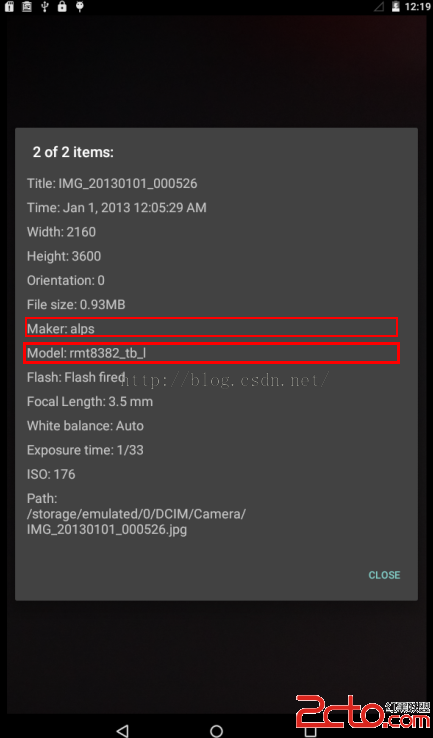 Android 系統之路(初識 MTK):修改首次開機默認亮度、日期格式與機型屬性
今天給大家分享一些 MTK 平台下的系統定製技巧:修改系統首次開機的默認屏幕背光亮度、在系統語言為英語時調整默認日期格式,以及修改拍照相關的機型屬性。如果對具體修改位置不
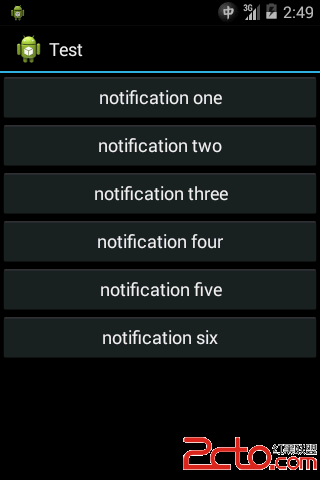 Android Notification.Builder 使用指南:打造完整通知體驗
通知的主要用途通知是 Android 中非常重要的互動方式,常用於提示訊息、背景任務狀態與即時事件。透過 Notification.Builder,開發者可以建立包含標題
 從源碼切入,透徹理解Android的weight屬性
最近在看一本堪稱古董的書《50 Android Hacks》,而書中開篇的第一個Hack就是「使用weight屬性實現視圖的居中顯示」。 說實話,weight是一個用法簡