

編輯:關於 Android 程式設計
系統本身提供了兩個現成的搜尋頁面類別——UISearchDisplayController 與 UISearchController,能讓搜尋功能的開發變得相當省事。實際效果如下:
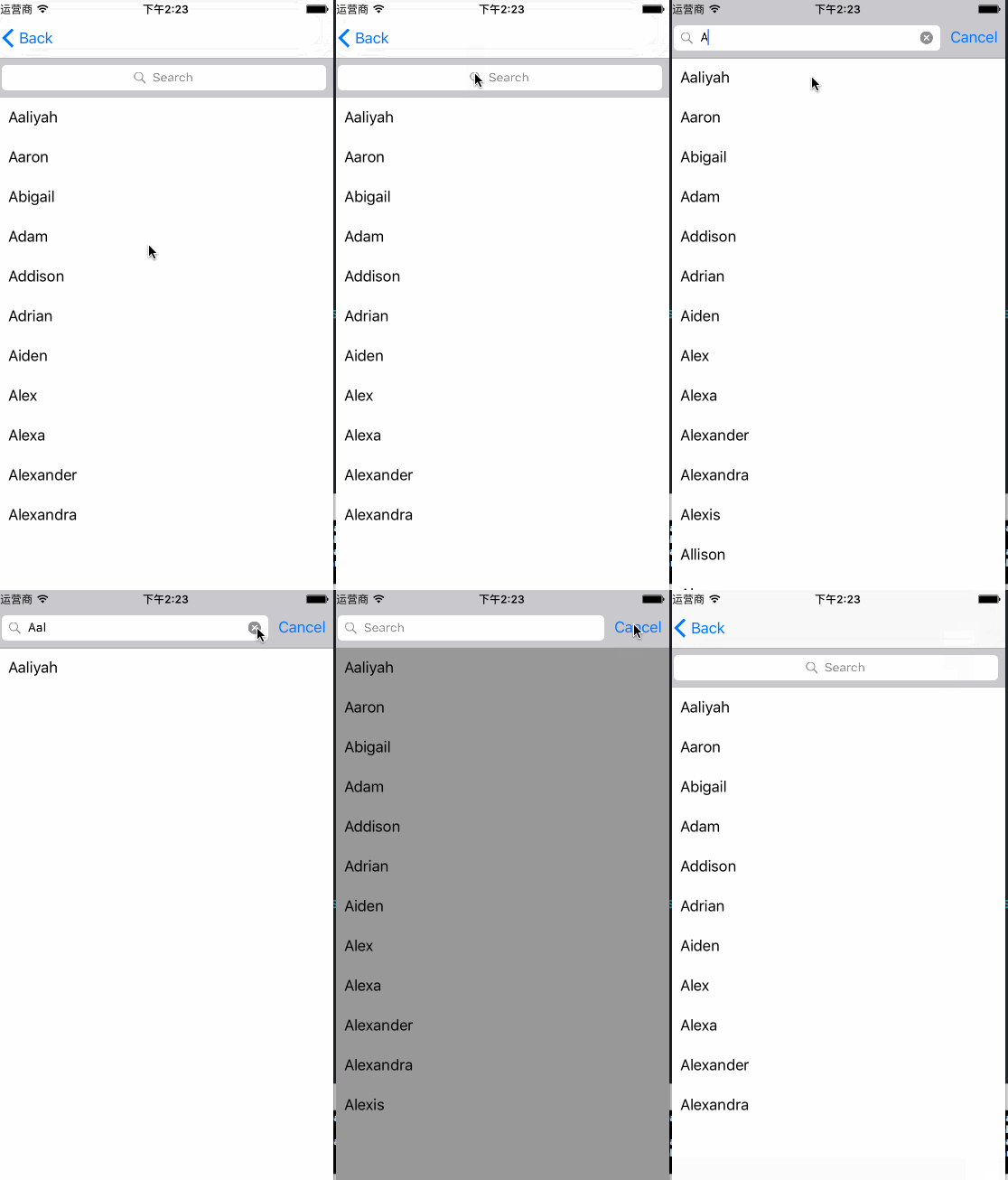
NS_CLASS_DEPRECATED_IOS(3_0, 8_0, "UISearchDisplayController has been replaced with UISearchController")
這個類別自 iOS 8.0 起已被 UISearchController 取代,但仍舊可用,因此值得一并理解。
@interface SearchDisplayVC ()<UITableViewDataSource, UITableViewDelegate,
        UISearchBarDelegate, UISearchDisplayDelegate>

@property (nonatomic, strong) UISearchDisplayController *searchDisplayController;
@property (nonatomic, strong) UITableView *tableView;
@property (nonatomic, strong) UITableView *resultTableView;
@property (nonatomic, strong) NSArray *dataArr;
@property (nonatomic, strong) NSArray *resultArr;

@end
先準備一組示範資料:
- (NSArray *)createData {
    NSArray *dataArr = @[@"Aaliyah", @"Aaron", @"Abigail", @"Adam", @"Addison",
        @"Adrian", @"Aiden", @"Alex", @"Alexa", @"Alexander", @"Alexandra",
        @"Alexis", @"Allison", @"Alyssa", @"Amelia", @"Andrea", @"Andrew",
        @"Angel", @"Anna", @"Annabelle", @"Anthony", @"Aria", @"Ariana",
        @"Arianna", @"Ashley", @"Aubree", @"Aubrey", @"Audrey", @"Austin",
        @"Autumn", @"Ava", @"Avery", @"Ayden", @"Bailey", @"Bella", @"Benjamin",
        @"Bentley", @"Blake", @"Brandon", @"Brayden", @"Brianna", @"Brody",
        @"Brooklyn", @"Bryson", @"Caleb", @"Cameron", @"Camila", @"Carlos",
        @"Caroline", @"Carson", @"Carter", @"Charles", @"Charlotte", @"Chase",
        @"Chloe", @"Christian", @"Christopher", @"Claire", @"Colton", @"Connor",
        @"Cooper", @"Damian", @"Daniel", @"David", @"Dominic", @"Dylan",
        @"Easton", @"Eli", @"Elijah", @"Elizabeth", @"Ella", @"Ellie",
        @"Emily", @"Emma", @"Ethan", @"Eva", @"Evan", @"Evelyn", @"Faith",
        @"Gabriel", @"Gabriella", @"Gavin", @"Genesis", @"Gianna", @"Grace",
        @"Grayson", @"Hailey", @"Hannah", @"Harper", @"Henry", @"Hudson",
        @"Hunter", @"Ian", @"Isaac", @"Isabella", @"Isaiah", @"Jace", @"Jack",
        @"Jackson", @"Jacob", @"James", @"Jasmine", @"Jason", @"Jaxon",
        @"Jayden", @"Jeremiah", @"Jocelyn", @"John", @"Jonathan", @"Jordan",
        @"Jose", @"Joseph", @"Joshua", @"Josiah", @"Juan", @"Julia", @"Julian",
        @"Justin", @"Katherine", @"Kayden", @"Kayla", @"Kaylee", @"Kennedy",
        @"Kevin", @"Khloe", @"Kimberly", @"Kylie", @"Landon", @"Lauren",
        @"Layla", @"Leah", @"Levi", @"Liam", @"Lillian", @"Lily", @"Logan",
        @"London", @"Lucas", @"Lucy", @"Luis", @"Luke", @"Lydia", @"Mackenzie",
        @"Madeline", @"Madelyn", @"Madison", @"Makayla", @"Mason", @"Matthew",
        @"Maya", @"Melanie", @"Mia", @"Michael", @"Molly", @"Morgan", @"Naomi",
        @"Natalie", @"Nathan", @"Nathaniel", @"Nevaeh", @"Nicholas", @"Noah",
        @"Nolan", @"Oliver", @"Olivia", @"Owen", @"Parker", @"Peyton", @"Piper",
        @"Reagan", @"Riley", @"Robert", @"Ryan", @"Ryder", @"Samantha",
        @"Samuel", @"Sarah", @"Savannah", @"Scarlett", @"Sebastian", @"Serenity",
        @"Skylar", @"Sofia", @"Sophia", @"Sophie", @"Stella", @"Sydney",
        @"Taylor", @"Thomas", @"Trinity", @"Tristan", @"Tyler", @"Victoria",
        @"Violet", @"William", @"Wyatt", @"Xavier", @"Zachary", @"Zoe", @"Zoey"];
    return dataArr;
}
- (void)configureTableView {
    self.dataArr = [self createData];
    self.tableView = [[UITableView alloc] initWithFrame:CGRectMake(0, 50, 375, 600)
                                                  style:UITableViewStylePlain];
    _tableView.delegate = self;
    _tableView.dataSource = self;
    [self.view addSubview:_tableView];
}

- (void)addSearchBarAndSearchDisplayController {
    UISearchBar *searchBar = [[UISearchBar alloc] init];
    [searchBar sizeToFit];
    searchBar.delegate = self;
    self.tableView.tableHeaderView = searchBar;

    self.searchDisplayController = [[UISearchDisplayController alloc]
            initWithSearchBar:searchBar contentsController:self];
    _searchDisplayController.delegate = self;
    _searchDisplayController.searchResultsDataSource = self;
    _searchDisplayController.searchResultsDelegate = self;
}
- (NSInteger)tableView:(UITableView *)tableView numberOfRowsInSection:(NSInteger)section {
    if ([tableView isEqual:_tableView]) {
        return self.dataArr.count;
    }
    return self.resultArr.count;
}

- (UITableViewCell *)tableView:(UITableView *)tableView
         cellForRowAtIndexPath:(NSIndexPath *)indexPath {
    UITableViewCell *cell = [tableView dequeueReusableCellWithIdentifier:@"cellId"
                                                            forIndexPath:indexPath];
    if ([tableView isEqual:_tableView]) {
        cell.textLabel.text = _dataArr[indexPath.row];
    } else {
        cell.textLabel.text = _resultArr[indexPath.row];
    }
    return cell;
}

- (void)tableView:(UITableView *)tableView
    didSelectRowAtIndexPath:(NSIndexPath *)indexPath {
    [tableView deselectRowAtIndexPath:indexPath animated:YES];
}
- (void)searchDisplayControllerWillBeginSearch:(UISearchDisplayController *)controller {
    NSLog(@"will begin search");
}
- (void)searchDisplayControllerDidBeginSearch:(UISearchDisplayController *)controller {
    NSLog(@"did begin search");
}
- (void)searchDisplayControllerWillEndSearch:(UISearchDisplayController *)controller {
    NSLog(@"will end search");
}
- (void)searchDisplayControllerDidEndSearch:(UISearchDisplayController *)controller {
    NSLog(@"did end search");
}
- (void)searchDisplayController:(UISearchDisplayController *)controller
     didLoadSearchResultsTableView:(UITableView *)tableView {
    NSLog(@"did load table");
}
- (void)searchDisplayController:(UISearchDisplayController *)controller
      willShowSearchResultsTableView:(UITableView *)tableView {
    NSLog(@"will show table");
}
- (void)searchDisplayController:(UISearchDisplayController *)controller
       didShowSearchResultsTableView:(UITableView *)tableView {
    NSLog(@"did show table");
}
- (BOOL)searchDisplayController:(UISearchDisplayController *)controller
        shouldReloadTableForSearchString:(NSString *)searchString {
    NSPredicate *predicate = [NSPredicate predicateWithFormat:@"SELF CONTAINS[cd] %@",
                              searchString];
    self.resultArr = [self.dataArr filteredArrayUsingPredicate:predicate];
    return YES;
}
- (BOOL)searchDisplayController:(UISearchDisplayController *)controller
       shouldReloadTableForSearchScope:(NSInteger)searchOption {
    return YES;
}
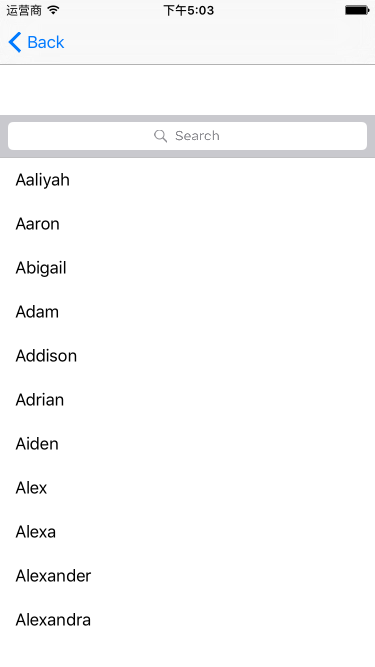
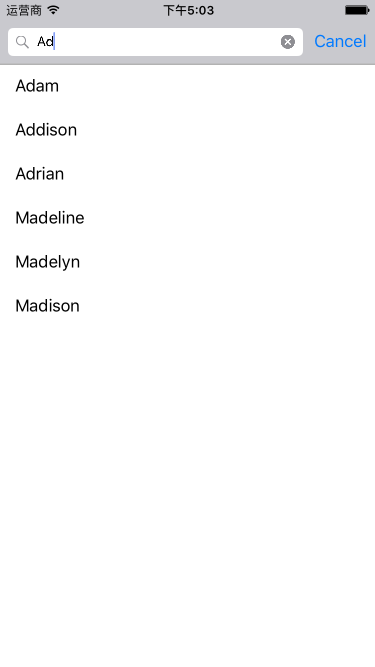
兩者最直觀的差異在於:UISearchController 傳入的是一個獨立的結果控制器,而 UISearchDisplayController 傳入的是當前控制器中的某個 tableview。
#import "SearchVC.h"
#import "DCSearchResultTVC.h"

@interface SearchVC ()<UISearchControllerDelegate, UISearchResultsUpdating,
        UISearchBarDelegate, UITableViewDelegate, UITableViewDataSource>

@property (nonatomic, strong) UISearchController *searchController;
@property (nonatomic, strong) UITableView *tableView;
@property (nonatomic, strong) DCSearchResultTVC *searchResultTVC;
@property (nonatomic, strong) NSArray *dataArr;
@end

@implementation SearchVC

- (void)viewDidLoad {
    [super viewDidLoad];
    self.view.backgroundColor = [UIColor whiteColor];
    [self configureTableView];
    [self configureSearchController];
}

- (void)configureSearchController {
    self.searchResultTVC = [[DCSearchResultTVC alloc] initWithStyle:UITableViewStylePlain];
    self.searchResultTVC.resultsArray = self.dataArr;

    UINavigationController *resultVC =
            [[UINavigationController alloc] initWithRootViewController:_searchResultTVC];

    self.searchController = [[UISearchController alloc]
            initWithSearchResultsController:resultVC];
    self.searchController.searchResultsUpdater = self;
    self.searchController.delegate = self;
    self.searchController.dimsBackgroundDuringPresentation = YES;   // 預設為 YES
    self.searchController.hidesNavigationBarDuringPresentation = YES; // 預設為 YES

    self.searchResultTVC.searchC = self.searchController;
    self.definesPresentationContext = YES;   // 解決 SearchController 偏移問題

    // 一般做法是搭配 tableview,直接把 searchBar 放進 tableHeaderView
    // 這樣點擊 searchBar 時搜尋頁會自動彈出
    _tableView.tableHeaderView = _searchController.searchBar;
}

// 也可以自行控制 present 的時機
- (void)showTheSearchVC {
    [self presentViewController:self.searchController animated:YES completion:nil];
}
- (BOOL)searchBarShouldBeginEditing:(UISearchBar *)searchBar { return YES; }
- (void)searchBarTextDidBeginEditing:(UISearchBar *)searchBar { }
- (BOOL)searchBarShouldEndEditing:(UISearchBar *)searchBar { return YES; }
- (void)searchBarTextDidEndEditing:(UISearchBar *)searchBar { }
- (void)searchBar:(UISearchBar *)searchBar textDidChange:(NSString *)searchText { }
- (void)searchBarSearchButtonClicked:(UISearchBar *)searchBar { }
- (void)searchBarCancelButtonClicked:(UISearchBar *)searchBar { }
- (void)searchBarResultsListButtonClicked:(UISearchBar *)searchBar { }
- (void)searchBar:(UISearchBar *)searchBar
    selectedScopeButtonIndexDidChange:(NSInteger)selectedScope { }
以下方法只在系統「自動」呈現或關閉搜尋控制器時才會被呼叫;若你自行呼叫 present/dismiss,則不會觸發。
- (void)willPresentSearchController:(UISearchController *)searchController { }
- (void)didPresentSearchController:(UISearchController *)searchController { }
- (void)willDismissSearchController:(UISearchController *)searchController { }
- (void)didDismissSearchController:(UISearchController *)searchController { }
- (void)presentSearchController:(UISearchController *)searchController { }
當搜尋欄的文字或範圍改變,或搜尋欄成為第一回應者時呼叫,過濾邏輯就寫在這裡:
- (void)updateSearchResultsForSearchController:(UISearchController *)searchController {
    NSPredicate *predicate = [NSPredicate predicateWithFormat:@"SELF CONTAINS[cd] %@",
                              searchController.searchBar.text];
    self.searchResultTVC.resultsArray =
            [self.dataArr filteredArrayUsingPredicate:predicate];
    [_searchResultTVC.tableView reloadData];
}
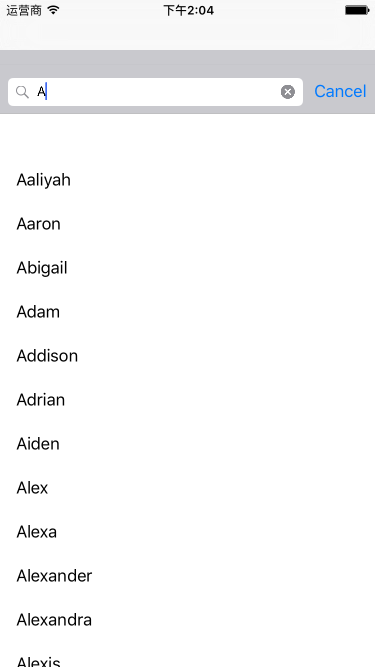
UISearchDisplayController 適用於 iOS 3.0 到 iOS 8.0,UISearchController 則是 iOS 8.0 之後的方案。除了版本差異,兩者在版面行為上有明顯不同,而且會隨 tableview 的布局而改變。
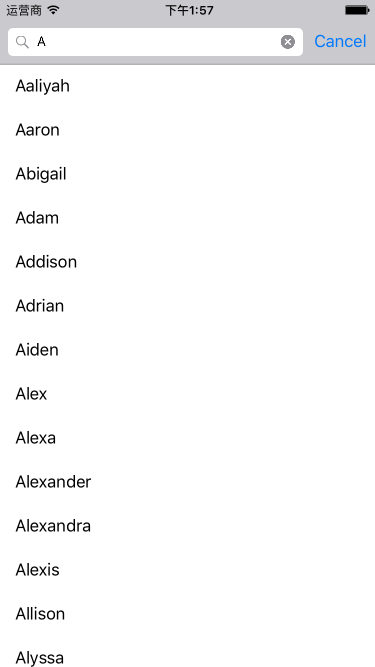
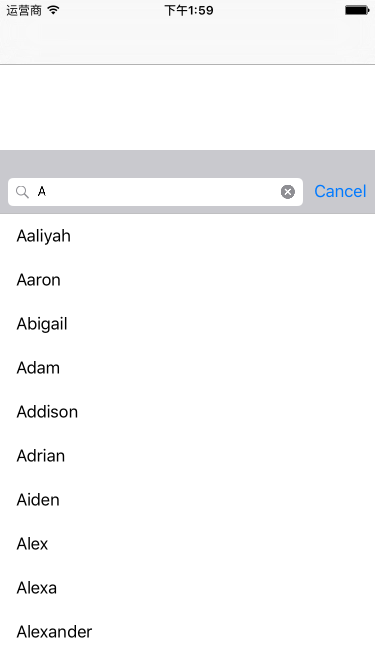
UISearchController 會依 tableview 的高度判斷:present 時整體向上推 64(一個導航列的高度)。而 UISearchDisplayController 完全不受 tableview 布局影響,永遠彈出一個正常置頂的搜尋介面。
舉例來說,一般 tableview 的 x、y 都為 0,此時兩者顯示一致,searchBar 都緊貼在導航列下方:
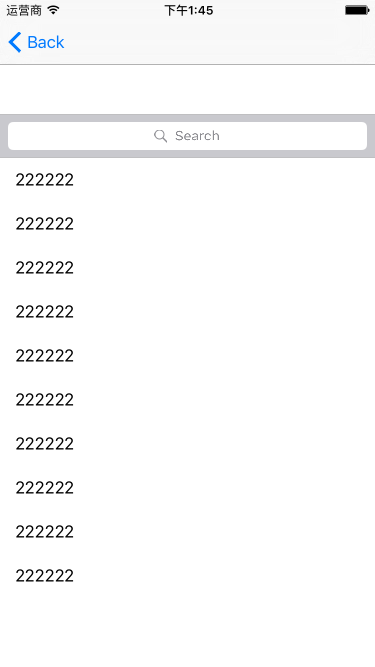
但若把 tableview 的 y 值設為 150,差異就出現了:UISearchDisplayController 的表現維持不變,而 UISearchController 只是在自己的布局基礎上向上推了一個導航列的高度:
此外,UISearchController 在使用時可能出現偏移問題,導致搜尋結果區域上方留白:
解決方式是在當前控制器加上一行:
self.definesPresentationContext = YES;
實務上兩者通常都搭配 tableview 使用,並把 searchBar 設為 tableHeaderView,如此點擊搜尋欄時搜尋頁會自動彈出。若想改為手動控制,呈現時呼叫 present 方法,關閉時把 active 設為 NO 即可:
// 呈現
[self presentViewController:searchController animated:YES completion:nil];

// 關閉
self.searchController.active = NO;
 Android 5.0 Toolbar 使用指南:取代 ActionBar 與獨立控件
Toolbar 的兩種定位 Toolbar 可以作為 ActionBar 使用,也可以視為獨立控件。實務上常見做法是讓 Toolbar 取代 ActionBar,以獲得更
 LRecyclerView 進階用法:側滑菜單、長按拖拽、滑動刪除一次搞定
LRecyclerView 現在能做什麼 反覆思考並兼顧使用便利性之後,LRecyclerView 整合了 SwipeMenu 系列能力:Item 左右側滑菜單、長按拖拽
 Android開發:發送短信的小程式實作與廣播回調
用程式發簡訊是 Android 的經典入門練習,因為它同時涵蓋了權限申請、Intent、PendingIntent 與廣播接收四個觀念。本文從最基礎的版本開始,再補上發送
 Android 網絡圖片異步加載實作解析
前言 運氣不錯,入職一週後就能跟著兩位師兄做 Android 開發。師兄們都是高手,身為新人的我唯有多看多學多努力。前陣子忙得沒時間整理,今天剛完成 Android 客戶