

編輯:關於 Android 程式設計
運氣不錯,入職一週後就能跟著兩位師兄做 Android 開發。師兄們都是高手,身為新人的我唯有多看多學多努力。前陣子忙得沒時間整理,今天剛完成 Android 客戶端的圖片異步加載類別,在這裡記錄一下(其實實現思路是參考網路上的開源方案)。
在 ListView 或 GridView 中加載圖片,思路基本一致,三層快取逐層回退:
先從記憶體快取取得,取到就回傳;取不到則前往檔案快取,取到就回傳並同步更新記憶體快取;檔案快取也沒有,才從網絡下載,下載完成後同時更新記憶體快取與檔案快取。
流程圖如下:
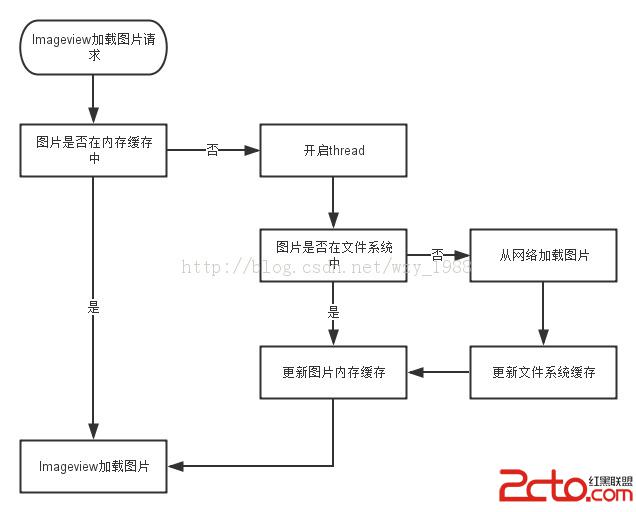
在 ListView 中加載圖片,直覺做法是每張圖開一條線程,但快速滑動時極易造成 OOM。因此必須控制線程數量,方式是使用線程池,而線程池的大小要依處理器情況與業務特性自行判斷。
ExecutorService executorService = Executors.newFixedThreadPool(5); // 5 可依情況調整
import java.io.File;
import android.content.Context;

public class FileCache {

    private static final String DIR_NAME = "your_dir";
    private File cacheDir;

    public FileCache(Context context) {
        // 找到用來保存快取圖片的目錄
        if (android.os.Environment.getExternalStorageState().equals(
                android.os.Environment.MEDIA_MOUNTED)) {
            cacheDir = new File(android.os.Environment.getExternalStorageDirectory(), DIR_NAME);
        } else {
            cacheDir = context.getCacheDir();
        }
        if (!cacheDir.exists()) {
            cacheDir.mkdirs();
        }
    }

    public File getFile(String url) {
        // 以 url 的 hash code 作為檔名
        String filename = String.valueOf(url.hashCode());
        return new File(cacheDir, filename);
    }

    public void clear() {
        File[] files = cacheDir.listFiles();
        if (files == null) {
            return;
        }
        for (File f : files) {
            f.delete();
        }
    }
}
這裡使用軟引用 SoftReference。簡單說,它讓快取在記憶體緊張時可以被 GC 回收,不會造成洩漏。
import java.lang.ref.SoftReference;
import java.util.Collections;
import java.util.LinkedHashMap;
import java.util.Map;
import android.graphics.Bitmap;

public class MemoryCache {

    private Map<String, SoftReference<Bitmap>> cache = Collections
            .synchronizedMap(new LinkedHashMap<String, SoftReference<Bitmap>>(10, 1.5f, true));

    public Bitmap get(String id) {
        if (!cache.containsKey(id)) {
            return null;
        }
        SoftReference<Bitmap> ref = cache.get(id);
        return ref.get();
    }

    public void put(String id, Bitmap bitmap) {
        cache.put(id, new SoftReference<Bitmap>(bitmap));
    }

    public void clear() {
        cache.clear();
    }
}
這裡用 LinkedHashMap 並把 accessOrder 設為 true,其實已經具備了 LRU 的雛形。後續 Android 官方提供了 LruCache,用強引用搭配容量上限,命中率和效能都比軟引用更好,是現在的首選。
package io.yunos.bbs;

import java.io.File;
import java.io.FileInputStream;
import java.io.FileNotFoundException;
import java.io.FileOutputStream;
import java.io.InputStream;
import java.io.OutputStream;
import java.net.HttpURLConnection;
import java.net.URL;
import java.util.Collections;
import java.util.Map;
import java.util.WeakHashMap;
import java.util.concurrent.ExecutorService;
import java.util.concurrent.Executors;

import android.content.Context;
import android.graphics.Bitmap;
import android.graphics.BitmapFactory;
import android.os.Handler;
import android.widget.ImageView;

public class ImageLoader {

    /** 網絡逾時 */
    private static final int TIME_OUT = 30000;
    /** 預設圖片資源 */
    private static final int DEFAULT_BG = R.drawable.plate_list_head_bg;
    /** 線程池大小 */
    private static final int THREAD_NUM = 5;

    /** 記憶體圖片快取 */
    MemoryCache memoryCache = new MemoryCache();
    /** 檔案圖片快取 */
    FileCache fileCache;
    /** 判定 ImageView 是否被重用 */
    private Map<ImageView, String> imageViews = Collections
            .synchronizedMap(new WeakHashMap<ImageView, String>());
    /** 線程池 */
    ExecutorService executorService;
    /** 用來在 UI 線程顯示圖片的 Handler */
    Handler handler = new Handler();

    public ImageLoader(Context context) {
        fileCache = new FileCache(context);
        executorService = Executors.newFixedThreadPool(THREAD_NUM);
    }

    public void disPlayImage(String url, ImageView imageView) {
        imageViews.put(imageView, url);
        Bitmap bitmap = memoryCache.get(url);
        if (bitmap != null) {
            // 直接從記憶體快取顯示
            imageView.setImageBitmap(bitmap);
        } else {
            // 從檔案快取或網絡佇列載入
            queuePhoto(url, imageView);
        }
    }

    private void queuePhoto(String url, ImageView imageView) {
        PhotoToLoad photoToLoad = new PhotoToLoad(url, imageView);
        executorService.submit(new PhotosLoader(photoToLoad));
    }

    private Bitmap getBitmap(String url) {
        File f = fileCache.getFile(url);

        // 先查檔案快取
        Bitmap bmp = decodeFile(f);
        if (bmp != null) {
            return bmp;
        }

        // 再走網絡
        try {
            URL imageUrl = new URL(url);
            HttpURLConnection conn = (HttpURLConnection) imageUrl.openConnection();
            conn.setConnectTimeout(TIME_OUT);
            conn.setReadTimeout(TIME_OUT);
            conn.setInstanceFollowRedirects(true);
            InputStream is = conn.getInputStream();
            OutputStream os = new FileOutputStream(f);
            copyStream(is, os);
            os.close();
            conn.disconnect();
            return decodeFile(f);
        } catch (Throwable ex) {
            if (ex instanceof OutOfMemoryError) {
                clearCache();
            }
            return null;
        }
    }

    private void copyStream(InputStream is, OutputStream os) {
        int buffer_size = 1024;
        try {
            byte[] bytes = new byte[buffer_size];
            while (true) {
                int count = is.read(bytes, 0, buffer_size);
                if (count == -1) {
                    break;
                }
                os.write(bytes, 0, count);
            }
        } catch (Exception e) {
            // 忽略
        }
    }

    private Bitmap decodeFile(File f) {
        try {
            FileInputStream fileInputStream = new FileInputStream(f);
            return BitmapFactory.decodeStream(fileInputStream);
        } catch (FileNotFoundException e) {
            return null;
        }
    }

    private void clearCache() {
        memoryCache.clear();
        fileCache.clear();
    }

    /** 佇列中的任務 */
    private class PhotoToLoad {
        public String url;
        public ImageView imageView;

        public PhotoToLoad(String url, ImageView imageView) {
            this.url = url;
            this.imageView = imageView;
        }
    }

    /** 異步載入圖片 */
    class PhotosLoader implements Runnable {
        PhotoToLoad photoToLoad;

        public PhotosLoader(PhotoToLoad photoToLoad) {
            this.photoToLoad = photoToLoad;
        }

        private boolean imageViewReused(PhotoToLoad photoToLoad) {
            String tag = imageViews.get(photoToLoad.imageView);
            if (tag == null || !tag.equals(photoToLoad.url)) {
                return true;
            }
            return false;
        }

        @Override
        public void run() {
            // 若 ImageView 已被重用於其他 url,放棄本次載入
            if (imageViewReused(photoToLoad)) {
                return;
            }
            Bitmap bitmap = getBitmap(photoToLoad.url);
            memoryCache.put(photoToLoad.url, bitmap);
            if (imageViewReused(photoToLoad)) {
                return;
            }
            // 不能在子線程改動 UI
            BitmapDisplayer bd = new BitmapDisplayer(bitmap, photoToLoad);
            handler.post(bd);
        }

        class BitmapDisplayer implements Runnable {
            Bitmap bitmap;
            PhotoToLoad photoToLoad;

            public BitmapDisplayer(Bitmap bitmap, PhotoToLoad photoToLoad) {
                this.bitmap = bitmap;
                this.photoToLoad = photoToLoad;
            }

            @Override
            public void run() {
                if (imageViewReused(photoToLoad)) {
                    return;
                }
                if (bitmap != null) {
                    photoToLoad.imageView.setImageBitmap(bitmap);
                } else {
                    photoToLoad.imageView.setImageResource(DEFAULT_BG);
                }
            }
        }
    }
}
ImageLoader imageLoader = new ImageLoader(context);
imageLoader.disPlayImage(imageUrl, imageView);
imageViewReused 是整份程式碼最關鍵的一段。ListView 會重用 convertView,同一個 ImageView 可能先被指派 url A、再被指派 url B。如果 A 的下載較慢,等它回來時 ImageView 上顯示的其實已經是 B 的內容了,就會出現「圖片錯位」這個經典 bug。用 WeakHashMap 記錄每個 ImageView 目前對應的 url,回來後比對一次,就能擋掉錯誤的貼圖。
還缺一塊拼圖:圖片縮放。程式碼中的 decodeFile() 註解寫著 TODO,這其實是最容易 OOM 的地方。完整做法是先用 BitmapFactory.Options 搭配 inJustDecodeBounds = true 只讀取尺寸,計算縮放比例後設定 inSampleSize,再正式解碼。
現代替代方案。這套實作作為學習材料很有價值,但正式專案建議直接使用 Glide、Picasso 或 Fresco。它們把上述三層快取、線程池調度、ImageView 重用偵測、請求取消、生命週期綁定、GIF 支援、硬體位圖等細節都處理好了,還能自動隨容器大小解碼,省下大量邊角問題。
最近終於開始忙起來了,我還是比較喜歡緊湊一點的節奏,能學到更多東西。
 Android ViewFlipper 實作教學:打造可手勢滑動的圖片輪播組件
在開發 App 的啟動頁、首頁廣告位或引導頁時,「圖片自動/手動輪播」幾乎是必備功能。Android 原生的 ViewFlipper 是一個專門用來在數个子 View
 Android Studio 常用設定整理:SDK 版本、配色、快捷鍵
換了 IDE 之後總要重新調一遍環境,把常用設定記錄下來省得每次翻找。 一、修改 SDK 版本 開啟 File → Project Structure...,接著選 M
 Android 智能短信應用實作(二):會話刪除、自定義對話框與簡訊發送
本篇接續短信應用的開發,處理幾個實務上一定會遇到的環節:批次刪除會話、打造可重複使用的自定義對話框、帶進度條的刪除流程、會話詳情頁的資料傳遞與異步載入,以及簡訊的發送。
 AppBarLayout + TabLayout + RecyclerView + ViewPager 實作可協同滑動的頭部
有人丟來一張效果圖,希望做出一個「Banner 捲出畫面後,標題欄吸頂」的頁面。仔細看起來不難,但要把 Material Design 那套協同滑動的規則串起來,還是得先