

編輯:關於 Android 程式設計
本文以 Android Studio 開發環境為例,說明如何在 App 中接入百度地圖定位功能。
首先登入百度地圖開放平台 https://lbsyun.baidu.com/ ,在主頁選擇「開發 → Android 定位 SDK」。這裡有大量教學,包含如何獲取金鑰、開發指南等,本文不再贅述,主要針對 App 接入百度定位時的一些細節操作。
接著選擇「相關下載 → 全部下載」,我們這裡只勾選「全量定位」即可。
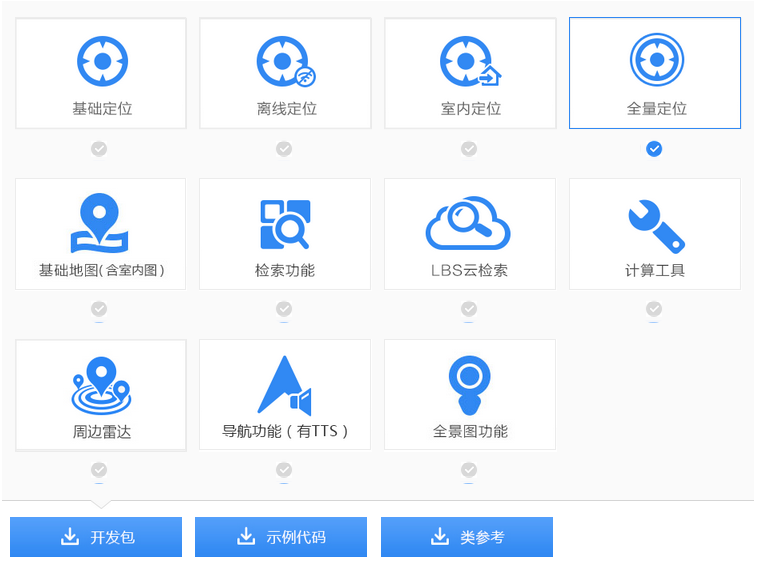
點擊下載開發包,你也可以一併下載示例程式碼與參考類。下載解壓後可以看到如下目錄結構:
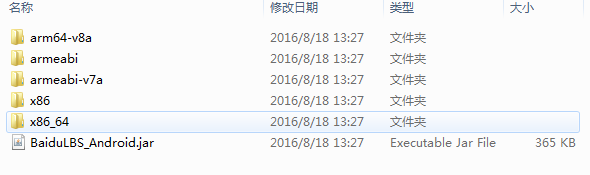
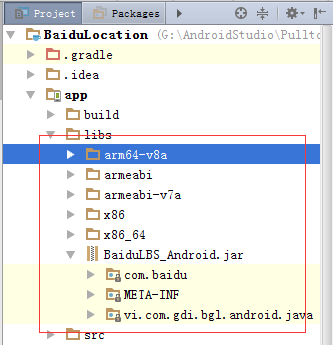
這些其實都是動態連結庫,百度針對不同架構的手機 CPU 編寫了不同的庫檔案,目的是為了適配各種 CPU 架構。如果你選了多功能開發包會發現體積很大,這時就得取捨——通常只要留下 armeabi 這個資料夾的庫即可,市面上絕大多數機型都沒問題。
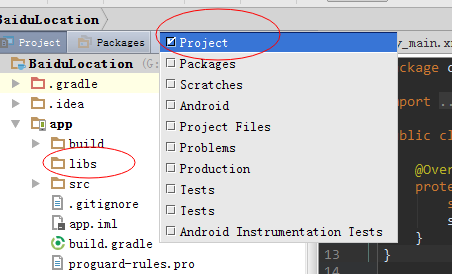
接下來把這些庫檔案與 jar 包導入 Android 工程,全部複製貼上到 libs 目錄下:
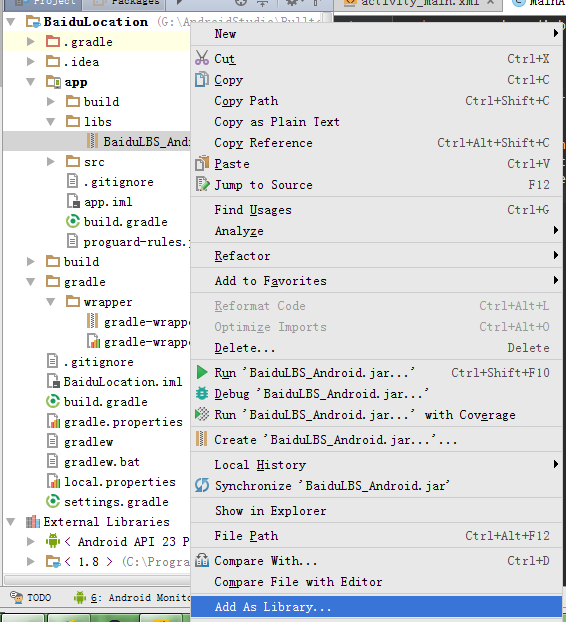
把 jar 包右鍵選擇 Add As Library 即可成功導入:
你也可以透過 Project Structure 的方式導入 jar 包:
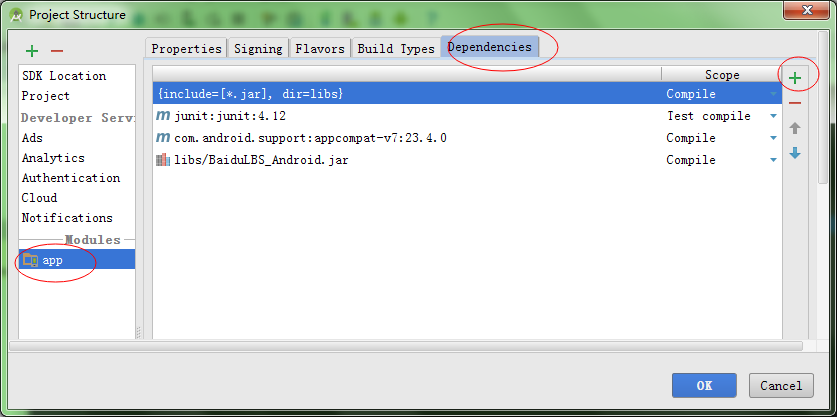
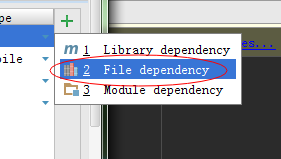
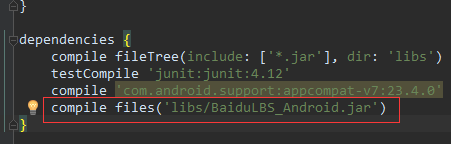
完成導入後,在 Gradle (Module: app) 檔中可看到相關描述,代表 jar 包導入成功:
導入後的 libs 目錄結構如下:
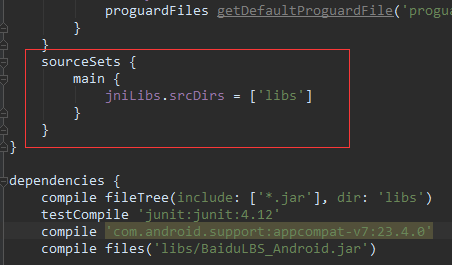
由於百度地圖定位需要用到動態連結庫,必須在 Gradle (Module: app) 中加入:
sourceSets {
    main {
        jniLibs.srcDirs = ['libs']
    }
}
另外還要在 Manifests 檔中聲明服務並配置金鑰:


此外也別忘了聲明所需的權限,詳情請參考官方開發指南。準備工作完成後,就可以對照百度官方指南開始撰寫程式碼了。官方開發指南:https://lbsyun.baidu.com/index.php?title=android-locsdk/guide/getloc
我在做專案時寫了一個工具類,方便操作,分享給大家:
public class BDLocationUtils implements BDLocationListener {
    private static BDLocationUtils bdLocationUtils;
    public LocationClient mLocationClient = null;
    private String describe = "";
    private List locationPoiList = new ArrayList<>();
    private List locationList = new ArrayList<>();
    private String address;
    public static BDLocationUtils newInstance(Context context) {
        if (bdLocationUtils == null) {
            bdLocationUtils = new BDLocationUtils(context);
        }
        return bdLocationUtils;
    }
    public BDLocationUtils(Context context) {
        mLocationClient = new LocationClient(context);
        initLocation();
        mLocationClient.registerLocationListener(this);
        mLocationClient.start();
    }
    /** 初始化位置獲取設定 */
    private void initLocation() {
        LocationClientOption option = new LocationClientOption();
        option.setLocationMode(LocationClientOption.LocationMode.Hight_Accuracy); // 高精度模式
        option.setCoorType("bd09ll"); // 回傳 bd09ll 座標系
        option.setIsNeedAddress(true); // 需要地址資訊
        option.setOpenGps(false);
        option.setIsNeedLocationPoiList(true); // 需要 POI 結果
        mLocationClient.setLocOption(option);
    }
    @Override
    public void onReceiveLocation(BDLocation location) {
        MyApplication.location.setLatitude(location.getLatitude());
        MyApplication.location.setLongitude(location.getLongitude());
        if (location.getLocType() == BDLocation.TypeGpsLocation) {
            address = location.getAddrStr();
            MyApplication.location.setAddress(address);
            describe = "gps定位成功";
        } else if (location.getLocType() == BDLocation.TypeNetWorkLocation) {
            address = location.getAddrStr();
            MyApplication.location.setAddress(address);
            describe = "網絡定位成功";
        } else if (location.getLocType() == BDLocation.TypeServerError) {
            describe = "服務端網絡定位失敗";
        } else if (location.getLocType() == BDLocation.TypeNetWorkException) {
            describe = "網絡不同導致定位失敗,請檢查網絡";
        }
        locationPoiList = location.getPoiList();
        if (locationPoiList != null) {
            locationList.clear();
            for (Poi p : locationPoiList) {
                locationList.add(p.getName());
            }
        }
    }
    public void startLocation() { mLocationClient.start(); }
    public void stopLocation() { mLocationClient.stop(); }
    public List getLocationList() { return locationList; }
    public String getAddress() { return address; }
    public String getDescribe() { return describe; }
}
取得當前可能的地點清單:
bdLocationUtils = BDLocationUtils.newInstance(getApplicationContext());
bdLocationUtils.startLocation();
locationList = bdLocationUtils.getLocationList();
locationList 存放著可能的地點。而取得當前位置的地點描述(一個範圍性描述,並非確切地址)則用:
bdLocationUtils.getAddress()
當定位失敗時,想要給使用者提示,可以呼叫:
String describe = bdLocationUtils.getDescribe();
這樣 describe 裡就有你想要的資訊。特別注意:在你的 Activity finish 時,別忘了呼叫一下:
bdLocationUtils.stopLocation();
以避免記憶體洩漏。如有問題,歡迎留言討論。
 Android 如何在兩個 Activity 之間傳遞 Bitmap 物件
剛開始寫 Android 時,要在 Activity 之間傳一張圖,我很自然地就寫了 intent.putExtra(image, bitmap)。測一張 ROI 小圖時
 Android ListView 那些事:效能、分隔線、绘制順序與焦點陷阱
ListView 是 Android 開發中再熟悉不過的控件,常用來展示大量資料。本文整理了几个容易忽略、卻深刻影響效能與行為的關鍵環節。一、Cache color hi
 Android 如何查看 Wi-Fi 密碼
前言: 在 Android 手機中,連接 Wi-Fi 之後,密碼一般就看不到了。那有沒有什麼辦法可以查看這些密碼呢?方法一般有兩種:一種是透過查看 Wi-Fi 的設定檔,
 MPAndroidChart 使用文件精讀(上):圖表建立、刷新與座標軸客製
MPAndroidChart 是 Android 平台上一套相當成熟的开源繪圖庫,目前提供折線圖、長條圖、散佈圖、K 線圖、圓餅圖、氣泡圖與雷達圖等多種類型,並內建選取、