

編輯:關於 Android 程式設計
讀完這篇文章,你將能徹底搞懂兩個常被提及卻又容易含糊的問題:
1、為什麼 EventBus 的事件處理方法通常要求聲明為 public?可我把它寫成 protected 也照樣能跑?
2、粘性事件(Sticky Event)背後的原理是什麼?為什麼連續發送多次事件,最終卻只有最新那一次能被接收處理?
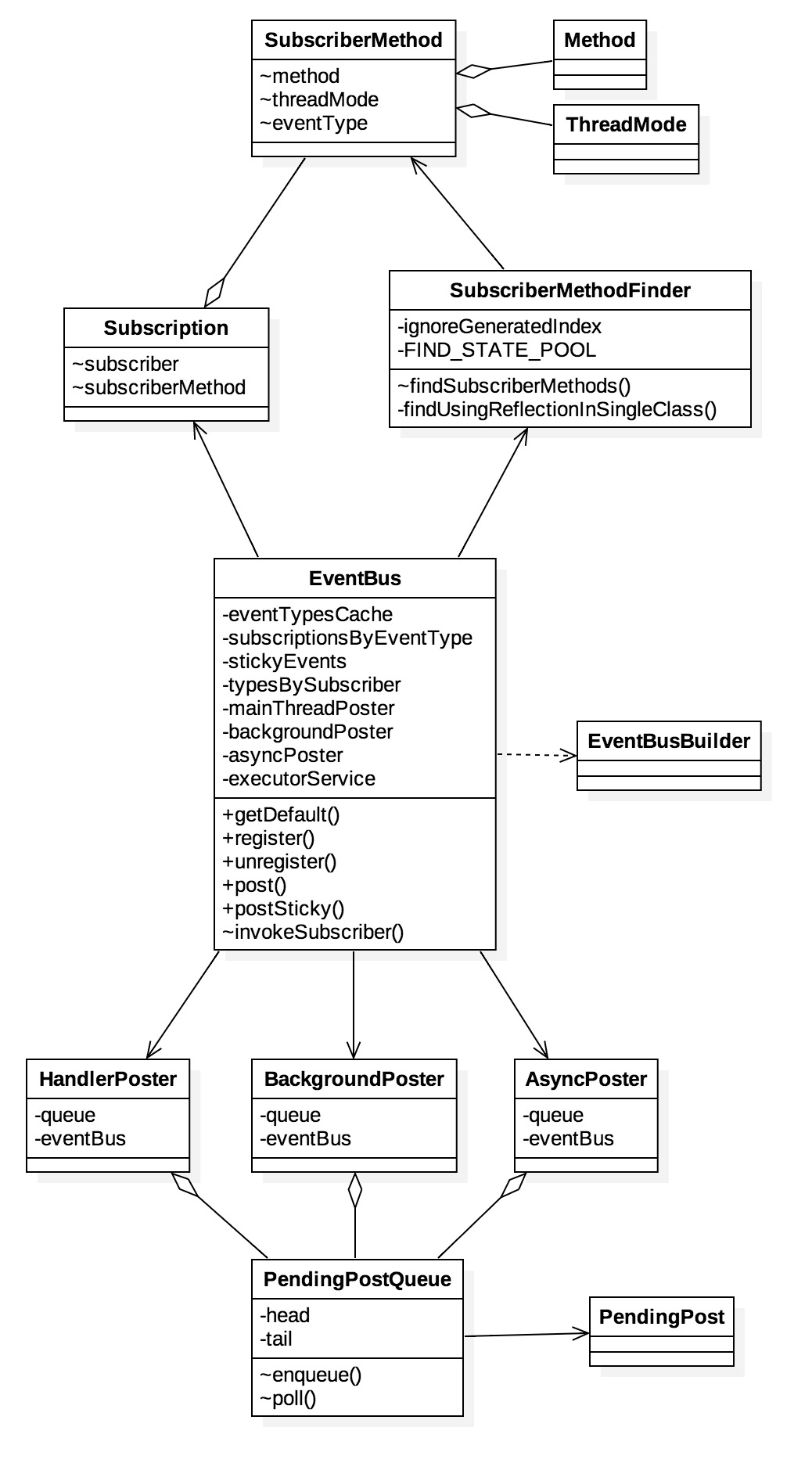
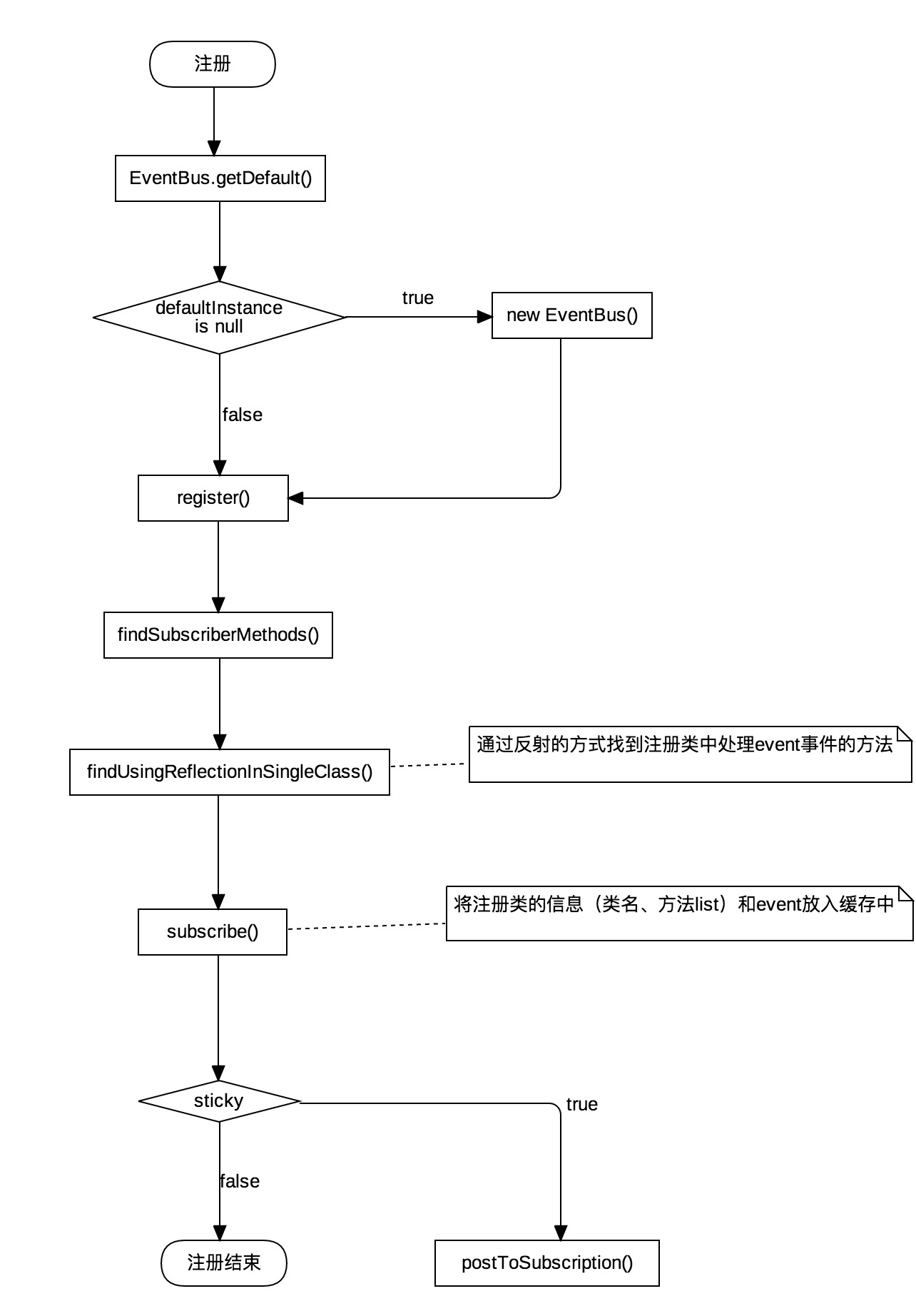
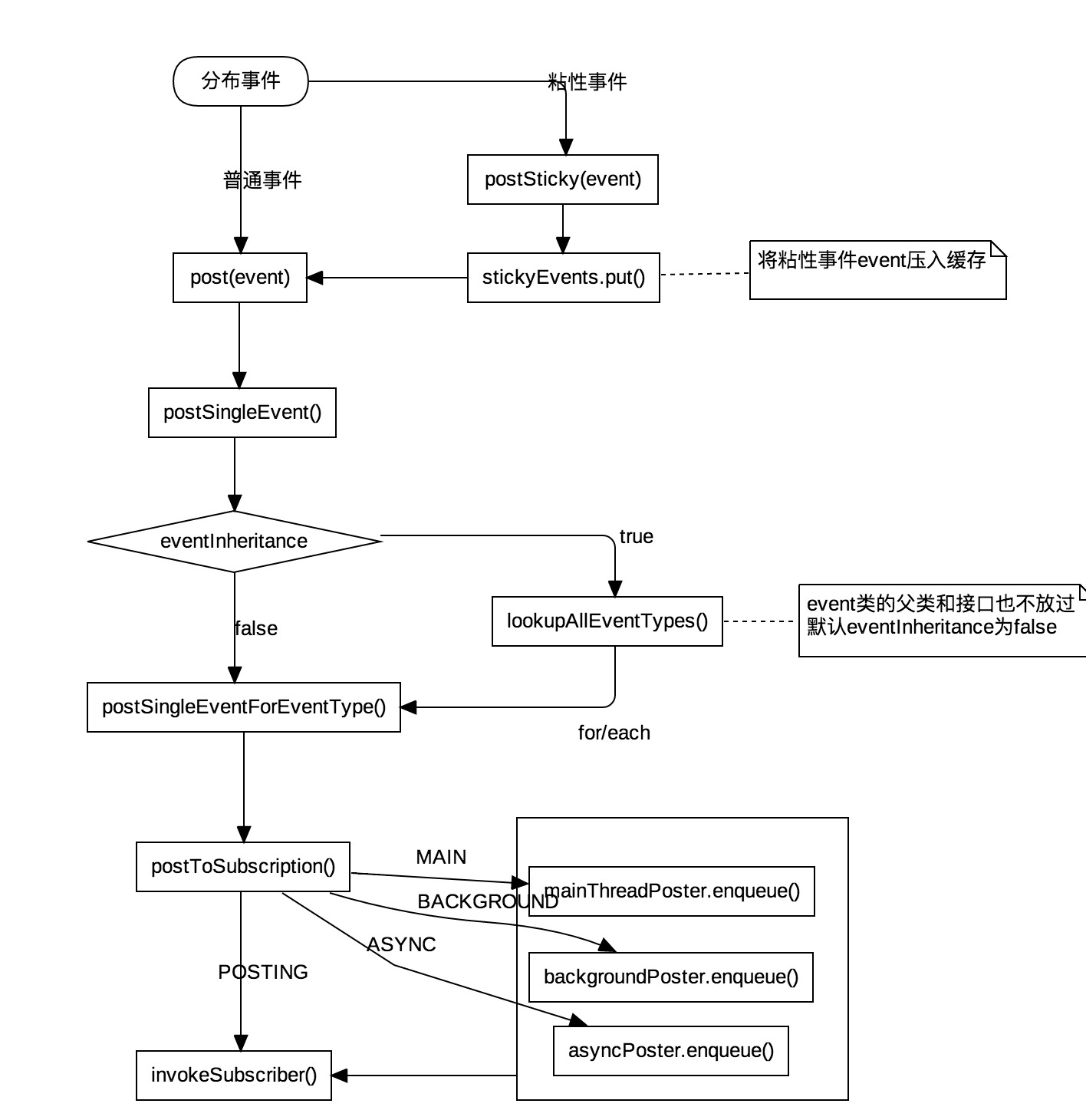
從整體流程來看,可以抓住兩條主線:
1)在註冊階段,EventBus 會借助反射機制掃描出註冊類中所有被 @Subscriber 標註的 public 方法,隨後把這個類的相關資訊存進 HashMap。如果掃描過程中發現某個方法是 sticky(粘性)的,那麼它會被直接推入事件發布流程。
2)在事件發布階段,無論採用哪一種線程模型,最終都會彙集到 EventBus 類中的 invokeSubscriber() 方法。倘若客戶端發送的是一個 Sticky 事件,EventBus 會先把它存入粘性事件緩存 stickyEvents,再回到普通事件的處理路徑上。
getDefault() 方法:獲取默認的 EventBus 單例實例。
//默認情況下,採用單例模式,線程安全。 //也可以不用單例模式,EventBus 的構造方法是 public 的,因此初始化自己的 EventBus 對象 public static EventBus getDefault() { if (defaultInstance == null) { synchronized (EventBus.class) { if (defaultInstance == null) { defaultInstance = new EventBus(); } } } return defaultInstance; }register() 方法:完成訂閱者註冊。
//subscriber 就是訂閱發布 模式中的訂閱者,如我們的 Activity public void register(Object subscriber) { Class subscriberClass = subscriber.getClass();//獲取訂閱者的 Class 類對象 List subscriberMethods = subscriberMethodFinder.findSubscriberMethods(subscriberClass);//獲取該類中的事件方法(@subscribe 標籤),SubscriberMethod 類包含了註冊者的類、方法、sticky、線程模式等資訊 synchronized (this) { for (SubscriberMethod subscriberMethod : subscriberMethods) { subscribe(subscriber, subscriberMethod);//緩存註冊者資訊 } } } findSubscriberMethods() 方法:找出訂閱者中被 @Subscribe 標註的方法。
ListfindSubscriberMethods(Class subscriberClass) { List subscriberMethods = METHOD_CACHE.get(subscriberClass);//從緩存中找 if (subscriberMethods != null) { return subscriberMethods;//緩存命中,直接返回 } //ignoreGeneratedIndex 默認情況為 false,但都會走到 findUsingReflectionInSingleClass 方法中,通過反射來找到 @Subscribe 標識的方法 if (ignoreGeneratedIndex) { subscriberMethods = findUsingReflection(subscriberClass); } else { subscriberMethods = findUsingInfo(subscriberClass); } if (subscriberMethods.isEmpty()) { throw new EventBusException("Subscriber " + subscriberClass + " and its super classes have no public methods with the @Subscribe annotation"); } else { METHOD_CACHE.put(subscriberClass, subscriberMethods);//存到緩存中 return subscriberMethods; } } //通過反射來處理,找到訂閱者中 @Subscribe 標識的方法 private void findUsingReflectionInSingleClass(FindState findState) { Method[] methods; try { // 獲取註冊類的所有申明方法(非繼承方法),該方法的效率比 getMehtods() 高 methods = findState.clazz.getDeclaredMethods(); } catch (Throwable th) { methods = findState.clazz.getMethods(); findState.skipSuperClasses = true; } for (Method method : methods) { int modifiers = method.getModifiers();//方法的修飾符:public //找到 public 修飾的方法,這裡奇怪的是,protected 的方法通過反射得到的方法修飾符也是 public,這就是為什麼 protected 修飾的方法也能使用的原因!! if ((modifiers & Modifier.PUBLIC) != 0 && (modifiers & MODIFIERS_IGNORE) == 0) { //找到參數個數為 1 的方法 Class[] parameterTypes = method.getParameterTypes(); if (parameterTypes.length == 1) { //找到注解 @Subscribe 標識的方法 Subscribe subscribeAnnotation = method.getAnnotation(Subscribe.class); if (subscribeAnnotation != null) { Class eventType = parameterTypes[0];//獲取參數 if (findState.checkAdd(method, eventType)) { ThreadMode threadMode = subscribeAnnotation.threadMode();//從注解獲取線程模型 findState.subscriberMethods.add(new SubscriberMethod(method, eventType, threadMode, subscribeAnnotation.priority(), subscribeAnnotation.sticky())); } } } else if (strictMethodVerification && method.isAnnotationPresent(Subscribe.class)) { String methodName = method.getDeclaringClass().getName() + "." + method.getName(); throw new EventBusException("@Subscribe method " + methodName + "must have exactly 1 parameter but has " + parameterTypes.length); } } else if (strictMethodVerification && method.isAnnotationPresent(Subscribe.class)) { String methodName = method.getDeclaringClass().getName() + "." + method.getName(); throw new EventBusException(methodName + " is a illegal @Subscribe method: must be public, non-static, and non-abstract"); } } }
值得留意的是:源碼裡明確指出,即便方法用 protected 修飾,反射拿到的修飾符依然是 public,這正是 protected 方法也能被正常處理的根本原因。
subscribe() 方法:在找到註冊類的方法之後,還需要把這些方法也註冊並存入緩存。
private void subscribe(Object subscriber, SubscriberMethod subscriberMethod) { Class eventType = subscriberMethod.eventType;//消息事件的類型 Subscription newSubscription = new Subscription(subscriber, subscriberMethod);//Subscription 類封裝了註冊者和它的一個方法 CopyOnWriteArrayList subscriptions = subscriptionsByEventType.get(eventType);//從緩存,是否已經註冊過 if (subscriptions == null) { subscriptions = new CopyOnWriteArrayList<>(); subscriptionsByEventType.put(eventType, subscriptions); } else { //緩存命中,無序重新註冊,拋出異常。 if (subscriptions.contains(newSubscription)) { throw new EventBusException("Subscriber " + subscriber.getClass() + " already registered to event " + eventType); } } int size = subscriptions.size(); for (int i = 0; i <= size; i++) { //優先級排序 if (i == size || subscriberMethod.priority > subscriptions.get(i).subscriberMethod.priority) { subscriptions.add(i, newSubscription); break; } } //向緩存中添加 subscriber 所對應的 Event。感覺 typesBySubscriber 沒啥用? List> subscribedEvents = typesBySubscriber.get(subscriber); if (subscribedEvents == null) { subscribedEvents = new ArrayList<>(); typesBySubscriber.put(subscriber, subscribedEvents); } subscribedEvents.add(eventType); //註冊粘性事件 if (subscriberMethod.sticky) { if (eventInheritance) { // Existing sticky events of all subclasses of eventType have to be considered. // Note: Iterating over all events may be inefficient with lots of sticky events, // thus data structure should be changed to allow a more efficient lookup // (e.g. an additional map storing sub classes of super classes: Class -> List). Set, Object>> entries = stickyEvents.entrySet(); for (Map.Entry, Object> entry : entries) { Class candidateEventType = entry.getKey(); if (eventType.isAssignableFrom(candidateEventType)) { Object stickyEvent = entry.getValue(); checkPostStickyEventToSubscription(newSubscription, stickyEvent); } } } else { Object stickyEvent = stickyEvents.get(eventType); checkPostStickyEventToSubscription(newSubscription, stickyEvent);//該方法將會直接跳轉到事件發布歷程中執行 } } } post() 方法:發布者向外發布消息事件。
//currentPostingThreadState 是一個 ThredLocal 變量,線程內部共享數據,線程間安全 private final ThreadLocalcurrentPostingThreadState = new ThreadLocal () { @Override protected PostingThreadState initialValue() { return new PostingThreadState(); } }; //發布 event 粘性事件 public void postSticky(Object event) { synchronized (stickyEvents) { //stickyEvents 是 ConcurrentHashMap,每次往 map 中 put 鍵值對,會覆蓋具有相同 event.getClass() 的值,因此導致即使發布多次粘性事件,也只會處理最新的那一個 //換句話即:同一個 event 類,在緩存中只會保存一個粘性事件! stickyEvents.put(event.getClass(), event); } post(event); } //發布 event 事件 public void post(Object event) { PostingThreadState postingState = currentPostingThreadState.get(); List
這裡正好回答了開篇的第二個問題:stickyEvents 是一個以事件 Class 為鍵的 Map,同一類型的粘性事件只會保留最新的一份,舊值會被覆蓋,所以無論你 postSticky 多少次,最終留存的永遠是最後那個。
AsyncPoster 類,實現了 Runnable 接口。
class AsyncPoster implements Runnable { private final PendingPostQueue queue; private final EventBus eventBus; AsyncPoster(EventBus eventBus) { this.eventBus = eventBus; queue = new PendingPostQueue(); } public void enqueue(Subscription subscription, Object event) { PendingPost pendingPost = PendingPost.obtainPendingPost(subscription, event); queue.enqueue(pendingPost);//加入隊列中 eventBus.getExecutorService().execute(this);//調用線程池執行,並發執行 } @Override public void run() { PendingPost pendingPost = queue.poll(); if(pendingPost == null) { throw new IllegalStateException("No pending post available"); } eventBus.invokeSubscriber(pendingPost);//調用 EventBus 的反射方法 } }BackgroundPoster 類:它同樣實現了 Runnable 接口,也在子線程中執行 EventBus 的反射回調,但與 AsyncPoster 有明顯差異:
1)AsyncPoster 每次任務都會新建線程,並發執行隊列中的任務;
2)BackgroundPoster 只會維持一個子線程,隊列中的任務僅按順序依次執行。
final class BackgroundPoster implements Runnable { private final PendingPostQueue queue; private final EventBus eventBus; private volatile boolean executorRunning; BackgroundPoster(EventBus eventBus) { this.eventBus = eventBus; queue = new PendingPostQueue(); } public void enqueue(Subscription subscription, Object event) { PendingPost pendingPost = PendingPost.obtainPendingPost(subscription, event); synchronized (this) { queue.enqueue(pendingPost); if (!executorRunning) { executorRunning = true; eventBus.getExecutorService().execute(this); } } } @Override public void run() { try { try { while (true) { PendingPost pendingPost = queue.poll(1000); if (pendingPost == null) { synchronized (this) { // Check again, this time in synchronized pendingPost = queue.poll(); if (pendingPost == null) { executorRunning = false; return; } } } eventBus.invokeSubscriber(pendingPost); } } catch (InterruptedException e) { Log.w("Event", Thread.currentThread().getName() + " was interruppted", e); } } finally { executorRunning = false; } } }mainThreadPoster 實際上是 HandlerPoster 類型的變量,它繼承自 Handler。不難推斷,它正是依靠 Handler+Looper 機制來實現主線程調用。
mainThreadPoster = new HandlerPoster(this, Looper.getMainLooper(), 10);//綁定主線程的 Looper final class HandlerPoster extends Handler { private final PendingPostQueue queue; private final int maxMillisInsideHandleMessage; private final EventBus eventBus; private boolean handlerActive; HandlerPoster(EventBus eventBus, Looper looper, int maxMillisInsideHandleMessage) { super(looper);//綁定主線程的 Looper this.eventBus = eventBus; this.maxMillisInsideHandleMessage = maxMillisInsideHandleMessage; queue = new PendingPostQueue(); } void enqueue(Subscription subscription, Object event) { PendingPost pendingPost = PendingPost.obtainPendingPost(subscription, event); synchronized (this) { queue.enqueue(pendingPost); if (!handlerActive) { handlerActive = true; if (!sendMessage(obtainMessage())) { throw new EventBusException("Could not send handler message"); } } } } //處理 event 事件,調用 EventBus 的 invokeSubscriber 反射回調 public void handleMessage(Message msg) { boolean rescheduled = false; try { long started = SystemClock.uptimeMillis(); while (true) { PendingPost pendingPost = queue.poll(); if (pendingPost == null) { synchronized (this) { // 雙重判 0,線程安全 pendingPost = queue.poll(); if (pendingPost == null) { handlerActive = false; return; } } } eventBus.invokeSubscriber(pendingPost);//調用 EventBus 的反射方法 long timeInMethod = SystemClock.uptimeMillis() - started; if (timeInMethod >= maxMillisInsideHandleMessage) { if (!sendMessage(obtainMessage())) { throw new EventBusException("Could not send handler message"); } rescheduled = true; return; } } } finally { handlerActive = rescheduled; } } }
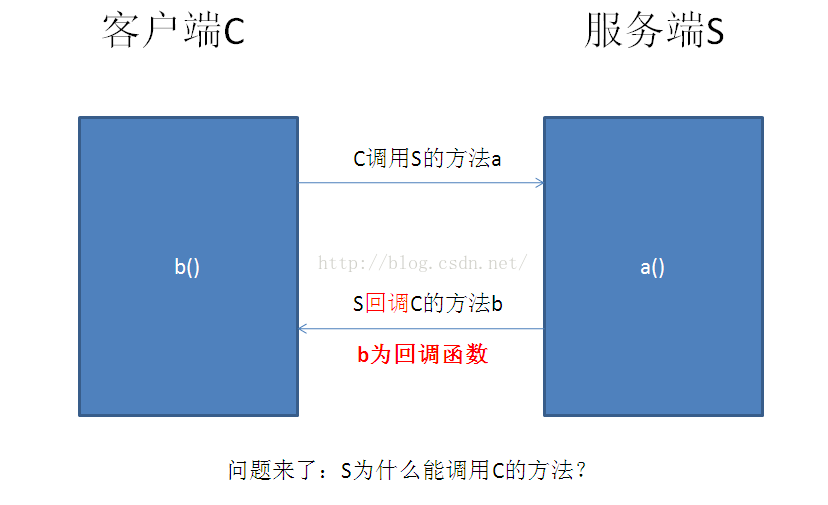 一篇講透 Android 接口回調機制:從生活隱喻到本質思考
剛入門時,我對「回調」這個詞始終有種說不清的模糊感。直到自己寫過幾輪業務,回頭重新梳理,才發現它其實是日常思維方式在代碼裡的投影。一句話概括:回調就是「先註冊、後觸發」,
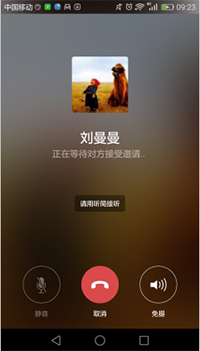 Android 高仿微信語音通話頁:高斯模糊毛玻璃背景實作
現在隨便打開幾款應用就會發現,毛玻璃(高斯模糊)效果幾乎無處不在。仔細看看微信的語音通話頁也是一樣:它的背景並不是一塊純色,而是拿使用者頭像做模糊之後鋪成的底圖。 先看效
 Android 安全加密系列:消息摘要 Message Digest 完全指南
系列文章索引 Android 安全加密:對稱加密 Android 安全加密:非對稱加密 Android 安全加密:消息摘要 Message Digest Android
 Android 界面編程探險(一):布局與基礎控件
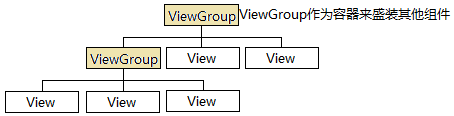
Android 應用的大部分 UI 組件都集中在 android.widget 及其子包、android.view 及其子包中,所有 UI 組件都繼承自 View 類。A