

編輯:關於 Android 程式設計
上一篇已經能把網絡上的圖片獲取下來了。生活中有這麼些場景:微信聯網打開別人的照片後,即使手機斷網,再去點擊那張圖片仍能完整看到。這並不是重新去網絡獲取,而是微信在首次加載時就把圖片在本地做了緩存——這也是微信佔用存儲空間較大的原因之一。
本篇用最簡單直接的方式給圖片做緩存,本質原理都相通。代碼如下:
public class MainActivity extends Activity {
    static ImageView iv;
    static MainActivity ma;

    static Handler handler = new Handler() {
        public void handleMessage(android.os.Message msg) {
            switch (msg.what) {
                case 1:
                    iv.setImageBitmap((Bitmap) msg.obj);
                    break;
                case 0:
                    Toast.makeText(ma, "請求失敗", 0).show();
                    break;
            }
        }
    };

    @Override
    protected void onCreate(Bundle savedInstanceState) {
        super.onCreate(savedInstanceState);
        setContentView(R.layout.activity_main);
        iv = (ImageView) findViewById(R.id.iv);
        ma = this;
    }

    public void click(View v) {
        final String path = "https://192.168.13.13:8080/dd.jpg";
        final File file = new File(getCacheDir(), getFileName(path));

        // 判斷緩存中是否存在該文件
        if (file.exists()) {
            // 緩存存在,直接從本地讀取
            System.out.println("從緩存讀取的");
            Bitmap bm = BitmapFactory.decodeFile(file.getAbsolutePath());
            iv.setImageBitmap(bm);
        } else {
            // 緩存不存在,從網絡下載
            System.out.println("從網上下載的");
            new Thread() {
                @Override
                public void run() {
                    try {
                        URL url = new URL(path);
                        HttpURLConnection conn = (HttpURLConnection) url.openConnection();
                        conn.setRequestMethod("GET");
                        conn.setConnectTimeout(5000);
                        conn.setReadTimeout(5000);
                        conn.connect();
                        if (conn.getResponseCode() == 200) {
                            InputStream is = conn.getInputStream();
                            // 把服務器返回的流寫入本地文件緩存
                            FileOutputStream fos = new FileOutputStream(file);
                            byte[] b = new byte[10240];
                            int len = 0;
                            while ((len = is.read(b)) != -1) {
                                fos.write(b, 0, len);
                            }
                            fos.close();
                            // 從本地文件構造位圖對象
                            Bitmap bm = BitmapFactory.decodeFile(file.getAbsolutePath());
                            Message msg = new Message();
                            msg.obj = bm;
                            msg.what = 1;
                            handler.sendMessage(msg);
                        } else {
                            Message msg = handler.obtainMessage();
                            msg.what = 0;
                            handler.sendMessage(msg);
                        }
                    } catch (Exception e) {
                        e.printStackTrace();
                    }
                }
            }.start();
        }
    }

    public String getFileName(String path) {
        int index = path.lastIndexOf("/");
        return path.substring(index + 1);
    }
}
可以看到,程序會先從本地緩存中查找圖片,找不到才去訪問網絡。只要有一次網絡訪問成功,之後就能直接從本地讀取,除非手動清理緩存。斷網之後再運行,效果如下:

 Android 實現用戶列表的滑動刪除與多選批量刪除
列表數據的刪除是極常見的需求。Android 上主流有兩種交互模式:一種類似微信,向左滑動露出刪除按鈕;另一種是通過 CheckBox 勾選多項,再點擊底部按鈕批量刪除。
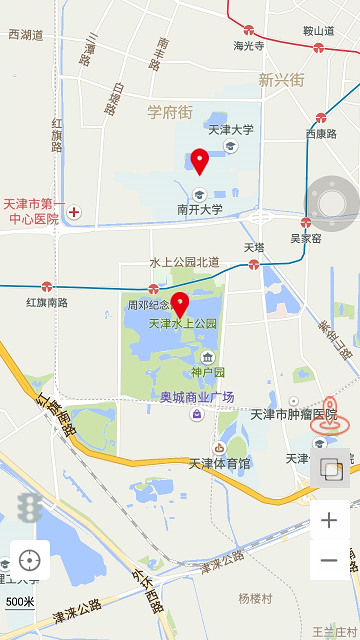 百度地圖實戰:添加覆蓋物並實現點擊查看詳情
前面講過百度地圖的定位與基礎操作,這篇接著來解決兩個常見需求:如何往地圖上添加覆蓋物(Marker),以及如何讓點擊覆蓋物後彈出詳情。 一、準備數據模型 添加覆蓋物至少
 用 ExpandableListView 嵌套實作三級樹選單
標準的 ExpandableListView 只有兩層(群組與子項),要做三級樹(公司 → 部門 → 員工)就需要在子項的位置再嵌一個 ExpandableListVie
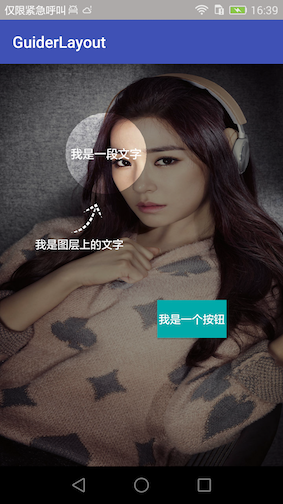 自定義遮罩層控件:幾行代碼搞定簡潔的用戶操作引導
最近實在忙得起飛,本來打算週末寫的東西,結果一拖再拖到了今天,不過也無妨。下午抽空把工作收尾了一下,順手開源出來分享給大家。 廢話不多說,先安利一波:Android 各模