

編輯:關於 Android 程式設計
為了讓使用者更快開啟應用,App 常需要在桌面產生一顆快捷方式。如果面前只有原生桌面,這件事很簡單——呼叫系統 API 就好。但現實是各家廠商深度客製、第三方桌面琳瑯滿目,於是相容性問題層出不窮:有的桌面不給刪(小米)、有的不給建(錘子)、有的圖標不給更新(華為榮耀 6);升級降級之後快捷方式變成應用主圖標、點了沒反應、卸載後殘留……
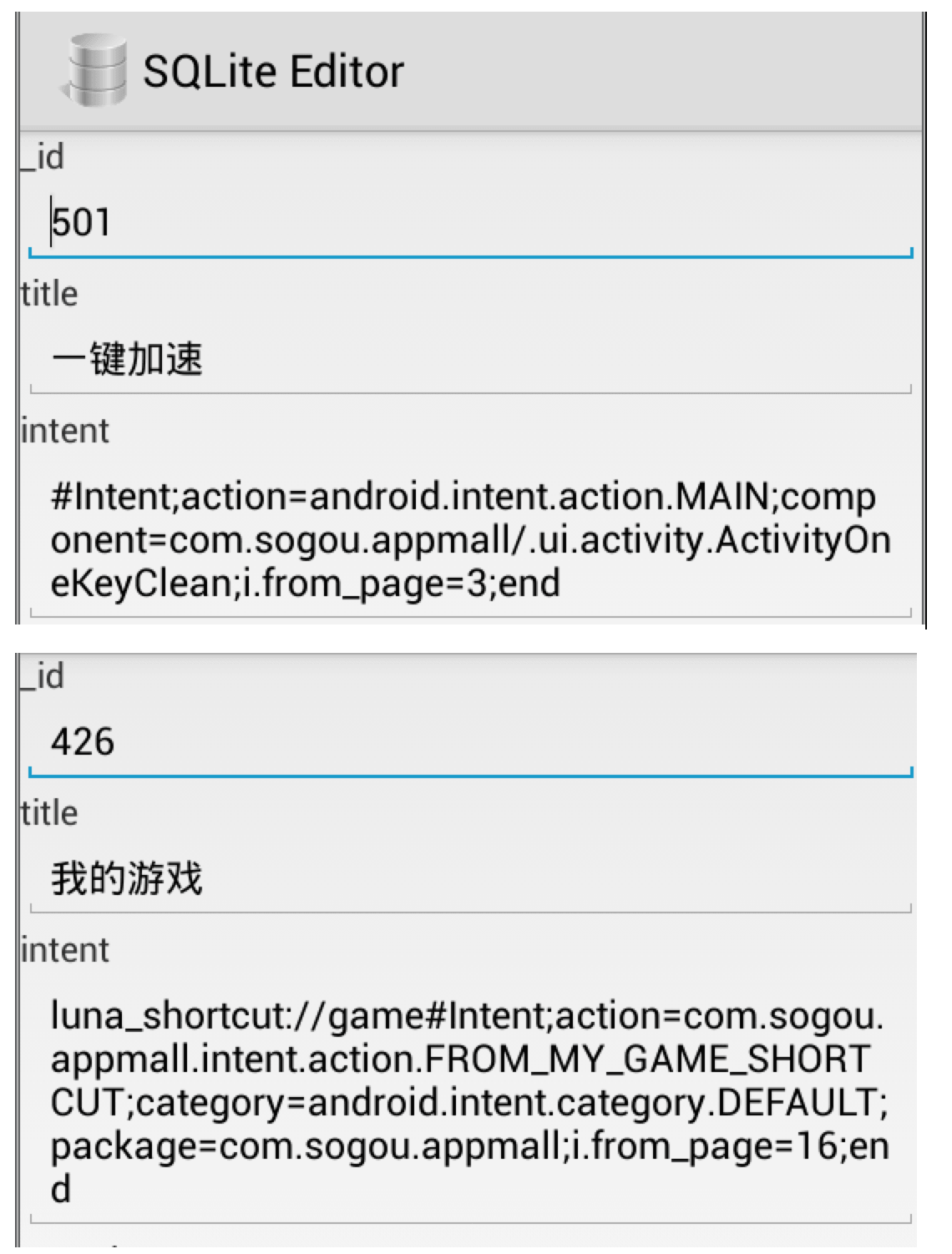
本文討論的範圍限定在「應用桌面快捷方式」,不含長按弹出的動態捷徑。所有快捷方式資訊都存在 Launcher 的 favorite 表裡,實務上最常用的欄位是 _id、title、intent、iconResource、icon,分別代表名稱、啟動意圖、本地圖標與二進位圖標資料。
資料可透過 SQLite Editor 檢視,前提是裝置已 root。
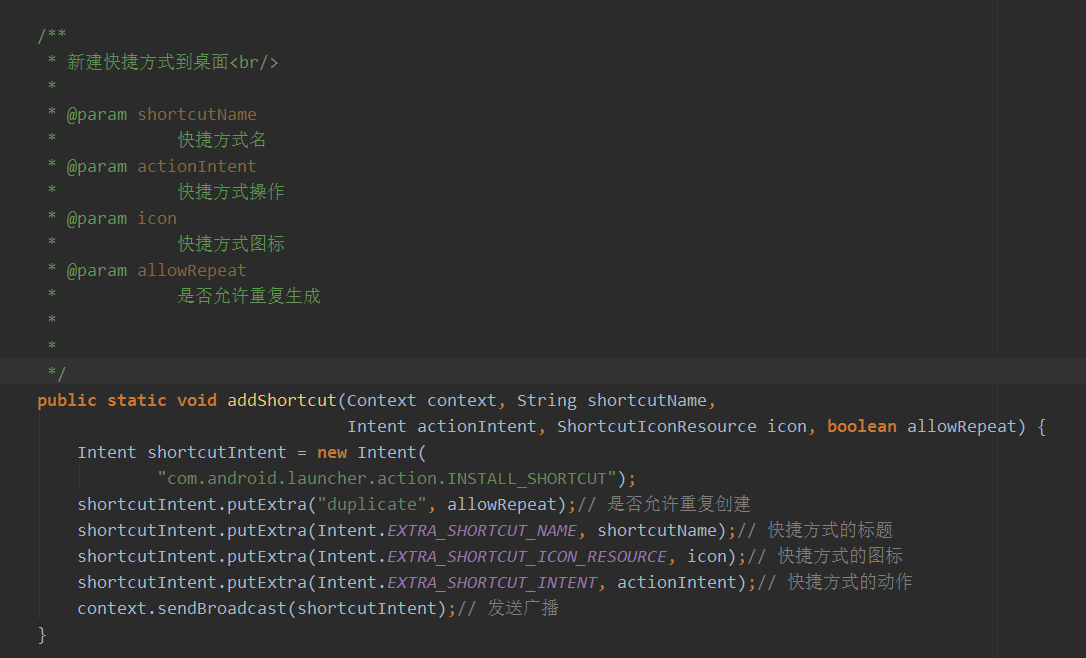
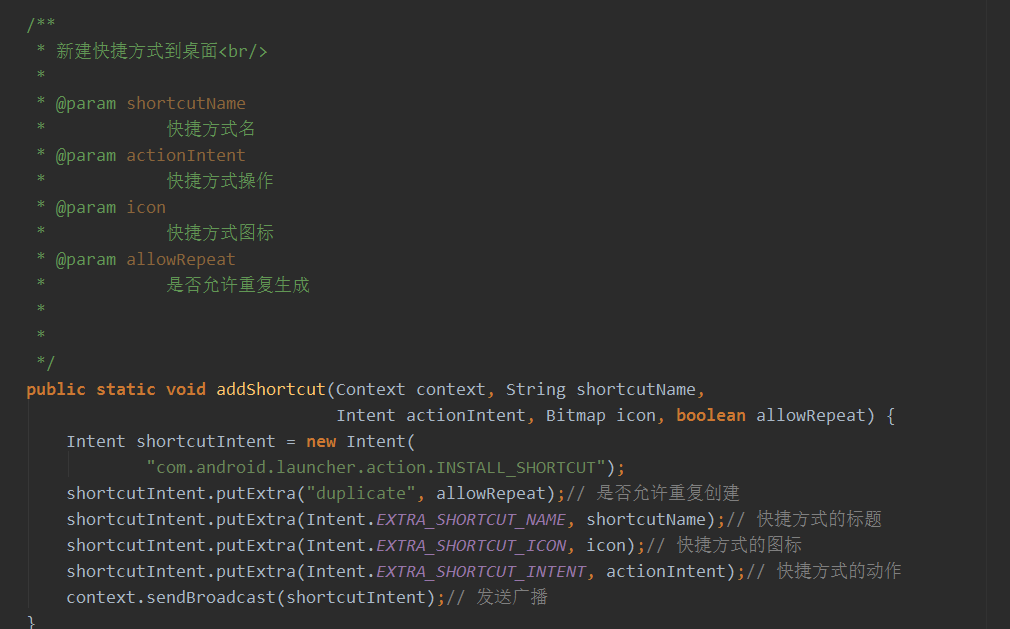
在 AndroidManifest.xml 加上安裝快捷方式的權限,並依 Intent 是隱式或顯式,在目標 Activity 上補齊對應的 intent-filter。
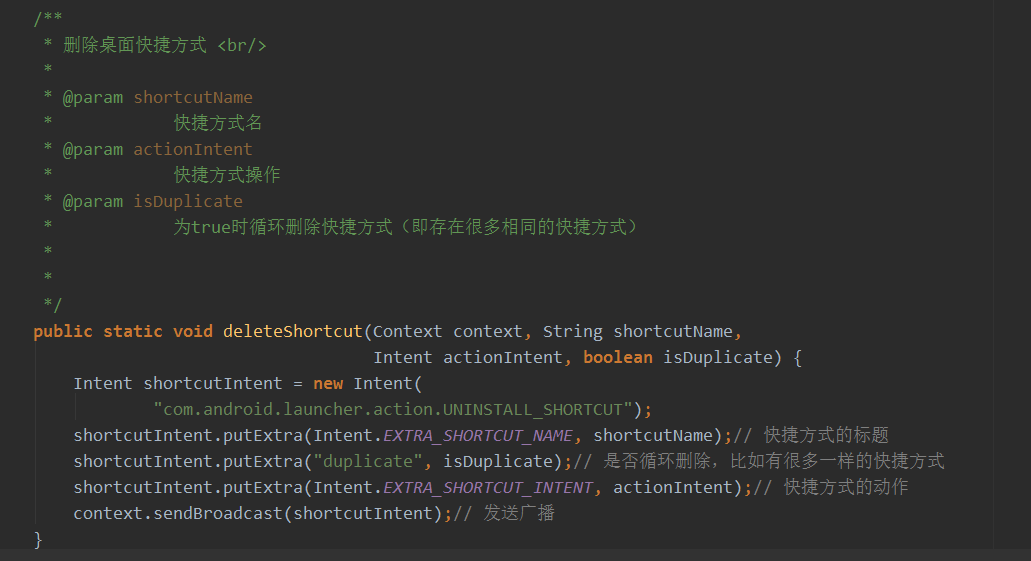
同樣需要對應權限,然後送出刪除意圖。
系統並沒有提供修改桌面快捷方式的公開 API,只能繞路。其中一條可行路線是直接透過 ContentProvider 改寫資料庫。
有人會問:先刪再建不就得了?確實可以,但部分系統根本不允許刪除;而且建立與刪除都靠廣播,兩者之間還得控制時間間隔,容易出現狀態錯亂。權衡之後,直接改資料是相對穩妥的做法。
/**
 * 更新桌面快捷方式圖標。並非所有機型都有效;若快捷方式不存在則不處理。
 */
public static void updateShortcutIcon(Context context, String title,
                                      Intent intent, Bitmap bitmap) {
    if (bitmap == null) {
        XLog.i(TAG, "update shortcut icon, bitmap empty");
        return;
    }
    try {
        final ContentResolver cr = context.getContentResolver();
        StringBuilder uriStr = new StringBuilder();
        String urlTemp;

        String authority = LauncherUtil.getAuthorityFromPermissionDefault(context);
        if (authority == null || authority.trim().equals("")) {
            authority = LauncherUtil.getAuthorityFromPermission(context,
                    LauncherUtil.getCurrentLauncherPackageName(context)
                            + ".permission.READ_SETTINGS");
        }

        uriStr.append("content://");
        if (TextUtils.isEmpty(authority)) {
            int sdkInt = android.os.Build.VERSION.SDK_INT;
            if (sdkInt < 8) {
                uriStr.append("com.android.launcher.settings");       // Android 2.1 及以下
            } else if (sdkInt < 19) {
                uriStr.append("com.android.launcher2.settings");      // Android 4.4 以下
            } else {
                uriStr.append("com.android.launcher3.settings");      // 4.4 及以上
            }
        } else {
            uriStr.append(authority);
        }
        urlTemp = uriStr.toString();
        uriStr.append("/favorites?notify=true");

        Uri uri = Uri.parse(uriStr.toString());
        Cursor c = cr.query(uri, new String[]{"_id", "title", "intent"},
                "title=? and intent=?", new String[]{title, intent.toUri(0)}, null);

        if (c != null && c.getCount() > 0) {
            c.moveToFirst();
            int index = c.getInt(0);

            ContentValues cv = new ContentValues();
            cv.put("icon", flattenBitmap(bitmap));

            Uri uri2 = Uri.parse(urlTemp + "/favorites/" + index + "?notify=true");
            int rows = cr.update(uri2, cv, null, null);
            // 注意:notifyChange 必須用 uri 而非 uri2,這是個坑
            cr.notifyChange(uri, null);
            XLog.i(TAG, "update ok, affected " + rows + " rows, index is " + index);
        } else {
            XLog.i(TAG, "update result failed");
        }

        if (c != null && !c.isClosed()) {
            c.close();
        }
    } catch (Exception ex) {
        ex.printStackTrace();
        XLog.i(TAG, "update shortcut icon error: " + ex.getMessage());
    }
}

private static byte[] flattenBitmap(Bitmap bitmap) {
    // 粗略估算序列化後的空間,避免寫入過程中的多餘配置與複製
    int size = bitmap.getWidth() * bitmap.getHeight() * 4;
    ByteArrayOutputStream out = new ByteArrayOutputStream(size);
    try {
        bitmap.compress(Bitmap.CompressFormat.PNG, 100, out);
        out.flush();
        out.close();
        return out.toByteArray();
    } catch (IOException e) {
        XLog.w(TAG, "Could not write icon");
        return null;
    }
}
雖然靠 SharedPreferences 記錄、加上 shortcutIntent.putExtra("duplicate", false) 已能避免重複建立,但為求保險,直接查資料庫才是最後一道防線。
/**
 * 檢查快捷方式是否存在(依名稱)。
 * 注意:部分機型無法判定,因此建立時仍建議加上 duplicate=false。
 */
public static boolean isShortCutExist(Context context, String title) {
    boolean result = false;
    try {
        final ContentResolver cr = context.getContentResolver();
        StringBuilder uriStr = new StringBuilder();

        String authority = LauncherUtil.getAuthorityFromPermissionDefault(context);
        if (authority == null || authority.trim().equals("")) {
            authority = LauncherUtil.getAuthorityFromPermission(context,
                    LauncherUtil.getCurrentLauncherPackageName(context)
                            + ".permission.READ_SETTINGS");
        }

        uriStr.append("content://");
        if (TextUtils.isEmpty(authority)) {
            int sdkInt = android.os.Build.VERSION.SDK_INT;
            if (sdkInt < 8) {
                uriStr.append("com.android.launcher.settings");
            } else if (sdkInt < 19) {
                uriStr.append("com.android.launcher2.settings");
            } else {
                uriStr.append("com.android.launcher3.settings");
            }
        } else {
            uriStr.append(authority);
        }
        uriStr.append("/favorites?notify=true");

        Uri uri = Uri.parse(uriStr.toString());
        Cursor c = cr.query(uri, new String[]{"title"}, "title=?",
                new String[]{title}, null);
        if (c != null && c.getCount() > 0) {
            result = true;
        }
        if (c != null && !c.isClosed()) {
            c.close();
        }
    } catch (Exception e) {
        e.printStackTrace();
        result = false;
    }
    return result;
}
若同時比對名稱與 Intent 会更精準,因為不同應用可能產生同名快捷方式:
public static boolean isShortCutExist(Context context, String title, Intent intent) {
    boolean result = false;
    try {
        final ContentResolver cr = context.getContentResolver();
        StringBuilder uriStr = new StringBuilder();

        String authority = LauncherUtil.getAuthorityFromPermissionDefault(context);
        if (authority == null || authority.trim().equals("")) {
            authority = LauncherUtil.getAuthorityFromPermission(context,
                    LauncherUtil.getCurrentLauncherPackageName(context)
                            + ".permission.READ_SETTINGS");
        }

        uriStr.append("content://");
        if (TextUtils.isEmpty(authority)) {
            int sdkInt = android.os.Build.VERSION.SDK_INT;
            if (sdkInt < 8) {
                uriStr.append("com.android.launcher.settings");
            } else if (sdkInt < 19) {
                uriStr.append("com.android.launcher2.settings");
            } else {
                uriStr.append("com.android.launcher3.settings");
            }
        } else {
            uriStr.append(authority);
        }
        uriStr.append("/favorites?notify=true");

        Uri uri = Uri.parse(uriStr.toString());
        Cursor c = cr.query(uri, new String[]{"title", "intent"},
                "title=? and intent=?", new String[]{title, intent.toUri(0)}, null);
        if (c != null && c.getCount() > 0) {
            result = true;
        }
        if (c != null && !c.isClosed()) {
            c.close();
        }
    } catch (Exception ex) {
        result = false;
        ex.printStackTrace();
    }
    return result;
}
需要留意的是,桌面分兩類:系統桌面(ROM 自帶)與第三方桌面。一般只需考慮前者;第三方桌面若沒有實作系統回應機制(例如 GO 桌面),是無法判斷的。
最重要的一條:已上線版本的快捷方式 Intent 絕對不要改參數,否則升級或降級時舊快捷方式立刻失效。同時盡量採用隱式呼叫、自訂 CATEGORY,而不要自訂 ACTION,且 Action 必須是 ACTION_MAIN,否則部分機型卸載時無法刪除快捷方式。
標註中的【所有】表示必定出現,【部分】表示部分機型出現。這些限制多源自系統本身,因此實務上的策略是:把兼容成本花在「建立」與「啟動」這兩個必然路徑上,把「刪除」與「更新」當成盡力而為的加分項。
 Android 開發實作:用 Camera 類控制相機拍照並自動對焦
現在的手機相機動輒上千萬畫素,有些甚至支援獨立對焦、光學變焦等以往只有單眼相機才有的功能。為了充分利用這些硬體能力,Android 提供了 Camera 類讓開發者自行控
 Android 使用廣播實現強制下線功能
本文通過實例講解如何利用廣播(Broadcast)實現「強制下線」功能,供感興趣的讀者參考。 1、新建活動管理類 通過一個活動管理類集中管理所有 Activity,便於後
 Android 6.0 運行時權限機制入門與實戰
6.0 的權限模型變了 在 6.0 之前,權限都是在安裝時一次性授予的,用戶若不點同意就裝不上。從 Android 6.0(API 23)開始,系統改為運行時權限:當你的
 用 Notification 做下載進度通知欄(含確定性與不確定性進度條)
App 提示版本更新時,按下確認之後,通知欄通常會即時顯示下載進度,下載完再切成安裝狀態。這兩種狀態對應的是兩種不同的進度條型態,也是本文要實作的內容。 先釐清兩種進度