

編輯:關於 Android 程式設計
在 Android 裡替圖片加上圓角,方法其實不少,常見的有這幾種:
前兩種做法比較直接粗暴,而 XferMode 與 BitmapShader 則是坊間最普遍採用的方案。
翻看目前熱門的圖片載入框架,無論是 Picasso、Glide、Fresco 還是 Android-Universal-Image-Loader,都能顯示圓角圖片。但除了 Fresco 能指定「哪幾個角圓、哪幾個角不圓」之外,其餘三者都做不到。而 Fresco 的問題在於侵入性偏強:版面配置裡得改用 com.facebook.drawee.view.SimpleDraweeView 而非單純的 ImageView,還要逐一為每個角設定 true/false,寫起來頗為繁瑣。
因此本文以 Universal-Image-Loader 的 RoundedBitmapDisplayer 為基礎進行擴充,自訂出一個 FlexibleRoundedBitmapDisplayer,讓你能用簡潔的程式碼自由指定哪些角要圓、哪些角不要圓。
public class RoundedBitmapDisplayer implements BitmapDisplayer { protected final int cornerRadius; protected final int margin; public RoundedBitmapDisplayer(int cornerRadiusPixels) { this(cornerRadiusPixels, 0); } public RoundedBitmapDisplayer(int cornerRadiusPixels, int marginPixels) { this.cornerRadius = cornerRadiusPixels; this.margin = marginPixels; } public void display(Bitmap bitmap, ImageAware imageAware, LoadedFrom loadedFrom) { if(!(imageAware instanceof ImageViewAware)) { throw new IllegalArgumentException("ImageAware should wrap ImageView. ImageViewAware is expected."); } else { imageAware.setImageDrawable(new RoundedBitmapDisplayer.RoundedDrawable(bitmap, this.cornerRadius, this.margin)); } } public static class RoundedDrawable extends Drawable { protected final float cornerRadius; protected final int margin; protected final RectF mRect = new RectF(); protected final RectF mBitmapRect; protected final BitmapShader bitmapShader; protected final Paint paint; public RoundedDrawable(Bitmap bitmap, int cornerRadius, int margin) { this.cornerRadius = (float)cornerRadius; this.margin = margin; this.bitmapShader = new BitmapShader(bitmap, TileMode.CLAMP, TileMode.CLAMP); this.mBitmapRect = new RectF((float)margin, (float)margin, (float)(bitmap.getWidth() - margin), (float)(bitmap.getHeight() - margin)); this.paint = new Paint(); this.paint.setAntiAlias(true); this.paint.setShader(this.bitmapShader); this.paint.setFilterBitmap(true); this.paint.setDither(true); } protected void onBoundsChange(Rect bounds) { super.onBoundsChange(bounds); this.mRect.set((float)this.margin, (float)this.margin, (float)(bounds.width() - this.margin), (float)(bounds.height() - this.margin)); Matrix shaderMatrix = new Matrix(); shaderMatrix.setRectToRect(this.mBitmapRect, this.mRect, ScaleToFit.FILL); this.bitmapShader.setLocalMatrix(shaderMatrix); } public void draw(Canvas canvas) { canvas.drawRoundRect(this.mRect, this.cornerRadius, this.cornerRadius, this.paint); } public int getOpacity() { return -3; } public void setAlpha(int alpha) { this.paint.setAlpha(alpha); } public void setColorFilter(ColorFilter cf) { this.paint.setColorFilter(cf); } } }Universal-Image-Loader 採用的正是第四種做法——BitmapShader。Shader 又被稱為著色器或渲染器,BitmapShader 產生的是一個影像,概念上有點像 Photoshop 裡的漸層填色:它讓 Paint 得以用指定的 Bitmap 去填滿畫布。這裡的填滿模式是 TileMode.CLAMP(拉伸模式,會複製圖片最後一個像素點,通常在圖片尺寸合適時不會真的被拉伸)。
講白一點,就是用一張圖片打造出一支「帶有影像填充能力」的畫筆,再用這支畫筆去畫出一個形狀,圖片就會呈現在畫過的地方。Universal-Image-Loader 這裡用 drawRoundRect() 畫出圓角矩形,於是圖片就顯示成圓角矩形了。
用過 Photoshop 的人應該很好理解:這就像替圖層加了一塊白色遮罩,再用不透明度 100% 的黑色畫筆在遮罩上塗抹,畫筆掃過之處原本的圖層便會顯現出來,正是同樣的道理。
搞懂 RoundedBitmapDisplayer 的原理後,自訂圓角的思路就很清楚了:先用圓角矩形把整張圖變成圓角,接著針對「你不想圓的那個角」,把那個角落位置的原圖用矩形補畫回來即可,使用的正是 drawRect() 方法。
/** * Universal-Image-Loader中RoundedBitmapDisplayer的增強版,可以自定義圖片4個角中的指定角為圓角 */ public class FlexibleRoundedBitmapDisplayer implements BitmapDisplayer { protected int cornerRadius; protected int corners; public static final int CORNER_TOP_LEFT = 1; public static final int CORNER_TOP_RIGHT = 1 << 1; public static final int CORNER_BOTTOM_LEFT = 1 << 2; public static final int CORNER_BOTTOM_RIGHT = 1 << 3; public static final int CORNER_ALL = CORNER_TOP_LEFT | CORNER_TOP_RIGHT | CORNER_BOTTOM_LEFT | CORNER_BOTTOM_RIGHT; /** * 構造方法說明:設定圓角像素大小,所有角都為圓角 * @param cornerRadiusPixels 圓角像素大小 */ public FlexibleRoundedBitmapDisplayer(int cornerRadiusPixels){ this.cornerRadius = cornerRadiusPixels; this.corners = CORNER_ALL; } /** * 構造方法說明:設定圓角像素大小,指定角為圓角 * @param cornerRadiusPixels 圓角像素大小 * @param corners 自定義圓角 * CORNER_NONE 無圓角 * CORNER_ALL 全為圓角 * CORNER_TOP_LEFT | CORNER_TOP_RIGHT | CORNER_BOTTOM_LEFT | CORNER_BOTTOM_RIGHT 指定圓角(選其中若干組合 ) */ public FlexibleRoundedBitmapDisplayer(int cornerRadiusPixels, int corners){ this.cornerRadius = cornerRadiusPixels; this.corners = corners; } @Override public void display(Bitmap bitmap, ImageAware imageAware, LoadedFrom loadedFrom) { if (!(imageAware instanceof ImageViewAware)) { throw new IllegalArgumentException("ImageAware should wrap ImageView. ImageViewAware is expected."); } imageAware.setImageDrawable(new FlexibleRoundedDrawable(bitmap,cornerRadius,corners)); } public static class FlexibleRoundedDrawable extends Drawable { protected final float cornerRadius; protected final RectF mRect = new RectF(), mBitmapRect; protected final BitmapShader bitmapShader; protected final Paint paint; private int corners; public FlexibleRoundedDrawable(Bitmap bitmap, int cornerRadius, int corners) { this.cornerRadius = cornerRadius; this.corners = corners; bitmapShader = new BitmapShader(bitmap, Shader.TileMode.CLAMP, Shader.TileMode.CLAMP); mBitmapRect = new RectF(0, 0, bitmap.getWidth(), bitmap.getHeight()); paint = new Paint(); paint.setAntiAlias(true); paint.setShader(bitmapShader); } @Override protected void onBoundsChange(Rect bounds) { super.onBoundsChange(bounds); mRect.set(0, 0, bounds.width(), bounds.height()); Matrix shaderMatrix = new Matrix(); shaderMatrix.setRectToRect(mBitmapRect, mRect, Matrix.ScaleToFit.FILL); bitmapShader.setLocalMatrix(shaderMatrix); } @Override public void draw(Canvas canvas) { //先畫一個圓角矩形將圖片顯示為圓角 canvas.drawRoundRect(mRect, cornerRadius, cornerRadius, paint); int notRoundedCorners = corners ^ CORNER_ALL; //哪個角不是圓角我再把你用矩形畫出來 if ((notRoundedCorners & CORNER_TOP_LEFT) != 0) { canvas.drawRect(0, 0, cornerRadius, cornerRadius, paint); } if ((notRoundedCorners & CORNER_TOP_RIGHT) != 0) { canvas.drawRect(mRect.right - cornerRadius, 0, mRect.right, cornerRadius, paint); } if ((notRoundedCorners & CORNER_BOTTOM_LEFT) != 0) { canvas.drawRect(0, mRect.bottom - cornerRadius, cornerRadius, mRect.bottom, paint); } if ((notRoundedCorners & CORNER_BOTTOM_RIGHT) != 0) { canvas.drawRect(mRect.right - cornerRadius, mRect.bottom - cornerRadius, mRect.right, mRect.bottom, paint); } } @Override public int getOpacity() { return PixelFormat.TRANSLUCENT; } @Override public void setAlpha(int alpha) { paint.setAlpha(alpha); } @Override public void setColorFilter(ColorFilter cf) { paint.setColorFilter(cf); } } }寫好之後,就能這樣搭配 Universal-Image-Loader 使用了:
/* * 設置圖片---自定義圖片4個角中的指定角為圓角 * @param url 圖片的url * @param cornerRadius 圓角像素大小 * @param corners 自定義圓角: * 以下參數為FlexibleRoundedBitmapDisplayer中靜態變量: * CORNER_NONE 無圓角 * CORNER_ALL 全為圓角 * CORNER_TOP_LEFT | CORNER_TOP_RIGHT | CORNER_BOTTOM_LEFT | CORNER_BOTTOM_RIGHT 指定圓角(選其中若干組合 ) * @param image url為空時加載該圖片 * @param imageView 要設置圖片的ImageView */ public void setRoundedImage(String url, int cornerRadius, int corners, int image, ImageView imageView) { ImageLoader imageLoader = ImageLoader.getInstance(); DisplayImageOptions options = new DisplayImageOptions.Builder() .showImageOnLoading(image).showStubImage(image) .showImageForEmptyUri(image)//url為空時顯示的圖片 .showImageOnFail(image)//加載失敗顯示的圖片 .cacheInMemory()//內存緩存 .cacheOnDisc()//磁盤緩存 .displayer(new FlexibleRoundedBitmapDisplayer(cornerRadius,corners)) // 自定義增強型BitmapDisplayer .build(); imageLoader.displayImage(url, imageView, options); }搭配方式如下:
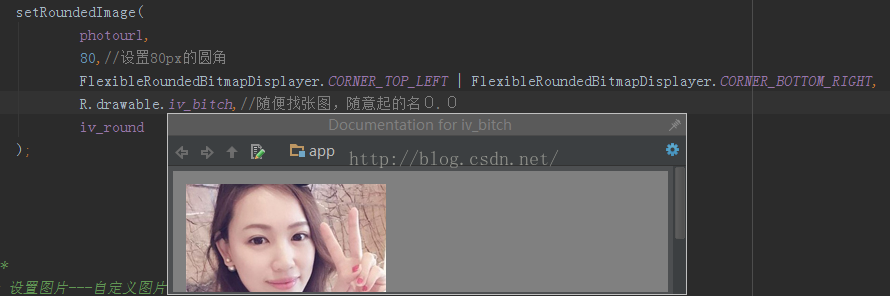
實際運行效果:

 React Native 環境建置筆記:Mac 與 Android 篇
本文記錄在 Mac 上建置 React Native Android 開發環境的流程,包含 Homebrew、Node.js、React Native CLI、Andro
 自定義AvatarImageView:滿足你所有頭像顯示需求的三種方案
1. PorterDuffXfermode 這是由Tomas Proter和Tom Duff命名的圖像轉換模式,它有16個枚舉值來控制Canvas上上下兩個圖層的交互(
 硅谷商城項目解析:發現模組的 TabLayout、彈幕與 Gson
硅谷商城項目中的發現模組,主要負責內容瀏覽與社群互動。它結合了 TabLayout、彈幕與 Gson,讓頁面切換、動態展示與資料解析更完整。 TabLayout 標題切
 360 安卓面試完整回顧與知識點整理
前言 從大二暑假開始就很想進騰訊或阿里的,實習生招募時遺憾落選。為了準備校招,我放棄了去步步高實習的機會,留在原公司繼續實習,也透過學長學姐內推了兩家,最後都卡在履歷篩選