

編輯:關於 Android 程式設計
你可能想過:同一個畫面裡能不能同時顯示好幾張地圖,各自定位到不同城市?好消息是,從 v2.3.5 版起,百度地圖控件就支援多實例了——你可以在一個頁面裡建立多個地圖物件,分別操作且互不干擾。
本範例(Demo05MultiMapView.cs)會在同一個介面內並排建立四個 TextureMapView,各自指向不同城市。在 x86 模擬器上的運行效果如下:
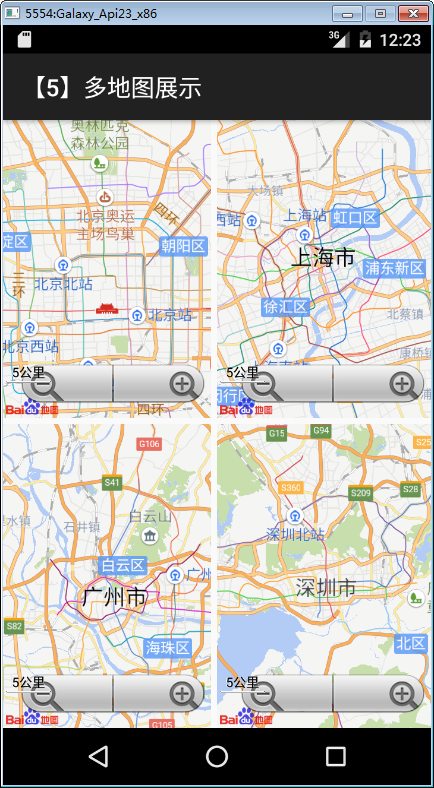
做法很簡單,只需在前一節範例的基礎上再加幾個步驟即可。
在 layout 資料夾下新增此檔,用巢狀的 LinearLayout 把畫面切成上下兩列、每列兩欄,每格放一個 TextureMapFragment:
<LinearLayout xmlns:android="https://schemas.android.com/apk/res/android" xmlns:map="https://schemas.android.com/apk/res-auto" android:layout_width="match_parent" android:layout_height="match_parent" android:orientation="vertical" > <LinearLayout android:layout_width="match_parent" android:layout_height="match_parent" android:layout_marginBottom="5dp" android:layout_weight="1" android:orientation="horizontal" > <fragment android:id="@+id/map1" android:layout_width="match_parent" android:layout_height="match_parent" android:layout_marginRight="5dp" android:layout_weight="1" class="com.baidu.mapapi.map.TextureMapFragment" /> <fragment android:id="@+id/map2" android:layout_width="match_parent" android:layout_height="match_parent" android:layout_weight="1" class="com.baidu.mapapi.map.TextureMapFragment" /> </LinearLayout> <LinearLayout android:layout_width="match_parent" android:layout_height="match_parent" android:layout_weight="1" android:orientation="horizontal" > <fragment android:id="@+id/map3" android:layout_width="match_parent" android:layout_height="match_parent" android:layout_marginRight="5dp" android:layout_weight="1" class="com.baidu.mapapi.map.TextureMapFragment" /> <fragment android:id="@+id/map4" android:layout_width="match_parent" android:layout_height="match_parent" android:layout_weight="1" class="com.baidu.mapapi.map.TextureMapFragment" /> </LinearLayout> </LinearLayout>
在 SdkDemos 資料夾下新增此檔。核心邏輯是用 FindFragmentById 抓到四個 Fragment,再逐一用 SetMapStatus 把它們定位到北京、上海、廣州、深圳:
using Android.App; using Android.Content.PM; using Android.OS; using Com.Baidu.Mapapi.Map; using Com.Baidu.Mapapi.Model; namespace BdMapV371Demos.SrcSdkDemos { /// <summary> /// 在一個 Activity 中展示多個地圖 /// </summary> [Activity(Label = "@string/demo_name_multimap", ConfigurationChanges = ConfigChanges.Orientation | ConfigChanges.KeyboardHidden, ScreenOrientation = ScreenOrientation.Sensor)] public class Demo05MutiMapView : Activity { private readonly LatLng Geo_BeiJing = new LatLng(39.945, 116.404); private readonly LatLng Geo_ShangHai = new LatLng(31.227, 121.481); private readonly LatLng Geo_GuangZhou = new LatLng(23.155, 113.264); private readonly LatLng Geo_ShenZhen = new LatLng(22.560, 114.064); protected override void OnCreate(Bundle savedInstanceState) { base.OnCreate(savedInstanceState); SetContentView(Resource.Layout.demo05_multimap); InitMap(); } private void InitMap() { MapStatusUpdate u1 = MapStatusUpdateFactory.NewLatLng(Geo_BeiJing); TextureMapFragment map1 = FragmentManager.FindFragmentById<TextureMapFragment>(Resource.Id.map1); map1.BaiduMap.SetMapStatus(u1); MapStatusUpdate u2 = MapStatusUpdateFactory.NewLatLng(Geo_ShangHai); TextureMapFragment map2 = FragmentManager.FindFragmentById<TextureMapFragment>(Resource.Id.map2); map2.BaiduMap.SetMapStatus(u2); MapStatusUpdate u3 = MapStatusUpdateFactory.NewLatLng(Geo_GuangZhou); TextureMapFragment map3 = FragmentManager.FindFragmentById<TextureMapFragment>(Resource.Id.map3); map3.BaiduMap.SetMapStatus(u3); MapStatusUpdate u4 = MapStatusUpdateFactory.NewLatLng(Geo_ShenZhen); TextureMapFragment map4 = FragmentManager.FindFragmentById<TextureMapFragment>(Resource.Id.map4); map4.BaiduMap.SetMapStatus(u4); } } }
在 demos 欄位定義中補上這一段,讓範例清單裡多出「多地圖展示」這一項:
//示例5--多地圖展示 new DemoInfo<Activity>(Resource.String.demo_title_multimap, Resource.String.demo_desc_multimap, new Demo05MutiMapView()),
完成後運行,就能一次看到四張各自定位的地圖同框呈現了。
 徹底搞懂 BaseAdapter 的 getView:ListView 為什麼只創建一屏 ItemView
先說結論:ListView 從不為每一條數據都造一個 View ListView 是 Android 開發裡出鏡率最高的控件之一,而與它配套的資料管理者就是 Adapte
 Android 登入、註冊與找回密碼功能設計實作
本文分享一套登入、找回密碼、註冊功能的實作,供參考。1. 資料庫設計這裡用了兩張表:一張存使用者資訊(帳號、密碼、手機號等,欄位可自行擴充),另一張存「上次登入的使用者」
 用Android Canvas手繪南丁格爾玫瑰圖的完整實作
第一次看到南丁格爾玫瑰圖(Nightingale rose diagram)時,我很難不被這種圖表的視覺張力吸引。查了背景之後才知道,這位把統計圖表發揮到极致的護理先驅,
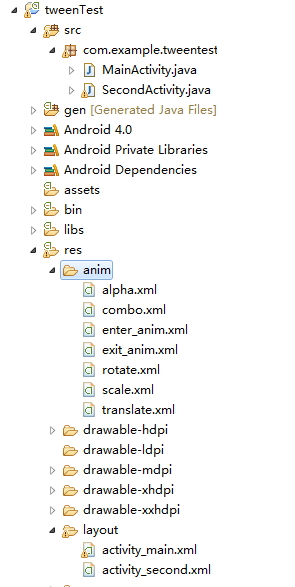 Android Tween 動畫:平移、縮放、旋轉與透明度
Android 中常見的動畫分為 Tween 動畫與 Frame 動畫。Tween 動畫主要對 View 進行平移、縮放、旋轉、透明度變化等操作,也可以將多種效果組合在一