

編輯:關於 Android 程式設計
RelativeLayout 顧名思義,內部控制項的位置都是「相對」的。實踐中的套路是:先定好一個錨點控制項 A,其餘控制項紛紛與 A 建立相對關係,或者與已經和 A 建好關係的控制項建立關係。
這裡有一條血淚經驗:盡量不要在相對布局裡牽扯過多控制項的 id。一旦依賴鏈拉得太長,改動其中任何一個,整片布局都會連鎖位移,可謂牽一發而動全身。
第一類:布林值屬性(true / false)——描述與父容器的關係。
android:layout_centerHorizontal      水平居中
android:layout_centerVertical        垂直居中
android:layout_centerInParent        相對於父元素完全居中
android:layout_alignParentBottom     貼緊父元素下邊緣
android:layout_alignParentLeft       貼緊父元素左邊緣
android:layout_alignParentRight      貼緊父元素右邊緣
android:layout_alignParentTop        貼緊父元素上邊緣
android:layout_alignWithParentIfMissing  對應兄弟元素找不到時,以父元素為參照
第二類:id 引用屬性——值必須寫成 "@id/id-name" 的形式,描述與兄弟控制項的關係。
android:layout_below        在某元素的下方
android:layout_above        在某元素的上方
android:layout_toLeftOf     在某元素的左邊
android:layout_toRightOf    在某元素的右邊
android:layout_alignTop     本元素上邊緣與某元素上邊緣對齊
android:layout_alignLeft    本元素左邊緣與某元素左邊緣對齊
android:layout_alignBottom  本元素下邊緣與某元素下邊緣對齊
android:layout_alignRight   本元素右邊緣與某元素右邊緣對齊
第三類:具體尺寸屬性——值為 dip、px 等像素單位,描述與父容器的間距。
android:layout_marginBottom   距父容器底邊緣的距離
android:layout_marginLeft     距父容器左邊緣的距離
android:layout_marginRight    距父容器右邊緣的距離
android:layout_marginTop      距父容器上邊緣的距離
屬性表看著多,其實拆開只有四種語義:
一、在誰的左邊或右邊 → toLeft-XX / toRight-XX
二、在誰的上面或下面 → X-below-X / X-above-X
三、和誰的邊緣對齊 → X-alignLeft_X 這一族
四、跟「爸爸」(父容器)打交道 → X_center_X / X_parent_X
把這四句在心裡默念幾遍,再聯想記憶,寫布局時基本不用查表。
相對布局說起來簡單,真正寫起來容易暈。我摸索出的最有效練習方式,就是用相對布局把數字拼成一個可辨識的圖形——比如用一堆 45dp 的 Button 擺出「58」這兩個字。這個練習會逼你把 above / below / toLeftOf / toRightOf / alignBottom / alignLeft 全部用上一遍。
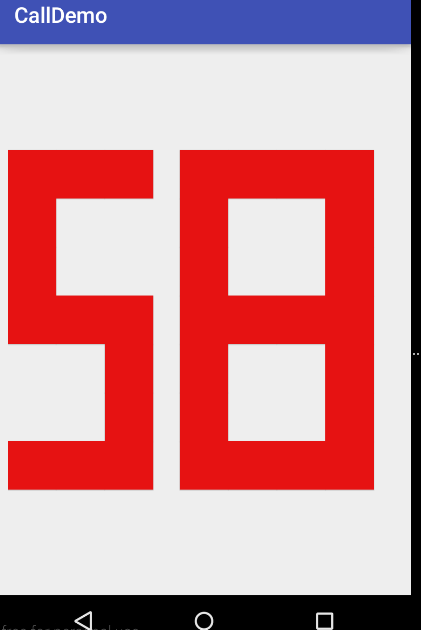
下面是我拼出來的完整布局,仔細讀每一個 Button 的定位屬性,你會發現規律非常清晰:同一豎列的用 layout_above 串起來,需要並排時用 layout_toRightOf 搭配 layout_alignBottom 對齊底邊,轉折處則用 alignLeft 鎖住垂直對齊。
<RelativeLayout xmlns:android="https://schemas.android.com/apk/res/android"
    android:layout_width="match_parent"
    android:layout_height="match_parent"
    android:padding="10dp">

    <!-- 豎向串起左半邊 -->
    <Button android:id="@+id/one"
        android:layout_width="45dp" android:layout_height="45dp"
        android:background="#e61212"
        android:layout_centerVertical="true"/>
    <Button android:id="@+id/two"
        android:layout_width="45dp" android:layout_height="45dp"
        android:background="#e61212"
        android:layout_above="@id/one"/>
    <Button android:id="@+id/three"
        android:layout_width="45dp" android:layout_height="45dp"
        android:background="#e61212"
        android:layout_above="@id/two"/>
    <Button android:id="@+id/four"
        android:layout_width="45dp" android:layout_height="45dp"
        android:background="#e61212"
        android:layout_above="@id/three"/>

    <!-- 轉折:右移並底邊對齊 -->
    <Button android:id="@+id/five"
        android:layout_width="45dp" android:layout_height="45dp"
        android:background="#e61212"
        android:layout_alignBottom="@id/four"
        android:layout_toRightOf="@id/four"/>
    <Button android:id="@+id/six"
        android:layout_width="45dp" android:layout_height="45dp"
        android:background="#e61212"
        android:layout_alignBottom="@id/five"
        android:layout_toRightOf="@id/five"/>
    <Button android:id="@+id/seven"
        android:layout_width="45dp" android:layout_height="45dp"
        android:background="#e61212"
        android:layout_alignBottom="@id/one"
        android:layout_toRightOf="@id/one"/>
    <Button android:id="@+id/eight"
        android:layout_width="45dp" android:layout_height="45dp"
        android:background="#e61212"
        android:layout_alignBottom="@id/seven"
        android:layout_toRightOf="@id/seven"/>

    <!-- 下行:左邊緣對齊 + 位於下方 -->
    <Button android:id="@+id/nine"
        android:layout_width="45dp" android:layout_height="45dp"
        android:background="#e61212"
        android:layout_alignLeft="@id/eight"
        android:layout_below="@id/eight"/>
    <Button android:id="@+id/ten"
        android:layout_width="45dp" android:layout_height="45dp"
        android:background="#e61212"
        android:layout_alignLeft="@id/nine"
        android:layout_below="@id/nine"/>
    <Button android:id="@+id/eleven"
        android:layout_width="45dp" android:layout_height="45dp"
        android:background="#e61212"
        android:layout_alignLeft="@id/ten"
        android:layout_below="@id/ten"/>

    <!-- 向左折返 -->
    <Button android:id="@+id/twelve"
        android:layout_width="45dp" android:layout_height="45dp"
        android:background="#e61212"
        android:layout_alignBottom="@id/eleven"
        android:layout_toLeftOf="@id/eleven"/>
    <Button android:id="@+id/thirteen"
        android:layout_width="45dp" android:layout_height="45dp"
        android:background="#e61212"
        android:layout_alignBottom="@id/twelve"
        android:layout_toLeftOf="@id/twelve"/>

    <!-- 以 centerInParent 為錨點,拼出右半邊的 8 -->
    <Button android:id="@+id/fourteen"
        android:layout_width="45dp" android:layout_height="45dp"
        android:background="#e61212"
        android:layout_centerInParent="true"/>
    <Button android:id="@+id/fifteen"
        android:layout_width="45dp" android:layout_height="45dp"
        android:background="#e61212"
        android:layout_above="@id/fourteen"
        android:layout_alignLeft="@id/fourteen"/>
    <Button android:id="@+id/sixteen"
        android:layout_width="45dp" android:layout_height="45dp"
        android:background="#e61212"
        android:layout_above="@id/fifteen"
        android:layout_alignLeft="@id/fifteen"/>
    <Button android:id="@+id/seventeen"
        android:layout_width="45dp" android:layout_height="45dp"
        android:background="#e61212"
        android:layout_above="@id/sixteen"
        android:layout_alignLeft="@id/sixteen"/>
    <Button android:id="@+id/eighteen"
        android:layout_width="45dp" android:layout_height="45dp"
        android:background="#e61212"
        android:layout_alignBottom="@id/seventeen"
        android:layout_toRightOf="@id/seventeen"/>
    <Button android:id="@+id/nineteen"
        android:layout_width="45dp" android:layout_height="45dp"
        android:background="#e61212"
        android:layout_alignBottom="@id/eighteen"
        android:layout_toRightOf="@id/eighteen"/>
    <Button android:id="@+id/twenty"
        android:layout_width="45dp" android:layout_height="45dp"
        android:background="#e61212"
        android:layout_alignBottom="@id/nineteen"
        android:layout_toRightOf="@id/nineteen"/>

    <!-- 折返下行,opx 系列為「8」的下半圈 -->
    <Button android:id="@+id/oone"
        android:layout_width="45dp" android:layout_height="45dp"
        android:background="#e61212"
        android:layout_alignLeft="@id/twenty"
        android:layout_below="@id/twenty"/>
    <Button android:id="@+id/otwo"
        android:layout_width="45dp" android:layout_height="45dp"
        android:background="#e61212"
        android:layout_alignLeft="@id/oone"
        android:layout_below="@id/oone"/>
    <Button android:id="@+id/othree"
        android:layout_width="45dp" android:layout_height="45dp"
        android:background="#e61212"
        android:layout_alignLeft="@id/otwo"
        android:layout_below="@id/otwo"/>
    <Button android:id="@+id/ofour"
        android:layout_width="45dp" android:layout_height="45dp"
        android:background="#e61212"
        android:layout_alignTop="@id/othree"
        android:layout_toLeftOf="@id/othree"/>
    <Button android:id="@+id/ofive"
        android:layout_width="45dp" android:layout_height="45dp"
        android:background="#e61212"
        android:layout_alignTop="@id/ofour"
        android:layout_toLeftOf="@id/ofour"/>

    <!-- 以 fourteen 為基準,向下補滿中間豎列 -->
    <Button android:id="@+id/osix"
        android:layout_width="45dp" android:layout_height="45dp"
        android:background="#e61212"
        android:layout_alignLeft="@id/fourteen"
        android:layout_below="@id/fourteen"/>
    <Button android:id="@+id/oseven"
        android:layout_width="45dp" android:layout_height="45dp"
        android:background="#e61212"
        android:layout_alignLeft="@id/osix"
        android:layout_below="@id/osix"/>
    <Button android:id="@+id/oeight"
        android:layout_width="45dp" android:layout_height="45dp"
        android:background="#e61212"
        android:layout_alignLeft="@id/oseven"
        android:layout_below="@id/oseven"/>
    <Button android:id="@+id/onine"
        android:layout_width="45dp" android:layout_height="45dp"
        android:background="#e61212"
        android:layout_alignBottom="@id/oeight"
        android:layout_toRightOf="@id/oeight"/>
    <Button android:id="@+id/oten"
        android:layout_width="45dp" android:layout_height="45dp"
        android:background="#e61212"
        android:layout_alignBottom="@id/onine"
        android:layout_toRightOf="@id/onine"/>
    <Button android:id="@+id/oeleven"
        android:layout_width="45dp" android:layout_height="45dp"
        android:background="#e61212"
        android:layout_alignBottom="@id/oten"
        android:layout_toRightOf="@id/oten"/>
    <Button android:id="@+id/otwelve"
        android:layout_width="45dp" android:layout_height="45dp"
        android:background="#e61212"
        android:layout_above="@id/oeleven"
        android:layout_alignLeft="@id/oeleven"/>
    <Button android:id="@+id/othirteen"
        android:layout_width="45dp" android:layout_height="45dp"
        android:background="#e61212"
        android:layout_above="@id/otwelve"
        android:layout_alignLeft="@id/otwelve"/>
</RelativeLayout>
寫完這一段,你對 RelativeLayout 的理解基本就到位了。建議自己也動手拼一次,比看十篇文章都管用。
 Android ROM 解包打包全流程:ext4 鏡像處理與批處理腳本自動化定製
eMMC 是手機、平板等裝置常見的嵌入式儲存方案,因為封裝內已整合控制器、提供標準介面並自行管理閃存,越來越受 Android 手機廠商青睞。以 eMMC 為儲存裝置
 談談 Android 打包簽名那些事
接觸 Android 開發一段時間後,對打包簽名有了初步認識,但始終不夠深入。今天結合網路資料與自身實踐,整理相關知識,順便釐清一些疑問並做個總結。 一、打包簽名的好處
 Android 基礎控件 Day22:CheckBox、Radio 與 Spinner 實戰
這一篇把三個「選擇類」控件放在一起講:多選的 CheckBox、單選的 RadioButton,以及下拉列表 Spinner。它們看起來簡單,但真正做出好看的交互,關鍵往
 Android 插件化思考:仿 QQ 的一鍵換膚是怎麼跑起來的
群裡有朋友希望寫一篇關於插件化的文章。老實說我也談不上精通,那就從最樸素的思路出發,試著把「一鍵換膚」做出來——思路往往比程式碼更值得聊。 QQ 的換膚細節我並不清楚,但