

編輯:關於 Android 程式設計
本章目標
掌握單選按鈕的用法
掌握復選框的用法
掌握開關按鈕的用法
掌握圖像視圖的用法
掌握自動完成文本框的用法
一個普通的單選控件示例:
<radiogroup android:layout_width="wrap_content" android:layout_height="wrap_content"> <radiobutton android:id="@+id/option1" android:layout_width="wrap_content" android:layout_height="wrap_content" android:text="選項1"> <radiobutton android:id="@+id/option2" android:layout_width="wrap_content" android:layout_height="wrap_content" android:text="選項2"> </radiobutton></radiobutton></radiogroup>
示例:從一組單選按鈕中選擇一項最喜歡的球類運動,選擇後將結果顯示在 TextView 中。
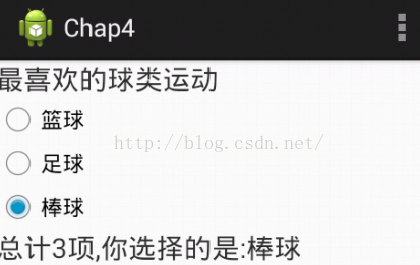
小結:RadioButton 與 RadioGroup 的關係:
1、RadioButton 表示單個圓形單選框,而 RadioGroup 是可以容納多個 RadioButton 的容器;
2、每個 RadioGroup 中的 RadioButton 同時只能有一個被選中;
3、不同 RadioGroup 中的 RadioButton 互不相干,即組 A 有一個選中,組 B 依然可以有一個被選中;
4、大部分場合下,一個 RadioGroup 中至少有 2 個 RadioButton;
5、大部分場合下,一個 RadioGroup 中的 RadioButton 默認會有一個被選中,建議將它放在 RadioGroup 的起始位置。
一個普通複選控件的示例:
<checkbox android:id="@+id/checkbox1" android:layout_height="wrap_content" android:layout_width="wrap_content" android:text="工作了嗎?"> <CheckBox android:id="@+id/checkbox2" android:layout_width="wrap_content" android:layout_height="wrap_content" android:text="結婚了嗎?" />
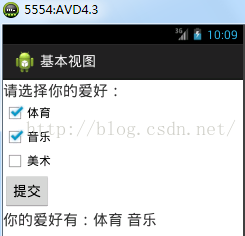
示例:在屏幕上添加 3 個愛好的複選框和 1 個按鈕;選中某種愛好時以日誌形式輸出信息;點擊提交按鈕時顯示所有選中的愛好項。
ToggleButton 是一個用於表示開關狀態的按鈕,可使用 ToggleButton 標籤在佈局文件中聲明:
<togglebutton android:id="@+id/togglebtn" android:layout_height="wrap_content" android:layout_width="wrap_content"></togglebutton>
要點說明:
和按鈕一樣,使用 android.view.View.OnClickListener 監聽事件;
常用事件還有 android.view.View.OnCheckedChangeListener;
對應的類是 android.widget.ToggleButton;
setTextOn() 和 setTextOff() 可用於設置按鈕的狀態文字;
setChecked() 可用於設置按鈕狀態;
getChecked() 用於提取按鈕狀態。
ImageView 是一個用於顯示圖片的視圖,可以顯示來自資源的圖片或其他內容提供者的圖片,並支持多種圖像格式。XML 佈局中的標籤是 ImageView,常用屬性如下:
android:src 設置要顯示的圖片源;
android:scaleType 圖片的填充方式;
android:adjustViewBounds 是否保持寬高比;
android:tint 圖片的著色;
對應的類是 android.widget.ImageView。
<imageview android:contentdescription="@string/hello_world" android:id="@+id/imageview" android:layout_height="wrap_content" android:layout_width="match_parent" android:src="@drawable/dog"></imageview>
ImageButton 是一個顯示圖片的按鈕,可通過 android:src 指定按鈕要顯示的圖片:
<button android:id="@+id/imagebutton" android:layout_height="wrap_content" android:layout_width="match_parent" android:src="@drawable/playbutton"></button>
通過 android.view.View.OnClickListener 監聽按鈕事件,對應的類是 android.widget.ImageButton。
ImageButton btn = (ImageButton)findViewById(R.id.ibtn); btn.setOnClickListener(new OnClickListener() { public void onClick(View v) { Log.d("imageview", "clicked"); }});
ImageSwitcher 主要用於顯示圖片,支持圖片切換效果,功能與 ImageView 相似,但支持動畫。使用 ImageSwitcher 進行佈局:
<imageswitcher android:id="@+id/imageswitcher" android:layout_width="match_parent" android:layout_height="400dip">
構建 ImageSwitcher 的步驟:
1、代碼中為 ImageSwitcher 提供視圖工廠,用於顯示圖片;
2、為 ImageSwitcher 設置圖片換入換出的動畫。
ImageSwitcher is = (ImageSwitcher)findViewById(R.id.imageswitcher); is.setFactory(new ViewFactory() { public View makeView() { return new ImageView(TestImageActivity.this); }}); is.setInAnimation(AnimationUtils.loadAnimation(this, android.R.anim.fade_in)); is.setOutAnimation(AnimationUtils.loadAnimation(this, android.R.anim.fade_out));
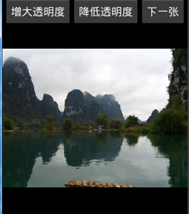
示例:完成一個簡易圖片浏覽器。
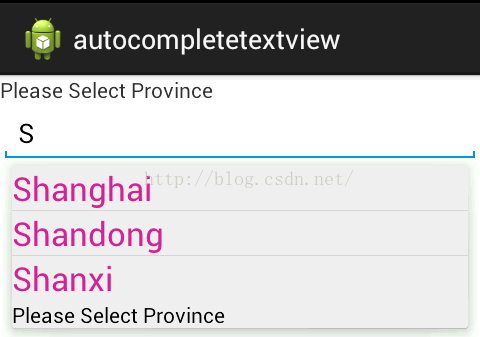
自動完成文本框是一個輸入組件:在用戶輸入開頭內容時,能夠自動匹配出設定的後續內容,類似於 Web 中 AJAX 技術下的自動補全功能。組件類是 android.widget.AutoCompleteTextView。
使用場合:
候選內容很多,不適合採用下拉框進行選擇;
用戶大部分時候輸入部分固定內容;
幫助用戶進行快捷輸入。
如何使用?
1. 為自動提示的下拉選擇項提供顯示佈局;
2. 為下拉框提供內容數據;
3. 使用自動完成文本框。
常用屬性:
android:completionHint 定義下拉菜單的提示信息;
android:completionThreshold 定義在下拉顯示提示前,用戶輸入的字符數量;
android:dropdownHeight 指定顯示提示時下拉框的高度。
 Android 自定義 View 打造電影票線上選座功能
先看一眼成品效果,心裡有個概念: 介面確實談不上精緻,的重點是把原理講透。 一、介面拆解 整個選座畫面可以拆成六個部分: 1、座位網格本身2、左側的排號標註3、左上角的
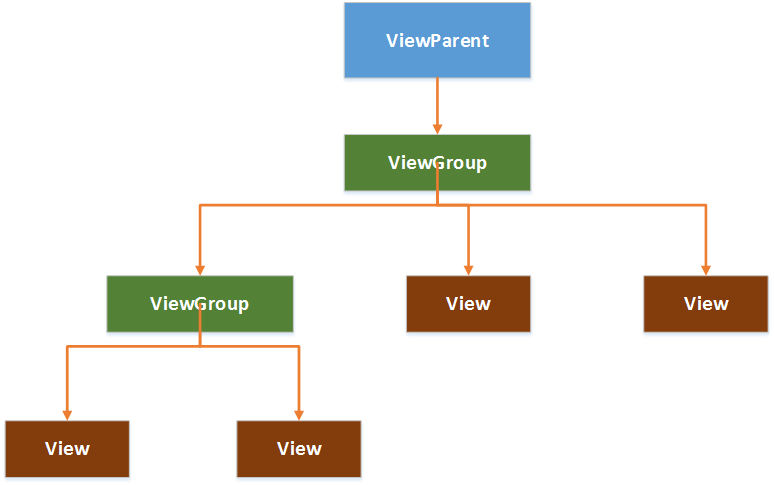 Android View 與 ViewGroup 架構解析:測量、排版與繪製
Android 的視圖控制項大致分為兩類:ViewGroup 與 View。ViewGroup 作為父容器,包含並管理子 View;兩者共同構成一棵「控制項樹」,每個 V
 Android 驗證碼倒計時的兩種實現:CountDownTimer 與 Handler+Thread
之前聊過順時針計時器的寫法,那種方式在錄屏、計時類場景裡很常用。這次換個方向,講講倒計時——最典型的落地場景就是「獲取短信驗證碼」按鈕。 本文面向初學者,代碼刻意寫得直白
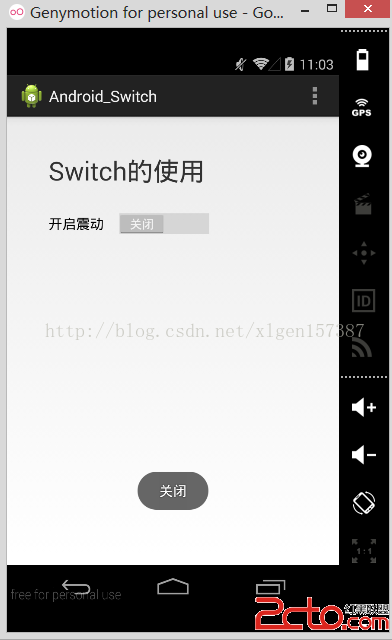 Android 學習筆記:Switch 開關控件的使用案例
Switch 是一個帶有開關效果的控件,常用來表示某個功能的開啟或關閉狀態。以下透過一個簡單範例說明它的布局與事件處理。 布局程式碼 控制程式碼