

編輯:關於 Android 程式設計
自從接觸貝塞爾曲線之後,我發現它幾乎無所不在:Android、iOS 到 Web 前端,處處可見。那幾年很流行的膠狀下拉刷新、天氣趨勢圖,背後都是它。而在所有繪圖軟體裡,以貝塞爾曲線為核心的鋼筆工具,更是使用頻率最高、最實用的存在。
貝塞爾曲線(Bézier curve),也譯作貝茲曲線,是廣泛應用於二維圖形領域的數學曲線。它由線段與節點構成:節點是可拖動的支點,線段則像可伸縮的橡皮筋。矢量繪圖軟體中的鋼筆工具,畫的就是這種曲線。
它的基本結構只有三種要素:起始點、終止點(又稱錨點)、控制點。移動控制點,曲線的形狀便隨之改變。
一階(線段)
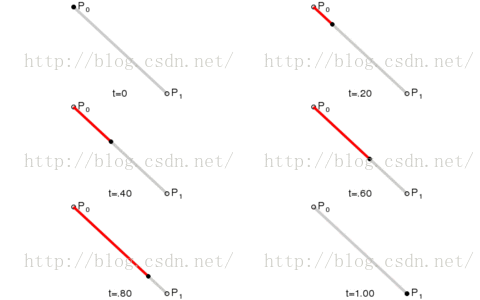
由 P0 到 P1 的一連串連續點,描述出一條直線段。
二階(拋物線)
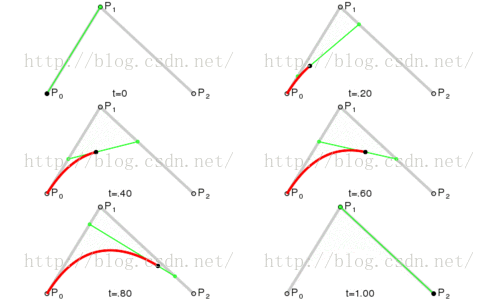
原理是兩段線段的再插值:P0 到 P1 的連續點構成 Q0,P1 到 P2 的連續點構成 Q1,再由 Q0 到 Q1 的連續點 B(t) 描述出一條二次曲線。
三階
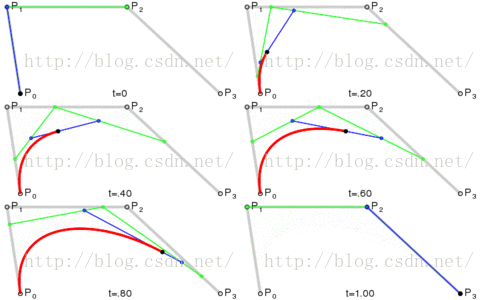
更高階的四階、五階依此類推。互動式的線上推導工具:https://bezier.method.ac/,拖動控制點就能直觀看到曲線如何生成,理解效果遠勝公式。
實務上我們最常用的是二階與三階。從動態圖不難看出,曲線由起點、終點與中間的控制點共同決定,而 Path 類別已經把這一切封裝好了。
/**
 * 從上一個點出發,趨近控制點 (x1,y1),結束於 (x2,y2)
 */
public void quadTo(float x1, float y1, float x2, float y2) {
    isSimplePath = false;
    native_quadTo(mNativePath, x1, y1, x2, y2);
}
quadTo 畫的是二階曲線:(x1, y1) 是控制點,(x2, y2) 是終點,起點則是前一次 moveTo 或上一段曲線的落點。
Path mPath = new Path();
mPath.moveTo(x0, y0);
mPath.quadTo(x1, y1, x2, y2);
如此便畫出一條起點 (x0, y0)、終點 (x2, y2)、控制點 (x1, y1) 的曲線。只要持續改變這三個座標,就能畫出千變萬化的圖形。
/**
 * 從上一個點出發,趨近控制點 (x1,y1) 與 (x2,y2),結束於 (x3,y3)
 */
public void cubicTo(float x1, float y1, float x2, float y2, float x3, float y3) {
    isSimplePath = false;
    native_cubicTo(mNativePath, x1, y1, x2, y2, x3, y3);
}
cubicTo 畫三階曲線,多一個控制點。控制點越多,曲線的可控性越強,越容易畫出平滑自然的線條。
手機電量、剩餘容量這類介面常會用到持續湧動的波浪。這種平滑自然的曲線,正是貝塞爾曲線的強項。
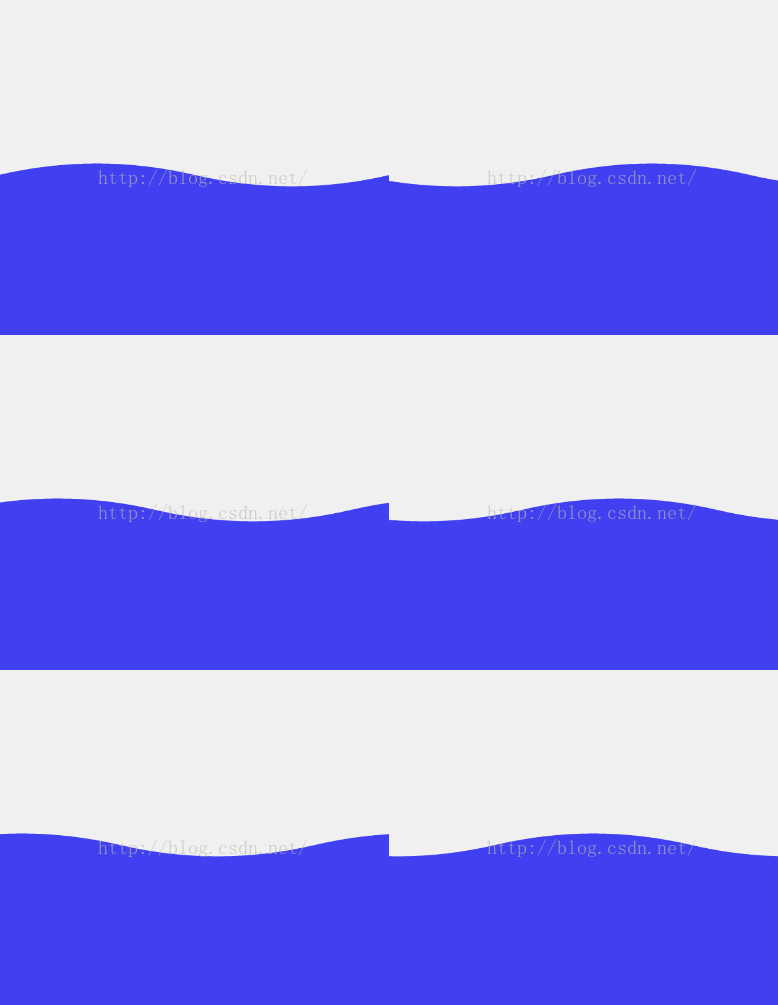
原理圖如下:
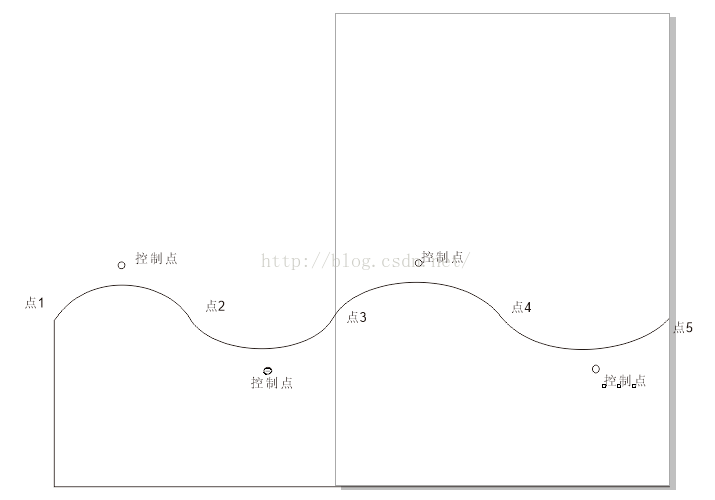
矩形即為 View 的可見範圍。做法是用 ValueAnimator 持續改變「點 1」的橫座標,點 2 至點 5 以及四個控制點都跟著平移相同距離;每次座標更新就呼叫 invalidate() 觸發重繪,畫出四段貝塞爾曲線。當點 1 移動到原本點 3 的位置時,一次動畫即完成,接著循環播放,波浪於是不斷湧動。
@Override
protected void onDraw(Canvas canvas) {
    super.onDraw(canvas);
    if (!mIsRunning || !mHasInit) return;

    mPath.reset();
    mPath.moveTo(mLeft1.x, mLeft1.y);
    mPath.quadTo(mControlLeft1.x, mControlLeft1.y, mLeft2.x, mLeft2.y);
    mPath.quadTo(mControlLeft2.x, mControlLeft2.y, mFirst.x, mFirst.y);
    mPath.quadTo(mControlFirst.x, mControlFirst.y, mSecond.x, mSecond.y);
    mPath.quadTo(mControlSecond.x, mControlSecond.y, mRight.x, mRight.y);
    mPath.lineTo(mRight.x, mHeight);
    mPath.lineTo(mLeft1.x, mHeight);
    mPath.lineTo(mLeft1.x, mLeft1.y);

    canvas.drawPath(mPath, mPaint);
}QQ 聊天列表有個很有意思的設計:用手指拖動未讀訊息標記時,它會與列表產生類似膠體的連拉效果。

看原理圖:
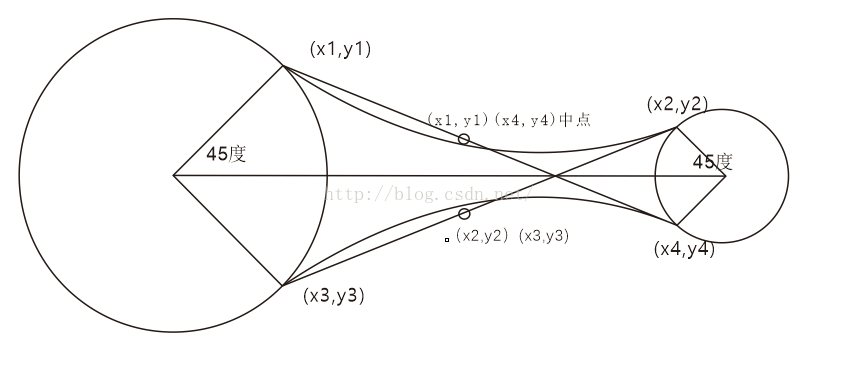
基本構造是兩個圓,加上兩端各一段二階貝塞爾曲線。二階只需要一個控制點,這裡兩個控制點分別取 (x1,y1) 與 (x4,y4) 的中點、(x2,y2) 與 (x3,y3) 的中點。
也就是說,控制點由端點決定,端點又由兩圓的相對位置決定。兩圓距離越大,曲線越趨平緩;距離越小,中間的「腰身」收得越緊,連拉感越強烈。圖中的 45 度偏移角同樣是一個可調參數,可用來微調弧度。
/**
 * 繪製兩圓之間的連體
 *
 * @param cx1, cy1 圓 1 圓心
 * @param r1       圓 1 半徑
 * @param offset1  圓 1 的貝塞爾曲線偏移角度
 * @param cx2, cy2 圓 2 圓心
 * @param r2       圓 2 半徑
 * @param offset2  圓 2 的貝塞爾曲線偏移角度
 */
public static Path drawAdhesionBody(float cx1, float cy1, float r1, float offset1,
                                    float cx2, float cy2, float r2, float offset2) {
    /* 兩圓連線與水平方向的夾角 */
    float degrees = (float) Math.toDegrees(
            Math.atan(Math.abs(cy2 - cy1) / Math.abs(cx2 - cx1)));

    float differenceX = cx1 - cx2;
    float differenceY = cy1 - cy2;

    /* 兩條貝塞爾曲線的四個端點 */
    float x1, y1, x2, y2, x3, y3, x4, y4;

    if (differenceX == 0 && differenceY > 0) {              // 圓 1 在圓 2 下方
        x2 = cx2 - r2 * (float) Math.sin(Math.toRadians(offset2));
        y2 = cy2 + r2 * (float) Math.cos(Math.toRadians(offset2));
        x4 = cx2 + r2 * (float) Math.sin(Math.toRadians(offset2));
        y4 = cy2 + r2 * (float) Math.cos(Math.toRadians(offset2));
        x1 = cx1 - r1 * (float) Math.sin(Math.toRadians(offset1));
        y1 = cy1 - r1 * (float) Math.cos(Math.toRadians(offset1));
        x3 = cx1 + r1 * (float) Math.sin(Math.toRadians(offset1));
        y3 = cy1 - r1 * (float) Math.cos(Math.toRadians(offset1));
    } else if (differenceX == 0 && differenceY < 0) {     // 圓 1 在圓 2 上方
        x2 = cx2 - r2 * (float) Math.sin(Math.toRadians(offset2));
        y2 = cy2 - r2 * (float) Math.cos(Math.toRadians(offset2));
        x4 = cx2 + r2 * (float) Math.sin(Math.toRadians(offset2));
        y4 = cy2 - r2 * (float) Math.cos(Math.toRadians(offset2));
        x1 = cx1 - r1 * (float) Math.sin(Math.toRadians(offset1));
        y1 = cy1 + r1 * (float) Math.cos(Math.toRadians(offset1));
        x3 = cx1 + r1 * (float) Math.sin(Math.toRadians(offset1));
        y3 = cy1 + r1 * (float) Math.cos(Math.toRadians(offset1));
    } else if (differenceX > 0 && differenceY == 0) {      // 圓 1 在圓 2 右側
        x2 = cx2 + r2 * (float) Math.cos(Math.toRadians(offset2));
        y2 = cy2 + r2 * (float) Math.sin(Math.toRadians(offset2));
        x4 = cx2 + r2 * (float) Math.cos(Math.toRadians(offset2));
        y4 = cy2 - r2 * (float) Math.sin(Math.toRadians(offset2));
        x1 = cx1 - r1 * (float) Math.cos(Math.toRadians(offset1));
        y1 = cy1 + r1 * (float) Math.sin(Math.toRadians(offset1));
        x3 = cx1 - r1 * (float) Math.cos(Math.toRadians(offset1));
        y3 = cy1 - r1 * (float) Math.sin(Math.toRadians(offset1));
    } else if (differenceX < 0 && differenceY == 0) {      // 圓 1 在圓 2 左側
        x2 = cx2 - r2 * (float) Math.cos(Math.toRadians(offset2));
        y2 = cy2 + r2 * (float) Math.sin(Math.toRadians(offset2));
        x4 = cx2 - r2 * (float) Math.cos(Math.toRadians(offset2));
        y4 = cy2 - r2 * (float) Math.sin(Math.toRadians(offset2));
        x1 = cx1 + r1 * (float) Math.cos(Math.toRadians(offset1));
        y1 = cy1 + r1 * (float) Math.sin(Math.toRadians(offset1));
        x3 = cx1 + r1 * (float) Math.cos(Math.toRadians(offset1));
        y3 = cy1 - r1 * (float) Math.sin(Math.toRadians(offset1));
    } else if (differenceX > 0 && differenceY > 0) {      // 右下
        x2 = cx2 - r2 * (float) Math.cos(Math.toRadians(180 - offset2 - degrees));
        y2 = cy2 + r2 * (float) Math.sin(Math.toRadians(180 - offset2 - degrees));
        x4 = cx2 + r2 * (float) Math.cos(Math.toRadians(degrees - offset2));
        y4 = cy2 + r2 * (float) Math.sin(Math.toRadians(degrees - offset2));
        x1 = cx1 - r1 * (float) Math.cos(Math.toRadians(degrees - offset1));
        y1 = cy1 - r1 * (float) Math.sin(Math.toRadians(degrees - offset1));
        x3 = cx1 + r1 * (float) Math.cos(Math.toRadians(180 - offset1 - degrees));
        y3 = cy1 - r1 * (float) Math.sin(Math.toRadians(180 - offset1 - degrees));
    } else if (differenceX < 0 && differenceY < 0) {      // 左上
        x2 = cx2 - r2 * (float) Math.cos(Math.toRadians(degrees - offset2));
        y2 = cy2 - r2 * (float) Math.sin(Math.toRadians(degrees - offset2));
        x4 = cx2 + r2 * (float) Math.cos(Math.toRadians(180 - offset2 - degrees));
        y4 = cy2 - r2 * (float) Math.sin(Math.toRadians(180 - offset2 - degrees));
        x1 = cx1 - r1 * (float) Math.cos(Math.toRadians(180 - offset1 - degrees));
        y1 = cy1 + r1 * (float) Math.sin(Math.toRadians(180 - offset1 - degrees));
        x3 = cx1 + r1 * (float) Math.cos(Math.toRadians(degrees - offset1));
        y3 = cy1 + r1 * (float) Math.sin(Math.toRadians(degrees - offset1));
    } else if (differenceX < 0 && differenceY > 0) {      // 左下
        x2 = cx2 - r2 * (float) Math.cos(Math.toRadians(degrees - offset2));
        y2 = cy2 + r2 * (float) Math.sin(Math.toRadians(degrees - offset2));
        x4 = cx2 + r2 * (float) Math.cos(Math.toRadians(180 - offset2 - degrees));
        y4 = cy2 + r2 * (float) Math.sin(Math.toRadians(180 - offset2 - degrees));
        x1 = cx1 - r1 * (float) Math.cos(Math.toRadians(180 - offset1 - degrees));
        y1 = cy1 - r1 * (float) Math.sin(Math.toRadians(180 - offset1 - degrees));
        x3 = cx1 + r1 * (float) Math.cos(Math.toRadians(degrees - offset1));
        y3 = cy1 - r1 * (float) Math.sin(Math.toRadians(degrees - offset1));
    } else {                                               // 右上
        x2 = cx2 - r2 * (float) Math.cos(Math.toRadians(180 - offset2 - degrees));
        y2 = cy2 - r2 * (float) Math.sin(Math.toRadians(180 - offset2 - degrees));
        x4 = cx2 + r2 * (float) Math.cos(Math.toRadians(degrees - offset2));
        y4 = cy2 - r2 * (float) Math.sin(Math.toRadians(degrees - offset2));
        x1 = cx1 - r1 * (float) Math.cos(Math.toRadians(degrees - offset1));
        y1 = cy1 + r1 * (float) Math.sin(Math.toRadians(degrees - offset1));
        x3 = cx1 + r1 * (float) Math.cos(Math.toRadians(180 - offset1 - degrees));
        y3 = cy1 + r1 * (float) Math.sin(Math.toRadians(180 - offset1 - degrees));
    }

    /* 控制點:取對側兩端點的中點 */
    float anchorX1, anchorY1, anchorX2, anchorY2;
    if (r1 > r2) {
        anchorX1 = (x2 + x3) / 2;
        anchorY1 = (y2 + y3) / 2;
        anchorX2 = (x1 + x4) / 2;
        anchorY2 = (y1 + y4) / 2;
    } else {
        anchorX1 = (x1 + x4) / 2;
        anchorY1 = (y1 + y4) / 2;
        anchorX2 = (x2 + x3) / 2;
        anchorY2 = (y2 + y3) / 2;
    }

    Path path = new Path();
    path.reset();
    path.moveTo(x1, y1);
    path.quadTo(anchorX1, anchorY1, x2, y2);
    path.lineTo(x4, y4);
    path.quadTo(anchorX2, anchorY2, x3, y3);
    path.lineTo(x1, y1);
    return path;
}
有了這個方法,只要再給控制項設一個「最大連拉距離」,超過就不再繪製連體,就能還原 QQ 的互動手感。同一套原理也能拿來做載入動畫:

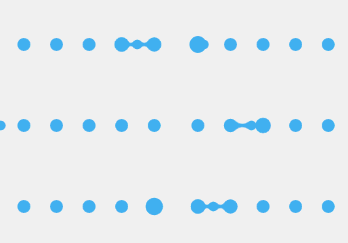
三階曲線有兩個控制點,公式看起來嚇人,但搭配前面提到的互動式工具就很好理解。相比二階,多一個控制點意味著能畫出更平滑、更有張力的曲線。
先看一個 Web 前端的彈性球效果:

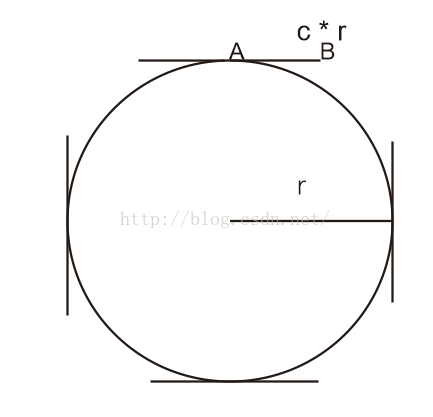
要用三階曲線畫圓,關鍵常數是 c = 0.552284749。如下圖,要畫右上角那段圓弧需要兩個控制點,令控制點到端點的距離等於 c * r,即可精確擬合 1/4 圓;接連畫四段這樣的弧線,就得到一個標準圓。
再看彈性球的運動,可以拆成五個階段:
一、啟動:只有運動方向那一側的點位移,其餘不動。
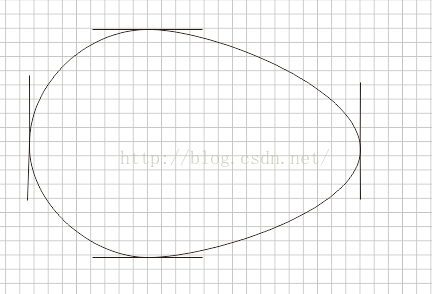
二、加速:整體開始遷移,偏移量同步加大。
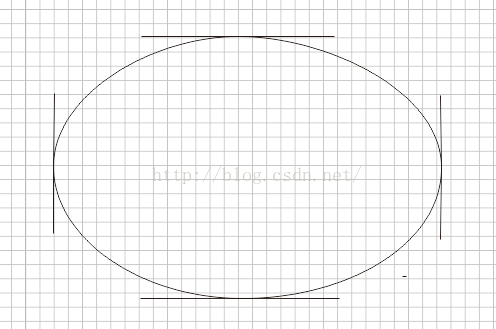
三、減速:接近終點,形變逐漸收斂。
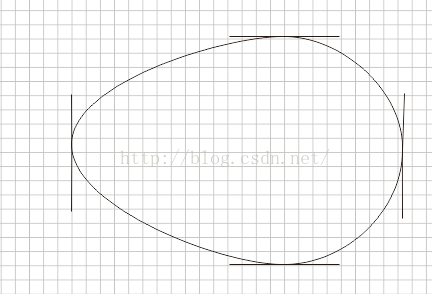
四、抵達終點。
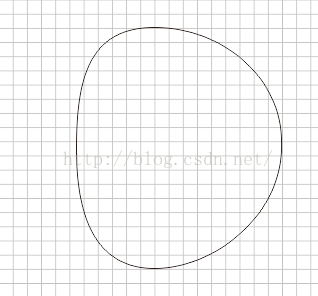
五、回彈:最後一段做形變回覆,收尾更自然。
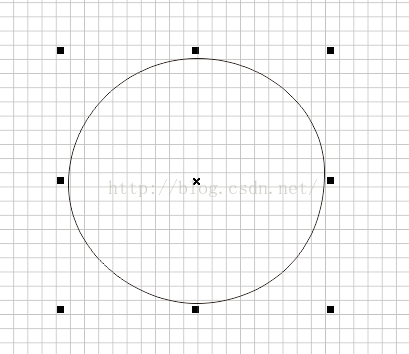
下面是完整的封裝,支援上下左右四個方向:
package com.zero.bezier.widget.elastic;

import android.animation.Animator;
import android.animation.ValueAnimator;
import android.graphics.Path;
import android.graphics.PointF;
import android.view.animation.AccelerateDecelerateInterpolator;

/**
 * 彈性球
 */
public class ElasticBall extends Ball {

    private static final int DIRECTION_UP = 1;
    private static final int DIRECTION_DOWN = 2;
    private static final int DIRECTION_LEFT = 3;
    private static final int DIRECTION_RIGHT = 4;

    private int mDirection;
    private float mAnimPercent;          // 動畫完成百分比 0~1
    private float mElasticDistance;      // 彈性距離
    private float mElasticPercent = 0.8f;// 彈性比例
    private float mMoveDistance;         // 位移距離
    private long mDuration = 1500;       // 動畫時長

    private float offsetTop, offsetBottom, offsetLeft, offsetRight;

    private float c = 0.551915024494f;   // 四分之一圓的擬合常數
    private float c2 = 0.65f;            // 形變時使用的偏移比例

    private Ball mStartPoint;
    private Ball mEndPoint;

    public ElasticBall(float x, float y, float radius) {
        super(x, y, radius);
        init();
    }

    private void init() {
        mElasticDistance = mElasticPercent * radius;
        offsetTop = offsetBottom = offsetLeft = offsetRight = c * radius;
    }

    public interface ElasticBallInterface {
        void onChange(Path path);
        void onFinish();
    }

    private ElasticBallInterface mElasticBallInterface;

    public void setDuration(long duration) {
        this.mDuration = duration;
    }

    public void startElasticAnim(PointF endPoint, ElasticBallInterface callback) {
        this.mEndPoint = new ElasticBall(endPoint.x, endPoint.y, radius);
        this.mStartPoint = new ElasticBall(x, y, radius);
        this.mStatusPoint1 = new ElasticBall(x, y, radius);
        this.mStatusPoint2 = new ElasticBall(x, y, radius);
        this.mStatusPoint3 = new ElasticBall(x, y, radius);
        this.mStatusPoint4 = new ElasticBall(x, y, radius);
        this.mStatusPoint5 = new ElasticBall(x, y, radius);
        this.mElasticBallInterface = callback;

        judgeDirection();
        mMoveDistance = getDistance(mStartPoint.x, mStatusPoint1.y, endPoint.x, endPoint.y);
        animStatus0();

        ValueAnimator valueAnimator = ValueAnimator.ofFloat(0, 1);
        valueAnimator.setDuration(mDuration);
        valueAnimator.setInterpolator(new AccelerateDecelerateInterpolator());
        valueAnimator.start();

        valueAnimator.addUpdateListener(new ValueAnimator.AnimatorUpdateListener() {
            @Override
            public void onAnimationUpdate(ValueAnimator animation) {
                mAnimPercent = (float) animation.getAnimatedValue();
                if (mAnimPercent >= 0 && mAnimPercent <= 0.2) {
                    animStatus1();          // 啟動形變
                } else if (mAnimPercent <= 0.5) {
                    animStatus2();          // 加速
                } else if (mAnimPercent <= 0.8) {
                    animStatus3();          // 減速
                } else if (mAnimPercent <= 0.9) {
                    animStatus4();          // 抵達
                } else {
                    animStatus5();          // 回彈
                }
                if (mElasticBallInterface != null) {
                    mElasticBallInterface.onChange(drawElasticCircle(
                            topX, topY, offsetTop, offsetTop,
                            bottomX, bottomY, offsetBottom, offsetBottom,
                            leftX, leftY, offsetLeft, offsetLeft,
                            rightX, rightY, offsetRight, offsetRight));
                }
            }
        });

        valueAnimator.addListener(new Animator.AnimatorListener() {
            @Override public void onAnimationStart(Animator animation) { }
            @Override public void onAnimationEnd(Animator animation) {
                if (mElasticBallInterface != null) {
                    mElasticBallInterface.onFinish();
                }
            }
            @Override public void onAnimationCancel(Animator animation) { }
            @Override public void onAnimationRepeat(Animator animation) { }
        });
    }

    private void judgeDirection() {
        if (mEndPoint.x - mStartPoint.x > 0) {
            mDirection = DIRECTION_RIGHT;
        } else if (mEndPoint.x - mStartPoint.x < 0) {
            mDirection = DIRECTION_LEFT;
        } else if (mEndPoint.y - mStartPoint.y > 0) {
            mDirection = DIRECTION_DOWN;
        } else {
            mDirection = DIRECTION_UP;
        }
    }

    /** 狀態 0:標準圓形 */
    private void animStatus0() {
        offsetTop = offsetBottom = offsetLeft = offsetRight = c * radius;
    }

    private Ball mStatusPoint1;
    /** 狀態 1(0~0.2):單側突出 */
    private void animStatus1() {
        float percent = mAnimPercent * 5f;
        if (mDirection == DIRECTION_LEFT) {
            leftX = mStartPoint.leftX - percent * mElasticDistance;
        } else if (mDirection == DIRECTION_RIGHT) {
            rightX = mStartPoint.rightX + percent * mElasticDistance;
        } else if (mDirection == DIRECTION_UP) {
            topY = mStartPoint.topY - percent * mElasticDistance;
        } else if (mDirection == DIRECTION_DOWN) {
            bottomY = mStartPoint.bottomY + percent * mElasticDistance;
        }
        mStatusPoint1.refresh(x, y, topX, topY, bottomX, bottomY, leftX, leftY, rightX, rightY);
    }

    private Ball mStatusPoint2;
    /** 狀態 2(0.2~0.5):加速遷移 */
    private void animStatus2() {
        float percent = (float) ((mAnimPercent - 0.2) * (10f / 3));
        if (mDirection == DIRECTION_LEFT) {
            leftX = mStatusPoint1.leftX - percent * (mMoveDistance / 2 - mElasticDistance / 2);
            x = mStatusPoint1.x - percent * (mMoveDistance / 2);
            rightX = mStatusPoint1.rightX - percent * (mMoveDistance / 2 - mElasticDistance / 2);
            topX = x; bottomX = x;
            offsetTop = radius * c + radius * (c2 - c) * percent;
            offsetBottom = radius * c + radius * (c2 - c) * percent;
        } else if (mDirection == DIRECTION_RIGHT) {
            rightX = mStatusPoint1.rightX + percent * (mMoveDistance / 2 - mElasticDistance / 2);
            x = mStatusPoint1.x + percent * (mMoveDistance / 2);
            leftX = mStatusPoint1.leftX + percent * (mMoveDistance / 2 - mElasticDistance / 2);
            topX = x; bottomX = x;
            offsetTop = radius * c + radius * (c2 - c) * percent;
            offsetBottom = radius * c + radius * (c2 - c) * percent;
        } else if (mDirection == DIRECTION_UP) {
            topY = mStatusPoint1.topY - percent * (mMoveDistance / 2 - mElasticDistance / 2);
            y = mStatusPoint1.y - percent * (mMoveDistance / 2);
            bottomY = mStatusPoint1.bottomY - percent * (mMoveDistance / 2 - mElasticDistance / 2);
            leftY = y; rightY = y;
            offsetLeft = radius * c + radius * (c2 - c) * percent;
            offsetRight = radius * c + radius * (c2 - c) * percent;
        } else if (mDirection == DIRECTION_DOWN) {
            bottomY = mStatusPoint1.bottomY + percent * (mMoveDistance / 2 - mElasticDistance / 2);
            y = mStatusPoint1.y + percent * (mMoveDistance / 2);
            topY = mStatusPoint1.topY + percent * (mMoveDistance / 2 - mElasticDistance / 2);
            leftY = y; rightY = y;
            offsetLeft = radius * c + radius * (c2 - c) * percent;
            offsetRight = radius * c + radius * (c2 - c) * percent;
        }
        mStatusPoint2.refresh(x, y, topX, topY, bottomX, bottomY, leftX, leftY, rightX, rightY);
    }

    private Ball mStatusPoint3;
    /** 狀態 3(0.5~0.8):減速趨近終點 */
    private void animStatus3() {
        float percent = (mAnimPercent - 0.5f) * (10f / 3f);
        if (mDirection == DIRECTION_LEFT) {
            leftX = mStatusPoint2.leftX - Math.abs(percent * (mEndPoint.rightX - mStatusPoint2.rightX));
            x = mStatusPoint2.x - Math.abs(percent * (mEndPoint.x - mStatusPoint2.x));
            rightX = mStatusPoint2.rightX - Math.abs(percent * (mEndPoint.x - mStatusPoint2.x));
            topX = x; bottomX = x;
            offsetTop = radius * c2 - radius * (c2 - c) * percent;
            offsetBottom = radius * c2 - radius * (c2 - c) * percent;
        } else if (mDirection == DIRECTION_RIGHT) {
            rightX = mStatusPoint2.rightX + percent * (mEndPoint.rightX - mStatusPoint2.rightX);
            x = mStatusPoint2.x + percent * (mEndPoint.x - mStatusPoint2.x);
            leftX = mStatusPoint2.leftX + percent * (mEndPoint.x - mStatusPoint2.x);
            topX = x; bottomX = x;
            offsetTop = radius * c2 - radius * (c2 - c) * percent;
            offsetBottom = radius * c2 - radius * (c2 - c) * percent;
        } else if (mDirection == DIRECTION_UP) {
            topY = mStatusPoint2.topY - Math.abs(percent * (mEndPoint.topY - mStatusPoint2.topY));
            y = mStatusPoint2.y - Math.abs(percent * (mEndPoint.y - mStatusPoint2.y));
            bottomY = mStatusPoint2.bottomY - Math.abs(percent * (mEndPoint.y - mStatusPoint2.y));
            leftY = y; rightY = y;
            offsetLeft = radius * c2 - radius * (c2 - c) * percent;
            offsetRight = radius * c2 - radius * (c2 - c) * percent;
        } else if (mDirection == DIRECTION_DOWN) {
            bottomY = mStatusPoint2.bottomY + percent * (mEndPoint.bottomY - mStatusPoint2.bottomY);
            y = mStatusPoint2.y + percent * (mEndPoint.y - mStatusPoint2.y);
            topY = mStatusPoint2.topY + percent * (mEndPoint.y - mStatusPoint2.y);
            leftY = y; rightY = y;
            offsetLeft = radius * c2 - radius * (c2 - c) * percent;
            offsetRight = radius * c2 - radius * (c2 - c) * percent;
        }
        mStatusPoint3.refresh(x, y, topX, topY, bottomX, bottomY, leftX, leftY, rightX, rightY);
    }

    private Ball mStatusPoint4;
    /** 狀態 4(0.8~0.9):抵達終點 */
    private void animStatus4() {
        float percent = (float) (mAnimPercent - 0.8) * 10;
        if (mDirection == DIRECTION_LEFT) {
            rightX = mStatusPoint3.rightX - percent
                    * (Math.abs(mEndPoint.rightX - mStatusPoint3.rightX) + mElasticDistance / 2);
            leftX = mEndPoint.leftX; x = mEndPoint.x;
            bottomX = mEndPoint.bottomX; topX = mEndPoint.topX;
        } else if (mDirection == DIRECTION_RIGHT) {
            leftX = mStatusPoint3.leftX + percent
                    * (mEndPoint.leftX - mStatusPoint3.leftX + mElasticDistance / 2);
            rightX = mEndPoint.rightX; x = mEndPoint.x;
            bottomX = mEndPoint.bottomX; topX = mEndPoint.topX;
        } else if (mDirection == DIRECTION_UP) {
            bottomY = mStatusPoint3.bottomY - percent
                    * (Math.abs(mEndPoint.bottomY - mStatusPoint3.bottomY) + mElasticDistance / 2);
            topY = mEndPoint.topY; y = mEndPoint.y;
            leftY = mEndPoint.leftY; rightY = mEndPoint.rightY;
        } else if (mDirection == DIRECTION_DOWN) {
            topY = mStatusPoint3.topY + percent
                    * (mEndPoint.topY - mStatusPoint3.topY + mElasticDistance / 2);
            bottomY = mEndPoint.bottomY; y = mEndPoint.y;
            leftY = mEndPoint.leftY; rightY = mEndPoint.rightY;
        }
        mStatusPoint4.refresh(x, y, topX, topY, bottomX, bottomY, leftX, leftY, rightX, rightY);
    }

    private Ball mStatusPoint5;
    /** 狀態 5(0.9~1):回彈收尾 */
    private void animStatus5() {
        float percent = (float) (mAnimPercent - 0.9) * 10;
        if (mDirection == DIRECTION_LEFT) {
            rightX = mStatusPoint4.rightX + percent * (mEndPoint.rightX - mStatusPoint4.rightX);
        } else if (mDirection == DIRECTION_RIGHT) {
            leftX = mStatusPoint4.leftX + percent * (mEndPoint.leftX - mStatusPoint4.leftX);
        } else if (mDirection == DIRECTION_UP) {
            bottomY = mStatusPoint4.bottomY + percent * (mEndPoint.bottomY - mStatusPoint4.bottomY);
        } else if (mDirection == DIRECTION_DOWN) {
            topY = mStatusPoint4.topY + percent * (mEndPoint.topY - mStatusPoint4.topY);
        }
        mStatusPoint5.refresh(x, y, topX, topY, bottomX, bottomY, leftX, leftY, rightX, rightY);
    }

    /**
     * 以四段三階貝塞爾曲線拼出可形變的圓
     */
    private Path drawElasticCircle(float topX, float topY, float offsetTop1, float offsetTop2,
                                   float bottomX, float bottomY, float offsetBottom1, float offsetBottom2,
                                   float leftX, float leftY, float offsetLeft1, float offsetLeft2,
                                   float rightX, float rightY, float offsetRight1, float offsetRight2) {
        PointF controlTop1 = new PointF(topX - offsetTop1, topY);
        PointF controlTop2 = new PointF(topX + offsetTop2, topY);
        PointF controlBottom1 = new PointF(bottomX - offsetBottom1, bottomY);
        PointF controlBottom2 = new PointF(bottomX + offsetBottom2, bottomY);
        PointF controlLeft1 = new PointF(leftX, leftY - offsetLeft1);
        PointF controlLeft2 = new PointF(leftX, leftY + offsetLeft2);
        PointF controlRight1 = new PointF(rightX, rightY - offsetRight1);
        PointF controlRight2 = new PointF(rightX, rightY + offsetRight2);

        Path path = new Path();
        path.moveTo(topX, topY);
        path.cubicTo(controlTop1.x, controlTop1.y, controlLeft1.x, controlLeft1.y, leftX, leftY);
        path.cubicTo(controlLeft2.x, controlLeft2.y, controlBottom1.x, controlBottom1.y, bottomX, bottomY);
        path.cubicTo(controlBottom2.x, controlBottom2.y, controlRight2.x, controlRight2.y, rightX, rightY);
        path.cubicTo(controlRight1.x, controlRight1.y, controlTop2.x, controlTop2.y, topX, topY);
        return path;
    }

    private float getDistance(float x1, float y1, float x2, float y2) {
        return (float) Math.sqrt((x1 - x2) * (x1 - x2) + (y1 - y2) * (y1 - y2));
    }
}
封裝完成後,就能用它組出一個彈性球風格的載入動畫:

貝塞爾曲線的應用遠不止這三個案例。真正開始留意它之後,你會在動畫、圖表、載入框、自訂控制項裡反覆遇到它。掌握 quadTo 與 cubicTo 這兩個 API,再加上一點三角函數,多數看似複雜的自訂繪製都能拆解成「起點、終點、控制點」的問題。
本文部分程式碼的實現思路參考自社群朋友的分享,在此致謝。
 Android 自動完成輸入:AutoCompleteTextView 與 MultiAutoCompleteTextView
搜索框、收件人輸入框這類場景,都需要在用戶敲字的同時給出候選提示。Android 提供了兩個現成控件來滿足需求。 AutoCompleteTextView:輸入時弹出下
 手機QQ聊天記錄怎麼導出?檔案位置與備份路徑完整說明
聊天記錄裡偶爾會藏著重要資訊:一段約定時間的對話、一組別人傳給你的帳號、一張需要留存的截圖。手機QQ內建了導出功能,但入口藏在聊天記錄頁面裡,很多人不知道。此外,直接從檔
 Android 內存洩漏全面總結
一、Java 中的內存洩漏 內存洩漏大家都不陌生。簡單粗暴地講,就是該被釋放的對象沒有釋放,一直被某個或某些實例持有卻不再被使用,導致 GC 無法回收。在 Java 中,
 實例講解 Android 自定義組合控件的方法
自定義 View 大致可分為四類:繼承 View、組合 View、自繪 View(用 Paint 和 Canvas)、自定義 ViewGroup(Widget)。本文聚焦