

編輯:關於 Android 程式設計
這次要介紹的是組合模式(Composite Pattern),它又叫「部分—整體模式(Part-Whole Pattern)」,屬於結構型模式的一員。組合模式的概念並不難:它把一組相似的物件當成單一物件來處理,並依據樹狀結構把物件層層組合,最後提供一個統一的方法去存取這些物件,藉此抹平「單一物件」與「物件集合」之間的差異。
最典型的例子莫過於資料結構裡的樹:一個節點若有子節點,它就是枝幹節點;若沒有子節點,它就是葉子節點。問題是——要怎麼把枝幹節點與葉子節點當成同一種物件來統一處理?這正是組合模式要解決的問題。
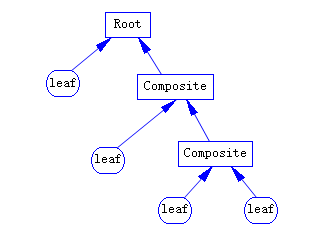
組合模式讓你能把物件組合成樹形結構來呈現「整體/部分」的層次關係,並且讓客戶端以一致的方式處理個別物件與組合物件。
換句話說,我們可以用樹形方式建立物件結構,樹中同時包含組合構件與葉子構件的物件,而相同的操作既能套用在組合構件上,也能套用在葉子構件上——在大多數情況下,我們甚至能忽略兩者之間的差別。組合模式適用的場景包括:
需要表達物件的部分—整體層次結構時; 需要從一個整體中獨立出部分模塊或功能時。
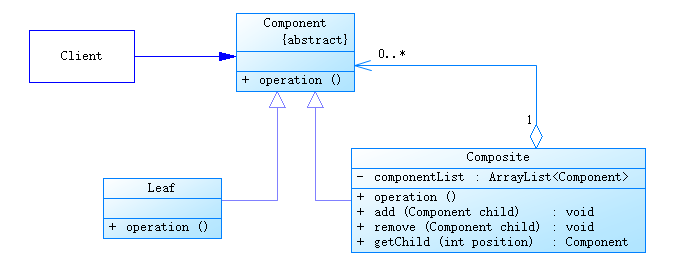
實務上,組合模式會分化出兩種形態:安全的組合模式與透明的組合模式。
先看安全組合模式的 UML 類圖:
Component.class
public abstract class Component { public abstract void operation(); }
Composite.class
public class Composite extends Component{ private ArrayList componentList = new ArrayList<>(); @Override public void operation() { Log.e("shawn", "this is composite " + this + " -------start"); for (Component component : componentList) { component.operation(); } Log.e("shawn", "this is composite " + this + " -------end"); } public void add(Component child) { componentList.add(child); } public void remove(Component child) { componentList.remove(child); } public Component getChild(int position) { return componentList.get(position); } }
Leaf.class
public class Leaf extends Component{ @Override public void operation() { Log.e("shawn", "this if leaf " + this); } }
Client 測試程式碼:
Composite root = new Composite(); Leaf leaf1 = new Leaf(); Composite branch = new Composite(); root.add(leaf1); root.add(branch); Leaf leaf2 = new Leaf(); branch.add(leaf2); root.operation(); break;
最後的輸出結果如下:
com.android.compositepattern E/shawn: this is composite com.android.compositepattern.composite.Composite@a37f4d8 -------start com.android.compositepattern E/shawn: this if leaf com.android.compositepattern.composite.Leaf@1d7d4031 com.android.compositepattern E/shawn: this is composite com.android.compositepattern.composite.Composite@ec97316 -------start com.android.compositepattern E/shawn: this if leaf com.android.compositepattern.composite.Leaf@5dae497 com.android.compositepattern E/shawn: this is composite com.android.compositepattern.composite.Composite@ec97316 -------end com.android.compositepattern E/shawn: this is composite com.android.compositepattern.composite.Composite@a37f4d8 -------end
程式碼很簡單,結果就是一棵再普通不過的樹。但仔看客戶端程式碼就會發現,它違反了六個設計模式原則中的「依賴倒置原則」——客戶端不該直接依賴具體實作,而應依賴抽象。既然講究面向介面編程,就應該把焦點放在介面的設計上。於是,透明的組合模式應運而生。
來看看透明組合模式的 UML 類圖:
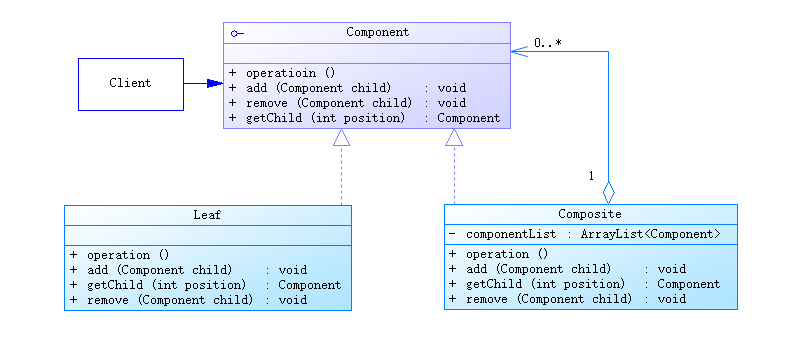
它與安全組合模式的差別,就在於把 Composite 的相關操作(add、remove 等)上提到了 Component 中,這也意味著 Leaf 角色同樣得實作 Component 裡的所有方法。程式碼相應調整如下:
Component.class
public interface Component { void operation(); void add(Component child); void remove(Component child); Component getChild(int position); }
Composite.class
public class Composite implements Component{ private ArrayList componentList = new ArrayList<>(); @Override public void operation() { Log.e("shawn", "this is composite " + this + " -------start"); for (Component component : componentList) { component.operation(); } Log.e("shawn", "this is composite " + this + " -------end"); } @Override public void add(Component child) { componentList.add(child); } @Override public void remove(Component child) { componentList.remove(child); } @Override public Component getChild(int position) { return componentList.get(position); } }
Leaf.class
public class Leaf implements Component { @Override public void operation() { Log.e("shawn", "this if leaf " + this); } @Override public void add(Component child) { throw new UnsupportedOperationException("leaf can't add child"); } @Override public void remove(Component child) { throw new UnsupportedOperationException("leaf can't remove child"); } @Override public Component getChild(int position) { throw new UnsupportedOperationException("leaf doesn't have any child"); } }
Client 測試程式碼
Component root = new Composite(); Component leaf1 = new Leaf(); Component branch = new Composite(); root.add(leaf1); root.add(branch); Component leaf2 = new Leaf(); branch.add(leaf2); root.operation();
最終的執行結果與前面完全一致。由於所有行為都定義在 Component 裡,客戶端就不必再直接依賴具體的 Composite 與 Leaf 實作,符合了依賴倒置原則——依賴抽象,而非依賴具體。但代價是,它違反了單一職責原則與介面隔離原則:Leaf 被迫繼承了它本不該擁有的方法,還得不太優雅地拋出 UnsupportedOperationException。這樣做的目的,就是讓客戶端能透明地呼叫對應元件的方法,把枝幹節點與葉子節點一視同仁。
另外,你也可以把 Component 寫成一個虛基類,把 Composite 的方法都實作 therein,預設全部拋異常,只讓 Composite 去覆寫父類的方法,而 Leaf 則完全不必理會这些方法。這樣做當然也是可行的。
安全的組合模式把責任拆散到不同介面中,設計上更嚴謹,也遵循了單一職責原則與介面隔離原則,代價是客戶端必須依賴具體實作;透明的組合模式則以犧牲單一職責與介面隔離為代價,換取「透明性」,遵循依賴倒置原則,讓客戶端只依賴 Component 抽象,將 Composite 與 Leaf 一視同仁——也就是說,一個元素究竟是枝幹還是葉子,對客戶端而言是透明的。
所以這是一個很典型的折衷案例。儘管我們有設計原則作為指引,但仍必須觀察每一條原則對整體設計帶來的影響。有些時候,六種設計模式原則在實務中是會彼此衝突的:究竟是讓客戶端每次使用前都先檢查類型,還是賦予子節點一些它本不該有的行為?這都取決於設計者的取捨。總的來說,兩種方案都站得住腳。
組合模式在生活裡的例子不勝枚舉,菜單、資料夾等都是。這裡我們以 Android 中極為經典的實作來分析。View 與 ViewGroup 想必大家都不陌生,它們背後用的正是組合模式。先看它們的 UML 類圖:
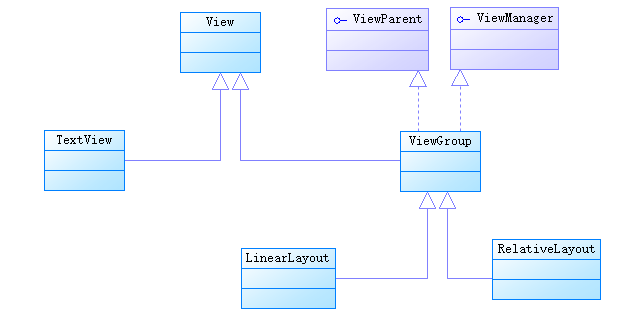
ViewManager 這個類在「java/android 設計模式學習筆記(8)—橋接模式」中提過,WindowManager 也繼承了它:
/** Interface to let you add and remove child views to an Activity. To get an instance * of this class, call {@link android.content.Context#getSystemService(java.lang.String) Context.getSystemService()}. */ public interface ViewManager { /** * Assign the passed LayoutParams to the passed View and add the view to the window. *
Throws {@link android.view.WindowManager.BadTokenException} for certain programming * errors, such as adding a second view to a window without removing the first view. *
Throws {@link android.view.WindowManager.InvalidDisplayException} if the window is on a * secondary {@link Display} and the specified display can't be found * (see {@link android.app.Presentation}). * @param view The view to be added to this window. * @param params The LayoutParams to assign to view. */ public void addView(View view, ViewGroup.LayoutParams params); public void updateViewLayout(View view, ViewGroup.LayoutParams params); public void removeView(View view); }
它只定義了關於 View 操作的三個方法。而 ViewParent 類則用來定義「父 View 角色」應有的職責,在 Android 裡,能當父 View 的一般也只有 ViewGroup:
/** * Defines the responsibilities for a class that will be a parent of a View. * This is the API that a view sees when it wants to interact with its parent. * */ public interface ViewParent { /** * Called when something has changed which has invalidated the layout of a * child of this view parent. This will schedule a layout pass of the view * tree. */ public void requestLayout(); /** * Indicates whether layout was requested on this view parent. * * @return true if layout was requested, false otherwise */ public boolean isLayoutRequested(); .... }
從 UML 類圖可以注意到一個細節:ViewGroup 與 View 採用的是「安全的組合模式」,而非透明組合模式。難怪我們在使用前有時得先把 View 強制轉型成 ViewGroup。
使用組合模式,我們能把相同的操作套用在組合物件與個別物件上;換句話說,在大多數情況下,我們都能忽略「物件組合」與「個別物件」之間的差別。組合模式特別適合用在 UI 結構的設計上,Android、iOS、Java 等提供的 UI 框架都是經典案例。
組合模式的優點:
能清楚定義分層的複雜物件,精確地表達物件的部分或全部層次,讓高層模塊不必關心層次差異,方便對整個層次結構進行控制; 高層模塊可以一致地使用一個組合結構或其中的單個物件,不必在意手裡處理的是單體還是組合體,簡化了高層模塊的程式碼; 新增枝幹構件或葉子構件都很方便,無需更動既有類庫,符合「開閉原則」; 為樹形結構的物件導向實作提供了靈活方案,透過葉子與枝幹物件的遞歸組合,可以形成複雜樹形,而對樹形的控制卻相當簡單。 組合模式的缺點:新增構件時,較難對枝幹中的構件類型施加限制,無法仰賴型別系統來約束,因為它們大多來自相同的抽象層;此時必須靠型別檢查來實現,而這個過程相對繁瑣。
https://github.com/zhaozepeng/Design-Patterns/tree/master/CompositePattern
 Android Studio 開發工具快速上手與常用快捷鍵
為何選擇 Android Studio 自 Google 停止更新 Eclipse 後,Android Studio 成為官方推薦的開發工具。它整合 Gradle、更直觀
 Android WebView 使用详解(一):核心類與常見操作
前言 Android 內置了基於 WebKit 內核的高性能浏覽器,而 WebView 正是在此基礎上封裝出來的一個控件。顧名思義,網頁視圖可以理解為一個能嵌入到界面中的
 Android平台Camera實時濾鏡實現方法探討(十):代碼地址與簡介
簡單做了一個相機與圖片編輯模組。由於時間關係,很多功能尚未完成,也還存在一些BUG,敬請見諒,之後會抽空逐步修改完善。 代碼地址 PS:歡迎點個Star ^-^ 簡介:
 Android 沉浸式體驗實戰:全屏加透明狀態欄的實現
前言從 Android 4.4 開始,系統提供了沉浸式全屏能力:狀態欄與虛擬按鍵可以動態隱藏,應用得以佔用完整的屏幕空間,按 Google 的說法,這能給用戶一種「身臨其