

編輯:關於 Android 程式設計
先的成果:GITHUB 上的完整專案為 Android 多執行緒下載斷點續傳。
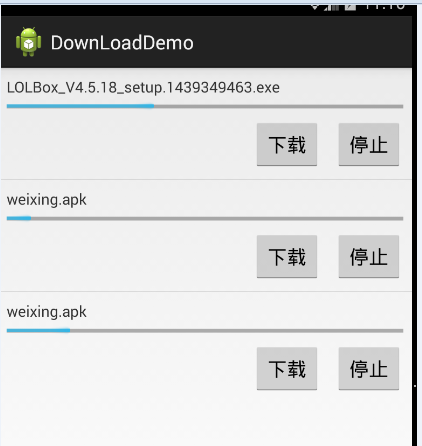
如圖所示,點擊下載就開始下載,點擊停止會中斷,再次點擊下載則接續上次的進度繼續。
整體流程是這樣的:Activity 透過廣播把下載指令傳給 DownLoadService;Service 依檔案 URL 取得檔案總大小,再交給 DownLoadTask 做任務分割;點擊停止時,把各執行緒的當前進度寫入資料庫;點擊開始時,從資料庫讀回進度,從中斷處續傳。
程式碼結構如下:
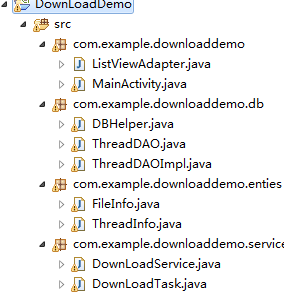
核心類是 DownLoadService 與 DownLoadTask。
public class DownLoadService extends Service {

    public static final String DOWN_PATH = Environment
            .getExternalStorageDirectory().getAbsolutePath() + "/downloads";

    public static final String ACTION_START  = "ACTION_START";
    public static final String ACTION_STOP   = "ACTION_STOP";
    public static final String ACTION_FINISH = "ACTION_FINISH";
    public static final String ACTION_UPDATE = "ACTION_UPDATE";
    public static final int MSG_INIT = 0;

    private Map<Integer, DownLoadTask> mTasks = new LinkedHashMap<>();

    @Override
    public int onStartCommand(Intent intent, int flags, int startId) {
        if (ACTION_START.equals(intent.getAction())) {
            FileInfo fileinfo = (FileInfo) intent.getSerializableExtra("fileinfo");
            DownLoadTask.sExecutorService.execute(new InitThread(fileinfo));
        } else if (ACTION_STOP.equals(intent.getAction())) {
            FileInfo fileinfo = (FileInfo) intent.getSerializableExtra("fileinfo");
            DownLoadTask task = mTasks.get(fileinfo.getId());
            if (task != null) {
                task.isPause = true;   // 通知各執行緒保存進度並退出
            }
        }
        return super.onStartCommand(intent, flags, startId);
    }

    @Override
    public IBinder onBind(Intent arg0) {
        return null;
    }

    Handler mHandler = new Handler() {
        public void handleMessage(android.os.Message msg) {
            switch (msg.what) {
                case MSG_INIT:
                    FileInfo info = (FileInfo) msg.obj;
                    // 預設開三個執行緒下載
                    DownLoadTask task = new DownLoadTask(DownLoadService.this, info, 3);
                    task.downLoad();
                    mTasks.put(info.getId(), task);
                    break;
                default:
                    break;
            }
        }
    };

    /** 初始化子執行緒:先探測檔案大小,並在本地建立佔位檔案 */
    class InitThread extends Thread {
        private FileInfo mfileInfo = null;

        public InitThread(FileInfo mfileInfo) {
            this.mfileInfo = mfileInfo;
        }

        @Override
        public void run() {
            HttpURLConnection conn = null;
            RandomAccessFile raf = null;
            try {
                URL url = new URL(mfileInfo.getUrl());
                conn = (HttpURLConnection) url.openConnection();
                conn.setConnectTimeout(3000);
                conn.setRequestMethod("GET");
                int length = -1;
                if (conn.getResponseCode() == HttpStatus.SC_OK) {
                    length = conn.getContentLength();
                }
                if (length <= 0) {
                    return;
                }
                File dir = new File(DOWN_PATH);
                if (!dir.exists()) {
                    dir.mkdir();
                }
                File file = new File(dir, mfileInfo.getFileName());
                // RandomAccessFile 可以隨意寫入任意位置
                raf = new RandomAccessFile(file, "rwd");
                raf.setLength(length);          // 預先佔位,這是續傳的前提
                mfileInfo.setLength(length);
                mHandler.obtainMessage(MSG_INIT, mfileInfo).sendToTarget();
            } catch (Exception e) {
                e.printStackTrace();
            } finally {
                try {
                    if (raf != null) raf.close();
                    if (conn != null) conn.disconnect();
                } catch (Exception e) {
                    e.printStackTrace();
                }
            }
            super.run();
        }
    }
}
public class DownLoadTask {

    private Context mContext = null;
    private FileInfo mFileInfo = null;
    private ThreadDAO mDao = null;
    private int mfinished = 0;
    public boolean isPause = false;
    private int threadCount = 1;
    private List<DownLoad> mThreadList = null;

    // 快取型執行緒池:適合執行生命週期短的非同步任務
    public static ExecutorService sExecutorService = Executors.newCachedThreadPool();

    public DownLoadTask(Context mContext, FileInfo mFileInfo, int threadCount) {
        this.mContext = mContext;
        this.mFileInfo = mFileInfo;
        this.threadCount = threadCount;
        mDao = new ThreadDAOImpl(mContext);
    }

    public void downLoad() {
        // 先從資料庫讀取已保存的執行緒資訊
        List<ThreadInfo> mThreadInfos = mDao.getThreads(mFileInfo.getUrl());
        if (mThreadInfos.size() == 0) {
            int length = mFileInfo.getLength() / threadCount;
            for (int i = 0; i < threadCount; i++) {
                ThreadInfo threadInfo = new ThreadInfo(
                        i, mFileInfo.getUrl(), i * length, (i + 1) * length, 0);
                if (i == threadCount - 1) {
                    threadInfo.setEnd(mFileInfo.getLength());   // 最後一段吃掉餘數
                }
                mThreadInfos.add(threadInfo);
                mDao.insertThread(threadInfo);
            }
        }
        mThreadList = new ArrayList<>();
        for (ThreadInfo info : mThreadInfos) {
            DownLoad download = new DownLoad(info);
            DownLoadTask.sExecutorService.execute(download);
            mThreadList.add(download);
        }
    }

    /** 判斷所有分段是否都下載完成 */
    private synchronized void checkAllThreadsFinished() {
        boolean allFinished = true;
        for (DownLoad download : mThreadList) {
            if (!download.isfinished) {
                allFinished = false;
                break;
            }
        }
        if (allFinished) {
            mDao.deleteThread(mFileInfo.getUrl());   // 完成後清理記錄
            Intent intent = new Intent(DownLoadService.ACTION_FINISH);
            intent.putExtra("fileInfo", mFileInfo);
            mContext.sendBroadcast(intent);
        }
    }

    class DownLoad extends Thread {
        private ThreadInfo mThreadInfo = null;
        public boolean isfinished = false;

        public DownLoad(ThreadInfo mThreadInfo) {
            this.mThreadInfo = mThreadInfo;
        }

        @Override
        public void run() {
            HttpURLConnection conn = null;
            RandomAccessFile raf = null;
            InputStream ins = null;
            try {
                URL url = new URL(mThreadInfo.getUrl());
                conn = (HttpURLConnection) url.openConnection();
                conn.setConnectTimeout(3000);
                conn.setRequestMethod("GET");

                // 已下載的長度 + 段起點 = 續傳位置
                int start = mThreadInfo.getStart() + mThreadInfo.getFinished();
                conn.setRequestProperty("Range", "bytes=" + start + "-" + mThreadInfo.getEnd());

                File file = new File(DownLoadService.DOWN_PATH, mFileInfo.getFileName());
                raf = new RandomAccessFile(file, "rwd");
                raf.seek(start);   // 移到指定位置寫入

                Intent intent = new Intent(DownLoadService.ACTION_UPDATE);
                mfinished += mThreadInfo.getFinished();

                if (conn.getResponseCode() == HttpStatus.SC_PARTIAL_CONTENT) {
                    ins = conn.getInputStream();
                    byte[] buffer = new byte[1024 * 4];
                    int length = -1;
                    long time = System.currentTimeMillis();
                    while ((length = ins.read(buffer)) != -1) {
                        raf.write(buffer, 0, length);
                        mfinished += length;
                        mThreadInfo.setFinished(mThreadInfo.getFinished() + length);
                        // 每秒發一次廣播更新進度,避免過度刷新 UI
                        if (System.currentTimeMillis() - time > 1000) {
                            time = System.currentTimeMillis();
                            intent.putExtra("finished", mfinished * 100 / mFileInfo.getLength());
                            intent.putExtra("id", mFileInfo.getId());
                            mContext.sendBroadcast(intent);
                        }
                        // 暫停:保存進度後退出
                        if (isPause) {
                            mDao.updateThread(mThreadInfo.getUrl(),
                                    mThreadInfo.getId(), mThreadInfo.getFinished());
                            return;
                        }
                    }
                    isfinished = true;
                    checkAllThreadsFinished();
                }
            } catch (Exception e) {
                e.printStackTrace();
            } finally {
                try {
                    if (conn != null) conn.disconnect();
                    if (ins != null) ins.close();
                    if (raf != null) raf.close();
                } catch (Exception e) {
                    e.printStackTrace();
                }
            }
            super.run();
        }
    }
}
寫之前我最大的疑問是:多個執行緒同時下載同一個檔案,寫出來的資料該怎麼拼回去?翻過 Java API 之後,答案是 RandomAccessFile——它能定位到任意偏移量寫入,拼接問題自然不存在。
Service 取得檔案總長度後,先在儲存位置建立檔案並用 setLength 預先佔位:
raf = new RandomAccessFile(file, "rwd");
raf.setLength(length);        // 先開好完整的空間
mfileInfo.setLength(length);
示意圖說明就很清楚了:
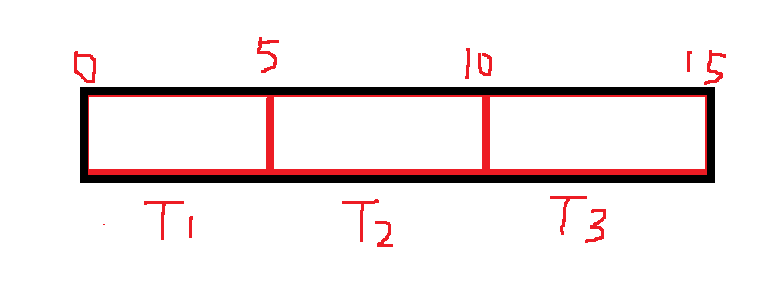
T1 下載 0–5,T2 下載 6–10,T3 下載 11–15,各自 seek 到自己的起始位置寫入即可,完全不衝突。
另外一個實務細節:寫入時每讀滿 4KB 就累加進度,但發廣播更新 UI 的頻率限制在每秒一次。若每個 buffer 都發廣播,主執行緒會被大量訊息淹沒,反而造成掉幀。
線程管理則交給 Executors.newCachedThreadPool():它會先嘗試重用閒置 60 秒以內的既有線程,適合執行這類生命週期短的非同步任務。
 Android ValueAnimator 源碼淺析
ValueAnimator 的作用 屬性動畫常用 ValueAnimator 產生連續數值變化,再由更新監聽器把數值套用到目標屬性。它本身不直接操作 View,而是負責計
 Android 線程池完全解析:調度原理、參數含義與實務封裝
一、線程到底是怎麼跑的 很多人對「多線程」有個誤會,以為開了十個線程就真的十件事同時在跑。真實情況要分兩種: 單核 CPU 在同一瞬間只能執行一個線程;多核 CPU 才能
 Android ListView 多種用法詳解:從 ArrayAdapter 到自訂 MyAdapter
在 Android 開發中,ListView 是我們最常使用的視圖之一。本文系統地介紹 ListView 的多種使用方式,從最簡單的 ArrayAdapter 一直到靈活
 Android 基礎(七):清單文件、Intent、生命周期與啟動模式
一、清單文件 AndroidManifest.xml 每個 Android 應用都需要一個名為 AndroidManifest.xml 的清單文件,固定放在應用根目錄下。