

編輯:關於 Android 程式設計
一、PagerSlidingTabStrip 的運用
扣丁音樂 1.0 前半段(受限於 gif 大小)演示:
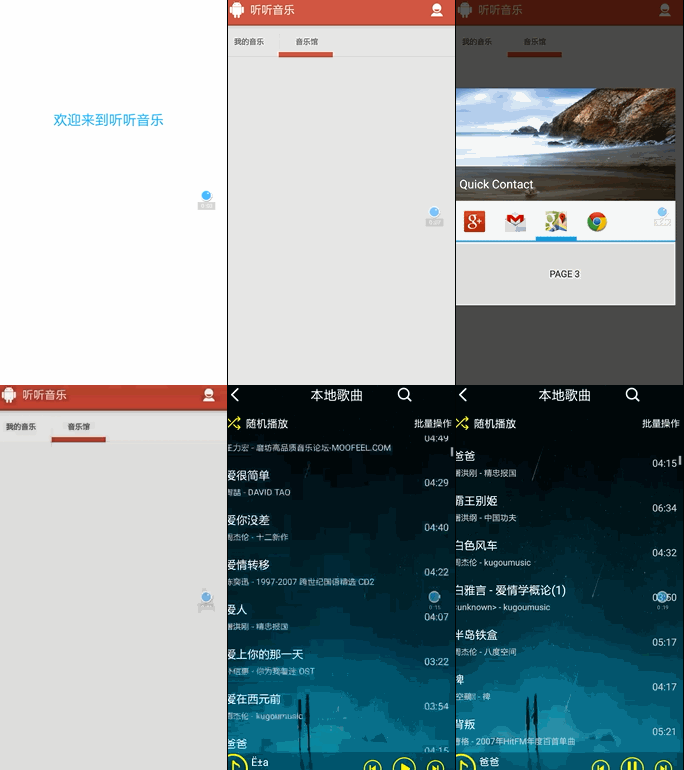
影片教學中直接沿用 PagerSlidingTabStrip 範例的主頁面,並針對用到的部分做出修改。
修改一:activity_main.xml 僅保留以下內容,其餘控件刪除。
 <com.astuetz.pagerslidingtabstrip
    android:id="@+id/tabs" android:layout_width="match_parent"
    android:layout_height="48dip" android:background="@drawable/background_tabs">
<android.support.v4.view.viewpager
    android:id="@+id/pager" android:layout_width="match_parent"
    android:layout_height="wrap_content" android:layout_below="@+id/tabs"
    tools:context=".MainActivity"></android.support.v4.view.viewpager>
</com.astuetz.pagerslidingtabstrip>
修改二:MainActivity.java
預設顏色:
private int currentColor = 0xFFC74B46;
滑動項名稱:
private final String[] TITLES = { "我的音樂", "音樂館" };
滑動 Fragment 的相關加載:
@Override public Fragment getItem(int position) { if(position==0){ if(myMusicFragment==null){ myMusicFragment = MyMusicFragment.newInstance(); } return myMusicFragment; }else if(position==1){ if(netMusicFragment==null){ netMusicFragment = NetMusicFragment.newInstance(); } return netMusicFragment; } return null; }
二、MyMusicFragment
從演示可以看到,「我的」頁面比影片多了個跳轉頁,歌曲加載並非在 MyMusicFragment 中實現,而是透過點擊跳轉,其實就是多了一個頁面。
MyMusicFragment.xml:
 <relativelayout xmlns:android="https://schemas.android.com/apk/res/android"
    android:layout_width="match_parent" android:layout_height="match_parent"
    android:background="@drawable/skin2">
    <relativelayout android:layout_width="wrap_content"
        android:layout_height="wrap_content" android:layout_marginTop="10dp"
        android:background="#10ffffff">
        <linearlayout android:id="@+id/four_module"
            android:layout_width="match_parent" android:layout_height="wrap_content"
            android:layout_marginTop="20dp" android:layout_marginBottom="20dp"
            android:orientation="horizontal">
            <!-- 本地歌曲、已下載、最近播放、設定四個模組 -->
        </linearlayout>
    </relativelayout>
</relativelayout>
MyMusicFragment.java:
 public class MyMusicFragment extends Fragment implements View.OnClickListener{
    private LinearLayout layout_local_songs;
    private MainActivity mainActivity;

    public static MyMusicFragment newInstance(){
        MyMusicFragment myMusicFragment = new MyMusicFragment();
        return myMusicFragment;
    }

    @Override public View onCreateView(LayoutInflater inflater, ViewGroup container, Bundle savedInstanceState) {
        View view = inflater.inflate(R.layout.my_music_fragment, null);
        layout_local_songs = (LinearLayout) view.findViewById(R.id.ll_local_songs);
        layout_local_songs.setOnClickListener(this);
        return view;
    }

    @Override public void onClick(View view) {
        switch (view.getId()) {
            case R.id.ll_local_songs:
                Intent intent = new Intent(getActivity(), LocalSongsActivity.class);
                startActivity(intent);
                break;
        }
    }
}
由於目前只實現了這些功能,畫面上的數據暫時是虛擬的,僅完成了對本地音樂列表的跳轉。
 Android 仿微信手勢滑動退出 Activity 實作
微信那種「從左側邊緣往右拖,當前頁面跟著手指移開、露出背後的上一頁」的交互,是很多人想模仿的效果。先看成果: 原理 &
 Android 安全機制七大支柱完全解析
Android 之所以能在開放的前提下維持相對可控的安全邊界,靠的不是單一防線,而是多層機制疊加出來的縱深防禦。從安裝那一刻的沙箱隔離,到執行期的大小配件檢查,再到核心層
 Fragment 狀態保存的三大坑與 StatedFragment 通用解決方案
和 Activity 一樣,Fragment 也有 onSaveInstanceState() 回調。但實踐中會發現,這個方法在 Fragment 上「非常不靠譜」:屏幕
 安卓開發之 ViewDragHelper 使用大全,並自定義可下拉展開內容的 ViewGroup
一、ViewDragHelper 一個自定義 ViewGroup 的工具類,它提供了許多有用的方法和狀態,允許用戶去拖拽並繪製子 View 在自定義 ViewGroup