

編輯:關於 Android 程式設計
Android 開發的本質,很大程度上就是手機與遠端伺服器之間的資料往返。反覆透過網路取資料的代價很高,一旦請求頻繁,效能與流量都會同時惡化。
解法是引入二級緩存,讓常用資料留在本地,減少不必要的網路往返。
以載入網路圖片為例,取資料時依序嘗試:先查記憶體,命中就直接用;沒命中再查磁碟檔案或 SQLite;兩者皆無才發請求。拿到網路資料後,一方面以 key-value 形式存入記憶體(一級緩存),另一方面落地到檔案或資料庫(二級緩存)。
這裡有個實務上必須牢記的約束:記憶體會造成堆積洩漏風險,一級緩存必須嚴格控制容量,一般建議不超過可用記憶體的四分之一,並搭配 LRU 淘汰策略。
合理的疑問:網路資料是變動的,一旦快取之後永遠讀舊資料,不就失去意義了?
做法是在寫入時附加有效期限,例如三十分鐘。超過期限即視為失效,釋放空間並重新請求網路。至於「三十分鐘內資料變了怎麼辦」——那屬於即時性需求,交給下拉刷新處理即可,不是緩存該負責的事。
ACache 是為 Android 設計的輕量級開源緩存框架,輕到幾乎只有一個 java 檔(由十幾個類精簡而來)。
普通字串、JSON、可序列化的 Java 物件,以及位元組陣列。此外也提供了 Bitmap 與 Drawable 的便捷轉換。
1. 極輕——只有一個 java 檔,直接複製進專案即可,沒有第三方相依
2. 可配置——緩存路徑、容量上限、數量上限都能自訂
3. 支援超時——可為每筆資料設定存活秒數,逾時自動失效並刪除
4. 多行程支援——快取路徑會附加 pid,避免多行程互相干擾
ACache aCache = ACache.get(context);
// 或自訂容量與數量
ACache aCache = ACache.get(context, max_size, max_count);
參數說明:
max_size:容量上限,預設 50 MB
max_count:數量上限,預設不限制
aCache.put(key, data, time);
aCache.put(key, data);
一次寫入會同時落到一級緩存(記憶體 Map)與二級緩存(檔案)。
參數說明:
key:唯一識別碼,讀取時據此定位
data:要存的內容,支援 String、可序列化物件、位元組陣列、Bitmap、Drawable、JSONObject、JSONArray
time:存活秒數,省略則永久保存
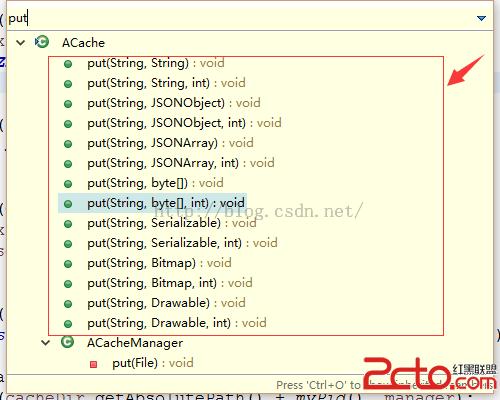
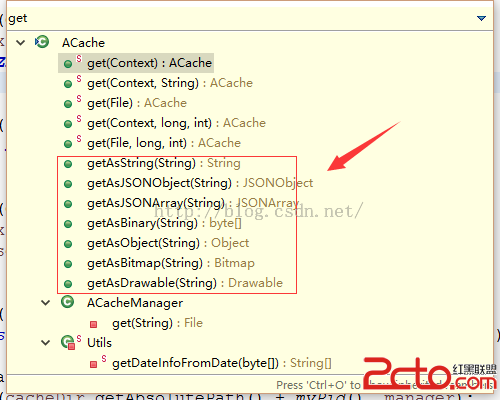
對應每種型別都有一組 getAsXXX() 方法,依寫入時的型別呼叫即可。
整個框架的設計重點在 ACacheManager:它用兩個原子計數器追蹤目前的快取大小與數量,並以「最後使用時間」的 Map 實作 LRU 淘汰。
public class ACacheManager {

    private final AtomicLong cacheSize;
    private final AtomicInteger cacheCount;
    private final long sizeLimit;
    private final int countLimit;
    private final Map<File, Long> lastUsageDates =
            Collections.synchronizedMap(new HashMap<File, Long>());

    /** 啟動時在子線程統計既有快取,避免拖慢呼叫端 */
    private void calculateCacheSizeAndCacheCount() {
        new Thread(new Runnable() {
            @Override
            public void run() {
                int size = 0;
                int count = 0;
                File[] cachedFiles = cacheDir.listFiles();
                if (cachedFiles != null) {
                    for (File cachedFile : cachedFiles) {
                        size += calculateSize(cachedFile);
                        count += 1;
                        lastUsageDates.put(cachedFile, cachedFile.lastModified());
                    }
                    cacheSize.set(size);
                    cacheCount.set(count);
                }
            }
        }).start();
    }

    /** 寫入後檢查是否超出上限,超出則淘汰最久未用的檔案 */
    private void put(File file) {
        int curCacheCount = cacheCount.get();
        while (curCacheCount + 1 > countLimit) {
            long freedSize = removeNext();
            cacheSize.addAndGet(-freedSize);
            curCacheCount = cacheCount.addAndGet(-1);
        }
        cacheCount.addAndGet(1);

        long valueSize = calculateSize(file);
        long curCacheSize = cacheSize.get();
        while (curCacheSize + valueSize > sizeLimit) {
            long freedSize = removeNext();
            curCacheSize = cacheSize.addAndGet(-freedSize);
        }
        cacheSize.addAndGet(valueSize);

        Long currentTime = System.currentTimeMillis();
        file.setLastModified(currentTime);
        lastUsageDates.put(file, currentTime);
    }

    /** 讀取時更新最後使用時間,這是 LRU 得以成立的關鍵 */
    private File get(String key) {
        File file = newFile(key);
        Long currentTime = System.currentTimeMillis();
        file.setLastModified(currentTime);
        lastUsageDates.put(file, currentTime);
        return file;
    }

    /** 找出最久未被存取的檔案並刪除 */
    private long removeNext() {
        if (lastUsageDates.isEmpty()) {
            return 0;
        }
        Long oldestUsage = null;
        File mostLongUsedFile = null;
        Set<Entry<File, Long>> entries = lastUsageDates.entrySet();
        synchronized (lastUsageDates) {
            for (Entry<File, Long> entry : entries) {
                if (mostLongUsedFile == null) {
                    mostLongUsedFile = entry.getKey();
                    oldestUsage = entry.getValue();
                } else {
                    Long lastValueUsage = entry.getValue();
                    if (lastValueUsage < oldestUsage) {
                        oldestUsage = lastValueUsage;
                        mostLongUsedFile = entry.getKey();
                    }
                }
            }
        }
        long fileSize = calculateSize(mostLongUsedFile);
        if (mostLongUsedFile.delete()) {
            lastUsageDates.remove(mostLongUsedFile);
        }
        return fileSize;
    }
}
過期判斷的做法相當巧妙:寫入時把「時間戳 + 時限 + 分隔符」當前綴拼在資料前面,讀取時只需檢查前綴即可判定是否過期,不必額外維護索引檔。
/** 判斷快取是否已過期 */
private static boolean isDue(byte[] data) {
    String[] strs = getDateInfoFromDate(data);
    if (strs != null && strs.length == 2) {
        String saveTimeStr = strs[0];
        while (saveTimeStr.startsWith("0")) {
            saveTimeStr = saveTimeStr.substring(1, saveTimeStr.length());
        }
        long saveTime = Long.valueOf(saveTimeStr);
        long deleteAfter = Long.valueOf(strs[1]);
        if (System.currentTimeMillis() > saveTime + deleteAfter * 1000) {
            return true;
        }
    }
    return false;
}

private static String createDateInfo(int second) {
    String currentTime = System.currentTimeMillis() + "";
    while (currentTime.length() < 13) {
        currentTime = "0" + currentTime;
    }
    return currentTime + "-" + second + mSeparator;
}
Bitmap 與 Drawable 之間的轉換則靠 ByteArrayOutputStream 與 Canvas 完成:
private static byte[] Bitmap2Bytes(Bitmap bm) {
    if (bm == null) {
        return null;
    }
    ByteArrayOutputStream baos = new ByteArrayOutputStream();
    bm.compress(Bitmap.CompressFormat.PNG, 100, baos);
    return baos.toByteArray();
}

private static Bitmap drawable2Bitmap(Drawable drawable) {
    if (drawable == null) {
        return null;
    }
    int w = drawable.getIntrinsicWidth();
    int h = drawable.getIntrinsicHeight();
    Bitmap.Config config = drawable.getOpacity() != PixelFormat.OPAQUE
            ? Bitmap.Config.ARGB_8888 : Bitmap.Config.RGB_565;
    Bitmap bitmap = Bitmap.createBitmap(w, h, config);
    Canvas canvas = new Canvas(bitmap);
    drawable.setBounds(0, 0, w, h);
    drawable.draw(canvas);
    return bitmap;
}
下面的 Activity 示範「先讀快取、沒有才請求網路、寫入後逾時自動失效」的完整流程:
public class MainActivity extends Activity {

    private ACache aCache;
    private TextView mTextView;

    private Handler mHandler = new Handler() {
        public void handleMessage(Message msg) {
            if (msg.what == 1) {
                mTextView.setText("開始保存");
            } else if (msg.what == 2) {
                initDate();
            } else {
                if (aCache.getAsString("newText") == null) {
                    mTextView.setText("快取已失效,需重新載入");
                }
            }
        }
    };

    @Override
    protected void onCreate(Bundle savedInstanceState) {
        super.onCreate(savedInstanceState);
        setContentView(R.layout.activity_main);
        mTextView = (TextView) findViewById(R.id.list);
        initAcache();
        initDate();
    }

    private void initDate() {
        String cacheData = aCache.getAsString("newText");
        if (cacheData != null) {
            mTextView.setText(cacheData);          // 命中快取,直接顯示
        } else {
            // 模擬一次網路請求
            new Thread(new Runnable() {
                @Override
                public void run() {
                    SystemClock.sleep(1000);
                    aCache.put("newText", "保存 3 秒", 3);   // 存活時間設為 3 秒
                    mHandler.sendEmptyMessage(1);
                    mHandler.sendEmptyMessageDelayed(2, 1000);   // 1 秒後驗證:仍在有效期
                    mHandler.sendEmptyMessageDelayed(3, 4000);   // 4 秒後驗證:已失效
                }
            }).start();
        }
    }

    private void initAcache() {
        // 預設路徑為 new File(context.getCacheDir(), "ACache")
        aCache = ACache.get(this);
    }
}
ACache 的優勢是零相依、API 直觀、適合中小型專案快速接入,尤其適合快取設定檔、列表 JSON、小圖與使用者資訊這類資料。
但如果你的情境涉及大量圖片快取、需要精細的磁碟快取策略、或要在協程與非同步框架下操作,那麼更合適的選擇是成熟方案:網路層用 OkHttp 內建的磁碟快取、圖片用 Glide 或 Coil、需要結構化持久化則考慮 Room 或 DataStore。這些方案在執行緒安全、記憶體控制與生命週期整合上都更完善。
理解 ACache 的實作價值,其實不在於「用它」,而在於它把二級緩存的最小可行設計攤開在你面前:一個檔案一個 key、時間戳前綴管理過期、原子計數器加 LRU 控制容量。把這三件事想通,換成任何框架你都能判斷它做得好不好。
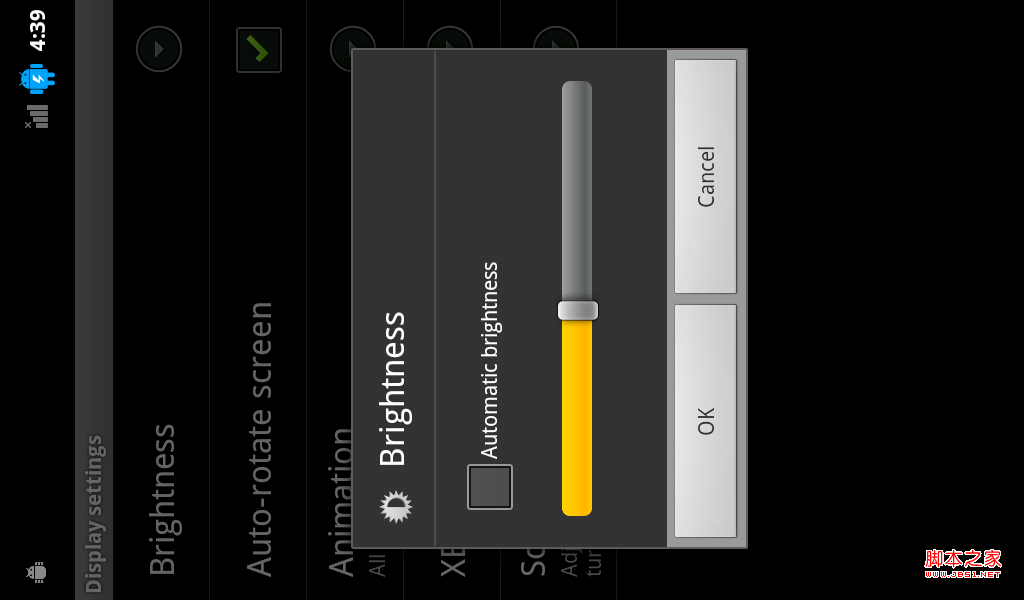 Android 螢幕亮度自動調節流程解析
Android 的螢幕亮度自動調節,核心在於光線感測器與系統設定檔的配合。當使用者開啟自動亮度後,系統會依環境光線动态调整背光。 在設定層面,BrightnessPref
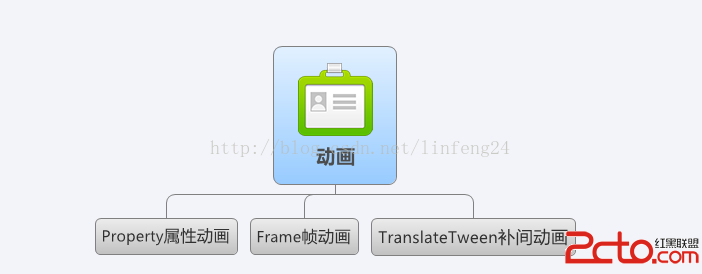 Android 屬性動畫入門:ObjectAnimator 與自定義屬性
動畫分類Android 動畫大致可分為補間動畫、逐幀動畫與屬性動畫。屬性動畫從 Android 3.0 後成為官方方案,能直接操作物件屬性,靈活度較高。XML 與 Act
 Android Notification 通知機制完整用法詳解
本文以實例完整講解 Android 中 Notification 的用法,供需要的朋友參考。 Notification 就是「通知」的意思。在 Android 裡,它指的
 自定義View打造Android柱狀圖:橫向、縱向與比例圖三合一
做專案的時候需要一種簡單的橫向柱狀圖,翻了不少現成框架卻總覺得不合手,最後索性自己寫了一個自定義 View,順手把三種常見的柱狀圖形態都封裝進去了。 先看成果 第一種是