

編輯:關於 Android 程式設計
圖1、藍色的進度條

圖2、紅色的進度條

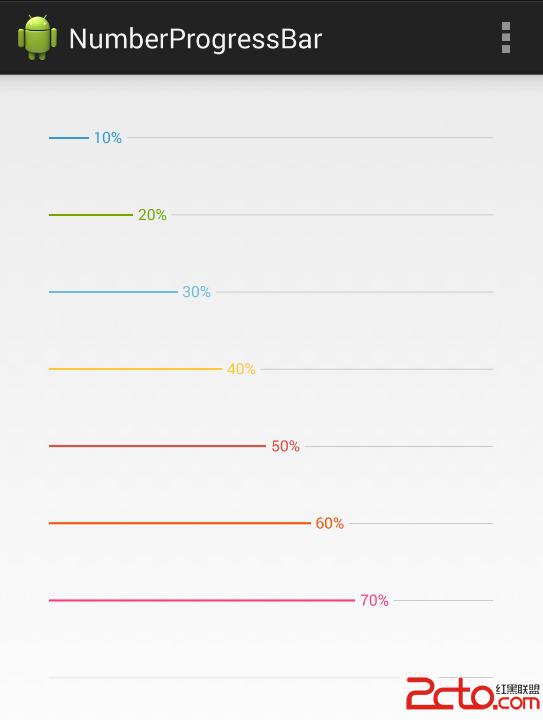
圖3、多條顏色不同的進度條
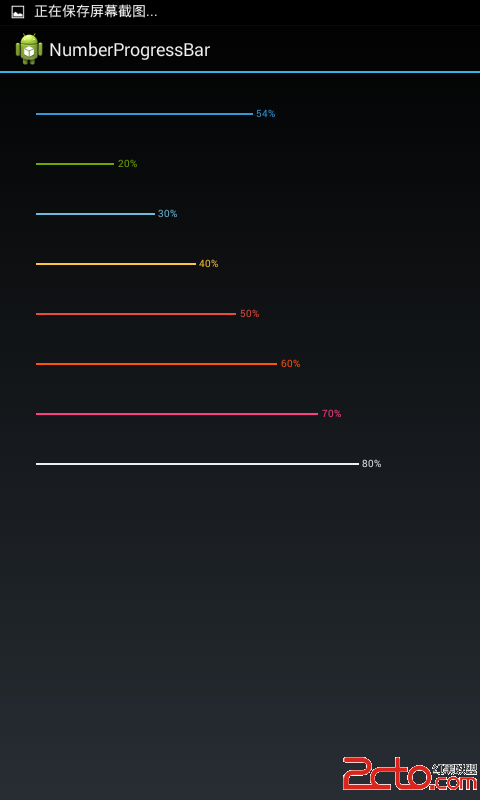
圖4、多條顏色不同的進度條
版權聲明:本文為【歐陽鵬】原創文章,歡迎轉載,轉載請注明出處! 【https://blog.csdn.net/ouyang_peng/article/details/50859094】

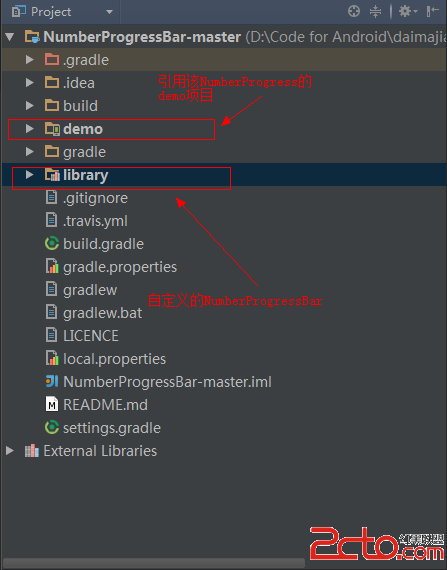
如上圖所示:library 項目是帶數字進度條 NumberProgressBar 的具體實現,demo 項目則是示例工程,以工程依賴的方式引用 library,並用它來展示自定義進度條的效果。
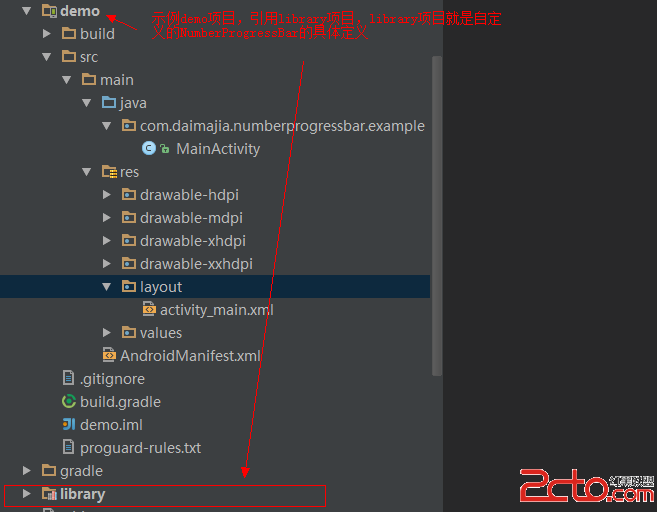
如上圖所示:自定義帶數字進度條的 library 項目結構圖
如上面幾幅圖形所示,這個進度條可以拆分成三個部分:

按照上面的分析,要實現帶數字的進度條,只需按三個步驟繪製即可:
1、繪製 reached area(當前進度值之前文本的進度條)
2、繪製 text area(當前進度值文本)
3、繪製 unreached area(當前進度值文本之後的進度條)即可。
我們注意到,這三個部分的顏色、字體大小、進度條最大值、長方形高度等屬性都可以調整,從而呈現出不同的界面效果。
因此我們把這些屬性都做成自定義屬性,這樣就能像 Android 官方提供的那些組件一樣,直接用 XML 來配置它們了。
在 res/values 目錄下新建一個 attrs.xml 文件,代碼如下所示:
同樣在 res/values 目錄下新建一個 styles.xml 文件,裡面預置了一些主題樣式,方便使用者直接挑選。代碼如下所示:
核心的自定義 View 代碼如下:
package com.daimajia.numberprogressbar; import android.content.Context; import android.content.res.TypedArray; import android.graphics.Canvas; import android.graphics.Color; import android.graphics.Paint; import android.graphics.RectF; import android.os.Bundle; import android.os.Parcelable; import android.util.AttributeSet; import android.view.View; import static com.daimajia.numberprogressbar.NumberProgressBar.ProgressTextVisibility.Invisible; import static com.daimajia.numberprogressbar.NumberProgressBar.ProgressTextVisibility.Visible; /** * Created by daimajia on 14-4-30. */ public class NumberProgressBar extends View { /** * 進度值最大值 */ private int mMaxProgress = 100; /** * Current progress, can not exceed the max progress. * 當前進度值,不能超過進度值最大值 */ private int mCurrentProgress = 0; /** * The progress area bar color. * 當前進度值文本之前的進度條顏色 */ private int mReachedBarColor; /** * The bar unreached area color. * 當前進度值文本之後的進度條顏色 */ private int mUnreachedBarColor; /** * The progress text color. * 當前進度值文本的顏色 */ private int mTextColor; /** * The progress text size. * 當前進度值文本的字體大小 */ private float mTextSize; /** * The height of the reached area. * 當前進度值文本之前的進度條的高度 */ private float mReachedBarHeight; /** * The height of the unreached area. * 當前進度值文本之後的進度條的高度 */ private float mUnreachedBarHeight; /** * The suffix of the number. * 當前進度值的百分比後綴 */ private String mSuffix = "%"; /** * The prefix. * 當前進度值的百分比前綴 */ private String mPrefix = ""; //當前進度值文本的默認顏色 private final int default_text_color = Color.rgb(66, 145, 241); //當前進度值文本的字體大小 private final float default_text_size; //當前進度值之前的默認進度條顏色 private final int default_reached_color = Color.rgb(66, 145, 241); //當前進度值之後的默認進度條顏色 private final int default_unreached_color = Color.rgb(204, 204, 204); //當前進度值之前文本的默認間距 private final float default_progress_text_offset; //當前進度值文本之前的進度條的默認高度 private final float default_reached_bar_height; //當前進度值文本之後的進度條的默認高度 private final float default_unreached_bar_height; /** * For save and restore instance of progressbar. */ private static final String INSTANCE_STATE = "saved_instance"; private static final String INSTANCE_TEXT_COLOR = "text_color"; private static final String INSTANCE_TEXT_SIZE = "text_size"; private static final String INSTANCE_REACHED_BAR_HEIGHT = "reached_bar_height"; private static final String INSTANCE_REACHED_BAR_COLOR = "reached_bar_color"; private static final String INSTANCE_UNREACHED_BAR_HEIGHT = "unreached_bar_height"; private static final String INSTANCE_UNREACHED_BAR_COLOR = "unreached_bar_color"; private static final String INSTANCE_MAX = "max"; private static final String INSTANCE_PROGRESS = "progress"; private static final String INSTANCE_SUFFIX = "suffix"; private static final String INSTANCE_PREFIX = "prefix"; private static final String INSTANCE_TEXT_VISIBILITY = "text_visibility"; //默認顯示當前進度值文本 0為顯示,1為不顯示 private static final int PROGRESS_TEXT_VISIBLE = 0; /** * The width of the text that to be drawn. * 要繪制的當前進度值的文本的寬度 */ private float mDrawTextWidth; /** * The drawn text start. * 要繪制的當前進度值的文本的起始位置 */ private float mDrawTextStart; /** * The drawn text end. * 要繪制的當前進度值的文本的結束位置 */ private float mDrawTextEnd; /** * The text that to be drawn in onDraw(). * 要繪制的當前進度值的文本 */ private String mCurrentDrawText; /** * The Paint of the reached area. * 繪制當前進度值文本之前的進度條的畫筆 */ private Paint mReachedBarPaint; /** * The Paint of the unreached area. * 繪制當前進度值文本之後的進度條的畫筆 */ private Paint mUnreachedBarPaint; /** * The Paint of the progress text. * 繪制當前進度值文本的的畫筆 */ private Paint mTextPaint; /** * Unreached bar area to draw rect. * 當前進度值文本之後的進度條(長方形) */ private RectF mUnreachedRectF = new RectF(0, 0, 0, 0); /** * Reached bar area rect. * 當前進度值之前文本的進度條(長方形) */ private RectF mReachedRectF = new RectF(0, 0, 0, 0); /** * The progress text offset. * 當前進度值之前文本的間距 */ private float mOffset; /** * Determine if need to draw unreached area. * 是否繪制當前進度值之後的進度條 */ private boolean mDrawUnreachedBar = true; /** * 是否繪制當前進度值之前的進度條 */ private boolean mDrawReachedBar = true; /** * 是否繪制當前進度值文本 */ private boolean mIfDrawText = true; /** * Listener */ private OnProgressBarListener mListener; public enum ProgressTextVisibility { Visible, Invisible } public NumberProgressBar(Context context) { this(context, null); } public NumberProgressBar(Context context, AttributeSet attrs) { this(context, attrs, R.attr.numberProgressBarStyle); } public NumberProgressBar(Context context, AttributeSet attrs, int defStyleAttr) { super(context, attrs, defStyleAttr); default_reached_bar_height = dp2px(1.5f); default_unreached_bar_height = dp2px(1.0f); default_text_size = sp2px(10); default_progress_text_offset = dp2px(3.0f); //獲取自定義屬性 final TypedArray attributes = context.getTheme().obtainStyledAttributes(attrs, R.styleable.NumberProgressBar, defStyleAttr, 0); mReachedBarColor = attributes.getColor(R.styleable.NumberProgressBar_progress_reached_color, default_reached_color); mUnreachedBarColor = attributes.getColor(R.styleable.NumberProgressBar_progress_unreached_color, default_unreached_color); mTextColor = attributes.getColor(R.styleable.NumberProgressBar_progress_text_color, default_text_color); mTextSize = attributes.getDimension(R.styleable.NumberProgressBar_progress_text_size, default_text_size); mReachedBarHeight = attributes.getDimension(R.styleable.NumberProgressBar_progress_reached_bar_height, default_reached_bar_height); mUnreachedBarHeight = attributes.getDimension(R.styleable.NumberProgressBar_progress_unreached_bar_height, default_unreached_bar_height); mOffset = attributes.getDimension(R.styleable.NumberProgressBar_progress_text_offset, default_progress_text_offset); int textVisible = attributes.getInt(R.styleable.NumberProgressBar_progress_text_visibility, PROGRESS_TEXT_VISIBLE); if (textVisible != PROGRESS_TEXT_VISIBLE) { mIfDrawText = false; } setProgress(attributes.getInt(R.styleable.NumberProgressBar_progress_current, 0)); setMax(attributes.getInt(R.styleable.NumberProgressBar_progress_max, 100)); //回收 TypedArray,用於後續調用時可復用之。回收到TypedArrayPool池中,以備後用 attributes.recycle(); initializePainters(); } @Override protected int getSuggestedMinimumWidth() { return (int) mTextSize; } @Override protected int getSuggestedMinimumHeight() { return Math.max((int) mTextSize, Math.max((int) mReachedBarHeight, (int) mUnreachedBarHeight)); } @Override protected void onMeasure(int widthMeasureSpec, int heightMeasureSpec) { /** * MeasureSpec參數的值為int型,分為高32位和低16為, * 高32位保存的是specMode,低16位表示specSize, * * specMode分三種: 1、MeasureSpec.UNSPECIFIED,父視圖不對子視圖施加任何限制,子視圖可以得到任意想要的大小; 2、MeasureSpec.EXACTLY,父視圖希望子視圖的大小是specSize中指定的大小; 3、MeasureSpec.AT_MOST,子視圖的大小最多是specSize中的大小。 */ setMeasuredDimension(measure(widthMeasureSpec, true), measure(heightMeasureSpec, false)); } private int measure(int measureSpec, boolean isWidth) { int result; int mode = MeasureSpec.getMode(measureSpec); int size = MeasureSpec.getSize(measureSpec); int padding = isWidth ? getPaddingLeft() + getPaddingRight() : getPaddingTop() + getPaddingBottom(); /** 父決定子的確切大小,子被限定在給定的邊界裡,忽略本身想要的大小。 (當設置width或height為match_parent時,模式為EXACTLY,因為子view會占據剩余容器的空間,所以它大小是確定的) */ if (mode == MeasureSpec.EXACTLY) { result = size; } else { result = isWidth ? getSuggestedMinimumWidth() : getSuggestedMinimumHeight(); result += padding; /** *子最大可以達到的指定大小 * (當設置為wrap_content時,模式為AT_MOST, 表示子view的大小最多是多少,這樣子view會根據這個上限來設置自己的尺寸) */ if (mode == MeasureSpec.AT_MOST) { if (isWidth) { result = Math.max(result, size); } else { result = Math.min(result, size); } } } return result; } @Override protected void onDraw(Canvas canvas) { //如果要繪制當前進度值文本 if (mIfDrawText) { calculateDrawRectF(); }else { calculateDrawRectFWithoutProgressText(); } //如果要繪制當前進度值之前的進度條 if (mDrawReachedBar) { canvas.drawRect(mReachedRectF, mReachedBarPaint); } //如果要繪制當前進度值之後的進度條 if (mDrawUnreachedBar) { canvas.drawRect(mUnreachedRectF, mUnreachedBarPaint); } //繪制當前進度值文本 if (mIfDrawText) canvas.drawText(mCurrentDrawText, mDrawTextStart, mDrawTextEnd, mTextPaint); } /** * 初始化畫筆 */ private void initializePainters() { mReachedBarPaint = new Paint(Paint.ANTI_ALIAS_FLAG); mReachedBarPaint.setColor(mReachedBarColor); mUnreachedBarPaint = new Paint(Paint.ANTI_ALIAS_FLAG); mUnreachedBarPaint.setColor(mUnreachedBarColor); mTextPaint = new Paint(Paint.ANTI_ALIAS_FLAG); mTextPaint.setColor(mTextColor); mTextPaint.setTextSize(mTextSize); } /** * 計算不要繪制當前進度值文本時 圖形的各個屬性 */ private void calculateDrawRectFWithoutProgressText() { //當前進度值不畫 //當前進度值之前的進度條(長方形)的屬性 mReachedRectF.left = getPaddingLeft(); mReachedRectF.top = getHeight() / 2.0f - mReachedBarHeight / 2.0f; mReachedRectF.right = (getWidth() - getPaddingLeft() - getPaddingRight()) / (getMax() * 1.0f) * getProgress() + getPaddingLeft(); mReachedRectF.bottom = getHeight() / 2.0f + mReachedBarHeight / 2.0f; //當前進度值之後的進度條(長方形)的屬性 mUnreachedRectF.left = mReachedRectF.right; mUnreachedRectF.right = getWidth() - getPaddingRight(); mUnreachedRectF.top = getHeight() / 2.0f + -mUnreachedBarHeight / 2.0f; mUnreachedRectF.bottom = getHeight() / 2.0f + mUnreachedBarHeight / 2.0f; } /** * 計算要繪制當前進度值文本時 圖形的各個屬性 */ private void calculateDrawRectF() { //要繪制的當前進度值的文本 mCurrentDrawText = String.format("%d", getProgress() * 100 / getMax()); mCurrentDrawText = mPrefix + mCurrentDrawText + mSuffix; //要繪制的當前進度值的文本的寬度 mDrawTextWidth = mTextPaint.measureText(mCurrentDrawText); //如果當前進度值為0,則不繪制當前進度值之前的進度條 if (getProgress() == 0) { mDrawReachedBar = false; mDrawTextStart = getPaddingLeft(); } //否則繪制當前進度值文本之前的進度條 else { mDrawReachedBar = true; //當前進度值文本之前的進度條(長方形)的屬性 mReachedRectF.left = getPaddingLeft(); mReachedRectF.top = getHeight() / 2.0f - mReachedBarHeight / 2.0f; mReachedRectF.right= (getWidth() - getPaddingLeft() - getPaddingRight()) / (getMax() * 1.0f) * getProgress() - mOffset + getPaddingLeft(); mReachedRectF.bottom = getHeight() / 2.0f + mReachedBarHeight / 2.0f; //當前進度值的文本的起始位置 mDrawTextStart = (mReachedRectF.right + mOffset); } //當前進度值的文本的結束位置 mDrawTextEnd = (int) ((getHeight() / 2.0f) - ((mTextPaint.descent() + mTextPaint.ascent()) / 2.0f)); //如果畫不下當前進度值的文本了,就重新計算下當前進度值的文本的起始位置和當前進度值之前的進度條(長方形)的右邊 if ((mDrawTextStart + mDrawTextWidth) >= getWidth() - getPaddingRight()) { mDrawTextStart = getWidth() - getPaddingRight() - mDrawTextWidth; mReachedRectF.right = mDrawTextStart - mOffset; } //當前進度值文本之後的進度條的起始位置 float unreachedBarStart = mDrawTextStart + mDrawTextWidth + mOffset; //如果畫不下進度值文本之後的進度條了,就不畫進度值之後的進度條 if (unreachedBarStart >= getWidth() - getPaddingRight()) { mDrawUnreachedBar = false; } else { mDrawUnreachedBar = true; //當前進度值文本之後的進度條(長方形)的屬性 mUnreachedRectF.left = unreachedBarStart; mUnreachedRectF.right = getWidth() - getPaddingRight(); mUnreachedRectF.top = getHeight() / 2.0f + -mUnreachedBarHeight / 2.0f; mUnreachedRectF.bottom = getHeight() / 2.0f + mUnreachedBarHeight / 2.0f; } } /** * Get progress text color. * 獲取當前進度值文本的顏色 * @return progress text color. */ public int getTextColor() { return mTextColor; } /** * Get progress text size. * 獲取當前進度值文本的字體大小 * @return progress text size. */ public float getProgressTextSize() { return mTextSize; } /** * 獲取當前進度值文本之後的進度條顏色 */ public int getUnreachedBarColor() { return mUnreachedBarColor; } /** * 獲取當前進度值文本之前的進度條顏色 */ public int getReachedBarColor() { return mReachedBarColor; } /** * 獲取進度條的當前進度值 */ public int getProgress() { return mCurrentProgress; } /** * 獲取進度條的最大值 */ public int getMax() { return mMaxProgress; } /** * 獲取當前進度值文本之前的進度條的高度 */ public float getReachedBarHeight() { return mReachedBarHeight; } /** * 獲取當前進度值文本之後的進度條的高度 */ public float getUnreachedBarHeight() { return mUnreachedBarHeight; } /** * 設置當前進度值文本的字體大小 * @param textSize 當前進度值文本的字體大小 */ public void setProgressTextSize(float textSize) { this.mTextSize = textSize; mTextPaint.setTextSize(mTextSize); invalidate(); } /** * 設置當前進度值文本的顏色 * @param textColor 當前進度值文本的顏色 */ public void setProgressTextColor(int textColor) { this.mTextColor = textColor; mTextPaint.setColor(mTextColor); invalidate(); } /** * 設置當前進度值文本之後的進度條顏色 * @param barColor 當前進度值文本之後的進度條顏色 */ public void setUnreachedBarColor(int barColor) { this.mUnreachedBarColor = barColor; mUnreachedBarPaint.setColor(mUnreachedBarColor); invalidate(); } /** * 設置當前進度值文本之前的進度條顏色 * @param progressColor 當前進度值文本之前的進度條顏色 */ public void setReachedBarColor(int progressColor) { this.mReachedBarColor = progressColor; mReachedBarPaint.setColor(mReachedBarColor); invalidate(); } /** * 設置當前進度值文本之前的進度條的高度 * @param height 當前進度值文本之前的進度條的高度 */ public void setReachedBarHeight(float height) { mReachedBarHeight = height; } /** * 設置當前進度值文本之後的進度條的高度 * @param height 當前進度值文本之後的進度條的高度 */ public void setUnreachedBarHeight(float height) { mUnreachedBarHeight = height; } /** * 設置進度值的最大值 * @param maxProgress 進度值的最大值 */ public void setMax(int maxProgress) { if (maxProgress > 0) { this.mMaxProgress = maxProgress; invalidate(); } } /** * 設置當前進度值文本的後綴 * @param suffix 當前進度值文本的後綴 */ public void setSuffix(String suffix) { if (suffix == null) { mSuffix = ""; } else { mSuffix = suffix; } } /** * 獲取當前進度值文本的後綴 */ public String getSuffix() { return mSuffix; } /** * 設置當前進度值文本的前綴 * @param prefix 當前進度值文本的前綴 */ public void setPrefix(String prefix) { if (prefix == null) mPrefix = ""; else { mPrefix = prefix; } } /** * 獲取當前進度值文本的前綴 */ public String getPrefix() { return mPrefix; } /** * 設置進度條的當前進度值增加 * @param by 增加多少 */ public void incrementProgressBy(int by) { if (by > 0) { setProgress(getProgress() + by); } if (mListener != null) { //回調onProgressChange()方法來處理進度值變化後的事件 mListener.onProgressChange(getProgress(), getMax()); } } /** * 設置當前進度值 * * @param progress 當前進度值 */ public void setProgress(int progress) { if (progress <= getMax() && progress >= 0) { this.mCurrentProgress = progress; invalidate(); } } @Override protected Parcelable onSaveInstanceState() { final Bundle bundle = new Bundle(); bundle.putParcelable(INSTANCE_STATE, super.onSaveInstanceState()); bundle.putInt(INSTANCE_TEXT_COLOR, getTextColor()); bundle.putFloat(INSTANCE_TEXT_SIZE, getProgressTextSize()); bundle.putFloat(INSTANCE_REACHED_BAR_HEIGHT, getReachedBarHeight()); bundle.putFloat(INSTANCE_UNREACHED_BAR_HEIGHT, getUnreachedBarHeight()); bundle.putInt(INSTANCE_REACHED_BAR_COLOR, getReachedBarColor()); bundle.putInt(INSTANCE_UNREACHED_BAR_COLOR, getUnreachedBarColor()); bundle.putInt(INSTANCE_MAX, getMax()); bundle.putInt(INSTANCE_PROGRESS, getProgress()); bundle.putString(INSTANCE_SUFFIX, getSuffix()); bundle.putString(INSTANCE_PREFIX, getPrefix()); bundle.putBoolean(INSTANCE_TEXT_VISIBILITY, getProgressTextVisibility()); return bundle; } @Override protected void onRestoreInstanceState(Parcelable state) { if (state instanceof Bundle) { final Bundle bundle = (Bundle) state; mTextColor = bundle.getInt(INSTANCE_TEXT_COLOR); mTextSize = bundle.getFloat(INSTANCE_TEXT_SIZE); mReachedBarHeight = bundle.getFloat(INSTANCE_REACHED_BAR_HEIGHT); mUnreachedBarHeight = bundle.getFloat(INSTANCE_UNREACHED_BAR_HEIGHT); mReachedBarColor = bundle.getInt(INSTANCE_REACHED_BAR_COLOR); mUnreachedBarColor = bundle.getInt(INSTANCE_UNREACHED_BAR_COLOR); initializePainters(); setMax(bundle.getInt(INSTANCE_MAX)); setProgress(bundle.getInt(INSTANCE_PROGRESS)); setPrefix(bundle.getString(INSTANCE_PREFIX)); setSuffix(bundle.getString(INSTANCE_SUFFIX)); setProgressTextVisibility(bundle.getBoolean(INSTANCE_TEXT_VISIBILITY) ? Visible : Invisible); super.onRestoreInstanceState(bundle.getParcelable(INSTANCE_STATE)); return; } super.onRestoreInstanceState(state); } /** * dp轉px */ public float dp2px(float dp) { final float scale = getResources().getDisplayMetrics().density; return dp * scale + 0.5f; } /** * sp轉px */ public float sp2px(float sp) { final float scale = getResources().getDisplayMetrics().scaledDensity; return sp * scale; } /** * 設置是否繪制當前進度值文本 */ public void setProgressTextVisibility(ProgressTextVisibility visibility) { mIfDrawText = visibility == Visible; invalidate(); } /** * 獲取是否繪制當前進度值文本 */ public boolean getProgressTextVisibility() { return mIfDrawText; } /** * 設置進度值變化時的監聽器 */ public void setOnProgressBarListener(OnProgressBarListener listener) { mListener = listener; } }
從以上代碼可以看到:在自定義 NumberProgressBar 的構造方法中,先獲取了所有已設置的自定義屬性值,若未設置則使用默認值。隨後重寫 onMeasure() 方法來確定控件的大小,再重寫 onDraw() 方法完成帶數字進度條的繪製。
在 res/layout 目錄下新建 activity_main.xml 文件,代碼如下所示:
MainActivity 的代碼如下所示:
package com.daimajia.numberprogressbar.example; import android.app.Activity; import android.graphics.Color; import android.os.Bundle; import android.widget.Toast; import com.daimajia.numberprogressbar.NumberProgressBar; import com.daimajia.numberprogressbar.OnProgressBarListener; import java.util.Timer; import java.util.TimerTask; public class MainActivity extends Activity implements OnProgressBarListener { private Timer timer; private NumberProgressBar bnp; private NumberProgressBar bnp9; @Override protected void onCreate(Bundle savedInstanceState) { super.onCreate(savedInstanceState); setContentView(R.layout.activity_main); bnp = (NumberProgressBar)findViewById(R.id.numberbar1); bnp.setOnProgressBarListener(this); bnp9 = (NumberProgressBar)findViewById(R.id.numberbar9); bnp9.setPrefix("歐陽鵬:"); bnp9.setSuffix("% CSDN"); bnp9.setProgressTextSize(20); bnp9.setProgressTextColor(Color.YELLOW); bnp9.setProgressTextVisibility(NumberProgressBar.ProgressTextVisibility.Visible); bnp9.setUnreachedBarColor(Color.RED); bnp9.setReachedBarHeight(10); bnp9.setReachedBarHeight(5); timer = new Timer(); timer.schedule(new TimerTask() { @Override public void run() { runOnUiThread(new Runnable() { @Override public void run() { bnp.incrementProgressBy(1); } }); } }, 1000, 100); } @Override protected void onDestroy() { super.onDestroy(); timer.cancel(); } @Override public void onProgressChange(int current, int max) { if(current == max) { Toast.makeText(getApplicationContext(), getString(R.string.finish), Toast.LENGTH_SHORT).show(); bnp.setProgress(0); } } }
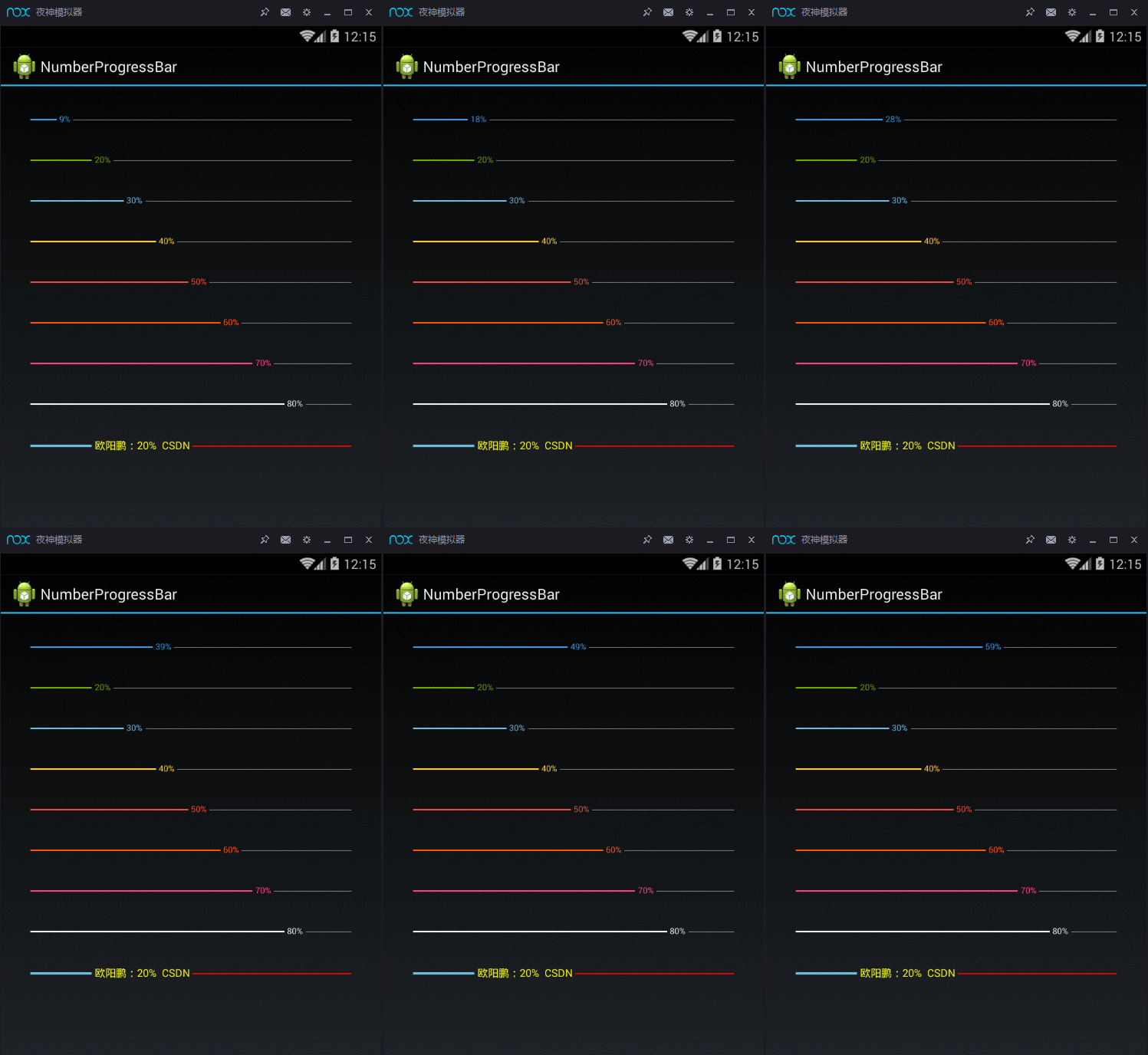
最終顯示的效果圖如下:
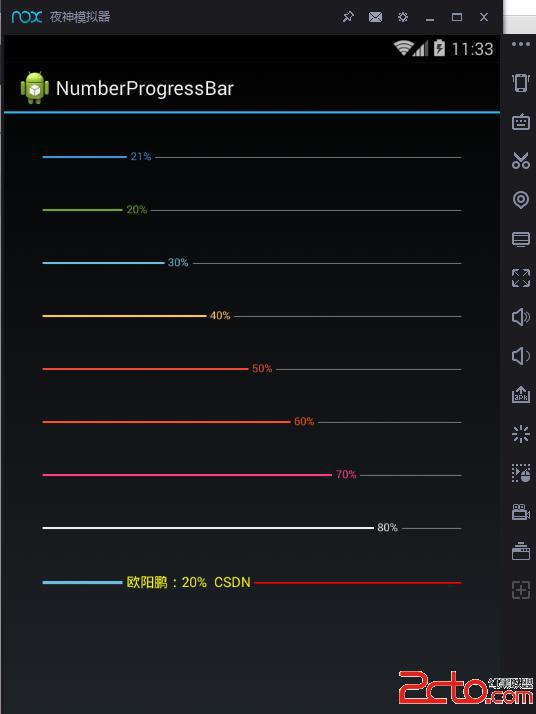
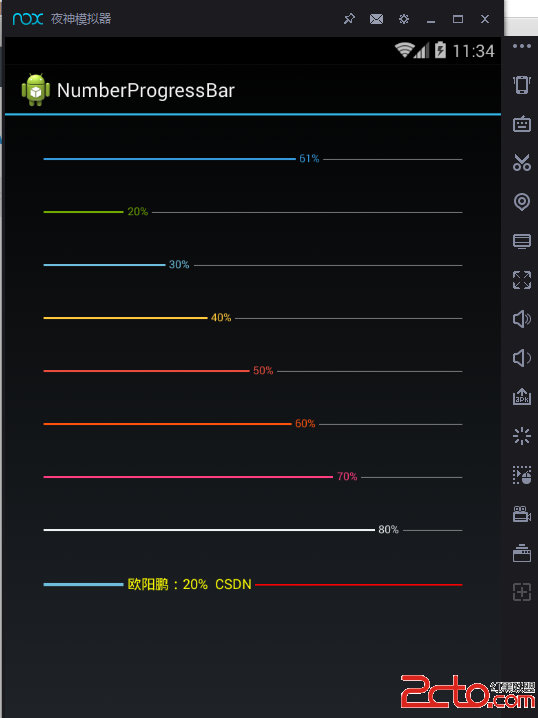
看完介紹後,讀者可以到以下地址查看完整的項目代碼。
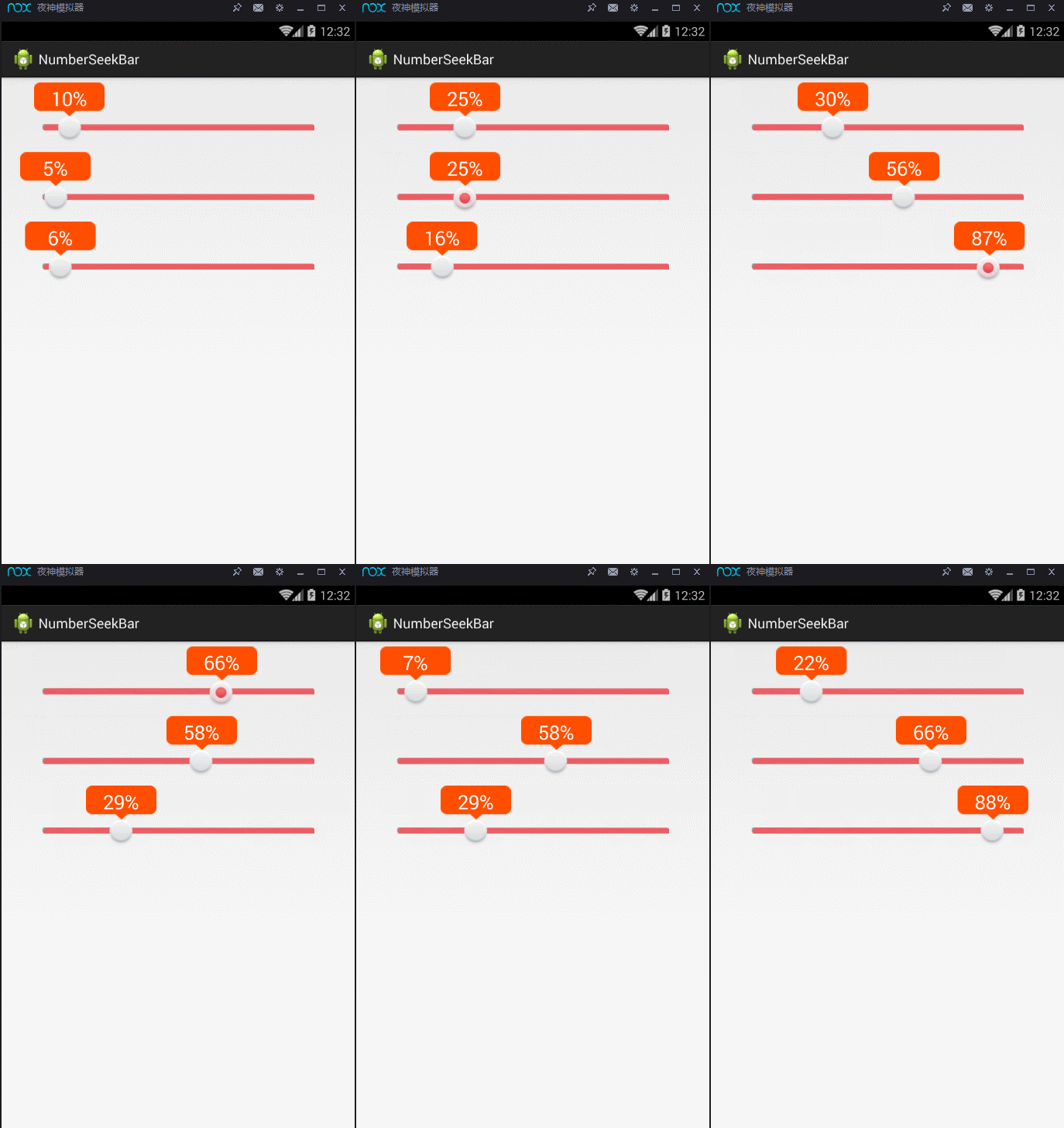
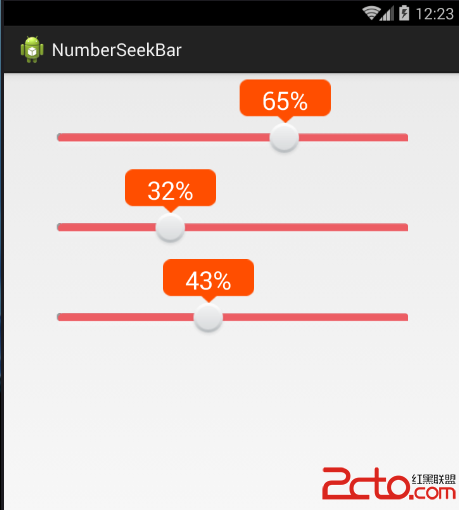
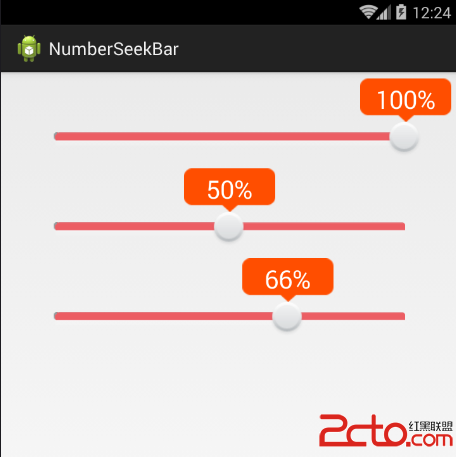
daimajia 在 github 上該項目的原始地址這裡還有一個 NumberProgressBar 的例子,如下圖所示
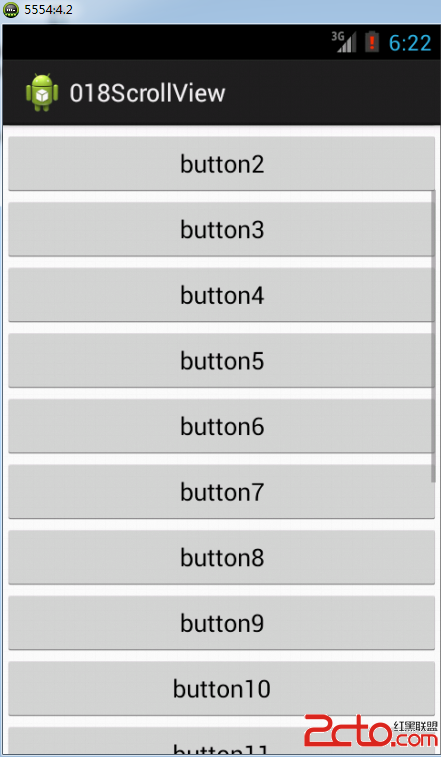 從零開始學 Android(十八):ScrollView 滾動視圖
手機螢幕高度有限,當畫面上要呈現的元件多到一頁放不下時,ScrollView 就是最直接的解法。它能容納大量內容,並讓使用者以滑動方式瀏覽。 類別繼承結構如下: jav
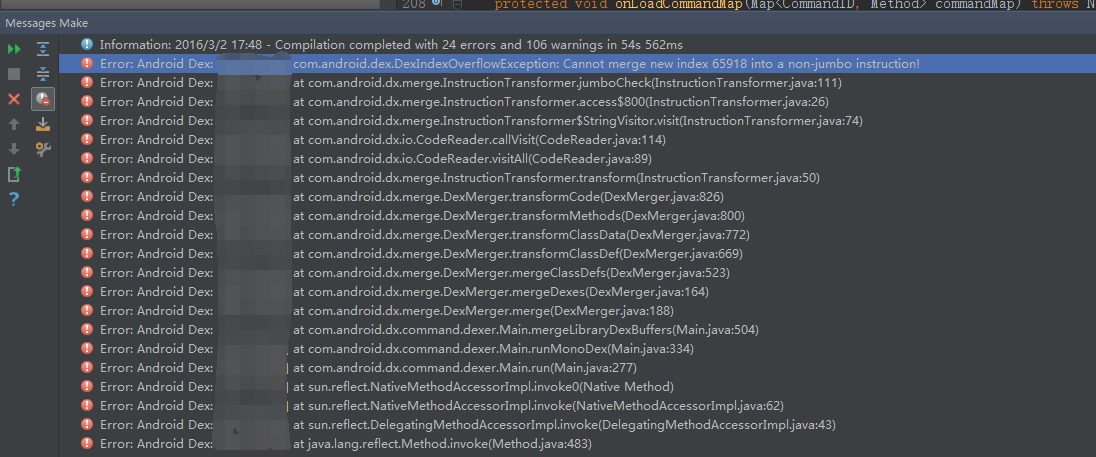 解決 Android Dex 方法數溢位錯誤 DexIndexOverflowException
在 Android 專案規模不斷增大時,常會遇到類似下面的錯誤: Error:AndroidDex: com.Android.dex.DexIndexOverflowEx
 Android MVP 模式實戰:從觀念到代碼的完整演練
概要 MVP 模式大家都聽過,它是由 MVC 演變而來的。先回顧一下 MVC:Model 存放實體模型與業務邏輯,View 存放布局與資源文件,Control 則對應 A
 Android 多線程斷點續傳下載的完整實現(附源碼)
多線程 + 斷點續傳是下載功能的標準答案。它把一個大文件切成若干塊,交給多個線程並行拉取,同時把每條線程的進度持久化,這樣即使中途退出、斷網、進程被殺,重新開始時也能從上