

編輯:關於 Android 程式設計
臨近年假,家裡估計會斷網,更新完這篇可能要等到年後了。不過在此期間我會把更新內容保存在本地,等恢復網絡後即可發表。今天要講的這個特效,原本是 Only 應用裡的一個小彩蛋,我們先來看效果圖。
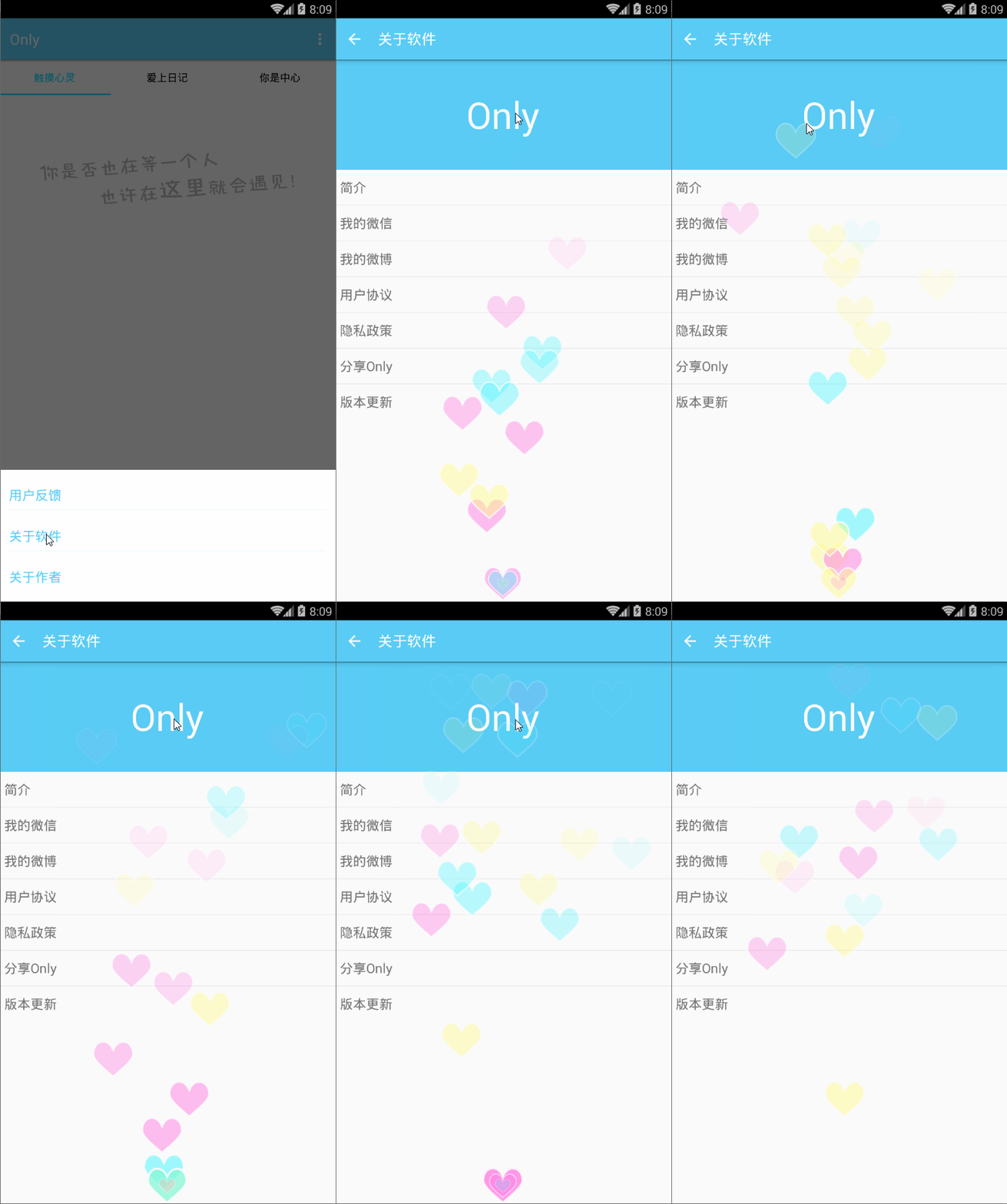
只要點擊「Only」這個字,下方就會開始升起氣泡。這個效果本質上就是一個「欲蓋彌彰」的動畫。我們準備三張顏色不同的心型圖片,就可以開始動手實現了。首先新建一個工程 —— HeartFoam。
單位轉換以及計算軌跡
 package com.lgl.heartfaom;

import android.animation.TypeEvaluator;
import android.graphics.PointF;

public class BezierEvaluator implements TypeEvaluator {
    private PointF pointF1;
    private PointF pointF2;

    public BezierEvaluator(PointF pointF1, PointF pointF2) {
        this.pointF1 = pointF1;
        this.pointF2 = pointF2;
    }

    @Override
    public PointF evaluate(float time, PointF startValue, PointF endValue) {
        float timeLeft = 1.0f - time;
        PointF point = new PointF();
        point.x = timeLeft * timeLeft * timeLeft * (startValue.x)
                + 3 * timeLeft * timeLeft * time * (pointF1.x)
                + 3 * timeLeft * time * time * (pointF2.x)
                + time * time * time * (endValue.x);
        point.y = timeLeft * timeLeft * timeLeft * (startValue.y)
                + 3 * timeLeft * timeLeft * time * (pointF1.y)
                + 3 * timeLeft * time * time * (pointF2.y)
                + time * time * time * (endValue.y);
        return point;
    }
}
貝塞爾曲線的計算以及氣泡的實現
 package com.lgl.heartfaom;

import java.util.Random;
import android.animation.Animator;
import android.animation.AnimatorListenerAdapter;
import android.animation.AnimatorSet;
import android.animation.ObjectAnimator;
import android.animation.ValueAnimator;
import android.annotation.TargetApi;
import android.content.Context;
import android.graphics.PointF;
import android.graphics.drawable.Drawable;
import android.os.Build;
import android.util.AttributeSet;
import android.view.View;
import android.view.animation.AccelerateDecelerateInterpolator;
import android.view.animation.AccelerateInterpolator;
import android.view.animation.DecelerateInterpolator;
import android.view.animation.Interpolator;
import android.view.animation.LinearInterpolator;
import android.widget.ImageView;
import android.widget.RelativeLayout;

public class PeriscopeLayout extends RelativeLayout {
    private Interpolator line = new LinearInterpolator();       // 線性
    private Interpolator acc = new AccelerateInterpolator();     // 加速
    private Interpolator dce = new DecelerateInterpolator();     // 減速
    private Interpolator accdec = new AccelerateDecelerateInterpolator(); // 先加速後減速
    private Interpolator[] interpolators;
    private int mHeight;
    private int mWidth;
    private LayoutParams lp;
    private Drawable[] drawables;
    private Random random = new Random();
    private int dHeight;
    private int dWidth;

    public PeriscopeLayout(Context context) { super(context); init(); }
    public PeriscopeLayout(Context context, AttributeSet attrs) { super(context, attrs); init(); }
    public PeriscopeLayout(Context context, AttributeSet attrs, int defStyleAttr) { super(context, attrs, defStyleAttr); init(); }

    @TargetApi(Build.VERSION_CODES.LOLLIPOP)
    public PeriscopeLayout(Context context, AttributeSet attrs, int defStyleAttr, int defStyleRes) {
        super(context, attrs, defStyleAttr, defStyleRes);
        init();
    }

    private void init() {
        drawables = new Drawable[3];
        Drawable red = getResources().getDrawable(R.drawable.pl_red);
        Drawable yellow = getResources().getDrawable(R.drawable.pl_yellow);
        Drawable blue = getResources().getDrawable(R.drawable.pl_blue);
        drawables[0] = red;
        drawables[1] = yellow;
        drawables[2] = blue;

        dHeight = red.getIntrinsicHeight();
        dWidth = red.getIntrinsicWidth();

        lp = new LayoutParams(dWidth, dHeight);
        lp.addRule(CENTER_HORIZONTAL, TRUE);
        lp.addRule(ALIGN_PARENT_BOTTOM, TRUE);

        interpolators = new Interpolator[4];
        interpolators[0] = line;
        interpolators[1] = acc;
        interpolators[2] = dce;
        interpolators[3] = accdec;
    }

    @Override
    protected void onMeasure(int widthMeasureSpec, int heightMeasureSpec) {
        super.onMeasure(widthMeasureSpec, heightMeasureSpec);
        mWidth = getMeasuredWidth();
        mHeight = getMeasuredHeight();
    }

    public void addHeart() {
        ImageView imageView = new ImageView(getContext());
        imageView.setImageDrawable(drawables[random.nextInt(3)]);
        imageView.setLayoutParams(lp);
        addView(imageView);
        Animator set = getAnimator(imageView);
        set.addListener(new AnimEndListener(imageView));
        set.start();
    }

    private Animator getAnimator(View target) {
        AnimatorSet set = getEnterAnimtor(target);
        ValueAnimator bezierValueAnimator = getBezierValueAnimator(target);
        AnimatorSet finalSet = new AnimatorSet();
        finalSet.playSequentially(set);
        finalSet.playSequentially(set, bezierValueAnimator);
        finalSet.setInterpolator(interpolators[random.nextInt(4)]);
        finalSet.setTarget(target);
        return finalSet;
    }

    private AnimatorSet getEnterAnimtor(final View target) {
        ObjectAnimator alpha = ObjectAnimator.ofFloat(target, View.ALPHA, 0.2f, 1f);
        ObjectAnimator scaleX = ObjectAnimator.ofFloat(target, View.SCALE_X, 0.2f, 1f);
        ObjectAnimator scaleY = ObjectAnimator.ofFloat(target, View.SCALE_Y, 0.2f, 1f);
        AnimatorSet enter = new AnimatorSet();
        enter.setDuration(500);
        enter.setInterpolator(new LinearInterpolator());
        enter.playTogether(alpha, scaleX, scaleY);
        enter.setTarget(target);
        return enter;
    }

    private ValueAnimator getBezierValueAnimator(View target) {
        BezierEvaluator evaluator = new BezierEvaluator(getPointF(2), getPointF(1));
        ValueAnimator animator = ValueAnimator.ofObject(evaluator,
                new PointF((mWidth - dWidth) / 2, mHeight - dHeight),
                new PointF(random.nextInt(getWidth()), 0));
        animator.addUpdateListener(new BezierListenr(target));
        animator.setTarget(target);
        animator.setDuration(3000);
        return animator;
    }

    private PointF getPointF(int scale) {
        PointF pointF = new PointF();
        pointF.x = random.nextInt((mWidth - 100));
        pointF.y = random.nextInt((mHeight - 100)) / scale;
        return pointF;
    }

    private class BezierListenr implements ValueAnimator.AnimatorUpdateListener {
        private View target;
        public BezierListenr(View target) { this.target = target; }
        @Override
        public void onAnimationUpdate(ValueAnimator animation) {
            PointF pointF = (PointF) animation.getAnimatedValue();
            target.setX(pointF.x);
            target.setY(pointF.y);
            target.setAlpha(1 - animation.getAnimatedFraction());
        }
    }

    private class AnimEndListener extends AnimatorListenerAdapter {
        private View target;
        public AnimEndListener(View target) { this.target = target; }
        @Override
        public void onAnimationEnd(Animator animation) {
            super.onAnimationEnd(animation);
            removeView((target));
        }
    }
}
布局的實現
接著看看如何使用它
 package com.lgl.heartfaom;

import android.app.Activity;
import android.os.Bundle;
import android.view.View;
import android.view.View.OnClickListener;
import android.widget.Button;

public class MainActivity extends Activity {
    private Button btn_start;
    private PeriscopeLayout periscopeLayout;

    @Override
    protected void onCreate(Bundle savedInstanceState) {
        super.onCreate(savedInstanceState);
        setContentView(R.layout.activity_main);

        periscopeLayout = (PeriscopeLayout) findViewById(R.id.periscope);
        btn_start = (Button) findViewById(R.id.btn_start);
        btn_start.setOnClickListener(new OnClickListener() {
            @Override
            public void onClick(View v) {
                periscopeLayout.addHeart();
            }
        });
    }
}
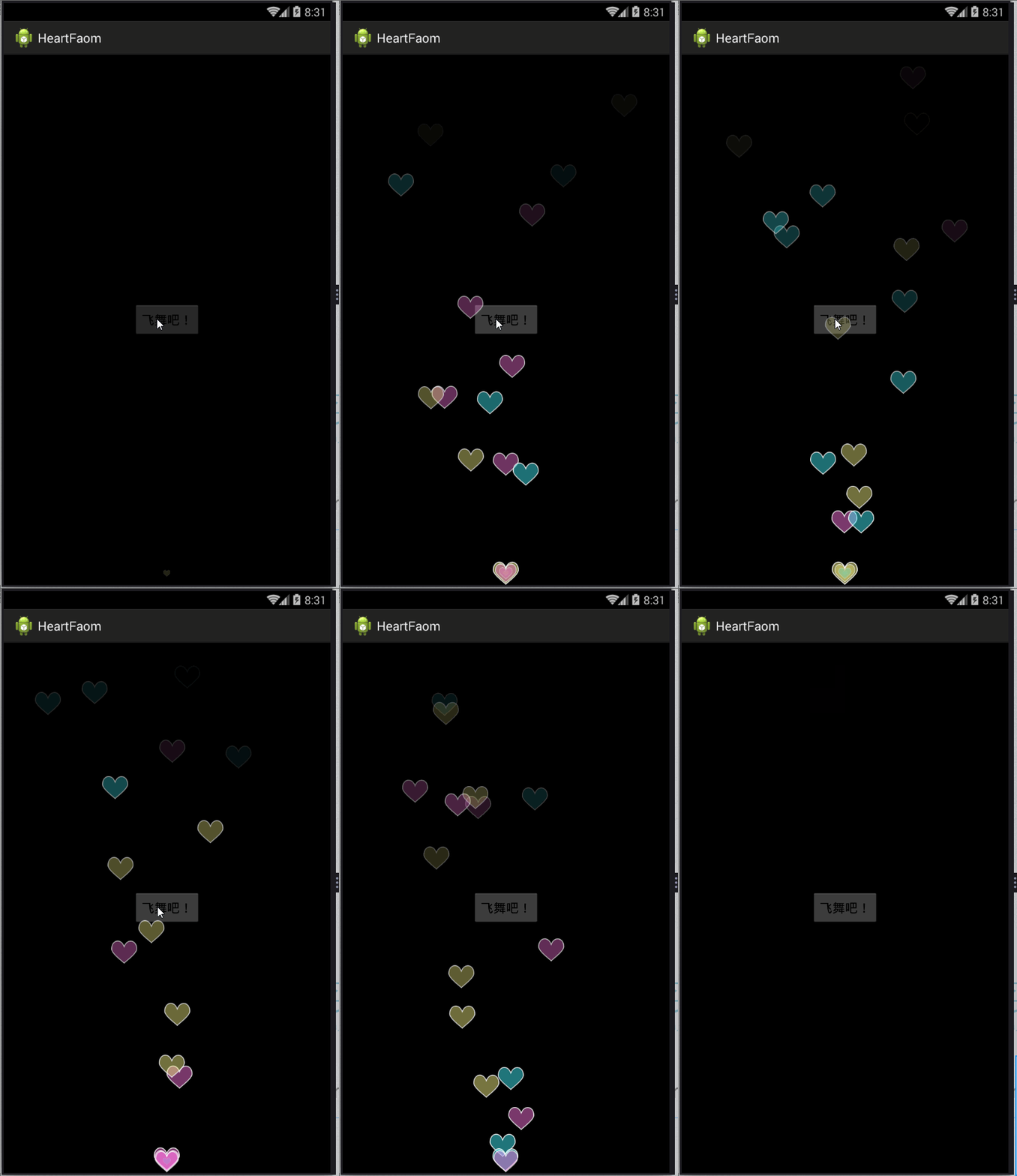
好了,接下來就可以運行看看實際效果了。
覺得不錯的話,記得點個贊哦!
 Android App 自動更新功能實作:接口協議、升級策略與下載安裝全流程
幾乎每個 App 都有版本更新功能。這個流程拆開來其實不複雜,但需要串起接口、策略判斷、下載服務與通知欄,程式碼量自然不少。 第一步:服務端 服務端只要提供一個 JSON
 用 Vitamio 打造萬能播放器(八):細節優化篇
前言 成功的產品往往在細節之處也做到極致。從使用角度看,產品和項目最大的區別,我認為就體現在細節的處理上。「開播視頻」的目標是做成一款產品,前面七篇文章高歌猛進地添加了許
 Android 圖片異步加載實踐:用多線程打造不錯位、不閃動的列表
從最直白的做法開始 所謂異步,說到底就是多任務、多線程。而多線程向來伴隨各種坑,我們一步步踩過去。 先建一個類 ImageLoaderWithoutCaches——顧名思
 Android 接入個推實現第三方應用的推送功能
為 App 接入消息推送,是提升用戶活躍度的重要手段。相比自研長連接,直接接入成熟的第三方推送服務要省心得多。本文以個推為例,記錄接入第三方推送的完整過程與關鍵代碼。