

編輯:關於 Android 程式設計
Service 是 Android 四大組件之一,地位舉足輕重。當你的應用需要下載檔案、播放音樂這類長期在後台進行、又沒有使用者介面的工作時,就得動用 Service。
但 Service 本身預設是跑在主線程上的,所以真正要做事,你必須自己開一個 Thread,變成「Service + Thread」的組合。問題是:每一次都要重搭一遍這個框架,實在囉嗦。Google 的工程師因此提供了現成的封裝——IntentService。
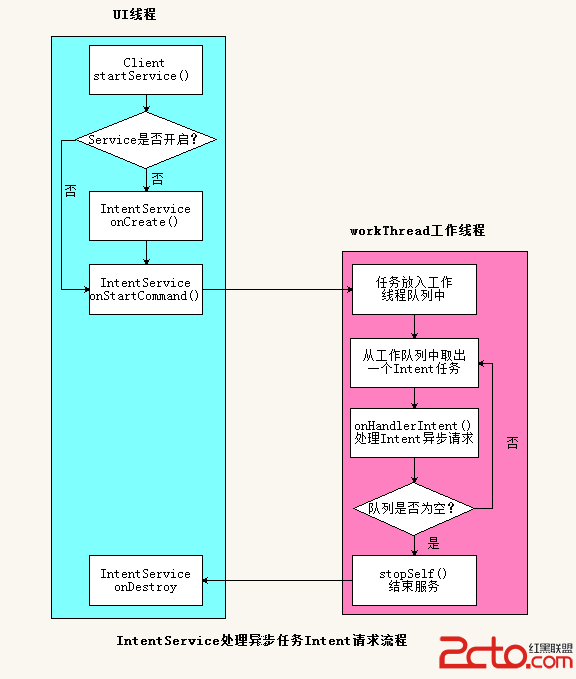
IntentService 是一個基礎類,專門用來處理 Intent 型別的非同步任務請求。當客戶端呼叫 Context#startService(Intent) 發出請求,Service 被啟動,同時在它內部建立一條工作線程來消化這些請求;工作線程跑完,Service 會自行停止。
它是抽象類,你必須繼承它並實作 onHandleIntent(Intent) 這個抽象方法,把非同步任務寫在裡面。
客戶端同時投出兩個任務:
public class ClientActivity extends AppCompatActivity {

    @Override
    protected void onCreate(Bundle savedInstanceState) {
        super.onCreate(savedInstanceState);
        setContentView(R.layout.activity_main);
    }

    // 同時送出兩個任務到 IntentService 執行
    public void send(View view) {
        Intent intent = new Intent(this, DownLoadService.class);
        intent.putExtra("key", 1);
        intent.putExtra("value", "the first task1");
        startService(intent);

        Intent intent1 = new Intent(this, DownLoadService.class);
        intent1.putExtra("key", 2);
        intent1.putExtra("value", "the second task2");
        startService(intent1);
    }
}
服務端:
public class DownLoadService extends IntentService {

    public static final String TAG = "DownLoadService";

    // 必須重寫預設構造方法,並呼叫父類
    public DownLoadService() {
        super("DownLoadService");
    }

    @Override
    protected void onHandleIntent(Intent intent) {
        int key = intent.getIntExtra("key", 0);
        String value = intent.getStringExtra("value");
        switch (key) {
            case 1:   // 模擬耗時任務 1
            case 2:   // 模擬耗時任務 2
                try {
                    Thread.sleep(3 * 1000);
                } catch (InterruptedException e) {
                    e.printStackTrace();
                }
                break;
            default:
                break;
        }
        Log.e(TAG, "the current time is: " + System.currentTimeMillis() / 1000
                + " the Thread id is " + Thread.currentThread().getId()
                + " the current task is " + value);
    }
}
注意:這裡完全沒有建立 Thread。所有耗時任務都在 onHandleIntent 裡完成,工作線程由 IntentService 內部代勞。
構造方法:
public IntentService(String name) {
    super();
    mName = name;
}
name 只用來命名工作線程,方便 debug。
onCreate:真正建立工作線程的地方。
public void onCreate() {
    super.onCreate();
    HandlerThread thread = new HandlerThread("IntentService[" + mName + "]");
    thread.start();
    mServiceLooper = thread.getLooper();
    mServiceHandler = new ServiceHandler(mServiceLooper);
}
HandlerThread 加上 Handler,就組成了一個帶消息循環機制的非同步任務處理器。所有非同步任務被打包成 Message,丟進這條線程執行。
onStartCommand:官方明確表示「不要覆寫這個方法」,它只是轉手呼叫 onStart。
@Override
public int onStartCommand(Intent intent, int flags, int startId) {
    onStart(intent, startId);
    return mRedelivery ? START_REDELIVER_INTENT : START_NOT_STICKY;
}

@Override
public void onStart(Intent intent, int startId) {
    Message msg = mServiceHandler.obtainMessage();
    msg.arg1 = startId;
    msg.obj = intent;
    mServiceHandler.sendMessage(msg);
}
startId 當作消息標識,Intent 當作消息內容,封裝好之後交給 mServiceHandler。
ServiceHandler 是 IntentService 的內部類:
private final class ServiceHandler extends Handler {
    public ServiceHandler(Looper looper) {
        super(looper);
    }

    @Override
    public void handleMessage(Message msg) {
        onHandleIntent((Intent) msg.obj);
        stopSelf(msg.arg1);   // 處理完一筆就嘗試停止服務
    }
}
handleMessage 是在工作線程中被呼叫的,所以我們覆寫的 onHandleIntent 自然也跑在工作線程裡。任務結束後呼叫 stopSelf,服務自動關閉。
onDestroy 收尾:
@Override
public void onDestroy() {
    mServiceLooper.quit();
}
quit() 讓工作線程的 Looper 跳出循環,線程結束,服務也跟著銷毀。
 Android 滑動機制全解析:從座標系到七種位移實作
重點導覽 本文重新整理 Android 滑動效果的核心概念,從座標系、觸控事件到七種常見位移方式,幫助讀者建立完整的實作脈絡。 一、滑動效果如何產生 所謂滑動,本質上是根
 實作可調透明度的 Android 圖片檢視器與局部放大
這個實例做了一個功能不算多但相當實用的圖片檢視器:可以切換圖片、以按鈕調整透明度,而且手指觸碰主圖時,另一個 ImageView 會即時顯示觸碰位置附近的局部放大——有點
 Android 實現類淘寶效果:View 滑至頂部後吸頂固定
在剛交付的一個專案裡,交互設計師提出了一個很典型的動效需求:頁面中的報名按鈕必須始終停留在可視區域內,無論內容能滾多長,使用者滑到哪裡都能看到它。最終效果如下圖所示: &
 Android 監聽應用安裝與卸載廣播實作教學
BroadcastReceiver 的基本觀念 BroadcastReceiver 是系統全域的廣播監聽類,核心方法是 onReceive()。自訂的接收器繼承它並實作自