

編輯:關於 Android 程式設計
在 Android 中要讓 VideoView 裡的影片旋轉,一直是個相當棘手的需求。本文記錄了嘗試讓「某個小區域中的 VideoView 影片旋轉 90 度」時走過的各種方法與最終可行的方案。
直接修改 View 的 orientation 屬性——但 FrameLayout 並沒有此屬性,LinearLayout 雖有,實際效果卻不理想:版面中所有元素都轉了,唯獨影片沒有跟著旋轉 90 度。
改用補間動畫旋轉 VideoView,結果是「容器」轉了,但其中的影片畫面依然紋絲不動。
在 AndroidManifest.xml 的 activity 屬性中加上:
android:configChanges="orientation"
android:screenOrientation="sensor"
並在程式碼中覆寫:
public void onConfigurationChanged(Configuration newConfig) {
    super.onConfigurationChanged(newConfig);
}
注意:程式中不可出現 setRequestedOrientation(ActivityInfo.SCREEN_ORIENTATION_LANDSCAPE); 這類強制方向的寫法,否則此方法會失效。實測當手機由橫轉豎時,整個畫面(含影片)都會跟著旋轉,效果不錯。但缺點是它會連同其他控制項一起旋轉,無法只旋轉影片。
若需求是「全螢幕播放影片」,只需重寫 VideoView 讓它在螢幕旋轉時自動調整尺寸,再搭配方案三即可:
public class VideoViewCustom extends VideoView {

    private int mForceHeight = 0;
    private int mForceWidth = 0;

    public VideoViewCustom(Context context) { super(context); }
    public VideoViewCustom(Context context, AttributeSet attrs) {
        this(context, attrs, 0);
    }
    public VideoViewCustom(Context context, AttributeSet attrs, int defStyle) {
        super(context, attrs, defStyle);
    }

    public void setDimensions(int w, int h) {
        this.mForceHeight = h;
        this.mForceWidth = w;
    }

    @Override
    protected void onMeasure(int widthMeasureSpec, int heightMeasureSpec) {
        setMeasuredDimension(mForceWidth, mForceHeight);
    }
}
搭配方向變化的回呼:
@Override
public void onConfigurationChanged(Configuration newConfig) {
    super.onConfigurationChanged(newConfig);
    if (newConfig.orientation == Configuration.ORIENTATION_LANDSCAPE) {
        getWindow().clearFlags(WindowManager.LayoutParams.FLAG_FORCE_NOT_FULLSCREEN);
        getWindow().setFlags(WindowManager.LayoutParams.FLAG_FULLSCREEN,
                             WindowManager.LayoutParams.FLAG_FULLSCREEN);
        questionVideo.setDimensions(displayHeight, displayWidth);
        questionVideo.getHolder().setFixedSize(displayHeight, displayWidth);
    } else {
        getWindow().setFlags(WindowManager.LayoutParams.FLAG_FORCE_NOT_FULLSCREEN,
                             WindowManager.LayoutParams.FLAG_FORCE_NOT_FULLSCREEN);
        questionVideo.setDimensions(displayWidth, smallHeight);
        questionVideo.getHolder().setFixedSize(displayWidth, smallHeight);
    }
}
記得在 XML 中使用「套件名稱.自訂類別名稱」的形式,才能正確把標籤綁定到程式碼中的自訂 class。
這個 API 大約在 API Level 16 才提供(Level 10 即 2.3.3 無法使用)。查閱官方文件後發現,它主要還是針對 image 生效,並未明確提及對 video 的支援。
若可以接受把某個 Layout 整體旋轉,可撰寫一個自訂的 RotateLayout:
public class RotateLayout extends FrameLayout {
    private Matrix mForward = new Matrix();
    private Matrix mReverse = new Matrix();
    private float[] mTemp = new float[2];

    public RotateLayout(Context context) { super(context); }
    public RotateLayout(Context context, AttributeSet attrs) { super(context, attrs); }

    @Override
    protected void dispatchDraw(Canvas canvas) {
        canvas.rotate(270, getWidth() / 2, getHeight() / 2);
        mForward = canvas.getMatrix();
        mForward.invert(mReverse);
        canvas.save();
        canvas.setMatrix(mForward); // 用於正確定位觸摸事件
        super.dispatchDraw(canvas);
        canvas.restore();
    }

    @Override
    public boolean dispatchTouchEvent(MotionEvent event) {
        final float[] temp = mTemp;
        temp[0] = event.getX();
        temp[1] = event.getY();
        mReverse.mapPoints(temp);       // 座標反向映射
        event.setLocation(temp[0], temp[1]);
        return super.dispatchTouchEvent(event);
    }
}
這個做法在 dispatchDraw 中旋轉 Canvas,並透過矩陣的正反轉換正確處理觸摸事件座標,讓旋轉後的版面仍能正常互動。
若需求是「只旋轉影片、其他控制項不動,且手機不旋轉」,坦白說在舊版 Android 上相當難以完美實現;較務實的折衷是旋轉整個螢幕(方案三),或改用自訂 RotateLayout 搭配觸摸座標映射(方案六)。選擇何種方案,取決於你能接受多少副作用。
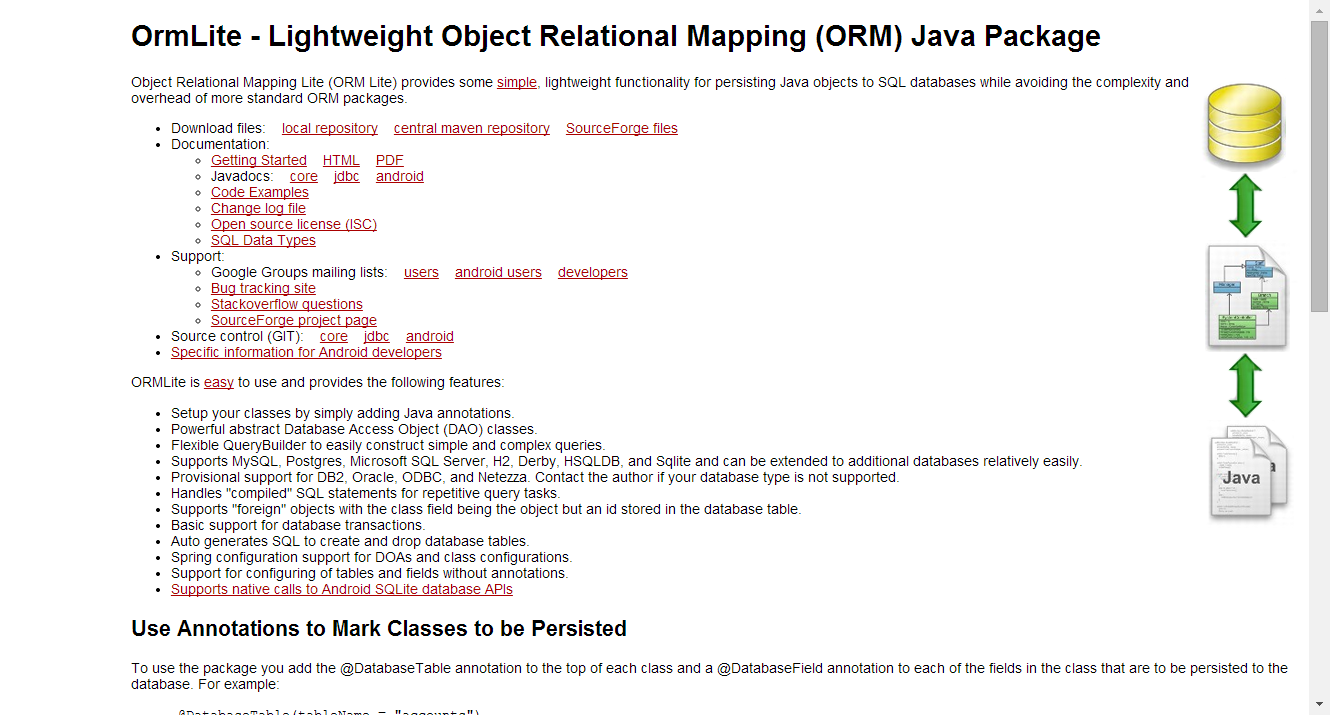 Android ORMLite 入門實戰:用註解搞定資料庫的增刪改查
做 Android 開發的人,大概都寫過 SQLiteOpenHelper。建表語句、游標取值、資源關閉,這些瑣碎又容易出錯的環節反覆出現,於是社群裡各種各樣的封裝框架應
 Android AlertDialog 五種常見對話框完整示例(確認/單選/多選/列表/自定義)
目標效果: 程式執行後,主畫面會列出五顆按鈕。點擊各顆按鈕,分別彈出第二張到第六張圖所示的四種系統對話框與一種自定義對話框;在對話框中點選項目或按下按鈕,畫面下方會同步
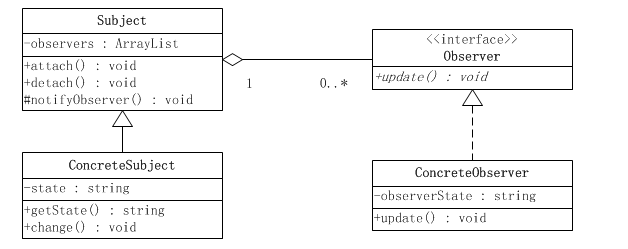 Android 源碼中的觀察者模式:以 Adapter 數據刷新為例
一、模式概述 定義 觀察者模式定義了對象之間的一種「一對多」依賴關係:當某一個對象的狀態發生改變時,所有依賴於它的對象都會收到通知,並被自動更新。 典型使用場景 關聯行
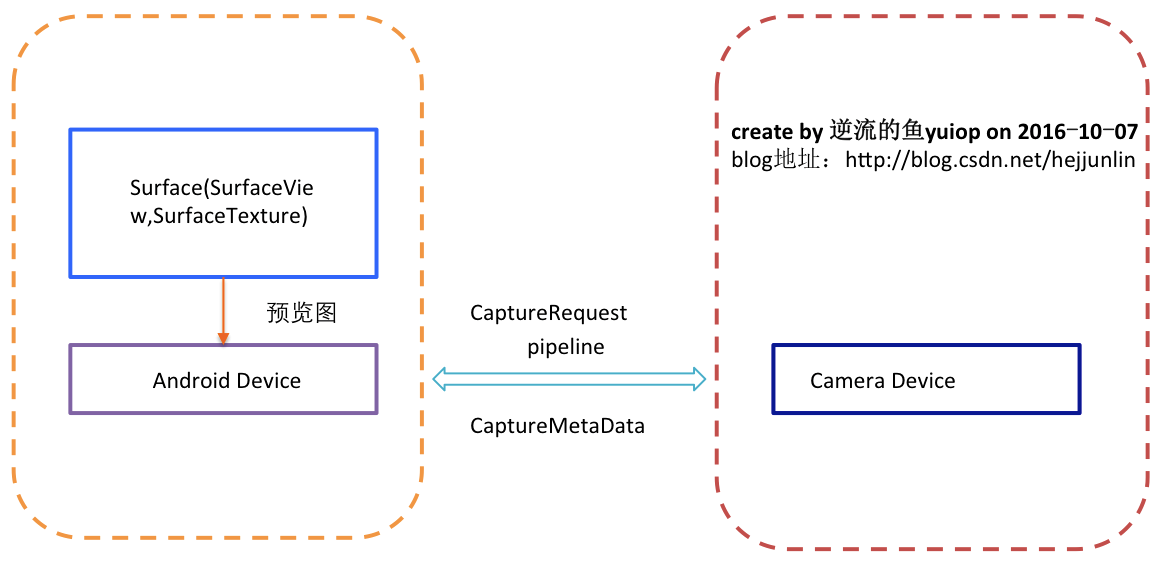 Android 多媒體框架(十五):Camera2 架構補充與核心 Callback 流程
前言:鉴于 5.0 之后 Google 用全新的 Camera2 API 取代了旧的 Camera,虽然旧版 Camera 经典,但已不再展开介绍,感兴趣的同学可自行查阅