

編輯:關於 Android 程式設計
轉眼間,我與 Android 開發已相伴走過了兩年時光。這段日子裡,我基本把 Android 的基礎知識摸了个透。可越往深處鑽研,越感到吃力——一方面自以為 Android 已經沒什麼可學(其實不然,還有大量知識值得深挖),另一方面網路上的各種開源框架早已替我們包辦了太多髒活累活,開發者似乎只需畫幾個界面,便覺得這門手藝缺乏技術含量。
閒來無事,我開始回顧此前積累的知識點,也琢磨著是否該拓展一些新領域,畢竟不能總把自己困在基礎知識的圈子裡。慢慢摸索下來我發現:在大型項目中,一套優秀的框架與得體的設計模式,往往能省下大量工作量。於是接下來的兩篇筆記,我想聊聊 Android 裡最常用的兩種架構模式——MVC 與 MVP。
MVC 是 Model、View、Controller 三個單詞的縮寫,翻譯過來就是「模型—視圖—控制器」。它本質上是一種軟件設計典範,核心思想是把業務邏輯、數據與界面顯示三者剝離開來。當我們想調整界面樣式或改進用戶交互時,無須重寫底層業務邏輯。其中,M 層負責數據與業務處理,V 層負責界面呈現,C 層則充當橋樑,協調 V 層與 M 層的通訊,從而實現視圖與邏輯的解耦。
道理聽起來有些抽象,空談無益,我們直接看看 MVC 在 Android 開發中究竟如何落地。
在 Android 開發裡,MVC 是相當主流的架構選擇,它的好處在於把界面顯示與業務邏輯、數據處理清晰分離。那麼在一個 Android 項目中,哪些代碼分別扮演 M、V、C 三個角色呢?
M 層:適合承擔業務邏輯處理,比如數據庫操作、網絡請求、複雜算法與耗時任務等,都應放在 Model 層完成。
V 層:負責界面 UI 的展示,XML 布局文件通常被視為 V 層,此外還包括處理界面顯示邏輯的相關代碼。
C 層:在 Android 中,Activity 往往充當控制器的角色。它發起業務請求,等待處理結果,再通知 View 更新界面。
下面我們通過一個獲取天氣預報數據的小項目,來直觀理解 MVC 在 Android 中的實踐。先看一眼界面效果:
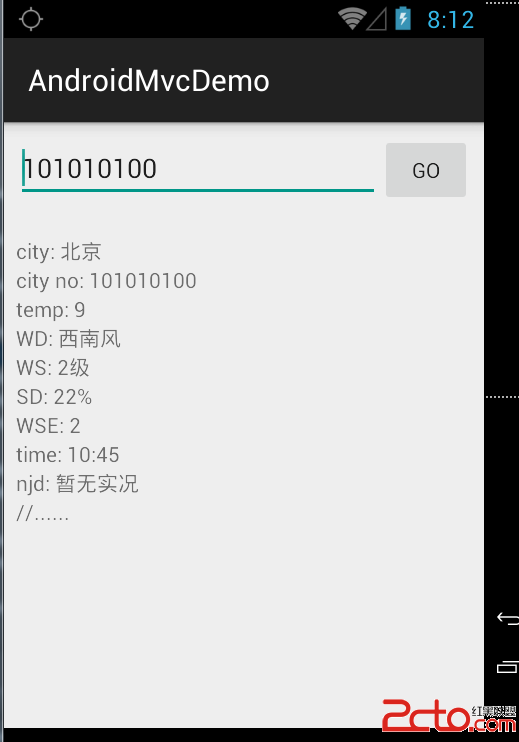
先看最直白的寫法——把界面響應和結果展示都塞進 Activity:
public class WeatherActivity extends ActionBarActivity {
    private Dialog loadingDialog;
    private EditText cityNOInput;
    private TextView city, cityNO, temp, wd, ws, sd, wse, time, njd;

    @Override
    protected void onCreate(Bundle savedInstanceState) {
        super.onCreate(savedInstanceState);
        setContentView(R.layout.activity_main);
        initView();
    }

    private void initView() {
        cityNOInput = (EditText) findViewById(R.id.et_city_no);
        city = (TextView) findViewById(R.id.tv_city);
        cityNO = (TextView) findViewById(R.id.tv_city_no);
        temp = (TextView) findViewById(R.id.tv_temp);
        wd = (TextView) findViewById(R.id.tv_WD);
        ws = (TextView) findViewById(R.id.tv_WS);
        sd = (TextView) findViewById(R.id.tv_SD);
        wse = (TextView) findViewById(R.id.tv_WSE);
        time = (TextView) findViewById(R.id.tv_time);
        njd = (TextView) findViewById(R.id.tv_njd);
        loadingDialog = new ProgressDialog(this);
        loadingDialog.setTitle("加載天氣中...");
        findViewById(R.id.btn_go).setOnClickListener(this);
    }

    public void displayResult(Weather weather) {
        WeatherInfo info = weather.getWeatherinfo();
        city.setText(info.getCity());
        cityNO.setText(info.getCityid());
        temp.setText(info.getTemp());
        wd.setText(info.getWD());
        ws.setText(info.getWS());
        sd.setText(info.getSD());
        wse.setText(info.getWSE());
        time.setText(info.getTime());
        njd.setText(info.getNjd());
    }

    @Override
    public void onClick(View v) {
        switch (v.getId()) {
            case R.id.btn_go:
                loadingDialog.show();
                // 執行網絡請求
                break;
        }
    }
}
可以看到,Activity 既處理了 View 的響應事件,又負責請求結果的界面展示。乍看之下似乎沒問題,但從可擴展性與可維護性角度審視,這樣寫存在明顯弊端:一旦客戶對界面展示提出新需求,我們不得不回到 Activity 裡大改代碼;界面改動越大,Activity 的改動就越劇烈,最終導致 Activity 臃腫不堪,難以維護,甚至在修改過程中還容易觸發其他部分的 bug。
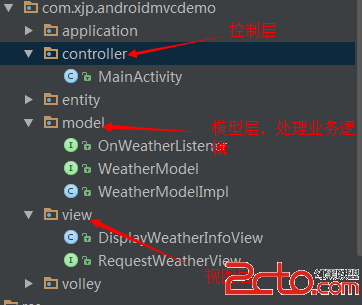
因此,我們並不提倡把界面顯示邏輯全部堆在 Activity 中。按照 MVC 的思路,應把 View 分離出去,為 Activity 減負,讓它專心扮演 Controller 的角色。先看工程的目錄結構:
public class DisplayWeatherInfoView {
    private ActionBarActivity activity;
    private RequestWeatherView iRequest;
    private Dialog loadingDialog;
    private EditText cityNOInput;
    private TextView city, cityNO, temp, wd, ws, sd, wse, time, njd;

    public DisplayWeatherInfoView(ActionBarActivity activity, RequestWeatherView iRequest) {
        this.activity = activity;
        this.iRequest = iRequest;
        initView();
    }

    private void initView() {
        cityNOInput = (EditText) activity.findViewById(R.id.et_city_no);
        city = (TextView) activity.findViewById(R.id.tv_city);
        cityNO = (TextView) activity.findViewById(R.id.tv_city_no);
        temp = (TextView) activity.findViewById(R.id.tv_temp);
        wd = (TextView) activity.findViewById(R.id.tv_WD);
        ws = (TextView) activity.findViewById(R.id.tv_WS);
        sd = (TextView) activity.findViewById(R.id.tv_SD);
        wse = (TextView) activity.findViewById(R.id.tv_WSE);
        time = (TextView) activity.findViewById(R.id.tv_time);
        njd = (TextView) activity.findViewById(R.id.tv_njd);
        loadingDialog = new ProgressDialog(activity);
        loadingDialog.setTitle("加載天氣中...");
        activity.findViewById(R.id.btn_go).setOnClickListener(new View.OnClickListener() {
            @Override
            public void onClick(View v) {
                loadingDialog.show();
                iRequest.sendRequest(cityNOInput.getText().toString().trim());
            }
        });
    }

    public void displayResult(Weather weather) {
        WeatherInfo info = weather.getWeatherinfo();
        city.setText(info.getCity());
        cityNO.setText(info.getCityid());
        temp.setText(info.getTemp());
        wd.setText(info.getWD());
        ws.setText(info.getWS());
        sd.setText(info.getSD());
        wse.setText(info.getWSE());
        time.setText(info.getTime());
        njd.setText(info.getNjd());
    }

    public void hideLoadingDialog() {
        loadingDialog.dismiss();
    }
}
我們把界面控制抽離成一個獨立的 DisplayWeatherInfoView 類,由它統一負責 View 的查找初始化、結果展示以及響應事件的接口。所有與界面相關的操作,都收攏在這一個類裡。
接著看看 Activity 是如何調用 DisplayWeatherInfoView 的:
public class MainActivity extends ActionBarActivity implements RequestWeatherView, OnWeatherListener {
    private DisplayWeatherInfoView displayView;
    private static WeatherModel weatherModel = null;

    @Override
    protected void onCreate(Bundle savedInstanceState) {
        super.onCreate(savedInstanceState);
        setContentView(R.layout.activity_main);
        displayView = new DisplayWeatherInfoView(this, this);
        if (null == weatherModel) {
            weatherModel = new WeatherModelImpl();
        }
    }

    @Override
    public void sendRequest(String number) {
        weatherModel.getWeather(number, this);
    }

    @Override
    public void onSuccess(Weather weather) {
        displayView.hideLoadingDialog();
        displayView.displayResult(weather);
    }

    @Override
    public void onError() {
        displayView.hideLoadingDialog();
        Toast.makeText(this, "獲取天氣信息失敗", Toast.LENGTH_SHORT).show();
    }
}
從代碼不難看出,Activity 持有 DisplayWeatherInfoView 的引用,並實現了 RequestWeatherView 響應事件接口。當 View 出現用戶點擊等響應時,會以接口通訊的方式通知 Activity,由 Activity 充當 Controller,把用戶請求轉發給 Model 層處理網絡請求。因此 Activity 同時也持有 Model 的引用。
最後看 WeatherModel 的實現:
public interface WeatherModel {
    void getWeather(String cityNumber, OnWeatherListener listener);
}

public class WeatherModelImpl implements WeatherModel {
    @Override
    public void getWeather(String cityNumber, final OnWeatherListener listener) {
        /* 數據層操作 */
        VolleyRequest.newInstance().newGsonRequest(
            "https://www.weather.com.cn/data/sk/" + cityNumber + ".html",
            Weather.class,
            new Response.Listener() {
                @Override
                public void onResponse(Weather weather) {
                    if (weather != null) {
                        listener.onSuccess(weather);
                    } else {
                        listener.onError();
                    }
                }
            },
            new Response.ErrorListener() {
                @Override
                public void onErrorResponse(VolleyError error) {
                    listener.onError();
                }
            });
    }
}
這裡我們先設計了一個 WeatherModel 接口,再由 WeatherModelImpl 去實現它。Controller 通過調用接口方法發起網絡請求,並借助 OnWeatherListener 拿到結果,然後回調 DisplayWeatherInfoView 把數據渲染到界面上。至此,Activity 作為 Controller,順暢地完成了 Model 與 View 之間的協調。
有人可能會問:為什麼不直接寫一個 getWeather() 方法去請求網絡,而非要多繞一層接口?不妨設想這樣一個場景——如今網絡請求用的是 Volley 框架,可哪天老闆非要你改用 Afinal 呢?難道要去改 getWeather() 的實現嗎?當然不。那樣不僅會破壞既有代碼,也不利於維護。出於對未來擴展性與可維護性的考量,我們選擇用接口來隔離變化:只需再寫一個 WeatherModelWithAfinalImpl 去實現同一個 WeatherModel 接口,重寫其中方法即可。這樣既保留了原有的 Volley 實現,又新增了 Afinal 實現,而 Activity 的調用代碼一行都不用改。
借助 MVC 設計模式,這個小小的天氣預報項目獲得了良好的可擴展性與可維護性。當需要調整 UI 顯示時,無須改動 Controller 與 Model 中的業務邏輯代碼,界面顯示與業務邏輯被乾淨地剝離開來。
在 Android 項目裡,業務邏輯與數據處理擔任 Model 角色,XML 界面顯示擔任 View 角色,Activity 則充當 Controller。Controller 是一座中間橋樑,通過接口通訊協同 View 與 Model 工作。
那麼什麼時候適合上 MVC 呢?如果是個小項目、需求也不會頻繁變動,硬套 MVC 反而顯得過度設計、代碼臃腫。一般來說,大型項目、業務邏輯複雜、頁面眾多、需要模塊化設計的場景,MVC 的優勢才會真正凸顯出來。
MVC 的優點主要有:
(1)耦合性低。耦合性指的是模塊代碼之間的關聯程度。MVC 讓 View 層與 Model 層彼此分離,達到解耦目的,從而減少模塊之間的相互影響。
(2)可擴展性好。由於耦合性低,新增需求時可以盡量不改動舊代碼,从而降低 bug 的出現概率。
(3)職責劃分明確。M、V、C 三個模塊各司其職,讓代碼更易於維護。
 Android TabHost 與 TabWidget 樣式自定義教學
自定義 TabHost 與 TabWidget 樣式 許多 App 會使用底部或頂部標籤切換頁面。Android 的 TabHost 與 TabWidget 可搭配自定義
 Android 動態加載框架 DL 架構解析
動態加載框架的目的 隨著 App 功能越來越多,安裝包也越來越大。動態加載框架可把部分功能做成外掛,使用時再下載並載入,不需要事先安裝。 核心問題 動態加載框架需要解決兩
 Android ProgressBar 用法解析
ProgressBar 基本概念 ProgressBar 用來顯示某項操作的進度。常用於資料載入、檔案下載或耗時任務執行時,讓使用者知道目前處理狀態。 版面配置 <
 Android 中使用 shape 標籤的屬性詳解
shape 標籤常用的屬性有: - corners —— 圓角 - padding —— 內邊距 - size(height、width)—— 設定寬高 - stroke