

編輯:關於 Android 程式設計
工具類是所有 Android 項目裡流傳最廣、複用率最高的代碼。下面這五個類幾乎每個項目都會用到,涵蓋單位換算、日誌管理、屏幕信息、JSON 序列化與網絡請求,收錄進來可以省下不少重複勞動。
屏幕上密度各異,直接寫像素值必然在不同設備上錯位。TypedValue.applyDimension 是官方提供的標準換算入口,比自己手算 density 更可靠。
public class DensityUtils {

    private DensityUtils() {
        throw new UnsupportedOperationException("cannot be instantiated");
    }

    /** dp 轉 px */
    public static int dp2px(Context context, float dpVal) {
        return Math.round(TypedValue.applyDimension(
                TypedValue.COMPLEX_UNIT_DIP, dpVal,
                context.getResources().getDisplayMetrics()));
    }

    /** sp 轉 px */
    public static int sp2px(Context context, float spVal) {
        return Math.round(TypedValue.applyDimension(
                TypedValue.COMPLEX_UNIT_SP, spVal,
                context.getResources().getDisplayMetrics()));
    }

    /** px 轉 dp */
    public static float px2dp(Context context, float pxVal) {
        final float scale = context.getResources().getDisplayMetrics().density;
        return pxVal / scale;
    }

    /** px 轉 sp */
    public static float px2sp(Context context, float pxVal) {
        return pxVal / context.getResources().getDisplayMetrics().scaledDensity;
    }
}
注意 dp 與 sp 的換算基數不同:dp 用 density,sp 用 scaledDensity,後者會受用戶系統字號設置影響,這正是 sp 適合文字尺寸的原因。
直接在代碼裡散落 Log.d 有兩個麻煩:上線後關不掉,級別也無法統一控制。封裝一層之後,只需調整一個開關就能決定哪些級別放行。
public class LogUtil {

    private static String mTag = "LogUtil";
    /** 是否允許輸出日誌:小于 1 全關,大于等于 1 按級別放行 */
    private static int mDebuggable = 10;

    public static final int LEVEL_VERBOSE = 1;
    public static final int LEVEL_DEBUG   = 2;
    public static final int LEVEL_INFO    = 3;
    public static final int LEVEL_WARN    = 4;
    public static final int LEVEL_ERROR   = 5;

    private LogUtil() throws InstantiationException {
        throw new InstantiationException("This class is not created for instantiation");
    }

    public static void v(String msg) {
        if (mDebuggable >= LEVEL_VERBOSE) Log.v(mTag, msg);
    }

    public static void d(String msg) {
        if (mDebuggable >= LEVEL_DEBUG) Log.d(mTag, msg);
    }

    public static void d(String tag, String msg) {
        if (mDebuggable >= LEVEL_DEBUG) Log.d(tag, msg);
    }

    public static void i(String msg) {
        if (mDebuggable >= LEVEL_INFO) Log.i(mTag, msg);
    }

    public static void i(String tag, String msg) {
        if (Debuggable >= LEVEL_INFO) Log.i(tag, msg);
    }

    public static void w(String msg) {
        if (mDebuggable >= LEVEL_WARN) Log.w(mTag, msg);
    }

    /** 輸出異常堆棧 */
    public static void w(Throwable tr) {
        if (mDebuggable >= LEVEL_WARN) Log.w(mTag, "", tr);
    }

    public static void w(String msg, Throwable tr) {
        if (mDebuggable >= LEVEL_WARN && null != msg) Log.w(mTag, msg, tr);
    }

    public static void e(String msg) {
        if (mDebuggable >= LEVEL_ERROR) Log.e(mTag, msg);
    }

    public static void e(String tag, String msg) {
        if (mDebuggable >= LEVEL_ERROR) Log.e(tag, msg);
    }

    public static void e(Throwable tr) {
        if (mDebuggable >= LEVEL_ERROR) Log.e(mTag, "", tr);
    }

    public static void e(String msg, Throwable tr) {
        if (mDebuggable >= LEVEL_ERROR && null != msg) Log.e(mTag, msg, tr);
    }
}
實戰中更推薦把 mDebuggable 直接綁定到 BuildConfig.DEBUG,這樣 release 包無需改代碼就自動靜音。原版本裡還保留了一段「佛祖顯靈」的 ASCII 彩蛋,用來在啓動時提醒自己要寫少一點 bug,算是程序員的一點浪漫。
public class ScreenUtils {

    private ScreenUtils() {
        throw new UnsupportedOperationException("cannot be instantiated");
    }

    /** 獲得屏幕寬度 */
    public static int getScreenWidth(Context context) {
        WindowManager wm = (WindowManager) context.getSystemService(Context.WINDOW_SERVICE);
        DisplayMetrics outMetrics = new DisplayMetrics();
        wm.getDefaultDisplay().getMetrics(outMetrics);
        return outMetrics.widthPixels;
    }

    /** 獲得屏幕高度 */
    public static int getScreenHeight(Context context) {
        WindowManager wm = (WindowManager) context.getSystemService(Context.WINDOW_SERVICE);
        DisplayMetrics outMetrics = new DisplayMetrics();
        wm.getDefaultDisplay().getMetrics(outMetrics);
        return outMetrics.heightPixels;
    }

    /** 獲得狀態欄高度 */
    public static int getStatusHeight(Context context) {
        int statusHeight = -1;
        try {
            Class<?> clazz = Class.forName("com.android.internal.R$dimen");
            Object object = clazz.newInstance();
            int height = Integer.parseInt(
                    clazz.getField("status_bar_height").get(object).toString());
            statusHeight = context.getResources().getDimensionPixelSize(height);
        } catch (Exception e) {
            e.printStackTrace();
        }
        return statusHeight;
    }

    /** 截屏(含狀態欄) */
    public static Bitmap snapShotWithStatusBar(Activity activity) {
        View view = activity.getWindow().getDecorView();
        view.setDrawingCacheEnabled(true);
        view.buildDrawingCache();
        Bitmap bmp = view.getDrawingCache();
        int width = getScreenWidth(activity);
        int height = getScreenHeight(activity);
        Bitmap bp = Bitmap.createBitmap(bmp, 0, 0, width, height);
        view.destroyDrawingCache();
        return bp;
    }

    /** 截屏(不含狀態欄) */
    public static Bitmap snapShotWithoutStatusBar(Activity activity) {
        View view = activity.getWindow().getDecorView();
        view.setDrawingCacheEnabled(true);
        view.buildDrawingCache();
        Bitmap bmp = view.getDrawingCache();
        Rect frame = new Rect();
        activity.getWindow().getDecorView().getWindowVisibleDisplayFrame(frame);
        int statusBarHeight = frame.top;
        int width = getScreenWidth(activity);
        int height = getScreenHeight(activity);
        Bitmap bp = Bitmap.createBitmap(bmp, 0, statusBarHeight, width, height - statusBarHeight);
        view.destroyDrawingCache();
        return bp;
    }
}
截屏部分記得調用 destroyDrawingCache() 釋放內存,頻繁截屏的場景尤其重要。狀態欄高度通過反射讀取系統內部 dimen 資源,屬於兼容性妥協方案,部分定製 ROM 上可能失敗,因此返回值保留了 -1 作為異常標識。
依賴 fastjson-1.x.xx.android.jar(可從 alibaba/fastjson 的 Releases 頁面獲取)。這個工具類的價值在於統一處理了空值策略與異常兜底,避免每個調用點都寫一遍 try-catch。
public class JsonUtil {

    private static final String CHARSET = "UTF-8";

    /** 統一處理網絡響應中的 null 字段與時間戳格式 */
    public static String dealResponseResult(String result) {
        return JSONObject.toJSONString(result,
                SerializerFeature.WriteClassName,
                SerializerFeature.WriteMapNullValue,
                SerializerFeature.WriteNullBooleanAsFalse,
                SerializerFeature.WriteNullListAsEmpty,
                SerializerFeature.WriteNullNumberAsZero,
                SerializerFeature.WriteNullStringAsEmpty,
                SerializerFeature.WriteDateUseDateFormat,
                SerializerFeature.WriteEnumUsingToString);
    }

    /** JSON 轉單個對象 */
    public static <T> T Json2T(String json, Class<T> classOfT) {
        if (null == json || "".equals(json.trim())) return null;
        try {
            return JSON.parseObject(json, classOfT);
        } catch (Throwable e) {
            e.printStackTrace();
            Log.e("JsonUtil.Json2T", "msg:" + json + "\nclazz:" + classOfT.getName());
            return null;
        }
    }

    /** JSON 轉列表 */
    public static <T> List<T> Json2List(String json, Class<T> classOfT) {
        if (null == json || "".equals(json.trim())) return null;
        try {
            return JSON.parseArray(json, classOfT);
        } catch (Exception e) {
            Log.e("JsonUtil.Json2List", "msg:" + json + "\nclazz:" + classOfT.getName());
            return null;
        }
    }

    /** 轉為 List<Map<String, Object>>,適合結構不確定的場景 */
    public static List<Map<String, Object>> json2MapList(String jsonData) throws Exception {
        return JSON.parseObject(jsonData,
                new TypeReference<List<Map<String, Object>>>() {});
    }

    /** 對象轉 JSONObject / JSONArray */
    public static JSONObject Object2JsonObject(Object o) {
        try {
            return (JSONObject) JSON.toJSON(o);
        } catch (Exception e) {
            e.printStackTrace();
            return null;
        }
    }

    public static JSONArray Collection2JsonArray(Collection collection) {
        try {
            return (JSONArray) JSON.toJSON(collection);
        } catch (Exception e) {
            e.printStackTrace();
            return null;
        }
    }

    /** 對象轉 JSON 字符串 */
    public static String Object2Json(Object o) {
        try {
            return JSON.toJSONString(o);
        } catch (Exception e) {
            e.printStackTrace();
            return null;
        }
    }

    /** 格式化輸出,可讀性更好但佔用空間更大 */
    public static String Object2JsonPrettyFormat(Object o) {
        try {
            return JSON.toJSONString(o, true);
        } catch (Exception e) {
            e.printStackTrace();
            return null;
        }
    }

    /** byte 數組轉對象,適合直接處理網絡原始響應 */
    public static <T> T bytes2T(byte[] bytes, Class<T> classOfT) {
        try {
            return JSON.parseObject(new String(bytes, CHARSET), classOfT);
        } catch (Exception e) {
            e.printStackTrace();
            return null;
        }
    }

    /** 全序列化方案:帶類名信息,還原時無需指定類型 */
    public static String Object2JsonSerial(Object o) {
        try {
            return JSON.toJSONString(o, SerializerFeature.WriteClassName);
        } catch (Exception e) {
            e.printStackTrace();
            return null;
        }
    }

    public static Object JsonSerial2Object(String json) {
        try {
            return JSON.parse(json);
        } catch (Exception e) {
            e.printStackTrace();
            return null;
        }
    }
}使用時有兩點要注意:WriteClassName 會把類型信息寫入 JSON,這屬於顯著的安全風險(反序列化漏洞的高發區),僅適用於可信環境的內部通信;dealResponseResult 中的空值策略會把 null 變成空字符串或 0,前端展示友好,但業務判斷時需要留意「空值」與「零值」已經無法區分。
public class HttpUtils {

    private static final int TIMEOUT_IN_MILLIONS = 5000;

    public interface CallBack {
        void onRequestComplete(String result);
    }

    /** 異步 GET */
    public static void doGetAsyn(final String urlStr, final CallBack callBack) {
        new Thread() {
            public void run() {
                try {
                    String result = doGet(urlStr);
                    if (callBack != null) callBack.onRequestComplete(result);
                } catch (Exception e) {
                    e.printStackTrace();
                }
            }
        }.start();
    }

    /** 異步 POST */
    public static void doPostAsyn(final String urlStr, final String params,
                                 final CallBack callBack) {
        new Thread() {
            public void run() {
                try {
                    String result = doPost(urlStr, params);
                    if (callBack != null) callBack.onRequestComplete(result);
                } catch (Exception e) {
                    e.printStackTrace();
                }
            }
        }.start();
    }

    /** 同步 GET */
    public static String doGet(String urlStr) {
        HttpURLConnection conn = null;
        InputStream is = null;
        ByteArrayOutputStream baos = null;
        try {
            URL url = new URL(urlStr);
            conn = (HttpURLConnection) url.openConnection();
            conn.setReadTimeout(TIMEOUT_IN_MILLIONS);
            conn.setConnectTimeout(TIMEOUT_IN_MILLIONS);
            conn.setRequestMethod("GET");
            conn.setRequestProperty("accept", "*/*");
            conn.setRequestProperty("connection", "Keep-Alive");
            if (conn.getResponseCode() == 200) {
                is = conn.getInputStream();
                baos = new ByteArrayOutputStream();
                int len = -1;
                byte[] buf = new byte[128];
                while ((len = is.read(buf)) != -1) {
                    baos.write(buf, 0, len);
                }
                baos.flush();
                return baos.toString();
            } else {
                throw new RuntimeException("responseCode is not 200 ...");
            }
        } catch (Exception e) {
            e.printStackTrace();
        } finally {
            try { if (is != null) is.close(); } catch (IOException e) { }
            try { if (baos != null) baos.close(); } catch (IOException e) { }
            conn.disconnect();
        }
        return null;
    }

    /** 同步 POST,param 格式為 name1=value1&name2=value2 */
    public static String doPost(String url, String param) {
        PrintWriter out = null;
        BufferedReader in = null;
        String result = "";
        try {
            URL realUrl = new URL(url);
            HttpURLConnection conn = (HttpURLConnection) realUrl.openConnection();
            conn.setRequestProperty("accept", "*/*");
            conn.setRequestProperty("connection", "Keep-Alive");
            conn.setRequestMethod("POST");
            conn.setRequestProperty("Content-Type", "application/x-www-form-urlencoded");
            conn.setRequestProperty("charset", "utf-8");
            conn.setUseCaches(false);
            // POST 必須同時開啟輸出與輸入
            conn.setDoOutput(true);
            conn.setDoInput(true);
            conn.setReadTimeout(TIMEOUT_IN_MILLIONS);
            conn.setConnectTimeout(TIMEOUT_IN_MILLIONS);

            if (param != null && !param.trim().equals("")) {
                out = new PrintWriter(conn.getOutputStream());
                out.print(param);
                out.flush();
            }
            in = new BufferedReader(new InputStreamReader(conn.getInputStream()));
            String line;
            while ((line = in.readLine()) != null) {
                result += line;
            }
        } catch (Exception e) {
            e.printStackTrace();
        } finally {
            try {
                if (out != null) out.close();
                if (in != null) in.close();
            } catch (IOException ex) {
                ex.printStackTrace();
            }
        }
        return result;
    }
}
這份實現思路清晰,適合小項目或教學使用,但在正式項目中有幾處值得改進:一是 doPost 用字符串拼接累加響應,遇到大響應會產生大量臨時對象,改用 StringBuilder 更好;二是異步方法直接 new Thread(),缺少線程池複用與取消機制;三是回調沒有切換到主線程,直接更新 UI 會拋出異常。
如果是新建項目,更建議直接採用 Retrofit + OkHttp 的組合,它們在連接複用、攔截器、異步調度與錯誤處理上都有成熟方案,也能顯著減少這類工具類的維護成本。
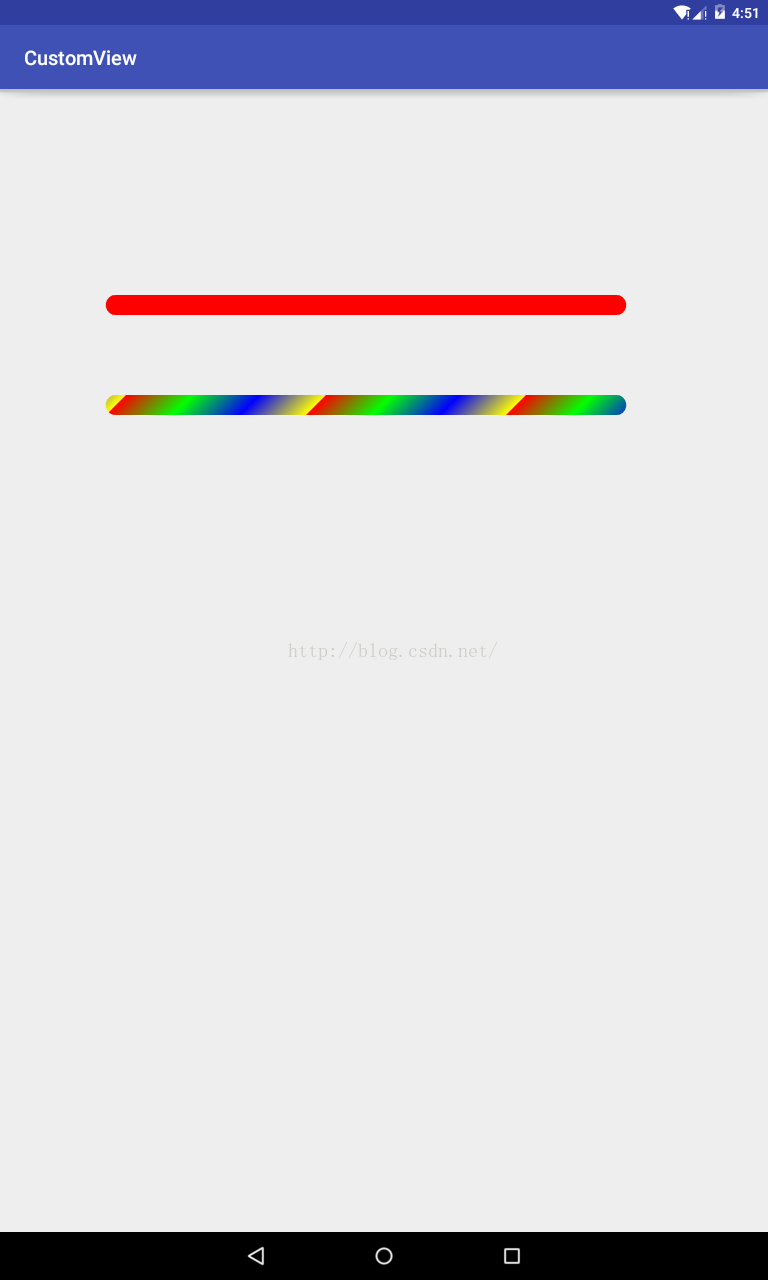 Android 2D 繪圖详解:Canvas 與 Paint
在 Android 自訂 View 中,2D 繪圖是很重要的一塊。最常見的兩個核心類別是 Canvas 與 Paint:Canvas 負責決定畫在哪裡、畫什麼形狀;Pai
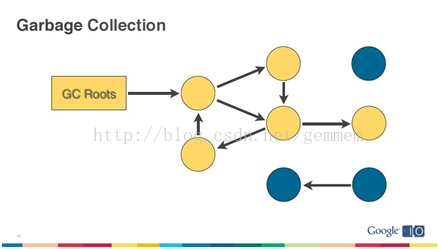 Android 內存優化實踐,兼談 Handler 引起的內存洩漏
Android 應用崩潰的原因裡,OOM 佔比一直居高不下。本文先理清內存管理的幾個基礎概念,再談 Bitmap 等常見大戶的優化手段,最後用 Handler 這個經典案
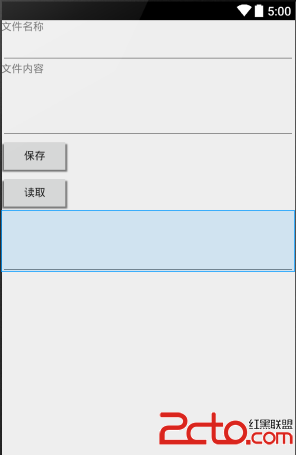 Android 小功能實作:內部檔案的讀與寫
一、布局 先看效果圖: main.xml: <?xml version=1.0 encoding=utf-8?> <LinearLayout xmln
 Android Notification 通知機制解析與完整範例
Notification 是顯示在手機狀態欄的通知,屬於系統層級的全域提示,通常由 NotificationManager 統一管理。不論訊息來自聊天軟體還是下載進度,使