

編輯:關於 Android 程式設計
授權流程可以概括成一句話:先問「你是誰」,再問「你能做什麼」。而跟認證環節類似,Shiro 在判定權限時,最後仍然是回到 Realm 去取資料。
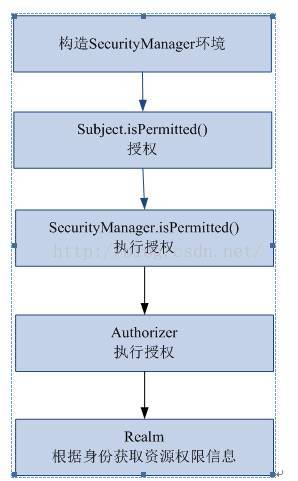
Shiro 提供了三種授權風格,可依場景挑選:
程式化授權——直接寫 if/else 判斷:
Subject subject = SecurityUtils.getSubject();

if (subject.hasRole("admin")) {
    // 有權限
} else {
    // 無權限
}
註解式授權——在方法上掛註解:
@RequiresRoles("admin")
public void hello() {
    // 有權限
}
JSP/GSP 標籤授權——在頁面層用標籤包住內容:
<shiro:hasRole name="admin">
    <!-- 有權限 -->
</shiro:hasRole>
先把權限模型寫進 ini 檔:
# 用戶
[users]
# 用戶 zhangsan 的密碼是 123,同時擁有 role1 與 role2 兩個角色
zhangsan=123,role1,role2

# 權限
[roles]
# role1 對 user 資源擁有 create、update 權限
role1=user:create,user:update
# role2 對 user 資源擁有 create、delete 權限
role2=user:create,user:delete
# role3 對 user 資源擁有 create 權限
role3=user:create
權限識別字有固定語法:資源:操作:實例,各段以半角冒號分隔。
例如 user:create:01 表示「對 user 資源的 01 實例執行 create」;user:create 等價於 user:create:*,代表對所有 user 實例都能 create;user:*:01 則是對 01 這個實例的所有操作都放行。萬用字元讓權限描述能收斂得很乾淨。
接著寫測試程式。做法很省事——在認證的程式碼基礎上往下接就行:
/**
 * 授權測試
 */
public class AuthorizationTest {

    // 角色授權 + 資源授權
    @Test
    public void testAuthorization() {
        // 建立 SecurityManager 工廠
        Factory<SecurityManager> factory = new IniSecurityManagerFactory("classpath:shiro-permission.ini");

        // 建立 SecurityManager
        SecurityManager securityManager = factory.getInstance();

        // 把 SecurityManager 設定到系統執行環境;
        // 若與 Spring 整合,則改為配置在 Spring 容器中
        SecurityUtils.setSecurityManager(securityManager);

        // 取得目前主體
        Subject subject = SecurityUtils.getSubject();

        // 先完成認證
        UsernamePasswordToken token = new UsernamePasswordToken("zhangsan", "123");
        try {
            subject.login(token);
        } catch (AuthenticationException e) {
            e.printStackTrace();
        }
        System.out.println("認證狀態:" + subject.isAuthenticated());

        // 認證通過後才做授權

        /* 基於角色的授權 */
        boolean isHasRole = subject.hasRole("role1");
        System.out.println("是否有 role1 權限:" + isHasRole);

        // 判斷是否同時具備多個角色
        boolean hasAllRoles = subject.hasAllRoles(Arrays.asList("role1", "role2"));
        System.out.println("是否擁有所有角色([role1],[role2]):" + hasAllRoles);

        // check 系列方法不傳回值,授權失敗時直接拋例外
        try {
            subject.checkRole("role12");
        } catch (AuthorizationException e) {
            System.out.println("用戶沒有 role12 角色");
            e.printStackTrace();
        }

        /* 基於資源的授權 */
        boolean isPermitted = subject.isPermitted("user:create:1");
        System.out.println("是否有 user:create:1 權限:" + isPermitted);

        boolean isPermittedAll = subject.isPermittedAll("user:create", "user:delete");
        System.out.println("是否有 user:create、user:delete 權限:" + isPermittedAll);

        // 同樣有無回傳值的 check 版本
        try {
            subject.checkPermission("user:post");
        } catch (AuthorizationException e) {
            System.out.println("用戶沒有 user:post 權限");
            e.printStackTrace();
        }
    }
}
跑完這一段,一個最基礎的「認證 + 授權」閉環就完整了。実務上要留意的是,hasRole / isPermitted 這類回傳 boolean 的方法適合用在需要分支判斷的地方,而 checkRole / checkPermission 適合用在「沒權限就應該中斷流程」的地方,兩者語意不同,別混用。
 ViewPagerIndicator 製作 Tab 標籤
用 ViewPagerIndicator 做出完整 Tab 體驗 ViewPagerIndicator 是一個常見的開源庫,可與 ViewPager 搭配,快速做出頂部
 如何把多個 Android Project 打包成一個 APK
當專案規模變大,把共用程式碼獨立成 Library Project 幾乎是必然選擇。做法是讓一個主專案引用其他專案,被引用方就像 jar 一樣被納入建置流程——但運作原理
 Android 檔案下載進度條實作:即時更新下載百分比
這次和大家分享如何實現 Android 檔案下載時的進度顯示,希望對初學者有所幫助。先看效果圖: 上方的藍色進度條會依下載百分比遞增,中間的文字控制項顯示下載百分比,最
 友盟集成進階:用一份 SDK 滿足產品與行銷的各種統計需求
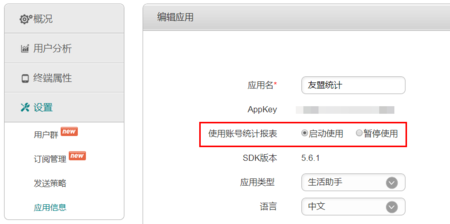
上一篇文章完成了友盟 SDK 的基本集成。但要真正滿足產品經理對一個 App 的期待,基本功能還遠遠不夠,這篇就來把剩下的常用能力補齊。 1. 帳號統計 友盟預設以設備