

編輯:關於 Android 程式設計
近來全面負責公司 Android 產品的開發與維護,產品線多而人手緊,很多事只能自己上手。日積月累下來,發現真正拖慢節奏的往往不是大架構,而是那些「明明寫過卻總要想一下」的零碎知識點。這裡做個歸檔,方便自己和同事隨時翻查。
// 隱藏 app 圖標
getSupportActionBar().setDisplayShowHomeEnabled(false);
// 顯示返回箭頭
getSupportActionBar().setDisplayHomeAsUpEnabled(true);實現 Comparator 即可,重點是最後那一行 Collections.sort():
public class MyComparator implements Comparator<Student> {
    public int compare(Student s1, Student s2) {
        if (s1.getID() > s2.getID()) {
            return 1;
        } else if (s1.getID() < s2.getID()) {
            return -1;
        }
        return 0;
    }
}
Student s1 = new Student("001", "Jim", "男", 50);
Student s2 = new Student("002", "Tom", "男", 70);
Student s3 = new Student("003", "Dave", "男", 65);
Student s4 = new Student("004", "Peter", "男", 80);
Student s5 = new Student("005", "Lucy", "女", 100);
ArrayList<Student> list = new ArrayList<>();
list.add(s1);
list.add(s2);
list.add(s3);
list.add(s4);
list.add(s5);
Comparator comparator = new MyComparator();
Collections.sort(list, comparator);Intent intent = new Intent();
intent.setAction("android.intent.action.VIEW");
Uri content_url = Uri.parse("file://" + strFilePathName);
intent.setData(content_url);
intent.setClassName("com.android.browser", "com.android.browser.BrowserActivity");
mContext.startActivity(intent);同時需要在 AndroidManifest.xml 中為相應 Activity 補上 intent-filter:
<intent-filter>
    <category android:name="android.intent.category.DEFAULT" />
    <category android:name="android.intent.category.BROWSABLE" />
    <data android:scheme="file" />
</intent-filter>split("\\+") 這種寫法不是多餘的。問號、加號、星號、豎線、點號等在正則中都是元字符,直接放進 split 會出錯,必須加 \\ 轉義。
public static int getStringExtractInt(String string) {
    String regEx = "[^0-9]";
    Pattern p = Pattern.compile(regEx);
    Matcher m = p.matcher(string);
    String strResult = m.replaceAll("").trim();
    if (strResult.isEmpty()) {
        strResult = "0";
    }
    return Integer.parseInt(strResult);
}public static int getStringSpiltToInt(String strSpilt, String string) {
String[] result = string.split(strSpilt);
if (result[0].isEmpty()) {
result[0] = "0";
}
return Integer.parseInt(result[0]);
}public static int[] getStringSpiltToIntArray(String strSpilt, String string) {
String[] result = string.split(strSpilt);
int[] nResult = new int[result.length];
for (int i = 0; i < result.length; i++) {
if (result[i].isEmpty()) {
result[i] = "0";
}
nResult[i] = Integer.parseInt(result[i]);
}
return nResult;
}textView.getPaint().setFlags(Paint.UNDERLINE_TEXT_FLAG); // 下劃線
textView.getPaint().setAntiAlias(true); // 抗鋸齒
textView.getPaint().setFlags(Paint.STRIKE_THRU_TEXT_FLAG); // 中劃線
// 中劃線 + 抗鋸齒
textView.getPaint().setFlags(Paint.STRIKE_THRU_TEXT_FLAG | Paint.ANTI_ALIAS_FLAG);
textView.getPaint().setFlags(0); // 清除所有劃線按列索引直接取,速度略快,但一旦表結構調整就容易出錯:
while (cursor.moveToNext()) {
    String strValue = cursor.getString(0);
}
按列名取索引,可讀性和健壯性更好,是我更推薦的寫法:
while (cursor.moveToNext()) {
    int nameColumnIndex = cursor.getColumnIndex("username");
    String strValue = cursor.getString(nameColumnIndex);
}
把索引查詢提到循環外還能再省一點開銷。另外別忘了用 try/finally 或 try-with-resources 確保 Cursor 被關閉。
 Android 性能優化:官方 Performance Tips 精讀
如果你真的願意去努力,人生最壞的結果也不過是大器晚成。 原文鏈接:https://developer.android.com/training/articles/pe
 Android DigitalClock 數位時鐘元件用法實例
本文說明 Android 內建的 DigitalClock 元件怎麼用,重點是:它完全不需要寫 Java 就能顯示時間。 直接在版面檔裡放上去就好 DigitalClo
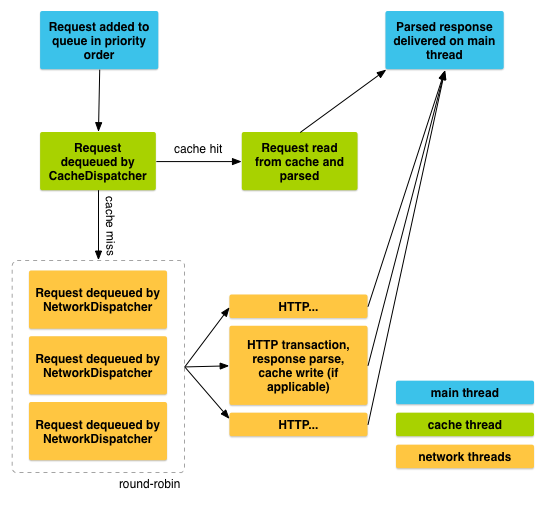 Android 網絡請求框架 Volley 學習筆記
本文 GitHub 地址: https://github.com/YoungBear/MyBlog/blob/master/VolleyLearn.md Volley 是
 微信網頁版怎麼查看我的收藏 indirectly實現的方法
微信網頁版其實是可以查看收藏的,只是不能直觀打開,需要先在手機上做一點設定。相信不少用戶從未用過這個功能,下面小編就演示完整流程。 微信網頁版查看收藏的步驟 第一步、登入