

編輯:關於 Android 程式設計
這個系列停更有一段時間了,差不多可以重新接著寫。這次要談的是策略模式;在此之前,先快速回顧前面聊過的四種:單例模式、Builder 模式、觀察者模式與原型模式。
設計模式很重要!設計模式很重要!設計模式很重要!
策略模式定義了一系列的演算法,把每一個演算法各自封裝起來,使它們可以互相替換。策略模式讓演算法獨立於使用它的客戶端而獨立變化。
光看定義有點抽象,還是舉個例子。
假設要出門旅遊,交通方式有步行、火車、飛機⋯⋯如果不用任何模式,程式碼大概會長這樣:
public class TravelStrategy {
    enum Strategy { WALK, PLANE, SUBWAY }

    private Strategy strategy;

    public TravelStrategy(Strategy strategy) {
        this.strategy = strategy;
    }

    public void travel() {
        if (strategy == Strategy.WALK) {
            print("walk");
        } else if (strategy == Strategy.PLANE) {
            print("plane");
        } else if (strategy == Strategy.SUBWAY) {
            print("subway");
        }
    }

    public void print(String str) {
        System.out.println("出行方式為:" + str);
    }

    public static void main(String[] args) {
        new TravelStrategy(Strategy.WALK).travel();
        new TravelStrategy(Strategy.PLANE).travel();
        new TravelStrategy(Strategy.SUBWAY).travel();
    }
}
致命缺點很明顯:每多一種出行方式,就得再塞一個 else-if。這違反了物件導向的「對修改封閉」原則。
第一步,抽出策略介面:
public interface Strategy {
    void travel();
}
第二步,每種出行方式各自實作:
public class WalkStrategy implements Strategy {
    @Override public void travel() { System.out.println("walk"); }
}

public class PlaneStrategy implements Strategy {
    @Override public void travel() { System.out.println("plane"); }
}

public class SubwayStrategy implements Strategy {
    @Override public void travel() { System.out.println("subway"); }
}
第三步,寫一個負責包裝策略並委派呼叫的 Context:
public class TravelContext {
    private Strategy strategy;

    public Strategy getStrategy() { return strategy; }

    public void setStrategy(Strategy strategy) { this.strategy = strategy; }

    public void travel() {
        if (strategy != null) {
            strategy.travel();
        }
    }
}
測試一下:
public class Main {
    public static void main(String[] args) {
        TravelContext context = new TravelContext();

        context.setStrategy(new PlaneStrategy());
        context.travel();

        context.setStrategy(new WalkStrategy());
        context.travel();

        context.setStrategy(new SubwayStrategy());
        context.travel();
    }
}
輸出:
plane
walk
subway
改用策略模式之後,要新增出行方式完全不必動到既有類別,只要多實作一個介面就好——這正是「對擴展開放」的含意。例如新增腳踏車:
public class BikeStrategy implements Strategy {
    @Override public void travel() { System.out.println("bike"); }
}
使用處僅需換掉實作:
TravelContext context = new TravelContext();
context.setStrategy(new BikeStrategy());
context.travel();
Android 系統原始碼中策略模式到處可見,最典型的例子就是屬性動畫的插值器。插值器的職責是:依據時間流逝的百分比,算出目前屬性值該變動多少百分比。
使用時透過 setInterpolator() 注入。內部維護一個 TimeInterpolator 引用,預設是先加速後減速,若傳入 null 則退回線性插值器:
private static final TimeInterpolator sDefaultInterpolator = new AccelerateDecelerateInterpolator();
private TimeInterpolator mInterpolator = sDefaultInterpolator;

@Override
public void setInterpolator(TimeInterpolator value) {
    mInterpolator = (value != null) ? value : new LinearInterpolator();
}

@Override
public TimeInterpolator getInterpolator() {
    return mInterpolator;
}
TimeInterpolator 是介面,而 Interpolator 繼承自它,純粹是為了相容舊有 API;BaseInterpolator 則是實作 Interpolator 的抽象類別。真正的「具體策略」是我們平常在用的那些實作,例如線性:
public class LinearInterpolator extends BaseInterpolator implements NativeInterpolatorFactory {
    @Override
    public float getInterpolation(float input) {
        return input;
    }
}
以及先加速後減速:
public class AccelerateDecelerateInterpolator extends BaseInterpolator implements NativeInterpolatorFactory {
    @Override
    public float getInterpolation(float input) {
        return (float) (Math.cos((input + 1) * Math.PI) / 2.0f) + 0.5f;
    }
}
動畫執行過程中,系統直接呼叫 getInterpolation() 就能拿到對應的百分比,換掉插值器就換掉了整條速度曲線——彈簧、自由落體等效果都是這個道理。
估值器(TypeEvaluator)的角色是:依據目前變更百分比,算出變更後的屬性值。它同樣是「介面 + 多個實作」的策略結構:
public interface TypeEvaluator<T> {
    T evaluate(float fraction, T startValue, T endValue);
}
public class IntEvaluator implements TypeEvaluator<Integer> {
    public Integer evaluate(float fraction, Integer startValue, Integer endValue) {
        int startInt = startValue;
        return (int) (startInt + fraction * (endValue - startInt));
    }
}

public class FloatEvaluator implements TypeEvaluator<Number> {
    public Float evaluate(float fraction, Number startValue, Number endValue) {
        float startFloat = startValue.floatValue();
        return startFloat + fraction * (endValue.floatValue() - startFloat);
    }
}

public class ArgbEvaluator implements TypeEvaluator {
    private static final ArgbEvaluator sInstance = new ArgbEvaluator();
    public static ArgbEvaluator getInstance() { return sInstance; }

    public Object evaluate(float fraction, Object startValue, Object endValue) {
        int startInt = (Integer) startValue;
        int endInt = (Integer) endValue;
        int startA = (startInt >> 24) & 0xff;
        int startR = (startInt >> 16) & 0xff;
        int startG = (startInt >> 8) & 0xff;
        int startB = startInt & 0xff;
        int endA = (endInt >> 24) & 0xff;
        int endR = (endInt >> 16) & 0xff;
        int endG = (endInt >> 8) & 0xff;
        int endB = endInt & 0xff;
        return ((startA + (int)(fraction * (endA - startA))) << 24)
             | ((startR + (int)(fraction * (endR - startR))) << 16)
             | ((startG + (int)(fraction * (endG - startG))) << 8)
             |  (startB + (int)(fraction * (endB - startB)));
    }
}
需要自訂評估值時,只要多寫一個實作即可,不必改動動畫框架本身。
Volley 的重試策略。先定義介面:
public interface RetryPolicy {
    int getCurrentTimeout();     // 目前請求逾時(供 Log 用)
    int getCurrentRetryCount();  // 已重試次數(供 Log 用)
    void retry(VolleyError error) throws VolleyError;
}
框架內建 DefaultRetryPolicy,在 retry() 中判斷重試次數是否已達上限;而策略的注入點在 Request 類別上:
public abstract class Request<T> implements Comparable<Request<T>> {
    private RetryPolicy mRetryPolicy;

    public Request setRetryPolicy(RetryPolicy retryPolicy) {
        mRetryPolicy = retryPolicy;
        return this;
    }

    public RetryPolicy getRetryPolicy() {
        return mRetryPolicy;
    }
}
Volley 的缓存策略。網路框架幾乎都會有緩存層,做法通常是定義一個 Cache 介面,再提供不同實作:
public interface Cache {
    Entry get(String key);
    void put(String key, Entry entry);
    void initialize();
    void invalidate(String key, boolean fullExpire);
    void remove(String key);
    void clear();
}
Volley 提供了 NoCache 與 DiskBasedCache 兩種實作,用哪種由呼叫方決定,同樣是策略模式。
Android 裡 ViewPager 幾乎是必備元件,而它通常要搭配一個 Indicator 指示器。如果讓你從零實作一個帶 Indicator 的 ViewPager,你會不會想到用策略模式?
思路很直接:在自訂的 ViewPager 中持有一個 Indicator 介面變數,透過 setter 注入;滑動時呼叫介面方法去更新指示器。然後提供幾個現成實作,例如圓形指示器 CircleIndicator、線性指示器 LineIndicator、Tab 指示器 TabIndicator、圖示指示器 IconIndicator⋯⋯有興趣不妨自己寫一版,寫完你對策略模式的理解會完全不同。
 手機QQ怎麼完全退出 兩種登出方式說明
有時關掉了手機QQ,卻仍然能收到消息,想徹底退出該怎麼做?下面我們一起來看。 手機QQ退出登入教學 方法一:退出QQ程序 第一步:打開手機QQ。 第二步:點擊手機上的【菜
 Android Fragment 入門:概念、生命週期與使用方式
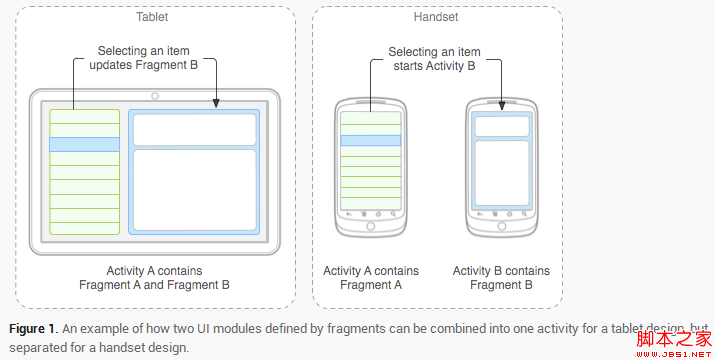
Fragment 是什麼 Android 從 3.0(API Level 11)開始引入 Fragment。可以把 Fragment 想成 Activity 中的一個模塊
 如何將 Android 專案打包成第三方 JAR 供他人使用
做專案時經常會遇到需要使用第三方 SDK 的情況。通常我們先把第三方 jar 包導入,再導入相應的資源檔,最後在自己的專案中呼叫。很多人只會用,卻不知道怎麼把自己的專案也
 Android 網路開發實戰:WebView、HTTP 請求與 OkHttp
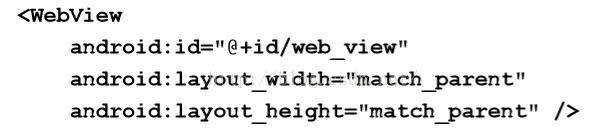
WebView 用法 參考《第一行代碼》。 布局檔案: 主體程式碼: MainActivity 中的程式碼相當精簡:先用 findViewById() 取得 WebV