

編輯:關於 Android 程式設計
HttpURLConnection 繼承自 URLConnection,因此天然支持向指定地址發送 GET 與 POST 請求。相比直接使用 Apache HttpClient,它是 JDK 自帶的實現,在 Android 上也更受官方推薦。它在父類基礎上補充了幾個便捷方法:
int    getResponseCode()      // 獲取服務器響應碼
String getResponseMessage()   // 獲取響應描述信息
String getRequestMethod()     // 獲取當前請求方法
void   setRequestMethod(String method)  // 設置請求方法
<WebView
    android:id="@+id/webView"
    android:layout_width="match_parent"
    android:layout_height="match_parent" />
public class MainActivity extends Activity {

    private WebView webview;
    private Handler handler = new Handler();

    @Override
    protected void onCreate(Bundle savedInstanceState) {
        super.onCreate(savedInstanceState);
        setContentView(R.layout.activity_main);
        webview = (WebView) findViewById(R.id.webView);
        new HttpThread("https://www.sina.com", webview, handler).start();
    }
}
網絡操作不能放在主線程,這裡用一個自定義 Thread 並借助 Handler 回主線程更新 UI。
public class HttpThread extends Thread {

    private String url;
    private WebView webview;
    private Handler handler;

    public HttpThread(String url, WebView webView, Handler handler) {
        this.url = url;
        this.webview = webView;
        this.handler = handler;
    }

    @Override
    public void run() {
        HttpURLConnection conn = null;
        BufferedReader reader = null;
        try {
            URL httpUri = new URL(url);
            conn = (HttpURLConnection) httpUri.openConnection();
            conn.setReadTimeout(5000);
            conn.setRequestMethod("GET");

            final StringBuffer sb = new StringBuffer();
            reader = new BufferedReader(
                    new InputStreamReader(conn.getInputStream()));
            String str;
            while ((str = reader.readLine()) != null) {
                sb.append(str);
            }

            handler.post(new Runnable() {
                @Override
                public void run() {
                    webview.loadData(sb.toString(),
                            "text/html;charset=utf-8", null);
                }
            });
        } catch (Exception e) {
            e.printStackTrace();
        } finally {
            if (reader != null) {
                try { reader.close(); } catch (IOException e) { }
            }
            if (conn != null) conn.disconnect();
        }
    }
}
<uses-permission android:name="android.permission.INTERNET" />
<ImageView
    android:id="@+id/imageView1"
    android:layout_width="match_parent"
    android:layout_height="match_parent" />
public class MainActivity extends Activity {

    private Handler handler = new Handler();
    private ImageView imageView;

    @Override
    protected void onCreate(Bundle savedInstanceState) {
        super.onCreate(savedInstanceState);
        setContentView(R.layout.activity_main);
        imageView = (ImageView) findViewById(R.id.imageView1);
        new HttpThread(
            "https://img5.duitang.com/uploads/item/201410/23/xxx.jpeg",
            imageView, handler).start();
    }
}
public class HttpThread extends Thread {

    private String url;
    private Handler handler;
    private ImageView imageView;

    public HttpThread(String url, ImageView imageView, Handler handler) {
        this.url = url;
        this.imageView = imageView;
        this.handler = handler;
    }

    @Override
    public void run() {
        HttpURLConnection conn = null;
        InputStream in = null;
        FileOutputStream out = null;
        try {
            URL httpUri = new URL(url);
            conn = (HttpURLConnection) httpUri.openConnection();
            conn.setReadTimeout(5000);
            conn.setRequestMethod("GET");
            conn.setDoInput(true);

            in = conn.getInputStream();

            // 先落盤到外部存儲,再解碼
            String fileName = String.valueOf(System.currentTimeMillis());
            File downloadFile = null;
            if (Environment.getExternalStorageState()
                    .equals(Environment.MEDIA_MOUNTED)) {
                File parent = Environment.getExternalStorageDirectory();
                downloadFile = new File(parent, fileName);
                out = new FileOutputStream(downloadFile);
            }

            byte[] b = new byte[2 * 1024];
            int len;
            while ((len = in.read(b)) != -1) {
                out.write(b, 0, len);
            }
            out.flush();

            final Bitmap bitmap =
                    BitmapFactory.decodeFile(downloadFile.getAbsolutePath());
            handler.post(new Runnable() {
                @Override
                public void run() {
                    imageView.setImageBitmap(bitmap);
                }
            });
        } catch (Exception e) {
            e.printStackTrace();
        } finally {
            try { if (in != null) in.close(); } catch (IOException e) { }
            try { if (out != null) out.close(); } catch (IOException e) { }
            if (conn != null) conn.disconnect();
        }
    }
}
<uses-permission android:name="android.permission.WRITE_EXTERNAL_STORAGE" />
在 Android 6.0 及以上版本,WRITE_EXTERNAL_STORAGE 屬於危險權限,除了靜態聲明之外還必須在運行時動態申請,否則寫文件會拋出 SecurityException。
setConnectTimeout 與 setReadTimeout 缺一不可,否則弱網下線程會長期掛起。getResponseCode() 是否為 200,並處理 3xx 重定向。 用 ListView 打造圓角表格樣式的清單效果
ListView 除了單調的列表,也能透過客製 Adapter 與背景資源,做出具有視覺層次的表格樣式。本文示範一個只有三筆資料的清單,並依位置套用不同的圓角背景(頂端、
 微信理財通怎麼買?從綁定銀行卡到收益入帳
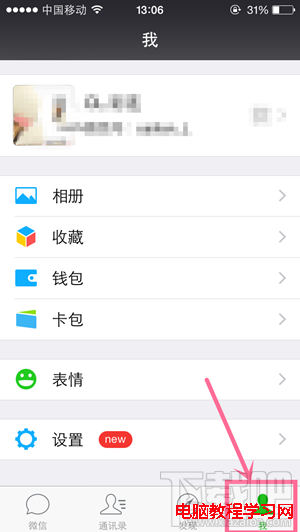
使用微信理財通前,需先在微信錢包綁定銀行卡,且零錢餘額要足夠。進入我、錢包、理財通,了解產品後選擇買入。 填寫金額並同意協議,選擇銀行卡支付。完成後可查看收益到帳時間。
 Android 布局與控件(三):TextView 屬性全解析
TextView 是界面設計中使用頻率最高的控件之一,同時也是 Button 等眾多控件的父類。可以說,把 TextView 玩透,界面排版就成功了一大半。 文字常用
 Android Studio 匯入 JAR 包的兩種完整做法(圖文並茂)
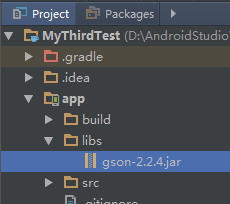
在 Android 開發中,經常需要引入第三方提供的 JAR 包,比如推送 SDK、加密工具類或者支付相關的庫。下面整理兩種在 Android Studio 中匯入 JA