

編輯:關於 Android 程式設計
不用自己寫手勢判斷,Android 從 support v4 開始就提供了現成的下拉刷新控件 SwipeRefreshLayout,位於 android.support.v4.widget 套件下(新版請改用 AndroidX 的 androidx.swiperefreshlayout.widget.SwipeRefreshLayout)。
OnRefreshListener 介面並覆寫 onRefresh()。onCreate() 中註冊監聽器。setRefreshing(false) 收起轉圈動畫。
<androidx.swiperefreshlayout.widget.SwipeRefreshLayout
    xmlns:android="https://schemas.android.com/apk/res/android"
    android:id="@+id/swipe_refresh"
    android:layout_width="match_parent"
    android:layout_height="match_parent">

    <ScrollView
        android:layout_width="match_parent"
        android:layout_height="match_parent">

        <TextView
            android:id="@+id/random_text"
            android:layout_width="match_parent"
            android:layout_height="wrap_content" />
    </ScrollView>

</androidx.swiperefreshlayout.widget.SwipeRefreshLayout>
public class MainActivity extends Activity implements OnRefreshListener {

    private SwipeRefreshLayout mSwipeRefreshLayout;
    private TextView mRandomText;

    @Override
    protected void onCreate(Bundle savedInstanceState) {
        super.onCreate(savedInstanceState);
        setContentView(R.layout.activity_main);

        mSwipeRefreshLayout = (SwipeRefreshLayout) findViewById(R.id.swipe_refresh);
        mSwipeRefreshLayout.setOnRefreshListener(this);
        mRandomText = (TextView) findViewById(R.id.random_text);
    }

    @Override
    public void onRefresh() {
        mSwipeRefreshLayout.setRefreshing(true);
        new Handler().postDelayed(new Runnable() {
            @Override
            public void run() {
                // 模擬 3 秒後完成刷新
                mSwipeRefreshLayout.setRefreshing(false);
                int num = (int) (Math.random() * 100 + 1);
                String s = mRandomText.getText().toString();
                mRandomText.setText(s + " " + num);
            }
        }, 3000);
    }
}
postDelayed 換成實際的網路請求,並在請求回呼(包含失敗分支)裡呼叫 setRefreshing(false),否則轉圈會一直轉。setColorSchemeColors() 自訂轉圈的顏色,setProgressViewOffset() 調整起始偏移,setDistanceToTriggerSync() 控制觸發門檻。canChildScrollUp() 自行判斷是否該攔截。 Android Intent 機制與常見用法:頁面跳轉、傳值與系統功能呼叫
Activity 與 Intent Activity 是 Android 應用程式的核心元件,負責畫面與使用者互動。Activity 之間的跳轉與資料傳遞,通常透過 In
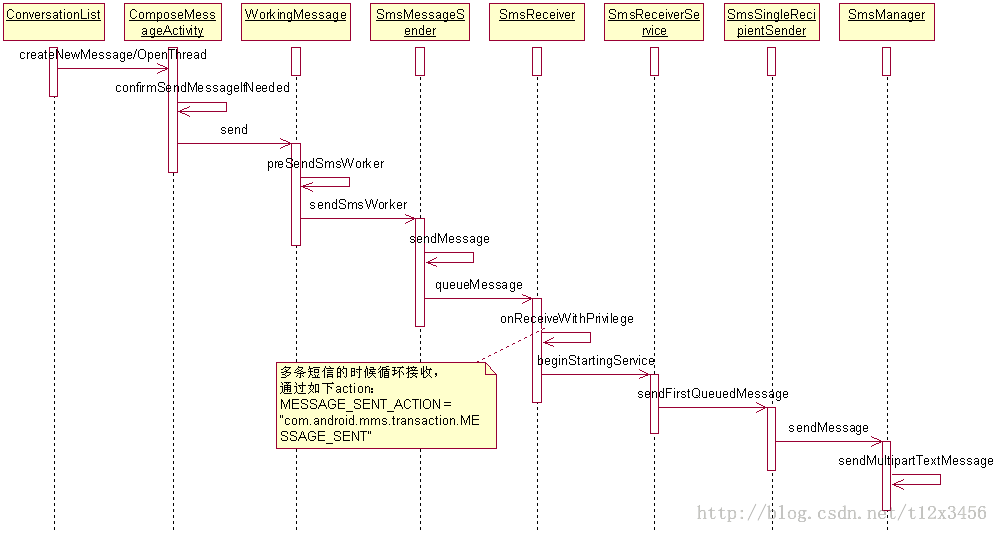 Android mms 模組實戰:單卡與雙卡短信收發流程及雙卡解析異常解法
一、訊息發送的起點 入口是 com.android.mms.data.WorkingMessage 類的 send(): public void send() {
 仿微信滑動選單:SwipeMenuListView 加上下拉刷新
本文示範如何用開源的 SwipeMenuListView 做出「滑動顯示編輯/刪除選單」的效果,並額外加上下拉刷新。完整流程如下。 一、引入開源庫 二、版面:用
 Android 動畫學習 Demo(3):讓 View 沿著貝塞爾曲線移動的 Property Animation
在 Property Animation 的整個體系裡,ValueAnimator 是最核心也最基礎的一個類別。它負責記錄「這個屬性已經變化了多少時間」,以及在當前時間點