

編輯:關於 Android 程式設計
為 App 提供多套主題皮膚,是提升使用者體驗常見的做法。Android 透過自訂屬性與 Style 的配合,就能實現靈活的主題切換。本文示範從定義屬性、編寫 Style 到動態讀取主題值的完整流程。
首先在 attrs.xml 中宣告一個可樣式化屬性集合:
<resources>
    <declare-styleable name="my_styleable">
    </declare-styleable>
</resources>
接著在 styles.xml 中定義具體主題,把屬性指向實際的顏色與圖片資源:
<style name="Bule" parent="@android:style/Theme.Light.NoTitleBar">
    <item name="colorValue">@color/bule_bg</item>
    <item name="backValue">@drawable/icon_bule_back</item>
</style>
使用時,透過 ?attr/ 語法引用自訂屬性,而非寫死具體值:
<TextView
    android:id="@+id/tv_test"
    android:layout_width="wrap_content"
    android:layout_height="wrap_content"
    android:gravity="center"
    android:text="測試文字"
    android:textColor="?attr/colorValue"
    android:textSize="28sp" />
別忘了在 onCreate 中、且必須在 setContentView 之前呼叫 setTheme:
setTheme(R.style.Bule);
// 注意:一定要在 setContentView 之前設定主題
setContentView(R.layout.activity_main);
當我們做了兩款以上主題,需要取得當前主題某個屬性的實際值(例如 tv_test 的 textColor)時,可透過 obtainStyledAttributes 讀取:
TypedArray ta = getTheme().obtainStyledAttributes(R.styleable.my_styleable);
// R.styleable.my_styleable_colorValue 是自動生成的
int color = ta.getColor(R.styleable.my_styleable_colorValue, 0);
// 別忘了回收
ta.recycle();
透過這套「自訂屬性 + Style + setTheme」的組合,就能輕鬆實現多主題切換,並在需要時動態取得主題相關的屬性值。
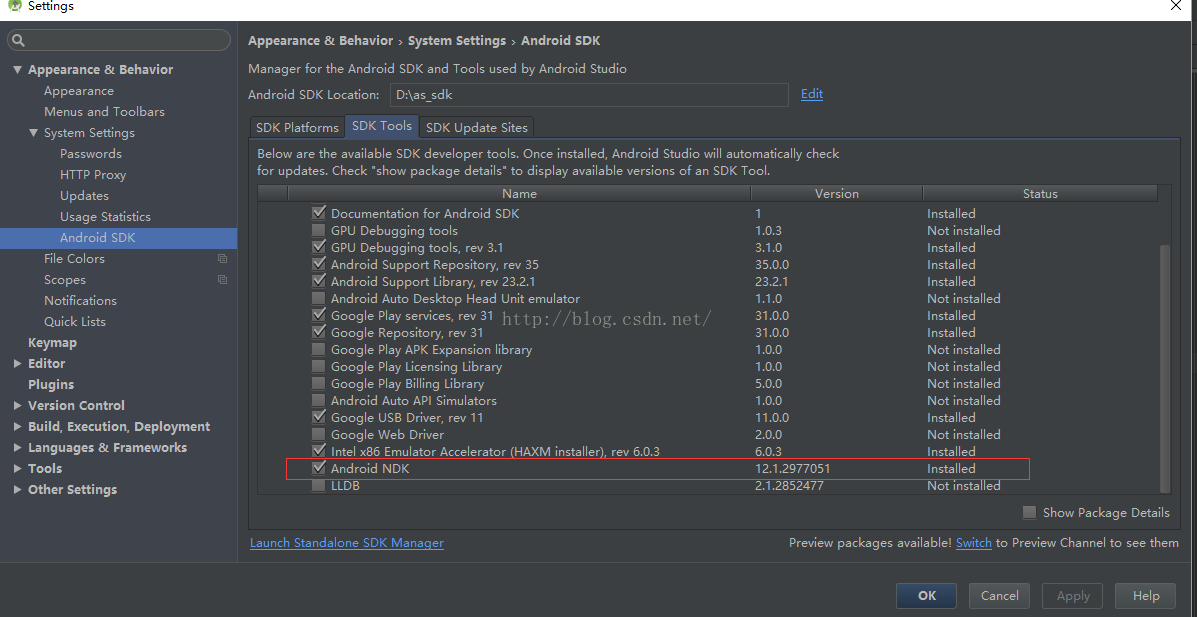 用 Android Studio 搭配 NDK 編譯自己的 .so 動態庫
Android 的架構是上層 App 用 Java 撰寫、底層以 C/C++ 實作。一般 App 工程師平常很少碰到 C/C++,但當專案出現複雜演算法或耗時運算(例如影
 Android 自定義控制項:貝賽爾曲線、手勢軌跡與水波紋
在 Android 自定義繪圖中,貝賽爾曲線常用於手勢軌跡、水波紋與平滑折線。它讓路徑不再只是生硬直線,而能呈現自然過渡的曲線效果。 貝賽爾曲線的由來 貝賽爾曲線是電
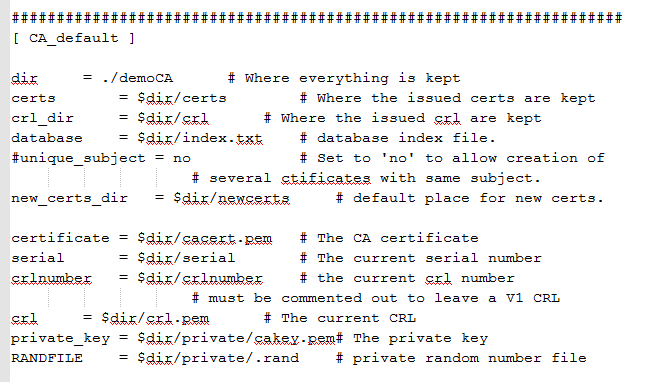 OpenSSL 自簽 CA 證書與雙向認證,Windows 證書批量導出與 CER 轉 BKS
過程中遇到了一些小問題,例如 openssl.cnf 從哪裡來。這個檔案在編譯完 OpenSSL 後,通常位於根目錄的 apps/demoCA 下,把它複製到與 open
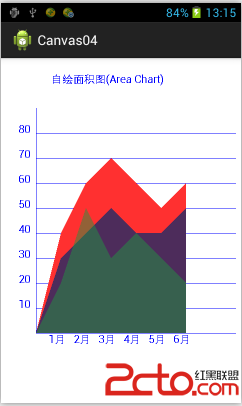 Android Canvas 練習(5):用 Path 與透明度手繪面積圖
原本只打算畫兩張圖練練手就快速跳過 Canvas 這塊,畢竟我對它一向興趣缺缺。不過最近畫了兩個圖表之後忽然發現,那些以前覺得很常見的統計圖表,仔細想想,如果不追求通用性