

編輯:關於 Android 程式設計
Android 開發中必須注意記憶體的釋放。一旦載入圖片或其他佔用過多記憶體的資源,就會發生 OOM(OutOfMemoryError)錯誤。實務上最常出問題的地方就是圖片資源的釋放。
版面配置
<LinearLayout xmlns:android="https://schemas.android.com/apk/res/android"
    android:id="@+id/mian_bg"
    android:layout_width="fill_parent"
    android:layout_height="fill_parent"
    android:orientation="vertical"
    android:background="@drawable/main_background"
    android:gravity="center">

    <ImageView
        android:id="@+id/main_cion"
        android:layout_width="180dp"
        android:layout_height="180dp"
        android:layout_gravity="center"
        android:src="@drawable/img_main_roll0" />
</LinearLayout>
先取得控制項
public ImageView imageView;
public LinearLayout linearLayout;

imageView = (ImageView) findViewById(R.id.main_cion);
linearLayout = (LinearLayout) findViewById(R.id.mian_bg);
在 Activity 銷毀時釋放
@Override
protected void onDestroy() {
    super.onDestroy();
    imageView.setImageBitmap(null);   // 釋放 ImageView 持有的 Bitmap
    linearLayout.setBackground(null); // 釋放背景 Drawable
    System.gc();                      // 通知進行回收
}
使用 Bitmap 記得在不用時呼叫 recycle()
bitmap.recycle();無論你是用哪種方式設定了背景圖片,都要記得用對應的方式清掉:
android:background 或 setBackgroundResource(resid) → 用 setBackgroundResource(0) 清除setBackgroundDrawable(background)(API 16 以下)→ 用 setBackgroundDrawable(null) 清除setBackground(background)(API 16 以上)→ 用 setBackground(null) 清除然後在 onDestroy() 中呼叫 System.gc()。
確定不再使用的 List、陣列等參數,釋放方式是設為 null;List 建議先 clear() 再令其等於 null,這樣內部的元素參照會先被斷開。若記憶體吃緊,可及時呼叫 System.gc() 通知進行回收。
if (mBitmapList != null) {
    mBitmapList.clear();
    mBitmapList = null;
}System.gc() 不是萬靈丹。它只是「建議」虛擬機進行垃圾回收,虛擬機完全可以忽略。在 Android 上頻繁呼叫它反而會打斷正常的 GC 節奏、造成效能低落。真正該做的是不要持有不必要的參照。
recycle() 之後不能再用。呼叫 recycle() 後該 Bitmap 的像素記憶體已被釋放,任何後續操作(畫到 Canvas、再解碼、給 ImageView)都會拋出 Canvas: trying to use a recycled bitmap。所以 recycle 的時機必須確定「不會再有人用」,在多個 View 共用同一個 Bitmap 時尤其要小心。
1. 降採樣解碼(inSampleSize)。顯示到 200×200dp 的 ImageView,就不要解碼 3000×2000 的圖。先用 inJustDecodeBounds = true 讀檔頭取得原始尺寸,算出合適的 inSampleSize 再解碼,記憶體用量可以按平方級下降。
2. 使用成熟的字型庫。Glide、Fresco、Picasso 都內建了記憶體快取、磁碟快取、請求取消與生命週期綁定。自己手寫圖片載入,很難把這些細節都做對。
3. 降低 heap 碎片化。反覆配置大小不一的 Bitmap 會讓 heap 產生碎片,最後即使總可用記憶體足夠,也可能因為找不到連續空間而 OOM。避免在 onDraw 或 getView 裡 new 物件,善用物件池。
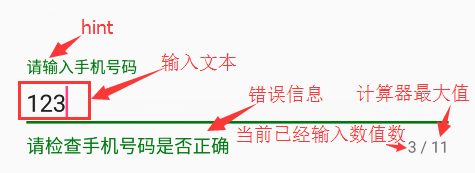 Material Design 元件 TextInputLayout:浮動提示、錯誤訊息與表單驗證
前言TextInputLayout 是 Material Design 中常見的輸入元件,主要用來包裹 EditText,讓提示文字在輸入時變成浮動標籤,也能顯示錯誤訊息
 Android 開發環境搭建圖文教程:JDK 與 ADT Bundle 配置
本文聚焦兩個環節:JDK 的安裝與環境變數設定,以及 ADT Bundle 的取得與配置。早期的 adt-bundle 版本會自帶 CPU/ABI 系統鏡像,完成本文兩個
 仿知乎日報:首頁網絡數據加載與 Gson 解析
首頁數據加載流程 這個章節以仿知乎日報為例,說明如何從網絡取得首頁資料,解析後填入輪播圖與新聞列表。整體流程可先讀取本地快取,若沒有再請求網絡,成功後更新介面並保存快取。
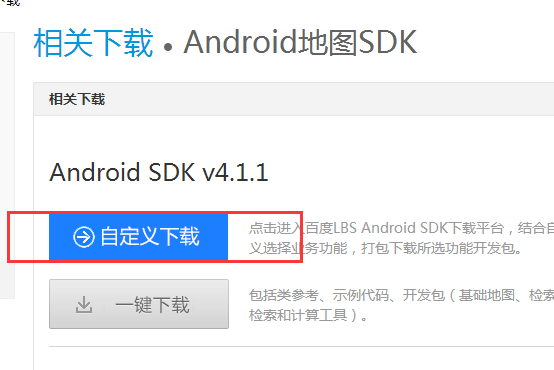 Android 整合百度地圖 API 的實作步驟圖解
要在 App 裡嵌入地圖,百度地圖 SDK 是最常見的選擇之一。以下依序說明從下載 SDK、申請密鑰到把地圖跑起來的完整流程。 一、從百度地圖開放平台下載 SDK 前往