

編輯:關於 Android 程式設計
Android 設備正常工作時,很多 Service 運行在後台,只有在系統記憶體不足時才會自動 kill 掉後台 Service。在 Android OTT 盒子專案中,由於網絡機頂盒運行內存僅 512M/1G,為提高系統流暢性,會在編譯固件時加入 App 黑白名單功能。
Android 系統開機後會發出開機廣播,我們可以在 App 中註冊一個 BootCompletedReceiver 來接收,並在 onReceive 中完成各項黑白名單的初始化配置:
 public class BootCompletedReceiverAML extends BroadcastReceiver {
    public static final String TAG = "BootCompletedReceiverAML";

    public void onReceive(Context context, Intent intent) {
        initScreenSaver();                     // 設置進入屏保的黑白名單
        initEnableRunningBackgroudComponents(); // 使能後台運行的 Service 白名單
        initEnableAutoRunningComponents();      // 開機自動運行的白名單
        initLauncherComponents();               // 開機 Launcher 白名單
    }

    // 設置進入屏保的黑白名單
    private void initScreenSaver() {
        Settings.System.putInt(mContext.getContentResolver(),
            Settings.System.BOOT_GUIDE_COMPLETED, 1);
        IDreamManager mDreamManager = IDreamManager.Stub.asInterface(
            ServiceManager.getService(DreamService.DREAM_SERVICE));
        ComponentName dream = new ComponentName("com.mipt.screensaver",
            "com.mipt.screensaver.ScreenSaverService");
        try {
            ComponentName[] dreams = { dream };
            mDreamManager.setDreamComponents(dream == null ? null : dreams);
        } catch (RemoteException e) { }
        String dreamEnableComponentNames =
            "com.skyworthdigital.filexplorer/com.skyworthdigital.weather.main";
        Settings.System.putString(mContext.getContentResolver(),
            Settings.System.DREAM_ENABLE_COMPONENT, dreamEnableComponentNames);
    }

    // 使能自動運行在後台的 Service 白名單
    private void initEnableRunningBackgroudComponents() {
        Settings.Secure.putString(mContext.getContentResolver(),
            Settings.Secure.ENABLE_RUNNING_BACKGROUD_COMPONENTS,
            "android/system/com.mipt/com.skyworth/com.google.android");
    }

    // 開機自動運行的白名單
    private void initEnableAutoRunningComponents() {
        Settings.Secure.putString(mContext.getContentResolver(),
            Settings.Secure.ENABLE_AUTO_LAUNCH_COMPONENTS,
            "com.android/android/system/com.mipt/com.skyworth");
    }

    // 開機 Launcher 白名單
    private void initLauncherComponents() {
        Settings.Secure.putString(mContext.getContentResolver(),
            Settings.Secure.ENABLE_LAUNCHER_COMPONENTS, "com.mipt.metro.launcher");
    }
}
其原理是:透過 Settings.System 與 Settings.Secure 中的自定義鍵值,把允許後台運行、開機自啟、進入屏保的應用包名配置成白名單。這些配置由定制固件中的系統服務讀取並據此管理應用,从而在內存有限的機頂盒上保證系統流暢。需要注意,這類 Settings.Secure 自定義項依賴定製 ROM 的支持,並非 Android 原生標準接口。
 在 Android 應用層驗證自訂硬體服務:內置 Java 程式
當硬體驅動與 Frameworks 服務完成後,下一步就是從應用層驗證是否能取得服務。做法是建立一個內置的 Java 應用程式,透過 ServiceManager 取得指
 自定義 View 實作打字機效果(含打字音效)
逐字蹦出的文字加上鍵盤敲擊音效,是很常被拿來做開場或引導文案的表現手法。它的原理其實非常單純:用計時器週期性地呼叫 setText(),每次多吐一個字,同時播放音效。
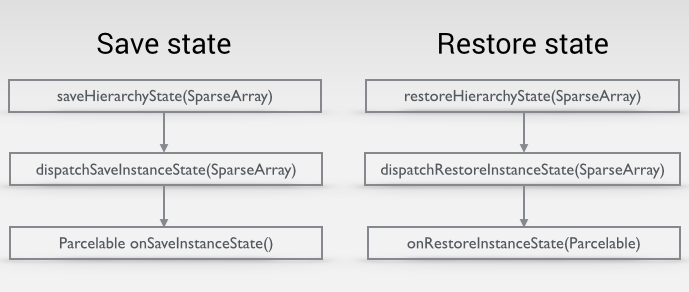 從源碼看 Android View 如何保存與恢復狀態
自定義控件是每個 Android 開發者的必經之路。走到某一步就會撞上同一個問題:狀態怎麼存? 如果不管這件事,用戶橫屏一下、或者按了返回再進來,控件就回到初始模樣——T
 Android 架構模式解析:MVC 與 MVP 如何選擇
為什麼 Android 專案需要關注架構許多開發者在剛開始建立 Android 應用時,會把邏輯、資料請求與畫面更新都寫在 Activity 或 Fragment 中。短