

編輯:關於 Android 程式設計
介面反覆打 API 除了吃流量,也讓伺服器壓力白白上升。把回應字串快取到本機,是最簡單也最有效的一招。這篇整理一套「侵入性低、可隨時替換」的快取方案。
沒必要自己從零打造,有兩個夠用的小工具:
本質上就是「把介面回傳的字串存到本機」。來源不必然要是網路,任何字串都能存,甚至換成資料庫也無妨,端看需求。
幾個設計原則:
toString() 後取 MD5 當作 key,同時記錄寫入時間與有效時間;讀取時比對當前時間、寫入時間與有效時間,判斷快取是否還能用。由於實作簡單,還有不少可以打磨的空間,例如不同介面用不同時間、快取過期後先沿用舊資料再背景更新、或完全離線模式等等。
需要額外保存的資訊不多,所以用兩個 LinkedHashMap 就夠,不必動用資料庫:
private static LinkedHashMap<String, Long> cacheTimeMills;  // 寫入時間
private static LinkedHashMap<String, Long> cacheTimeValid;  // 有效時長
/** 快取檢查:若命中且未過期,直接走解析流程,不再打網路 */
protected boolean postCheck(final Context context, final boolean isShow, final String content,
                            PostUrlInfo postUrlInfo, final RequestParams params,
                            final IParser iParse, final INetCallBack callBack) {
    // 未啟用快取的介面,直接交回網路層
    if (postUrlInfo.isEnabledCache() == false) {
        return false;
    }

    // 嘗試取出快取字串,重點在 get 方法內的過期判斷
    String response = Reservoir.get(postUrlInfo.reqIndentKey, String.class);
    if (TextUtils.isEmpty(response)) {
        return false;
    }

    // 沿用原網路層的解析流程,但標記為快取來源,且不再回寫快取
    DialogFragment dialogFragment = new ProgressDialogFragment(content);
    ParseResult parseResult = new ParseResult();
    parseResult.isNetParse = false;

    parseTask task = new parseTask(dialogFragment, iParse, callBack, 0,
            getDefaultHeaders(params), response, postUrlInfo, parseResult);
    task.execute();

    // 已處理完畢,呼叫端不需再發網路請求
    return true;
}

/** 把 URL 資訊封裝起來,方便計算 key */
protected void post(final Context context, final boolean isShow, final String content,
                    String relativePath, final RequestParams params,
                    final IParser iParse, final INetCallBack callBack) {
    PostUrlInfo urlInfo = new PostUrlInfo(BaseURL, relativePath);
    post(context, isShow, content, urlInfo, params, iParse, callBack);
}

/** 擴充版:多傳一個快取時間 */
protected void post(long cacheTime, final Context context, final boolean isShow, final String content,
                    String relativePath, final RequestParams params,
                    final IParser iParse, final INetCallBack callBack) {
    PostUrlInfo urlInfo = new PostUrlInfo(BaseURL, relativePath);
    urlInfo.setDefaultCacheTime(cacheTime);
    post(context, isShow, content, urlInfo, params, iParse, callBack);
}

/** 真正的載入入口 */
protected void post(final Context context, final boolean isShow, final String content,
                    final PostUrlInfo postUrlInfo, final RequestParams params,
                    final IParser iParse, final INetCallBack callBack) {
    if (params == null) {
        return;
    }
    Logger.i(postUrlInfo.getPostUrl());
    Logger.i(params.toString());

    // 計算這次請求的 key;若有隨機數等不適合參與計算的欄位,可在 getReqIdentifiter 中排除
    postUrlInfo.reqIndentKey = getReqIdentifiter(postUrlInfo, params);

    if (postCheck(context, isShow, content, postUrlInfo, params, iParse, callBack)) {
        return;
    }

    // 網路成功後可在此回寫快取:
    // Reservoir.put(postUrlInfo.reqIndentKey, response, postUrlInfo.getDefaultCacheTime());

    client.post(context, postUrlInfo.getPostUrl(),
            (org.apache.http.Header[]) getDefaultHeaders(params),
            params, null, new AsyncHttpResponseHandler() {
                // 原有回呼邏輯
            });
}
快取字串落在裝置上,若內容敏感,建議先加密再寫入。以下是一個可直接沿用的 AES 工具類:
package com.anupcowkur.reservoir;

import java.io.UnsupportedEncodingException;
import java.math.BigInteger;
import java.security.MessageDigest;
import java.security.NoSuchAlgorithmException;
import java.security.SecureRandom;
import javax.crypto.Cipher;
import javax.crypto.KeyGenerator;
import javax.crypto.SecretKey;
import javax.crypto.spec.SecretKeySpec;

public class EnDecrypt {

    private static final String AES  = "AES";
    private static final String MD5  = "MD5";
    private static final String UTF8 = "UTF-8";

    public static String encrypts(String sourContent, String password) {
        try {
            return parseByte2HexStr(encrypt(sourContent, password));
        } catch (Exception ex) {
            return sourContent;
        }
    }

    public static String decrypts(String cryContent, String password) {
        try {
            byte[] decryptFrom = parseHexStr2Byte(cryContent);
            return new String(decrypt(decryptFrom, password));
        } catch (Exception ex) {
            return cryContent;
        }
    }

    private static byte[] encrypt(String content, String password) throws Exception {
        SecretKeySpec key = buildKey(password);
        Cipher cipher = Cipher.getInstance(AES);
        cipher.init(Cipher.ENCRYPT_MODE, key);
        return cipher.doFinal(content.getBytes(UTF8));
    }

    private static byte[] decrypt(byte[] content, String password) throws Exception {
        SecretKeySpec key = buildKey(password);
        Cipher cipher = Cipher.getInstance(AES);
        cipher.init(Cipher.DECRYPT_MODE, key);
        return cipher.doFinal(content);
    }

    private static SecretKeySpec buildKey(String password) throws Exception {
        KeyGenerator kgen = KeyGenerator.getInstance(AES);
        kgen.init(128, new SecureRandom(password.getBytes(UTF8)));
        SecretKey secretKey = kgen.generateKey();
        return new SecretKeySpec(secretKey.getEncoded(), AES);
    }

    private static String parseByte2HexStr(byte buf[]) {
        StringBuffer sb = new StringBuffer();
        for (byte b : buf) {
            String hex = Integer.toHexString(b & 0xFF);
            if (hex.length() == 1) {
                hex = "0" + hex;
            }
            sb.append(hex.toUpperCase());
        }
        return sb.toString();
    }

    private static byte[] parseHexStr2Byte(String hexStr) {
        if (hexStr.length() < 1) return null;
        byte[] result = new byte[hexStr.length() / 2];
        for (int i = 0; i < hexStr.length() / 2; i++) {
            int high = Integer.parseInt(hexStr.substring(i * 2, i * 2 + 1), 16);
            int low  = Integer.parseInt(hexStr.substring(i * 2 + 1, i * 2 + 2), 16);
            result[i] = (byte) (high * 16 + low);
        }
        return result;
    }

    public static String md5(String s) throws Exception {
        MessageDigest m = MessageDigest.getInstance(MD5);
        m.update(s.getBytes(UTF8));
        byte[] digest = m.digest();
        return new BigInteger(1, digest).toString(16);
    }
}
這個 AES 實作用「密碼字串直接產生金鑰」,本質上等同於把金鑰硬編在 APK 裡,反編譯後很容易被還原。若資料真的敏感,建議改用 Android Keystore 產生並保存金鑰,讓金鑰留在硬體支援的安全區域內,永不以明文形式離開裝置。
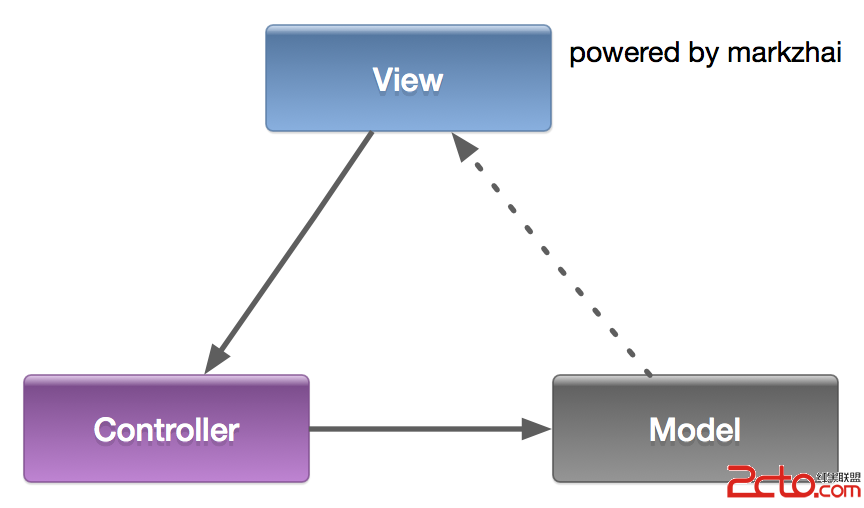 Android 新專案實踐:MVP 與 MVVM 並非互斥,而是可以融合的 MVPVM
前言 在 Android 專案架構的演進過程中,MVP 與 MVVM 常被拿來比較,甚至被誤解為只能二選一。實際上,兩者關注的問題不同:MVP 強調把業務邏輯從 View
 Android View 繪制機制源碼分析(二):LinearLayout 如何處理 layout_weight
本文承接上一篇。上一篇講了 View 的 measure 過程,這次來看 ViewGroup 的 measure。由於 ViewGroup 是抽象類,需要挑一個具體佈局來
 AutoCompleteTextView 接上 SQLite:打造會查資料庫的自動完成欄位
輸入框打兩個字就跳出候選清單,是搜尋體驗的基本功。本文用一個很經典的 MVC 切分來完成它:AutoCompleteTextView 是 View,SimpleCurso
 微信公眾平台怎麼用?圖文素材編輯與群發的完整流程
微信公眾平台發佈的訊息,所有追隨者都看得到——這也是它作為經營窗口的核心價值。但很多人登入之後會困惑:為什麼我編輯的內容推不出去,或者為什麼不能帶連結?答案在於「群發訊息