

編輯:關於 Android 程式設計
Android 內建了大量共用的 Intent Action,用對了就能省下自己實作的工夫,直接呼叫系統或其他 App 既有的功能。以下整理常用的幾個,並附上可執行的範例。
| 常數 | 字串值 | 用途 |
|---|---|---|
ACTION_MAIN | android.intent.action.MAIN | 應用程式入口 |
ACTION_VIEW | android.intent.action.VIEW | 顯示資料給使用者 |
ACTION_ATTACH_DATA | android.intent.action.ATTACH_DATA | 指明附加資訊給其他地方的資料 |
ACTION_EDIT | android.intent.action.EDIT | 顯示可編輯的資料 |
ACTION_PICK | android.intent.action.PICK | 選擇資料 |
ACTION_CHOOSER | android.intent.action.CHOOSER | 顯示一個 Activity 選擇器 |
ACTION_GET_CONTENT | android.intent.action.GET_CONTENT | 取得內容 |
ACTION_DIAL | android.intent.action.DIAL | 顯示撥號面板 |
ACTION_CALL | android.intent.action.CALL | 直接撥打電話 |
ACTION_SEND | android.intent.action.SEND | 發送資料 |
ACTION_SENDTO | android.intent.action.SENDTO | 選擇發送管道 |
ACTION_ANSWER | android.intent.action.ANSWER | 應答電話 |
ACTION_INSERT | android.intent.action.INSERT | 插入資料 |
ACTION_DELETE | android.intent.action.DELETE | 刪除資料 |
ACTION_RUN | android.intent.action.RUN | 執行資料 |
ACTION_SYNC | android.intent.action.SYNC | 同步資料 |
ACTION_PICK_ACTIVITY | android.intent.action.PICK_ACTIVITY | 選擇 Activity |
ACTION_SEARCH | android.intent.action.SEARCH | 搜尋 |
ACTION_WEB_SEARCH | android.intent.action.WEB_SEARCH | 網頁搜尋 |
ACTION_FACTORY_TEST | android.intent.action.FACTORY_TEST | 工廠測試入口點 |
原始資料中 ACTION_DIAL 與 ACTION_CALL 兩列的說明文字互相對調了,這裡已修正——DIAL 只是開啟撥號面板讓使用者確認,CALL 才是直接撥出。
<ScrollView xmlns:android="https://schemas.android.com/apk/res/android"
    android:layout_width="match_parent"
    android:layout_height="match_parent">

    <LinearLayout
        android:layout_width="match_parent"
        android:layout_height="wrap_content"
        android:orientation="vertical">

        <TextView
            android:layout_width="wrap_content"
            android:layout_height="wrap_content"
            android:layout_gravity="center"
            android:layout_marginTop="5dp"
            android:text="Android 中常用系統 Intent" />

        <Button android:id="@+id/intent_call_btn"
            android:layout_width="match_parent" android:layout_height="wrap_content"
            android:layout_marginTop="2dp" android:text="撥打電話" />

        <Button android:id="@+id/intent_sms_btn"
            android:layout_width="match_parent" android:layout_height="wrap_content"
            android:layout_marginTop="2dp" android:text="發送短信" />

        <Button android:id="@+id/intent_email_btn"
            android:layout_width="match_parent" android:layout_height="wrap_content"
            android:layout_marginTop="2dp" android:text="發送郵件" />

        <Button android:id="@+id/intent_net_btn"
            android:layout_width="match_parent" android:layout_height="wrap_content"
            android:layout_marginTop="2dp" android:text="打開網頁" />

        <Button android:id="@+id/intent_pic_btn"
            android:layout_width="match_parent" android:layout_height="wrap_content"
            android:layout_marginTop="2dp" android:text="發送圖片" />

        <Button android:id="@+id/intent_media_btn"
            android:layout_width="match_parent" android:layout_height="wrap_content"
            android:layout_marginTop="2dp" android:text="打開媒體" />

        <Button android:id="@+id/intent_search_btn"
            android:layout_width="match_parent" android:layout_height="wrap_content"
            android:layout_marginTop="2dp" android:text="搜尋" />

        <Button android:id="@+id/intent_install_btn"
            android:layout_width="match_parent" android:layout_height="wrap_content"
            android:layout_marginTop="2dp" android:text="安裝軟體" />

        <Button android:id="@+id/intent_unstall_btn"
            android:layout_width="match_parent" android:layout_height="wrap_content"
            android:layout_marginTop="2dp" android:text="卸載軟體" />
    </LinearLayout>
</ScrollView>public class MainActivity extends Activity implements OnClickListener {
private Button callBtn, smsBtn, emailBtn, browseBtn, searchBtn;
private Button installBtn, unInstallBtn, mediaBtn, picBtn;
@Override
public void onCreate(Bundle savedInstanceState) {
super.onCreate(savedInstanceState);
setContentView(R.layout.activity_main);
initViewsById();
initListeners();
}
private void initViewsById() {
callBtn = (Button) findViewById(R.id.intent_call_btn);
smsBtn = (Button) findViewById(R.id.intent_sms_btn);
emailBtn = (Button) findViewById(R.id.intent_email_btn);
browseBtn = (Button) findViewById(R.id.intent_net_btn);
picBtn = (Button) findViewById(R.id.intent_pic_btn);
installBtn = (Button) findViewById(R.id.intent_install_btn);
unInstallBtn = (Button) findViewById(R.id.intent_unstall_btn);
mediaBtn = (Button) findViewById(R.id.intent_media_btn);
searchBtn = (Button) findViewById(R.id.intent_search_btn);
}
private void initListeners() {
callBtn.setOnClickListener(this);
smsBtn.setOnClickListener(this);
emailBtn.setOnClickListener(this);
browseBtn.setOnClickListener(this);
picBtn.setOnClickListener(this);
installBtn.setOnClickListener(this);
unInstallBtn.setOnClickListener(this);
mediaBtn.setOnClickListener(this);
searchBtn.setOnClickListener(this);
}
/** 瀏覽網頁 */
private void netBrowse() {
Uri uri = Uri.parse("https://www.baidu.com");
startActivity(new Intent(Intent.ACTION_VIEW, uri));
}
/** 播放媒體 */
private void playMedia() {
Uri uri = Uri.withAppendedPath(
MediaStore.Audio.Media.INTERNAL_CONTENT_URI, "1");
startActivity(new Intent(Intent.ACTION_VIEW, uri));
}
/** 網頁搜尋 */
private void search() {
Intent intent = new Intent(Intent.ACTION_WEB_SEARCH);
intent.putExtra(SearchManager.QUERY, "android");
startActivity(intent);
}
/** 撥打電話(僅開啟撥號面板) */
private void callTelphone() {
Uri uri = Uri.parse("tel:10086");
startActivity(new Intent(Intent.ACTION_DIAL, uri));
}
/** 發送簡訊 */
private void sendSms() {
Uri uri = Uri.parse("smsto:10086");
startActivity(new Intent(Intent.ACTION_SENDTO, uri));
}
/** 發送圖片(彩信) */
@SuppressLint("SdCardPath")
private void sendPicSms() {
Uri imguri = Uri.parse("/mnt/sdcard/abc.png");
Intent intent = new Intent(Intent.ACTION_SEND);
intent.putExtra(Intent.EXTRA_STREAM, imguri);
intent.setType("image/png");
startActivity(Intent.createChooser(intent, "Send Image To:"));
}
/** 發送郵件 */
private void sendEmail() {
Intent intent = new Intent(Intent.ACTION_SEND);
intent.putExtra(Intent.EXTRA_EMAIL, new String[]{"shoujianren@163.com"});
intent.putExtra(Intent.EXTRA_CC, new String[]{"chaosong@163.com"});
intent.putExtra(Intent.EXTRA_SUBJECT, "朋友,您好!");
intent.putExtra(Intent.EXTRA_TEXT, "好多的內容呀........");
intent.setType("message/rfc822");
startActivity(Intent.createChooser(intent, "請選擇客戶端郵箱!"));
}
/** 安裝應用 */
private void installSotf() {
Intent intent = new Intent(Intent.ACTION_VIEW);
intent.setDataAndType(Uri.fromFile(new File("/mnt/sdcard/tutu.apk")),
"application/vnd.android.package-archive");
startActivity(intent);
}
/** 卸載應用 */
private void uninstallSoft() {
Uri uri = Uri.fromParts("package", "tutu.ch05", null);
startActivity(new Intent(Intent.ACTION_DELETE, uri));
}
@Override
public void onClick(View v) {
switch (v.getId()) {
case R.id.intent_call_btn: callTelphone(); break;
case R.id.intent_sms_btn: sendSms(); break;
case R.id.intent_email_btn: sendEmail(); break;
case R.id.intent_pic_btn: sendPicSms(); break;
case R.id.intent_net_btn: netBrowse(); break;
case R.id.intent_search_btn: search(); break;
case R.id.intent_install_btn: installSotf(); break;
case R.id.intent_unstall_btn: uninstallSoft(); break;
case R.id.intent_media_btn: playMedia(); break;
}
}
}需要的權限:
<uses-permission android:name="android.permission.WRITE_EXTERNAL_STORAGE" />
<uses-permission android:name="android.permission.MOUNT_UNMOUNT_FILESYSTEMS" />
這份範例寫於幾年前,直接跑在當前版本上會遇到幾個問題,值得逐項說明。
直接撥號需要權限。ACTION_CALL 需要 CALL_PHONE 權限(且為執行期動態申請)。這也是為什麼範例刻意選用 ACTION_DIAL——它只開啟撥號面板、由使用者按下通話鈕,不需要任何權限,是更友善也更安全的做法。
file:// URI 已不能用於跨應用。sendPicSms() 與 installSotf() 都傳了 file:// URI,在 Android 7.0 以上會拋出 FileUriExposedException。必須改用 FileProvider.getUriForFile() 取得 content URI,並加上 FLAG_GRANT_READ_URI_PERMISSION。
安裝未知來源應用受限。從 Android 8.0 起,REQUEST_INSTALL_PACKAGES 權限加上「逐應用授權」機制取代了舊的全域「未知來源」開關。若 App 要能安裝 APK,必須引導使用者到系統設定中為自己的 App 開啟這項權限。
MOUNT_UNMOUNT_FILESYSTEMS 不該使用。這是一個 signature 等級的權限,普通應用拿不到,也不應申請。
SearchManager.QUERY 的使用。ACTION_WEB_SEARCH 已被標記為 deprecated,建議改用 ACTION_WEB_SEARCH 的替代方案或直接以 ACTION_VIEW 搭配搜尋 URL。
這些修正做完之後,這份範例集就能作為日常開發的參考手冊使用了。
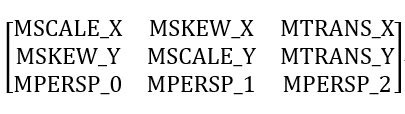 Android Matrix 用法總結:平移、旋轉、縮放與錯切
Matrix 是 Android 圖像處理中常見的 3x3 矩陣。它主要用於平面上的平移、旋轉、縮放與錯切等變換。本文從概念出發,整理 Matrix 的常見用法與背後的座
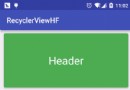 使用 RecyclerView 添加 Header 和 Footer 的方法
RecyclerView 雖然效能優秀,但沒有像 ListView 那樣直接提供 addHeaderView() 與 addFooterView()。若要加入頭部與底部,
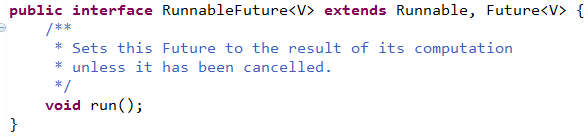 AsyncTask 源碼分析:從 Callable、FutureTask 到主線程回呼
讀 AsyncTask 之前,先把三個前置概念理清:Callable、Future、FutureTask。 Executor 子類的 execute 方法接收一個
 Android 常見錯誤集錦(持續更新中)
本文彙整了日常 Android 開發中經常遇到的各種錯誤及其解決方案,方便日後查閱對照。Eclipse 真機無法列印 log 資訊系統環境:Windows7 64 位解決