

編輯:關於 Android 程式設計
本文示範如何在系統層級的 PhoneWindowManager 中掛上一層全螢幕的觸控面板,藉此攔截使用者的滑動手勢。這種做法需要修改 framework 原始碼並自行編譯 ROM,屬於系統客製化的範疇。
首先在 PolicyHandler 中註冊新的 message 分支,並透過 InputEventReceiver 把觸控事件導給自訂的 View:
package com.android.internal.policy.impl;

public class PhoneWindowManager implements WindowManagerPolicy {

    private static final int MSG_ENABLE_POINTER_LOCATION = 1;
    private static final int MSG_DISABLE_POINTER_LOCATION = 2;

    // 新增:導覽列下滑手勢
    private static final int MSG_ENABLE_NAV_BAR_PULL_UP_GESTURE = 7;
    private static final int MSG_DISABLE_NAV_BAR_PULL_UP_GESTURE = 8;

    private class PolicyHandler extends Handler {
        @Override
        public void handleMessage(Message msg) {
            switch (msg.what) {
                case MSG_ENABLE_POINTER_LOCATION:
                    enablePointerLocation();
                    break;
                case MSG_DISABLE_POINTER_LOCATION:
                    disablePointerLocation();
                    break;
                case MSG_ENABLE_NAV_BAR_PULL_UP_GESTURE:
                    enableNavBarPullupGesture();
                    break;
                case MSG_DISABLE_NAV_BAR_PULL_UP_GESTURE:
                    disableNavBarPullupGesture();
                    break;
            }
        }
    }

    class SettingsObserver extends ContentObserver {
        SettingsObserver(Handler handler) {
            super(handler);
        }

        void observe() {
            ContentResolver resolver = mContext.getContentResolver();
            resolver.registerContentObserver(
                    Settings.System.getUriFor(Settings.System.MULTI_TOUCH_GESTURE),
                    false, this, UserHandle.USER_ALL);
            updateSettings();
        }

        @Override
        public void onChange(boolean selfChange) {
            updateSettings();
            updateRotation(false);
        }
    }

    public void updateSettings() {
        ContentResolver resolver = mContext.getContentResolver();
        boolean updateRotation = false;
        synchronized (mLock) {
            if (FeatureOption.K19_NCX_ASSISTIVE_TOUCH_NAV_BAR) {
                if (mNavBarPullupGestureMode != 1) {
                    mNavBarPullupGestureMode = 1;
                    mHandler.sendEmptyMessage(MSG_ENABLE_NAV_BAR_PULL_UP_GESTURE);
                }
            }
        }
    }

    int mNavBarPullupGestureMode = 0;
    NavBarPullupGestureInputEventReceiver mNavBarPullupGestureInputEventReceiver;
    NavBarPullupGesturePanel mNavBarPullupGestureView;
    InputChannel mNavBarPullupGestureInputChannel;

    static final String TAG_NAV_BAR_PULL_UP_GESTURE = "NavBarPullupGesture";
    static boolean DEBUG_NAV_BAR_PULL_UP_GESTURE = true;

    private int mPosX = 0;
    private int mPosY = 0;
    private int mCurrentPosX = 0;
    private int mCurrentPosY = 0;
    private boolean mNavBarPullUpValid = false;

    private static final class NavBarPullupGestureInputEventReceiver extends InputEventReceiver {
        private final NavBarPullupGesturePanel mView;

        public NavBarPullupGestureInputEventReceiver(InputChannel inputChannel,
                                                     Looper looper,
                                                     NavBarPullupGesturePanel view) {
            super(inputChannel, looper);
            mView = view;
        }

        @Override
        public void onInputEvent(InputEvent event) {
            boolean handled = false;
            try {
                if (event instanceof MotionEvent
                        && (event.getSource() & InputDevice.SOURCE_CLASS_POINTER) != 0) {
                    final MotionEvent motionEvent = (MotionEvent) event;
                    mView.onTouchEvent(motionEvent);
                    handled = true;
                }
            } finally {
                finishInputEvent(event, handled);
            }
        }
    }

    public void NavBarDisplayGesture() {
        IStatusBarService statusBarService = IStatusBarService.Stub.asInterface(
                ServiceManager.getService("statusbar"));
        try {
            if (DEBUG_NAV_BAR_PULL_UP_GESTURE) {
                Log.d(TAG_NAV_BAR_PULL_UP_GESTURE, "NavBarDisplayGesture ()");
            }
            statusBarService.EnableNavBarDisplay();
        } catch (RemoteException e) {
            Log.e(TAG, "Error toggling recent apps.");
        }
    }
}
面板本身是一個覆寫 onTouchEvent 的 FrameLayout。這裡的做法是:在 ACTION_DOWN 時記下起始座標並判斷目前螢幕方向,再依直向或橫向對應的 Y 座標區間決定是否觸發功能。相較於比對位移量,這種「按下的位置落在特定高度」的判定方式更穩定,也避免了誤觸。
public class NavBarPullupGesturePanel extends FrameLayout {

    public NavBarPullupGesturePanel(Context context) {
        super(context);
    }

    @Override
    public boolean onTouchEvent(MotionEvent event) {
        if (DEBUG_NAV_BAR_PULL_UP_GESTURE) {
            Log.d(TAG_NAV_BAR_PULL_UP_GESTURE,
                    "NavBarPullupGesturePanel event.getAction() =" + event.getAction());
        }

        if (MotionEvent.ACTION_DOWN == event.getAction()) {
            mPosX = (int) event.getX();
            mPosY = (int) event.getY();
            int orientation = mContext.getResources().getConfiguration().orientation;
            Log.d(TAG, "current config orienation " + orientation);

            if (DEBUG_NAV_BAR_PULL_UP_GESTURE) {
                Log.d(TAG_NAV_BAR_PULL_UP_GESTURE, "NavBarPullupGesturePanel tp_down mPosX ="
                        + mPosX + ",mPosY =" + mPosY + ",orientation =" + orientation);
            }

            if (orientation == Configuration.ORIENTATION_LANDSCAPE) {
                if (mPosY >= 540 && mPosY <= 600) {
                    NavBarDisplayGesture();
                }
            } else if (orientation == Configuration.ORIENTATION_PORTRAIT) {
                if (mPosY >= 940 && mPosY <= 1024) {
                    NavBarDisplayGesture();
                }
            }
        }
        return true;
    }

    @Override
    public boolean onGenericMotionEvent(MotionEvent event) {
        return true;
    }
}
啟用時建立面板並以 WindowManager 加入系統層級的 overlay 視窗,同時透過 monitorInput 開啟一個獨立的 InputChannel,讓觸控事件能繞過一般的事件分發流程,直接送到我們的接收器。
private void enableNavBarPullupGesture() {
    if (mNavBarPullupGestureView == null) {
        mNavBarPullupGestureView = new NavBarPullupGesturePanel(mContext);

        WindowManager.LayoutParams lp = new WindowManager.LayoutParams(
                WindowManager.LayoutParams.MATCH_PARENT,
                WindowManager.LayoutParams.MATCH_PARENT);
        lp.type = WindowManager.LayoutParams.TYPE_SECURE_SYSTEM_OVERLAY;
        lp.flags = WindowManager.LayoutParams.FLAG_FULLSCREEN
                | WindowManager.LayoutParams.FLAG_NOT_TOUCHABLE
                | WindowManager.LayoutParams.FLAG_NOT_FOCUSABLE
                | WindowManager.LayoutParams.FLAG_LAYOUT_IN_SCREEN;
        lp.format = PixelFormat.TRANSLUCENT;
        lp.setTitle("NavBarPullupGesturePanel");

        WindowManager wm = (WindowManager) mContext.getSystemService(Context.WINDOW_SERVICE);
        wm.addView(mNavBarPullupGestureView, lp);

        if (DEBUG_NAV_BAR_PULL_UP_GESTURE) {
            Log.d(TAG_NAV_BAR_PULL_UP_GESTURE, "enableNavBarPullupGesture");
        }

        mNavBarPullupGestureInputChannel = mWindowManagerFuncs.monitorInput("NavBarPullupGesture");
        mNavBarPullupGestureInputEventReceiver = new NavBarPullupGestureInputEventReceiver(
                mNavBarPullupGestureInputChannel, Looper.myLooper(), mNavBarPullupGestureView);
    }
}

private void disableNavBarPullupGesture() {
    if (DEBUG_NAV_BAR_PULL_UP_GESTURE) {
        Log.d(TAG_NAV_BAR_PULL_UP_GESTURE, "disableNavBarPullupGesture");
    }
    if (mNavBarPullupGestureInputEventReceiver != null) {
        mNavBarPullupGestureInputEventReceiver.dispose();
        mNavBarPullupGestureInputEventReceiver = null;
    }
    if (mNavBarPullupGestureInputChannel != null) {
        mNavBarPullupGestureInputChannel.dispose();
        mNavBarPullupGestureInputChannel = null;
    }
    if (mNavBarPullupGestureView != null) {
        WindowManager wm = (WindowManager) mContext.getSystemService(Context.WINDOW_SERVICE);
        wm.removeView(mNavBarPullupGestureView);
        mNavBarPullupGestureView = null;
    }
}
這裡的座標門檻是寫死的,換一台解析度不同的機型就會失效,實務上應該改為依螢幕高度換算比例。另外,InputChannel 與 EventReceiver 都是需要明確 dispose 的原生資源,開關若反覆切換卻沒有確實釋放,容易累積出資源洩漏。
 Android 開發步步為營(31):TabActivity 用法與把 Tab 顯示在底部
Tab 標籤頁是非常常用的控制項。.NET 裡有 multipage+tabstrip 的組合透過標籤切換頁面,HTML 裡常用 frameset 來實現;而在 Andr
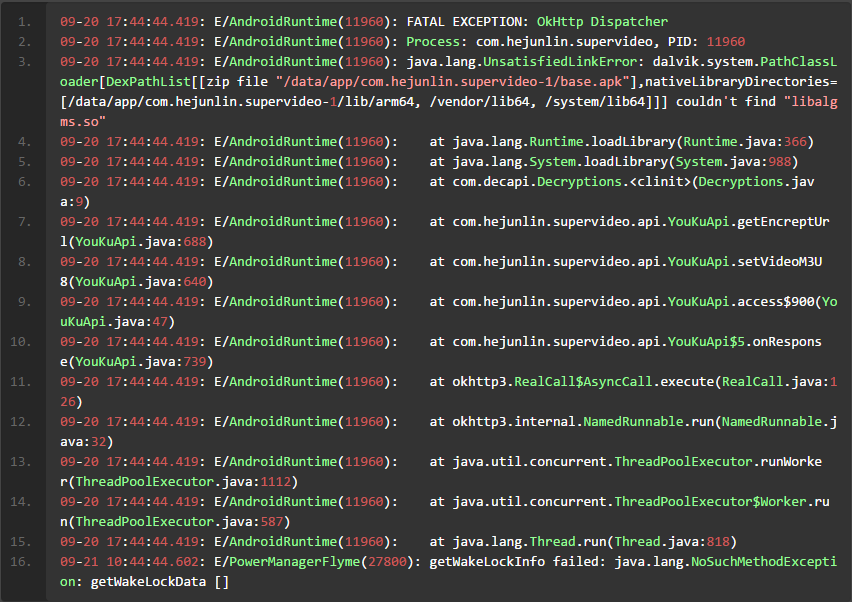 Android Studio 中的 UnsatisfiedLinkError:兩個真正容易忽略的原因
最近在處理一個需要解析影片位址的專案,其中一段解密邏輯是以 JNI 實作、透過对应的 key 才能還原資料。以前用 Eclipse 時,把 .so 放進 libs/arm
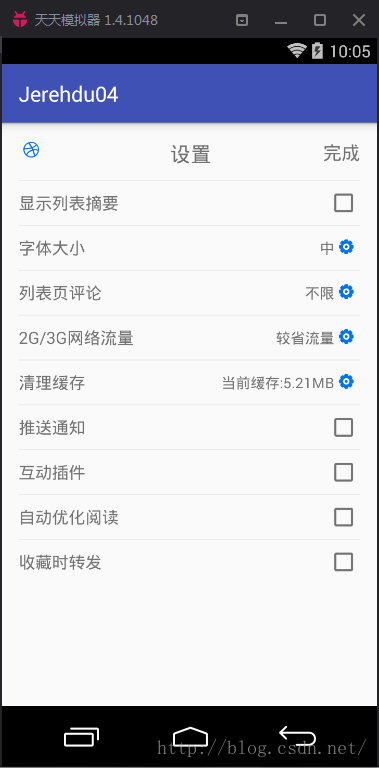 Android 如何保存用戶設定?以實體類為媒介存入內部儲存與 SD 卡
本次實例要做的,是把用戶的設定資訊,以實體類為媒介,保存到內部儲存或 SD 卡的檔案裡。再次打開應用時,程式會自動讀取檔案中的實體類,並對設定資訊進行套用,使其恢復到用戶
 Android 接入百度鷹眼軌跡:配送場景實戰
以外賣配送為例:配送員從接單開始上傳行駛軌跡,用戶端可以實時查看配送員的行駛路線。對於點外賣的用戶來說,能更直觀地看到訂單是否正在配送,不必再一遍遍打電話催商戶了。