

編輯:關於 Android 程式設計
某個銀行專案要求 App 的 Android 客戶端與 Web 端在把使用者上傳的檔案(語音、圖片)送到伺服器前先加密。實作上使用 javax.crypto 套件,其中最重要的是 Cipher 類。
Android 端的步驟分三步:先依指定的 strKey 產生加解密用的 key,再用 key 加密檔案,最後用同一個 key 解密。
/**
 * 依參數產生 KEY
 */
public String getKey(String strKey) {
    try {
        byte[] keyByte = strKey.getBytes();
        // 建立一個空的八位元陣列,預設為 0
        byte[] byteTemp = new byte[8];
        // 把使用者指定的規則轉成八位元陣列
        for (int i = 0; i < byteTemp.length && i < keyByte.length; i++) {
            byteTemp[i] = keyByte[i];
        }
        return new SecretKeySpec(byteTemp, "DES");
    } catch (Exception e) {
        throw new RuntimeException("Error initializing SqlMap class. Cause: " + e);
    }
}
這裡有個問題必須指出:方法簽名宣告回傳 String,實際卻 return new SecretKeySpec(...),無法通過編譯。正確做法是把回傳型別改成 SecretKeySpec(或直接回傳 Key),並把該物件存成成員變數重複使用。
// 加密檔案
public void encrypt(String file, String destFile) throws Exception {
    Cipher cipher = Cipher.getInstance("DES");
    cipher.init(Cipher.ENCRYPT_MODE, this.key);
    InputStream is = new FileInputStream(file);
    OutputStream out = new FileOutputStream(destFile);
    CipherInputStream cis = new CipherInputStream(is, cipher);
    byte[] buffer = new byte[1024];
    int r;
    while ((r = cis.read(buffer)) > 0) {
        out.write(buffer, 0, r);
    }
    cis.close();
    is.close();
    out.close();
    // 刪除未加密的來源檔
    File img2 = new File(file);
    CommUtil.delete(img2);
}
// 解密檔案,此為 Android 端;Web 端的加密邏輯相同
public Bitmap decrypt(String file, String dest) throws Exception {
    Bitmap bitmapOriginal = null;
    Cipher cipher = Cipher.getInstance("DES");
    cipher.init(Cipher.DECRYPT_MODE, this.key);
    InputStream is = new FileInputStream(file);
    OutputStream out = new FileOutputStream(dest);
    CipherOutputStream cos = new CipherOutputStream(out, cipher);
    byte[] buffer = new byte[1024];
    int r;
    while ((r = is.read(buffer)) >= 0) {
        cos.write(buffer, 0, r);
    }
    cos.close();
    out.close();
    is.close();

    InputStream openis = new FileInputStream(dest);
    bitmapOriginal = BitmapFactory.decodeStream(openis);
    openis.close();
    File img2 = new File(dest);
    CommUtil.delete(img2);
    return bitmapOriginal;
}
strKey 是自行配置的字串,用來產生加解密的 key。為了安全性與配置彈性,專案把它放在伺服器端,使用者登入 Android 客戶端時才下發。若某些檔案操作不需要與伺服器一致,也可以把 strKey 用 JNI 寫在 C 程式碼中,提高逆向的難度。
DES 的密鑰長度只有 56 位元,早在上個世紀就能被暴力破解,已經不適合承擔真正的機密性保護,尤其是金融場景。若要沿用這套流程,建議至少換成 AES:
// 建議改用 AES,並使用 256 位元金鑰與 GCM 模式
Cipher cipher = Cipher.getInstance("AES/GCM/NoPadding");
cipher.init(Cipher.ENCRYPT_MODE, secretKey);
byte[] iv = cipher.getIV(); // IV 必須與密文一起保存,解密密時帶入
幾個實務重點:
· 不要把金鑰硬編碼在 APK 或 C 程式碼裡。JNI 只能提高一點門檻,反編譯 .so 一樣能拿到字串。金鑰應由伺服器端協商或派生,並綁定使用者身分。
· 使用 CBC/ECB 這類模式時,IV 必須每次隨機產生並與密文一同存放;GCM 模式還能同時提供完整性驗證,避免密文被竄改。
· 傳輸層仍應全程使用 HTTPS。應用層加密不能取代傳輸加密,兩者是不同層次的防護。
· 範例中的 new String()、固定 1024 緩衝區讀取都假設檔案不大,處理語音檔時建議加大緩衝區並串流處理,避免記憶體峰值。
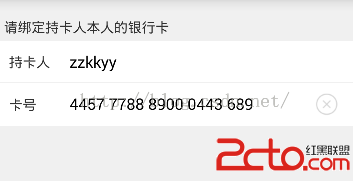 Android 自定義控件案例:銀行卡號分隔與清空圖標
案例效果 本案例實作一個自定義 EditText,支援銀行卡號每四位自動以空格分隔,並在輸入框右側顯示清空圖標。 需求分析 銀行卡號需要即時格式化,方便使用者核對。清
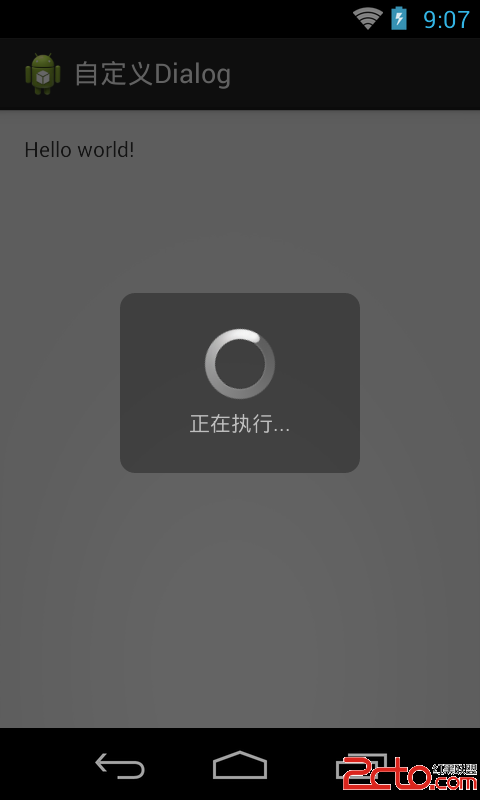 Android 自訂 Dialog:改主題、換版面、封裝成類別
自訂對話框是開發中很常出現的需求。這裡示範的做法用到了 Android 的 shape 圖形資源,Android 的 drawable 種類相當豐富,後續再另篇整理。本篇
 Android 後台定時提醒實作:用 Service 與 AlarmManager 打造護眼小幫手
緣起:每當埋頭寫程式或打遊戲,總是很容易忘記時間,一抬頭常常已經連續盯著螢幕超過三個小時,對眼睛的傷害著實不小。於是我動手做了一個護眼定時提醒的小應用——每隔一段時間就跳
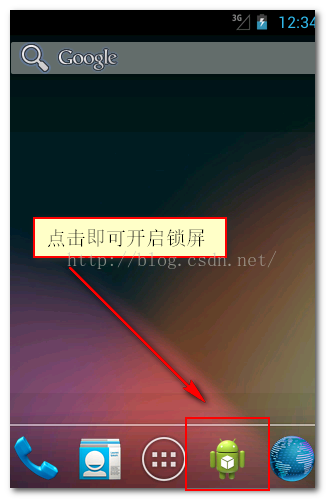 Android 簡易實戰教程——第六話《開發一鍵鎖屏應用(完成篇)》
上一篇留下兩個尾巴:一是仍然無法卸載;二是必須手動點開 App 再點按鈕才能鎖屏,操作太繞。 這篇把兩個問題都解決掉。 一、解決無法卸載的問題 在清單文件中,再配置一個「