

編輯:關於 Android 程式設計
本文以一個最小可運行的範例,說明如何用 HttpURLConnection 把本機檔案以 multipart 方式上傳,並在伺服器端用 Servlet 接收寫入磁碟,同時透過自訂的串流類別回報上傳進度。
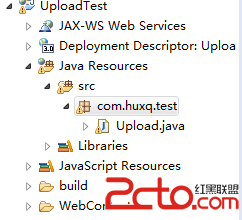
先看一下專案結構:

關鍵點有三個:把耗時的網路寫入放到子執行緒、用 ProgressDialog 顯示進度、用 Handler 把進度從工作執行緒送回 UI 執行緒。
public class MainActivity extends Activity implements OnUploadListener {

    // 伺服器位址,實際使用時換成自己的
    private String urlString = "https://192.168.1.2:8080/UploadTest/Upload";

    String filePath;   // 要上傳的檔案完整路徑
    String fileName;   // 檔名
    ProgressDialog dialog;

    /** 讀取串流時同一個進度會被回呼很多次,靠這個變數去重,避免洗版 UI */
    int oldProcess;

    private Handler handler = new Handler() {
        public void handleMessage(Message msg) {
            dialog.setProgress(msg.arg1);
            if (!dialog.isShowing()) {
                dialog.show();
            } else if (msg.arg1 == 100) {
                dialog.dismiss();
                toast("上傳完成!");
            }
        }
    };

    @Override
    protected void onCreate(Bundle savedInstanceState) {
        super.onCreate(savedInstanceState);
        setContentView(R.layout.activity_main);
        initProgressDialog();
    }

    public void upLoad(View v) {
        if (Environment.getExternalStorageState().equals(Environment.MEDIA_MOUNTED)) {
            String sdcardPath = Environment.getExternalStorageDirectory().getAbsolutePath();
            filePath = sdcardPath + "/Abook/";
            File file = new File(filePath);
            // 這裡示範挑 Abook 資料夾裡的某個檔案,實務上要依需求決定
            fileName = file.list()[4];
            filePath += fileName;
        } else {
            toast("沒有記憶卡");
            return;
        }

        new Thread() {
            public void run() {
                try {
                    HttpUtil.sendFile(urlString, filePath, fileName, MainActivity.this);
                } catch (Exception e) {
                    e.printStackTrace();
                }
            }
        }.start();
    }

    /** 檔案讀取進度的回呼,process 介於 0~1 */
    @Override
    public void onUpload(double process) {
        int currentProcess = (int) (process * 100);
        if (currentProcess > oldProcess) {   // 只有真正前進才發訊息
            Message msg = handler.obtainMessage();
            msg.arg1 = currentProcess;
            handler.sendMessage(msg);
        }
        oldProcess = currentProcess;
    }

    private void initProgressDialog() {
        dialog = new ProgressDialog(this);
        dialog.setMax(100);
        dialog.setProgress(0);
        dialog.setProgressStyle(ProgressDialog.STYLE_HORIZONTAL);
        dialog.setCancelable(false);
        dialog.setCanceledOnTouchOutside(false);
        dialog.setTitle("正在努力上傳...");
    }

    private void toast(String text) {
        Toast.makeText(getApplicationContext(), text, Toast.LENGTH_SHORT).show();
    }
}
multipart 的格式其實很樸素:一組分隔符號(boundary)+ 每個區塊的描述標頭 + 內容。伺服器就是靠 boundary 切分資料。
public static String sendFile(String urlPath, String filePath, String newName,
                              OnUploadListener listener) throws Exception {
    String end = "\r\n";
    String twoHyphens = "--";
    String boundary = "******";

    HttpURLConnection con = (HttpURLConnection) new URL(urlPath).openConnection();
    con.setDoInput(true);
    con.setDoOutput(true);
    con.setUseCaches(false);
    con.setRequestMethod("POST");
    con.setRequestProperty("Connection", "Keep-Alive");
    con.setRequestProperty("Charset", "UTF-8");
    con.setRequestProperty("Content-Type", "multipart/form-data;boundary=" + boundary);

    DataOutputStream ds = new DataOutputStream(con.getOutputStream());
    ds.writeBytes(twoHyphens + boundary + end);
    // 檔案區塊的描述:表單欄位名、檔名
    ds.writeBytes("Content-Disposition: form-data; "
            + "name=\"file1\";filename=\"" + newName + "\"" + end);
    ds.writeBytes(end);

    // 自訂的 FileInputStream,用來回報進度
    CustomFileInputStream fStream = new CustomFileInputStream(filePath);
    fStream.setOnUploadListener(listener);

    int bufferSize = 1024;
    byte[] buffer = new byte[bufferSize];
    int length = -1;
    while ((length = fStream.read(buffer)) != -1) {
        ds.write(buffer, 0, length);
    }

    ds.writeBytes(end);
    ds.writeBytes(twoHyphens + boundary + twoHyphens + end);
    fStream.close();
    ds.flush();

    // 讀取伺服器回應
    InputStream is = con.getInputStream();
    StringBuffer b = new StringBuffer();
    int ch;
    while ((ch = is.read()) != -1) {
        b.append((char) ch);
    }
    ds.close();
    return b.toString();
}
進度=已讀位元組 ÷ 檔案總大小。總大小可以透過覆寫 available() 取得。
public class CustomFileInputStream extends FileInputStream {

    private OnUploadListener listener;
    private int total, done;
    private double process;

    public CustomFileInputStream(String path) throws FileNotFoundException {
        super(path);
        available();
    }

    @Override
    public int read(byte[] buffer, int byteOffset, int byteCount) throws IOException {
        int result = super.read(buffer, byteOffset, byteCount);
        if (result > 0) {
            done += result;
            process = 1.0 * done / total;
            if (listener != null) {
                listener.onUpload(process);
            }
        }
        return result;
    }

    public void setOnUploadListener(OnUploadListener listener) {
        this.listener = listener;
    }

    @Override
    public int available() {
        try {
            total = super.available();
        } catch (IOException e) {
            e.printStackTrace();
        }
        return total;
    }
}

public interface OnUploadListener {
    void onUpload(double process);
}
@WebServlet("/Upload")
public class Upload extends HttpServlet {

    private static final long serialVersionUID = 1L;
    private final String savaPath = "E:\\uploads";

    protected void doPost(HttpServletRequest request, HttpServletResponse response)
            throws ServletException, IOException {

        boolean isMultipart = ServletFileUpload.isMultipartContent(request);
        if (!isMultipart) {
            return;
        }

        FileItemFactory factory = new DiskFileItemFactory();
        ServletFileUpload upload = new ServletFileUpload(factory);
        try {
            List<FileItem> items = upload.parseRequest(request);
            Iterator<FileItem> iter = items.iterator();
            // 迴圈可同時接收多個檔案
            while (iter.hasNext()) {
                FileItem item = iter.next();
                if (item.isFormField()) {
                    // 一般文字欄位
                    System.out.println(item.getFieldName() + ":" + item.getString());
                } else {
                    // 檔案欄位
                    String fileName = item.getName();
                    byte[] data = item.get();

                    File dir = new File(savaPath);
                    if (!dir.exists()) {
                        dir.mkdirs();
                    }
                    File target = new File(savaPath, fileName);
                    if (target.exists()) {
                        target.delete();
                    }
                    FileOutputStream fos = new FileOutputStream(target);
                    fos.write(data);
                    fos.close();
                }
            }
            response.getWriter().write("UPLOAD_SUCCESS");
        } catch (FileUploadException e) {
            e.printStackTrace();
            response.getWriter().write("UPLOAD_FAILED");
        }
    }
}
伺服器端需要兩個 jar:commons-fileupload-1.3.1.jar 與 commons-io-2.4.jar。
範例為了聚焦在主流程,省略了幾個實作上必須補齊的環節:上傳前應檢查檔案大小並在伺服器端做型別白名單;檔名不可直接信任,建議重新產生 UUID 或至少過濾路徑字元,避免路徑穿越;正式環境請改用 HTTPS,否則檔案內容在網路上等於裸奔。
 解決 Eclipse 開發 Android 時出現的 Cannot connect to VM 錯誤
在 Eclipse 中開發 Android,執行時偶爾會跳出這樣的錯誤訊息:Launching ???? has encountered a problem. Canno
 ImageView 的 ScaleType 全解析:八種縮放模式的真實差異
ScaleType 決定了一張圖片在 ImageView 內部「如何縮放、如何對齊」。同樣一張圖、同樣一個 150dp × 100dp 的容器,換一個 ScaleType
 四大組件之 Activity(上):生命週期、系統回收與配置改變
第一節 Activity 的使用 Activity 幾乎是每個應用必備的組件,因此 Android 開發幾乎都從 Activity 開始。舉例來說,若要設計一個計算器應用
 Android 動畫學習筆記(一):補間動畫四兄弟完全入門
前言:從剛接觸 Android 到現在,動畫始終是個繞不開的話題。它在實際專案裡的出現頻率遠比想像中高,而且只要用得好,介面的質感會立刻拉上一個檔次。但也常常遇到一種尷尬