

編輯:關於 Android 程式設計
先從字面理解:Intent 的英文原意是「意圖」,而 Pending 表示「即將發生、尚未到來」的事情。顧名思義,PendingIntent 這個類別就是用来处理「即將執行的意圖」。
最典型的例子是通知(Notification)中的頁面跳轉:使用者此刻不會立刻跳頁,而是等到未來某個時機點擊通知才觸發,這正是 PendingIntent 的用武之地。
Intent 是「即時啟動」的,它會隨所在的 Activity 一起消失;而 PendingIntent 則像是 Intent 的包裝,通常透過 getActivity、getBroadcast、getService 取得實例。當前的 Activity 並不會馬上啟動它內含的 Intent,而是等到外部執行這個 PendingIntent 時才呼叫其中的 Intent。
正因為 PendingIntent 保存了當前 App 的 Context,它賦予了外部 App 一種能力:讓外部 App 能如同本 App 一樣去執行 PendingIntent 裡的 Intent。即使執行時本 App 已經不存在,也能靠 PendingIntent 中的 Context 照樣執行,此外還能處理 Intent 執行後的後續動作。它常與 AlarmManager、NotificationManager 搭配使用。
簡單總結:Intent 一般用於 Activity、Service、BroadcastReceiver 之間傳遞資料;PendingIntent 則多用在 Notification 上,可理解為「延遲執行的 Intent」。
private void showNotify(){ Notification notice=new Notification(); notice.icon=R.drawable.icon; notice.tickerText="您有一條新的信息"; notice.defaults=Notification.DEFAULT_SOUND; notice.when=10L; //notice.setLatestEventInfo(this, "通知", "開會啦", PendingIntent.getActivity(this, 0, null, 0)); notice.setLatestEventInfo(this, "通知", "開會啦", PendingIntent.getActivity(this, 0, new Intent(this,Activity2.class), 0));//即將跳轉頁面,還沒跳轉 NotificationManager manager=(NotificationManager)getSystemService(this.NOTIFICATION_SERVICE); manager.notify(0,notice); }
PendingIntent 就像是一份 Intent 的「描述書」,我們把這份描述交給別的程式,對方就能在未來的某個時間點,替我們執行這件被安排好的事情。以下以簡訊為例:
String msg ="你好,美女"; String number = "135****6784"; SmsManager sms = SmsManager.getDefault(); PendingIntent pi = PendingIntent.getBroadcast(SmsActivity.this,0,new Intent(...),0); sms.sendTextMessage(number, null, msg, pi, null); Toast.makeText(SmsActivity.this,"發送成功",Toast.LENGTH_LONG).show();
sendTextMessage 方法的兩個 PendingIntent 參數分別是:
1)sentIntent:簡訊發出成功時,會把其內部描述的 Intent 廣播出去;失敗則產生錯誤碼並透過 PendingIntent.OnFinished 回呼。此參數最好不要為空,否則可能有資源浪費的隱憂。
2)deliveryIntent:當訊息成功傳遞給收信人之後所進行的 PendingIntent 廣播。
查閱 PendingIntent 類別可看到許多 send 方法,正是 PendingIntent 執行「被賦予的相關操作」的體現。
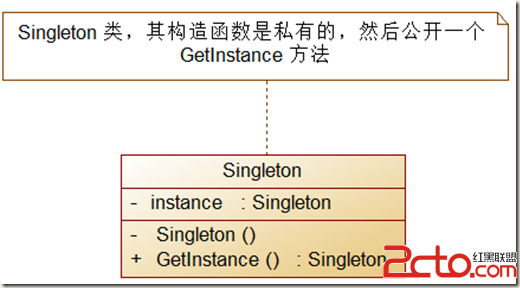 Android 單例模式七種常見寫法與實踐要點
單例模式的核心價值 在 Android 開發中,單例模式常用於管理需要全域唯一且資源消耗較高的物件,例如圖片載入器、網路請求器、資料庫 helper 等。以 ImageL
 仿「英語流利說」取詞放大控件:原理拆解與實作
英語流利說是個很不錯的口語學習 App。在它的修煉頁面長按螢幕,會彈出一個放大鏡;手指移到某個單字附近,該單字就會被選中並變色。這個互動細節做得相當漂亮,值得拆解。 實
 Android 基礎入門教程——10.3 AudioManager 音頻管理器詳解
Android 基礎入門教程——10.3 AudioManager(音頻管理器) 標籤:Android 基礎入門教程 本節引言 在多媒體系列的第一節裡,我們用 Sou
 okhttp-utils:一個更好用的 OkHttp 二次封裝庫
一、為什麼要重寫 之前寫過一篇 OkHttp 的普及文章,順手封裝了一個工具類。沒想到關注的人不少,於是各種需求湧進來,方法越加越多、重載層層堆疊,到後來自己用著都嫌彆扭