

編輯:關於 Android 程式設計

FileService.java 是操作 sdcard 的工具類,涵蓋了寫入根目錄、寫入自訂目錄、讀取資料、依副檔名分類保存以及刪除檔案等功能。
package com.example.data_storage_sdcard.file; import java.io.ByteArrayOutputStream; import java.io.File; import java.io.FileInputStream; import java.io.FileNotFoundException; import java.io.FileOutputStream; import java.io.IOException; import android.os.Environment; /** * sdcard的存在於上下文無關 * * @author piaodangdehun * */ public class FileService { /* * 存放在sdcard的根目錄 */ public boolean saveFileToSdcardRoot(String fileName, byte[] data) { boolean flag = false; /* * 先判斷sdcard的狀態,是否存在 */ String state = Environment.getExternalStorageState(); FileOutputStream outputStream = null; File rootFile = Environment.getExternalStorageDirectory(); // 獲得sdcard的根路徑 /* * 表示sdcard掛載在手機上,並且可以讀寫 */ if (state.equals(Environment.MEDIA_MOUNTED)) { File file = new File(rootFile, fileName); try { outputStream = new FileOutputStream(file); try { outputStream.write(data, 0, data.length); flag = true; } catch (IOException e) { e.printStackTrace(); } } catch (FileNotFoundException e) { e.printStackTrace(); } finally { if (outputStream != null) { try { outputStream.close(); } catch (IOException e) { e.printStackTrace(); } } } } return flag; } /* * 存放在sdcard下自定義的目錄 */ public boolean saveFileToSdcardDir(String fileName, byte[] data) { boolean flag = false; /* * 先判斷sdcard的狀態,是否存在 */ String state = Environment.getExternalStorageState(); FileOutputStream outputStream = null; File rootFile = Environment.getExternalStorageDirectory(); // 獲得sdcard的根路徑 /* * 表示sdcard掛載在手機上,並且可以讀寫 */ if (state.equals(Environment.MEDIA_MOUNTED)) { File file = new File(rootFile.getAbsoluteFile() + /txt); if (!file.exists()) { file.mkdirs(); } try { outputStream = new FileOutputStream(new File(file, fileName)); try { outputStream.write(data, 0, data.length); flag = true; } catch (IOException e) { e.printStackTrace(); } } catch (FileNotFoundException e) { e.printStackTrace(); } finally { if (outputStream != null) { try { outputStream.close(); } catch (IOException e) { e.printStackTrace(); } } } } return flag; } /* * 用於讀取sdcard的數據 */ public String readContextFromSdcard(String fileName) { String state = Environment.getExternalStorageState(); File rooFile = Environment.getExternalStorageDirectory(); // 獲得sdcard的目錄 FileInputStream inputStream = null;// 用於度取數據的流 ByteArrayOutputStream outputStream = new ByteArrayOutputStream(); // 用於存放獨處的數據 if (state.equals(Environment.MEDIA_MOUNTED)) { File file = new File(rooFile.getAbsoluteFile() + /txt/);// 在sdcard目錄下創建一個txt目錄 File file2 = new File(file, fileName); int len = 0; byte[] data = new byte[1024]; if (file2.exists()) { try { inputStream = new FileInputStream(file2); try { while ((len = inputStream.read(data)) != -1) { outputStream.write(data, 0, data.length); } } catch (IOException e) { e.printStackTrace(); } return new String(outputStream.toByteArray()); } catch (FileNotFoundException e) { // TODO Auto-generated catch block e.printStackTrace(); } finally { if (outputStream != null) { try { outputStream.close(); } catch (IOException e) { e.printStackTrace(); } } } } } return null; } /** * 對文件進行分類的保存到固定的文件中去 * * @param fileName * @param data */ public void saveFileToSdcardBySuff(String fileName, byte[] data) { // File file = Environment.getExternalStoragePublicDirectory(); // 保存文件的目錄 File file = null; if (Environment.getExternalStorageState().equals( Environment.MEDIA_MOUNTED)) { /* * 將不同的文件放入到不同的類別中 */ if (fileName.endsWith(.mp3)) { file = Environment .getExternalStoragePublicDirectory(Environment.DIRECTORY_MUSIC); } else if (fileName.endsWith(.jpg) || fileName.endsWith(.png) || fileName.endsWith(.gif)) { file = Environment .getExternalStoragePublicDirectory(Environment.DIRECTORY_PICTURES); } else if (fileName.endsWith(.mp4) || fileName.endsWith(.avi) || fileName.endsWith(.3gp)) { file = Environment .getExternalStoragePublicDirectory(Environment.DIRECTORY_MOVIES); } else { file = Environment .getExternalStoragePublicDirectory(Environment.DIRECTORY_DOWNLOADS); } FileOutputStream outputStream = null; try { outputStream = new FileOutputStream(new File(file, fileName)); try { outputStream.write(data, 0, data.length); } catch (IOException e) { e.printStackTrace(); } } catch (FileNotFoundException e) { e.printStackTrace(); } finally { if (outputStream != null) { try { outputStream.close(); } catch (IOException e) { e.printStackTrace(); } } } } } /* * 刪除一個文件 */ public boolean deleteFileFromSdcard(String folder, String fileName) { boolean flag = false; File file = Environment.getExternalStorageDirectory(); if (Environment.getExternalStorageState().equals( Environment.MEDIA_MOUNTED)) { File exitFile = new File(file.getAbsoluteFile() + / + folder); if (exitFile.exists()) { exitFile.delete(); } } return flag; } } HttpUtils.java 負責網路訪問,透過 HttpClient 下載圖片的位元組陣列。
package com.example.data_storage_sdcard.http; import java.io.IOException; import org.apache.http.HttpResponse; import org.apache.http.client.ClientProtocolException; import org.apache.http.client.HttpClient; import org.apache.http.client.methods.HttpPost; import org.apache.http.impl.client.DefaultHttpClient; import org.apache.http.util.EntityUtils; public class HttpUtils { /* * */ public static byte[] getImage(String path) { byte[] data = null; HttpClient httpClient = new DefaultHttpClient(); HttpPost httpPost = new HttpPost(path); try { HttpResponse response = httpClient.execute(httpPost); if (response.getStatusLine().getStatusCode() == 200) { data = EntityUtils.toByteArray(response.getEntity()); } } catch (ClientProtocolException e) { e.printStackTrace(); } catch (IOException e) { e.printStackTrace(); } finally { httpClient.getConnectionManager().shutdown(); } return data; } } ImageCache.java 負責把圖片寫入 cache。
package com.example.data_storage_sdcard.img; import java.io.File; import java.io.FileOutputStream; import java.io.IOException; import android.os.Environment; public class ImageCache { public static String saveImageCache(String fileName, byte[] data) { File file = Environment.getExternalStorageDirectory(); // 根目錄 FileOutputStream outputStream = null; if (Environment.getExternalStorageState().equals( Environment.MEDIA_MOUNTED)) { try { outputStream = new FileOutputStream(new File(file, fileName)); outputStream.write(data, 0, data.length); return file.getAbsolutePath() + / + fileName; } catch (Exception e) { e.printStackTrace(); } finally { if (outputStream != null) { try { outputStream.close(); } catch (IOException e) { e.printStackTrace(); } } } } return null; } } MainActivity.java 透過 AsyncTask 下載圖片並顯示,同時將結果存入 cache。
package com.example.data_storage_sdcard; import android.app.Activity; import android.app.ProgressDialog; import android.graphics.Bitmap; import android.graphics.BitmapFactory; import android.os.AsyncTask; import android.os.Bundle; import android.view.Menu; import android.view.View; import android.view.View.OnClickListener; import android.widget.Button; import android.widget.ImageView; import com.example.data_storage_sdcard.http.HttpUtils; import com.example.data_storage_sdcard.img.ImageCache; public class MainActivity extends Activity { private Button button; private ImageView imageView; private ProgressDialog progressDialog; private String imageName; private final String pathString = https://www.baidu.com/img/bd_logo1.png; @Override protected void onCreate(Bundle savedInstanceState) { super.onCreate(savedInstanceState); setContentView(R.layout.activity_main); button = (Button) this.findViewById(R.id.button1); imageView = (ImageView) this.findViewById(R.id.imageView1); progressDialog = new ProgressDialog(this); progressDialog.setTitle(下載提示); progressDialog.setMessage(load...); button.setOnClickListener(new OnClickListener() { @Override public void onClick(View v) { new MyTask().execute(pathString); } }); } class MyTask extends AsyncTask { @Override protected void onPreExecute() { super.onPreExecute(); progressDialog.show(); } @Override protected byte[] doInBackground(String... params) { String name = params[0]; imageName = name .substring(name.lastIndexOf(/) + 1, name.length()); return HttpUtils.getImage(params[0]); } @Override protected void onProgressUpdate(Void... values) { super.onProgressUpdate(values); } @Override protected void onPostExecute(byte[] result) { super.onPostExecute(result); if (result != null) { Bitmap bm = BitmapFactory.decodeByteArray(result, 0, result.length); imageView.setImageBitmap(bm); ImageCache.saveImageCache(, result); } else { imageView.setImageResource(R.drawable.ic_launcher); } progressDialog.dismiss(); } } @Override public boolean onCreateOptionsMenu(Menu menu) { // Inflate the menu; this adds items to the action bar if it is present. getMenuInflater().inflate(R.menu.main, menu); return true; } } 測試類 MyTest 用於驗證各項檔案操作。
package com.example.data_storage_sdcard; import java.io.FileWriter; import com.example.data_storage_sdcard.file.FileService; import android.nfc.Tag; import android.test.AndroidTestCase; import android.util.Log; public class MyTest extends AndroidTestCase { public void saveFileToSdcardTest() { FileService fileService = new FileService(); fileService.saveFileToSdcardRoot(aa.txt, jkhdsfjkhdskjfhdsjf.getBytes()); } public void saveFileToSdcardDir() { FileService fileService = new FileService(); fileService.saveFileToSdcardRoot(aa.txt, jkhdsfjkhdskjfhdsjf.getBytes()); } public void readContextFromSdcardTest() { FileService fileService = new FileService(); String msg = fileService.readContextFromSdcard(aa.txt); System.err.println(--> + msg); } public void saveFileToSdcardBySuffTest() { FileService fileService = new FileService(); fileService.saveFileToSdcardBySuff(aa.avi, asdfkajsgdhagsdfhdgsf.getBytes()); } public void delFile() { FileService fileService = new FileService(); boolean flag = fileService.deleteFileFromSdcard(txt, aa.txt); } } 最後別忘了在清單檔中加入網路訪問、sdcard 操作與測試相關的權限。
 Android 使用 GET / POST 存取 HTTP 伺服器完整實作
曾經我覺得 Android 的網路通訊有點神奇,直到把網路基礎補起來,才發現一切都很有條理。這篇就透過一個小 Demo,把 GET 與 POST 兩種提交方式講清楚。De
 自定義 RefreshRecyclerView:下拉刷新與載入更多的完整實作
ListView 已經用了很多年,後來有了 RecyclerView,基本可以取代 ListView / GridView,還支援瀑布流模式,加上各種動畫效果,於是就試著
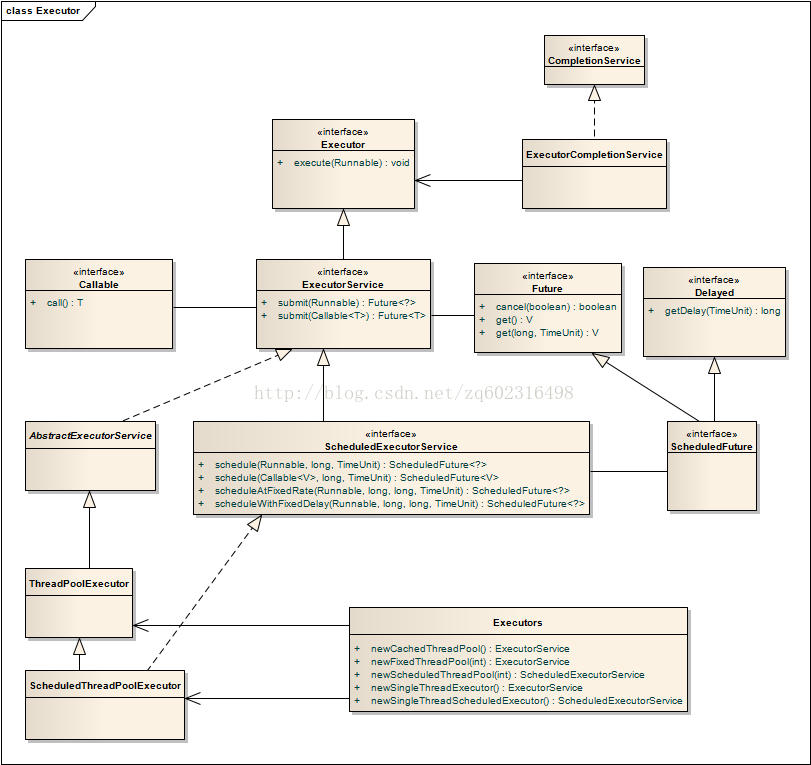 Android 線程與線程池知識總結(二):線程池全景
前言 線程是操作系統調度的最小單元,同時也是一種受限資源:不能無限創建,創建與銷毀都有開銷。系統靠時間片輪轉來調度每一個線程,因此除非線程數不超過 CPU 核心數,否則不
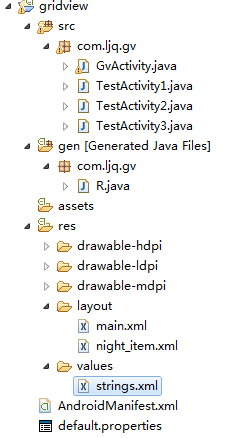 Android GridView 用法解析
GridView 基本概念 GridView 是可滾動的二維網格檢視,常用來顯示多張圖片或九宮格功能。 版面配置 <GridView xmlns:android=h