

編輯:關於 Android 程式設計
為 Button 綁定點擊事件有三種常見寫法,從最直觀到最精簡排列如下。
<LinearLayout xmlns:android="https://schemas.android.com/apk/res/android"
    xmlns:tools="https://schemas.android.com/tools"
    android:layout_width="match_parent"
    android:layout_height="match_parent"
    android:orientation="vertical"
    tools:context="${relativePackage}.${activityClass}" >

    <EditText
        android:id="@+id/edit_text"
        android:layout_width="wrap_content"
        android:layout_height="wrap_content"
        android:text="@string/hello_world1" />

    <Button
        android:id="@+id/clear_button"
        android:layout_width="wrap_content"
        android:layout_height="wrap_content"
        android:text="點擊清除輸入" />
</LinearLayout>
最直白的寫法,在取得控制項後直接掛上匿名監聽物件:
package com.example.myandroid;

import android.app.Activity;
import android.os.Bundle;
import android.view.View;
import android.widget.Button;
import android.widget.EditText;

public class MainActivity extends Activity {

    @Override
    protected void onCreate(Bundle savedInstanceState) {
        super.onCreate(savedInstanceState);
        setContentView(R.layout.activity_main);

        final EditText editText = (EditText) findViewById(R.id.edit_text);
        Button button = (Button) findViewById(R.id.clear_button);

        button.setOnClickListener(new Button.OnClickListener() {
            public void onClick(View v) {
                editText.setText("");
            }
        });
    }
}
注意 editText 必須宣告為 final,因為匿名內部類只能存取外部方法中 final(或 effectively final)的區域變數。
把監聽器抽成一個具名物件,適合有多顆按鈕共用同一份邏輯、或需要在多處重用的情況:
button.setOnClickListener(listener);

Button.OnClickListener listener = new Button.OnClickListener() {
    public void onClick(View v) {
        editText.setText("");
    }
};
版面檔中為按鈕加上 android:onClick:
<Button
    android:layout_width="wrap_content"
    android:layout_height="wrap_content"
    android:text="@string/button_send"
    android:onClick="sendMessage" />
Activity 中對應實作一個接收 View 參數的 public 方法:
public void sendMessage(View view) {
    editText.setText("");
}
這種寫法程式碼最少,但有兩個限制要注意:方法必須是 public、參數必須恰好是 View;而且它只在該控制項屬於這個 Activity 的直接版面時有效,用在 Fragment 或 <include> 引入的子版面中常會找不到方法而拋出例外。此外,把事件邏輯藏在 XML 裡也不利於閱讀,大型專案中通常不建議大量使用。
button.setOnClickListener { editText.text.clear() },是上述方式一的簡化形式。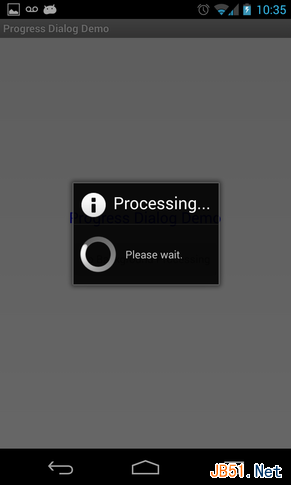 Android 手把手實作:打造一個透明背景的進度對話框
先來看看我們要做出來的「透明進度對話框」長什麼樣子——它沒有傳統對話框的邊框與背景,只有一個持續旋轉的加載動畫,乾淨又低調。 實作步驟 1、建立專案 用 Eclips
 微信電腦版怎麼發起視頻通話
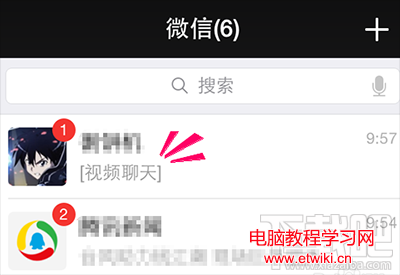
微信電腦版同樣支持視頻聊天,來看看具體怎麼操作。 1、首先需要把微信電腦版更新到 1.5 及以上版本,舊版本沒有這個入口。 2、發起方式有兩種。第一種是在手機微信上選中想
 用 GLSL 實作輝光(Glare / Glow)效果:原理、流程與 Shader
引言 GraphicsLab Project 立項之後,大部分時間都花在搭 Shader 實驗環境上。環境終於堪用,於是就拿它來做第一個實際效果——輝光。本文記錄在 Op
 Android 聯絡人按字母索引快速查找實作
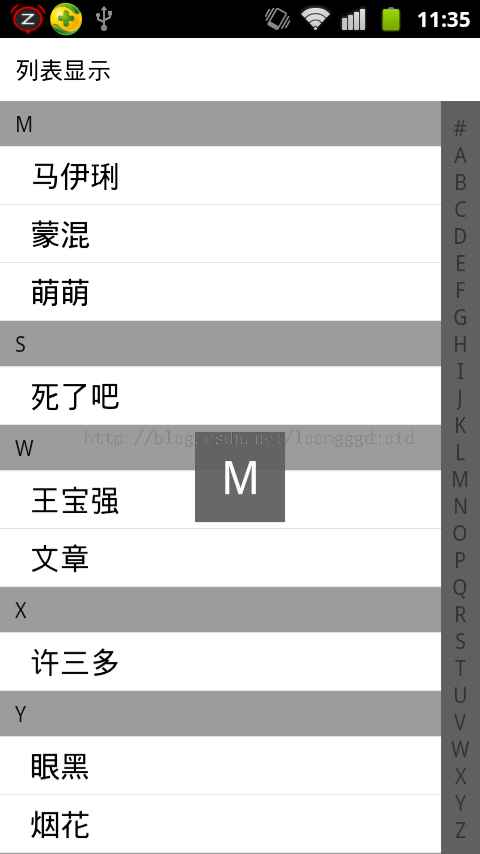
效果目標聯絡人清單若有大量資料,通常需要字母索引來加速查找。這個範例會在清單右側顯示 A 到 Z 的索引,當使用者滑動或點擊索引時,ListView 會快速跳到對應位置,