

編輯:關於 Android 程式設計
稍前我們分析了 FM 的整体流程與主要類別,接下來把焦點放在 FM 的錄音功能上。先看整體流程圖:
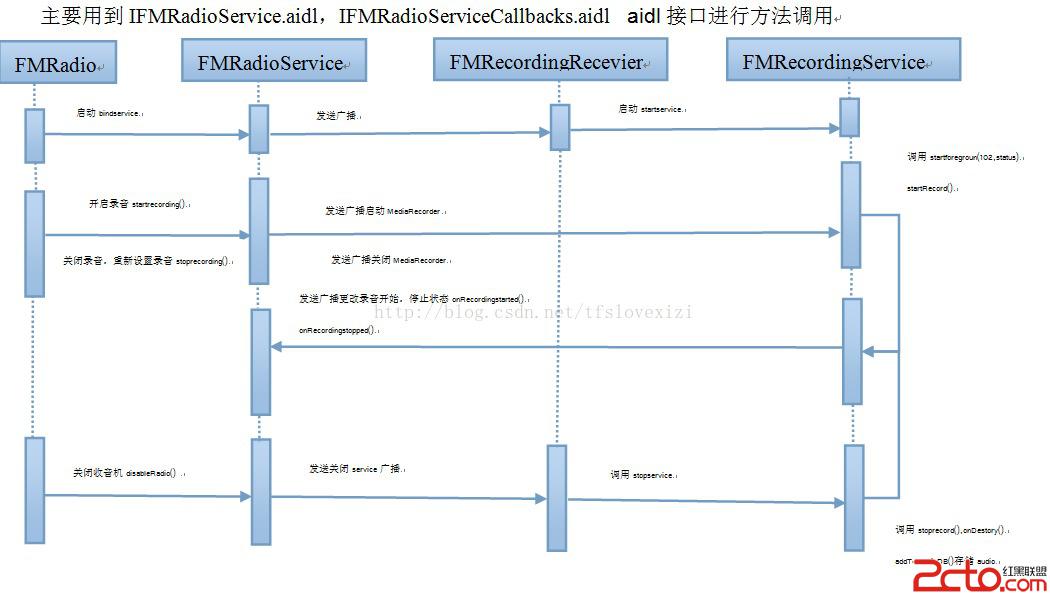
按下錄音鍵後,FMRadioService 會發出一個廣播,源碼如下:
public void startRecording() { Log.d(LOGTAG, "In startRecording of Recorder"); if ((true == mSingleRecordingInstanceSupported) && (true == mOverA2DP )) { Toast.makeText( this, "playback on BT in progress,can't record now", Toast.LENGTH_SHORT).show(); return; } sendRecordIntent(RECORD_START); }
其中 sendRecordServiceIntent 會帶上一個代表錄音開關的整數狀態值:
private void sendRecordServiceIntent(int action) { Intent intent = new Intent(ACTION_FM); intent.putExtra("state", action); intent.addFlags(Intent.FLAG_RECEIVER_FOREGROUND); Log.d(LOGTAG, "Sending Recording intent for = " +action); getApplicationContext().sendBroadcast(intent); }
對應的 FM 廣播 action 定義為:public static final String ACTION_FM = "codeaurora.intent.action.FM";
FMRecordingReceiver 收到廣播後,依 state 值決定啟動或停止錄音 Service:
public class FMRecordingReceiver extends BroadcastReceiver { private static final String TAG = "FMRecordingReceiver"; public static final String ACTION_FM = "codeaurora.intent.action.FM"; @Override public void onReceive(Context context, Intent intent) { String action = intent.getAction(); Log.d(TAG, "Received intent: " + action); if((action != null) && action.equals(ACTION_FM)) { Log.d(TAG, "FM intent received"); Intent in = new Intent(); in.putExtras(intent); in.setClass(context, FMRecordingService.class); int state = intent.getIntExtra("state", 0); boolean startService = true; if (state == 1) {Log.d(TAG, "FM ON intent received"); startService = true; context.startService(in); } else if(state == 0){ Log.d(TAG, "FM OFF intent received"); startService = false; context.stopService(in); } } } }
FM 錄音相關的 action:
public static final String ACTION_FM_RECORDING = "codeaurora.intent.action.FM_Recording"; public static final String ACTION_FM_RECORDING_STATUS = "codeaurora.intent.action.FM.Recording.Status";
onCreate() 中註冊錄音狀態、FM 關閉狀態與 SD 卡卸載等廣播:
public void onCreate() { super.onCreate(); Log.d(TAG, "FMRecording Service onCreate"); registerRecordingListner(); registerShutdownListner(); registerStorageMediaListener(); }
onDestroy() 中若仍在錄音則先停止,並逐一解除註冊:
public void onDestroy() { Log.d(TAG, "FMRecording Service onDestroy"); if (mFmRecordingOn == true) { Log.d(TAG, "Still recording on progress, Stoping it"); stopRecord(); } unregisterBroadCastReceiver(mFmRecordingReceiver); unregisterBroadCastReceiver(mFmShutdownReceiver); unregisterBroadCastReceiver(mSdcardUnmountReceiver); super.onDestroy(); }
關機時同樣要停止錄音:
private void registerShutdownListner() { if (mFmShutdownReceiver == null) { mFmShutdownReceiver = new BroadcastReceiver() { @Override public void onReceive(Context context, Intent intent) { String action = intent.getAction(); if (action.equals("android.intent.action.ACTION_SHUTDOWN")) { stopRecord(); } } }; IntentFilter iFilter = new IntentFilter(); iFilter.addAction("android.intent.action.ACTION_SHUTDOWN"); registerReceiver(mFmShutdownReceiver, iFilter); } }
private static long getAvailableSpace() { String state = Environment.getExternalStorageState(); if (Environment.MEDIA_CHECKING.equals(state)) { return PREPARING; } if (!Environment.MEDIA_MOUNTED.equals(state)) { return UNAVAILABLE; } try { File sampleDir = Environment.getExternalStorageDirectory(); StatFs stat = new StatFs(sampleDir.getAbsolutePath()); return stat.getAvailableBlocks() * (long) stat.getBlockSize(); } catch (Exception e) { Log.i(TAG, "Fail to access external storage", e); } return UNKNOWN_SIZE; }
核心即「可用區塊數 × 區塊大小」。相關狀態包含 MEDIA_CHECKING(正在檢查)、MEDIA_MOUNTED(已掛載)、UNKNOWN_SIZE(空間未知)與 LOW_STORAGE_THRESHOLD(低於儲存下限)等。
startRecord() 是錄音的核心:先處理既有錄音、檢查空間,再設定音源、格式與輸出路徑,最後啟動 MediaRecorder。
private boolean startRecord() { Log.d(TAG, "Enter startRecord"); if (mRecorder != null) { /* Stop existing recording if any */ try { mRecorder.stop(); mRecorder.reset(); mRecorder.release(); mRecorder = null; } catch(Exception e) { e.printStackTrace(); } } if (!updateAndShowStorageHint()) return false; long maxFileSize = mStorageSpace - LOW_STORAGE_THRESHOLD; mRecorder = new MediaRecorder(); try { mRecorder.setMaxFileSize(maxFileSize); if(mRecordDuration >= 0) mRecorder.setMaxDuration(mRecordDuration); } catch (RuntimeException exception) { } mSampleFile = null; File sampleDir; if((Environment.getExternalSDStorageState(this).equals(Environment.MEDIA_MOUNTED))){ sampleDir = new File(Environment.getExternalSDStorageDirectory(), "/FMRecording"); }else{ sampleDir = new File(Environment.getExternalStorageDirectory().getAbsolutePath() +"/FMRecording"); } if(!(sampleDir.mkdirs() || sampleDir.isDirectory())) return false; try { mSampleFile = File.createTempFile("FMRecording", ".3gpp", sampleDir); } catch (IOException e) { Toast.makeText(this, "Not able to access SD Card", Toast.LENGTH_SHORT).show(); } try { mRecorder.setAudioSource(MediaRecorder.AudioSource.FM_RX); mRecorder.setOutputFormat(MediaRecorder.OutputFormat.THREE_GPP); mRecorder.setAudioEncoder(MediaRecorder.AudioEncoder.AAC); mAudioType = "audio/3gpp"; } catch (RuntimeException exception) { mRecorder.reset(); mRecorder.release(); mRecorder = null; return false; } mRecorder.setOutputFile(mSampleFile.getAbsolutePath()); try { mRecorder.prepare(); mRecorder.start(); } catch (IOException e) { mRecorder.reset(); mRecorder.release(); mRecorder = null; return false; } catch (RuntimeException e) { mRecorder.reset(); mRecorder.release(); mRecorder = null; return false; } mFmRecordingOn = true; mRecorder.setOnInfoListener(new MediaRecorder.OnInfoListener() { public void onInfo(MediaRecorder mr, int what, int extra) { if ((what == MediaRecorder.MEDIA_RECORDER_INFO_MAX_DURATION_REACHED) || (what == MediaRecorder.MEDIA_RECORDER_INFO_MAX_FILESIZE_REACHED)) { if (mFmRecordingOn) { stopRecord(); } } } public void onError(MediaRecorder mr, int what, int extra) { if (what == MediaRecorder.MEDIA_RECORDER_ERROR_UNKNOWN) { if (mFmRecordingOn) { stopRecord(); } updateAndShowStorageHint(); } } }); mSampleStart = System.currentTimeMillis(); sendRecordingStatusIntent(START); startNotification(); return true; }
關鍵步驟包含:設定音源為 FM_RX、輸出格式 THREE_GPP、編碼器 AAC;透過 OnInfoListener 監聽錄音達到最大時長或檔案大小上限時自動停止;錯誤時停止並提示。
透過 startForeground 把 Service 拉到前台,並設定遠端狀態列:
private void startNotification() { RemoteViews views = new RemoteViews(getPackageName(), R.layout.record_status_bar); Notification status = new Notification(); status.contentView = views; status.flags |= Notification.FLAG_ONGOING_EVENT; status.icon = R.drawable.ic_menu_record; startForeground(102, status); }
停止時發送狀態廣播、儲存檔案、關閉前台通知:
private void stopRecord() { mFmRecordingOn = false; if (mRecorder == null) return; try { mRecorder.stop(); mRecorder.reset(); mRecorder.release(); mRecorder = null; } catch(Exception e) { e.printStackTrace(); } sendRecordingStatusIntent(STOP); saveFile(); stopForeground(true); stopClientStatusCheck(); }
saveFile() 會計算錄音時長,若為 0 則不保存;否則在 SD 卡可用時把檔案加入多媒體資料庫:
private void saveFile() { int sampleLength = (int)((System.currentTimeMillis() - mSampleStart)/1000 ); if (sampleLength == 0) return; String state = Environment.getExternalStorageState(); if (Environment.MEDIA_MOUNTED.equals(state)) { try { this.addToMediaDB(mSampleFile); Toast.makeText(this,getString(R.string.save_record_file, mSampleFile.getAbsolutePath( )), Toast.LENGTH_LONG).show(); } catch(Exception e) { e.printStackTrace(); } } else { Toast.makeText(this, "Recording aborted", Toast.LENGTH_SHORT).show(); } return; }
addToMediaDB 會把音訊檔寫入 MediaStore,並發送掃描廣播讓音樂等應用感知到新檔案:
private Uri addToMediaDB(File file) { Resources res = getResources(); ContentValues cv = new ContentValues(); long current = System.currentTimeMillis(); long modDate = file.lastModified(); Date date = new Date(current); SimpleDateFormat formatter = new SimpleDateFormat(res.getString(R.string.audio_db_title_format)); String title = formatter.format(date); cv.put(MediaStore.Audio.Media.IS_MUSIC, "1"); cv.put(MediaStore.Audio.Media.TITLE, title); cv.put(MediaStore.Audio.Media.DATA, file.getAbsolutePath()); cv.put(MediaStore.Audio.Media.DATE_ADDED, (int) (current / 1000)); cv.put(MediaStore.Audio.Media.DATE_MODIFIED, (int) (modDate / 1000)); cv.put(MediaStore.Audio.Media.MIME_TYPE, mAudioType); ContentResolver resolver = getContentResolver(); Uri base = MediaStore.Audio.Media.EXTERNAL_CONTENT_URI; Uri result = resolver.insert(base, cv); sendBroadcast(new Intent(Intent.ACTION_MEDIA_SCANNER_SCAN_FILE, result)); return result; }
錄音開始後會啟動一個檢測執行緒,比對目前所有執行中的 App 行程;若發起錄音的 App 已被結束,就停止錄音:
private void stopClientStatusCheck() { if(mStatusCheckThread != null) { mStatusCheckThread.interrupt(); } }
整體而言,FM 錄音是透過一連串廣播驅動 Service 狀態,並以 MediaRecorder 搭配前台通知與多媒體資料庫完成錄音、儲存與通知的閉環。
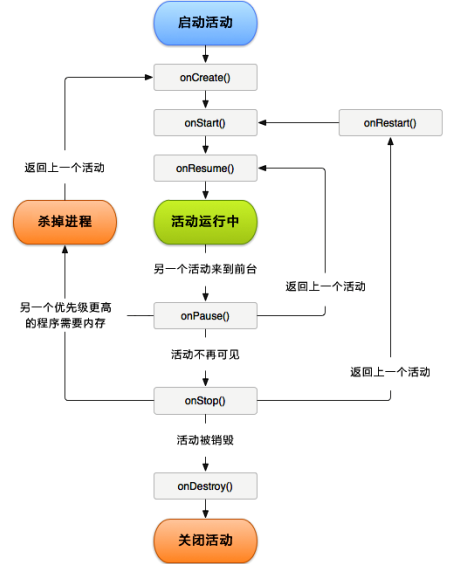 Android Activity 生命週期完全解析:七大回呼與實測驗證
Google 官方 Android 開發文件在描述生命週期時,給出了這樣一張圖: Activity 類別中定義的七個回呼方法,涵蓋了活動生命週期的每一個環節。以下逐一說
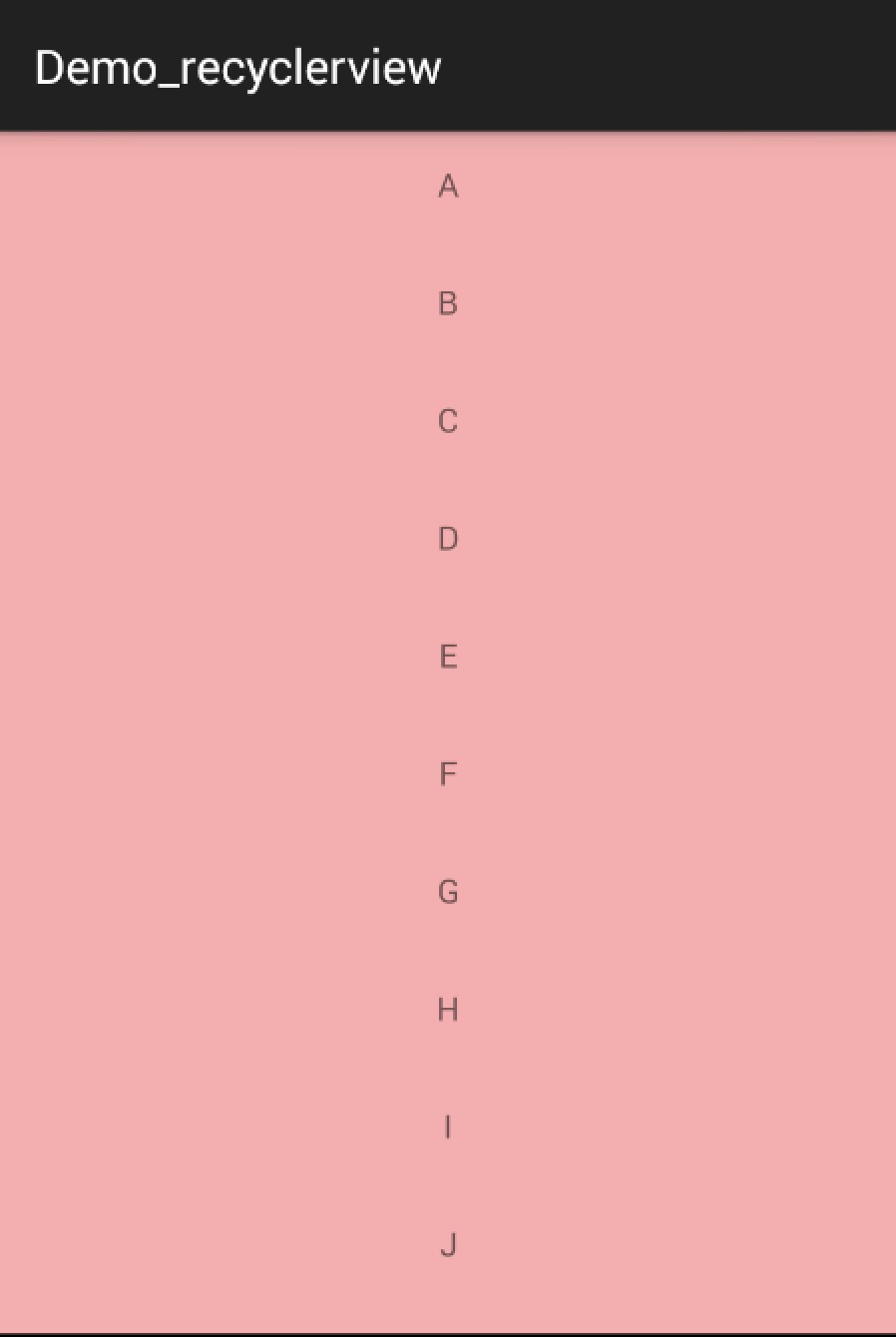 RecyclerView 完全解析:用插拔式架構一次搞定 ListView、GridView 與瀑布流
RecyclerView 推出已經有一段時間,只要引入 support-v7 依賴就能使用,多數 Android 開發者對它都不算陌生。官方對它的定位是「在有限的視窗中展
 Android ListView 實現圖文並列並自定義分割線(仿微信聯繫人)
在前一篇文章中,我們通過 Fragment 和 ViewPager 模仿實現了微信的布局框架。今天我們繼續用 ListView 來實現其中「聯繫人」欄目的基本視圖,效果如
 Android 仿余額寶數字滾動動畫實作
余額寶那種金額數字從 0 快速滾動到最終值的動畫,視覺效果很好,實作起來卻不難。以下是一個可直接複用的自訂 TextView。 效果預覽 完整程式碼 package