

編輯:關於 Android 程式設計
Advertising ID(廣告識別碼)由 Google Play 服務提供,是一組面向使用者的匿名標識。它有三個關鍵特性:唯一、可重置、可被使用者關閉。對使用者而言,何時重置、是否退出基於興趣的廣告,都由自己決定;對開發者而言,則得到了一套標準且簡單的識別方式,不必再自行發明設備標識方案。
接入並不複雜,一個 API 即可搞定。
標準而簡單:廣告標識是 Google Play 服務體系的一部分,天然適用於廣告投放與使用行為分析。
把控制權交給使用者:使用者可以在系統設定中隨時重置自己的廣告 ID,也可以隨時退出基於興趣的廣告。這項偏好會透過 API 同步給每一個使用該 ID 的應用。
先取得 Google Play 服務 SDK:在已下載的 Android SDK 中,進入 Extras 目錄,找到 google-play-services 庫,其中的 google-play-service.jar 就是我們需要的檔案。接著建議讀一遍官方文件與範例。
自 2014 年 8 月 1 日起,提交到 Google Play 的新應用與更新版本,在廣告場景中只能使用廣告 ID,不得再使用其他任何持久性設備標識。如需確認自己的應用是否合規,可透過開發者控制台查看,或到 Google Play 開發者幫助中心查閱廣告 ID 相關的政策條文。
廣告 ID 是一個唯一但可由使用者重置的字串標識,讓廣告網路與其他應用能在不辨識真實身分的前提下標記同一個使用者。應用透過 Google Play 服務提供的 API 取得它。
使用者在裝置的「設定 → 廣告」中,可以重置廣告 ID,也可以開關「停用興趣導向廣告」。這兩個狀態——ID 本身與是否限制廣告追蹤——都會透過 API 回傳給應用。
因此,任何使用廣告 ID 的應用都必須先檢查並尊重使用者的追蹤偏好,同時遵守 Google Play 的開發者內容政策。
API 以 UUID 格式的字串暴露廣告 ID。該能力需要 Google Play 服務 4.0 以上版本,具體是否可用取決於裝置上安裝的 Play 服務版本。
API 位於 com.google.android.gms.ads.identifier 套件中。呼叫 getAdvertisingIdInfo() 會回傳一個 AdvertisingIdClient.Info 物件,其中封裝了當前 ID 與追蹤偏好:
public String getId() —— 取得廣告 ID。
public boolean isLimitAdTrackingEnabled() —— 回傳使用者是否已開啟「限制廣告追蹤」。
要特別留意:這個 API 不提供「重置」方法,重置只能由使用者在 Play 服務設定中自行觸發。另外,getAdvertisingIdInfo() 是阻塞呼叫,在主執行緒(UI 執行緒)呼叫會拋出 IllegalStateException。
把 jar 放到專案的 lib 目錄下即可(整個 jar 約 3 MB 出頭)。取得 ID 的邏輯必須放在子執行緒中:
import com.google.android.gms.ads.identifier.AdvertisingIdClient;
import com.google.android.gms.ads.identifier.AdvertisingIdClient.Info;
import com.google.android.gms.common.GooglePlayServicesAvailabilityException;
import com.google.android.gms.common.GooglePlayServicesNotAvailableException;
import java.io.IOException;

// 不要從主執行緒呼叫,否則會拋出 IllegalStateException
public void getIdThread() {
    Info adInfo = null;
    try {
        adInfo = AdvertisingIdClient.getAdvertisingIdInfo(mContext);
    } catch (IOException e) {
        // 連線 Google Play 服務時發生不可恢復的錯誤
        // 例如舊版服務不支援取得 AdvertisingId
    } catch (GooglePlayServicesAvailabilityException e) {
        // 連線 Google Play 服務時發生可恢復的錯誤
    } catch (GooglePlayServicesNotAvailableException e) {
        // 裝置上完全沒有 Google Play 服務
    }
    final String id = adInfo.getId();
    final boolean isLAT = adInfo.isLimitAdTrackingEnabled();
}
如果不想把 3 MB 多的 jar 塞進專案,可以自己實作一個 AdvertisingIdClient,透過 bindService 直接與 Play 服務的廣告識別 Service 通信。前提是裝置本身已安裝 Google Play 服務。
public class AdvertisingIdClient {

    public static final class AdInfo {
        private final String advertisingId;
        private final boolean limitAdTrackingEnabled;

        AdInfo(String advertisingId, boolean limitAdTrackingEnabled) {
            this.advertisingId = advertisingId;
            this.limitAdTrackingEnabled = limitAdTrackingEnabled;
        }

        public String getId() {
            return this.advertisingId;
        }

        public boolean isLimitAdTrackingEnabled() {
            return this.limitAdTrackingEnabled;
        }
    }

    public static AdInfo getAdvertisingIdInfo(Context context) throws Exception {
        if (Looper.myLooper() == Looper.getMainLooper()) {
            throw new IllegalStateException("Cannot be called from the main thread");
        }
        try {
            PackageManager pm = context.getPackageManager();
            pm.getPackageInfo("com.android.vending", 0);
        } catch (Exception e) {
            throw e;
        }

        AdvertisingConnection connection = new AdvertisingConnection();
        Intent intent = new Intent("com.google.android.gms.ads.identifier.service.START");
        intent.setPackage("com.google.android.gms");
        if (context.bindService(intent, connection, Context.BIND_AUTO_CREATE)) {
            try {
                AdvertisingInterface adInterface = new AdvertisingInterface(connection.getBinder());
                return new AdInfo(adInterface.getId(),
                        adInterface.isLimitAdTrackingEnabled(true));
            } catch (Exception exception) {
                throw exception;
            } finally {
                context.unbindService(connection);
            }
        }
        throw new IOException("Google Play connection failed");
    }

    private static final class AdvertisingConnection implements ServiceConnection {
        boolean retrieved = false;
        private final LinkedBlockingQueue<IBinder> queue = new LinkedBlockingQueue<IBinder>(1);

        public void onServiceConnected(ComponentName name, IBinder service) {
            try {
                this.queue.put(service);
            } catch (InterruptedException localInterruptedException) {
            }
        }

        public void onServiceDisconnected(ComponentName name) {
        }

        public IBinder getBinder() throws InterruptedException {
            if (this.retrieved) throw new IllegalStateException();
            this.retrieved = true;
            return (IBinder) this.queue.take();
        }
    }

    private static final class AdvertisingInterface implements IInterface {
        private IBinder binder;

        public AdvertisingInterface(IBinder pBinder) {
            binder = pBinder;
        }

        public IBinder asBinder() {
            return binder;
        }

        public String getId() throws RemoteException {
            Parcel data = Parcel.obtain();
            Parcel reply = Parcel.obtain();
            String id;
            try {
                data.writeInterfaceToken(
                        "com.google.android.gms.ads.identifier.internal.IAdvertisingIdService");
                binder.transact(1, data, reply, 0);
                reply.readException();
                id = reply.readString();
            } finally {
                reply.recycle();
                data.recycle();
            }
            return id;
        }

        public boolean isLimitAdTrackingEnabled(boolean paramBoolean) throws RemoteException {
            Parcel data = Parcel.obtain();
            Parcel reply = Parcel.obtain();
            boolean limitAdTracking;
            try {
                data.writeInterfaceToken(
                        "com.google.android.gms.ads.identifier.internal.IAdvertisingIdService");
                data.writeInt(paramBoolean ? 1 : 0);
                binder.transact(2, data, reply, 0);
                reply.readException();
                limitAdTracking = 0 != reply.readInt();
            } finally {
                reply.recycle();
                data.recycle();
            }
            return limitAdTracking;
        }
    }
}
同樣要放在子執行緒,取得結果後再透過 Handler 回到主執行緒更新介面:
new Thread(new Runnable() {
    public void run() {
        try {
            AdInfo adInfo = AdvertisingIdClient.getAdvertisingIdInfo(MainActivity.this);
            advertisingId = adInfo.getId();
            optOutEnabled = adInfo.isLimitAdTrackingEnabled();
        } catch (Exception e) {
            e.printStackTrace();
        }
        mHandler.sendEmptyMessage(HANDEL_ADID);
    }
}).start();
廣告 ID 的接入成本很低,真正的重點在於合規:不要用其他持久標識取代它、不要在主執行緒呼叫、並且一定要在使用者開啟「限制廣告追蹤」時停止基於興趣的定向投放。如果應用依賴海外服務,兩種方案可以依專案體積與維護成本自由取捨。
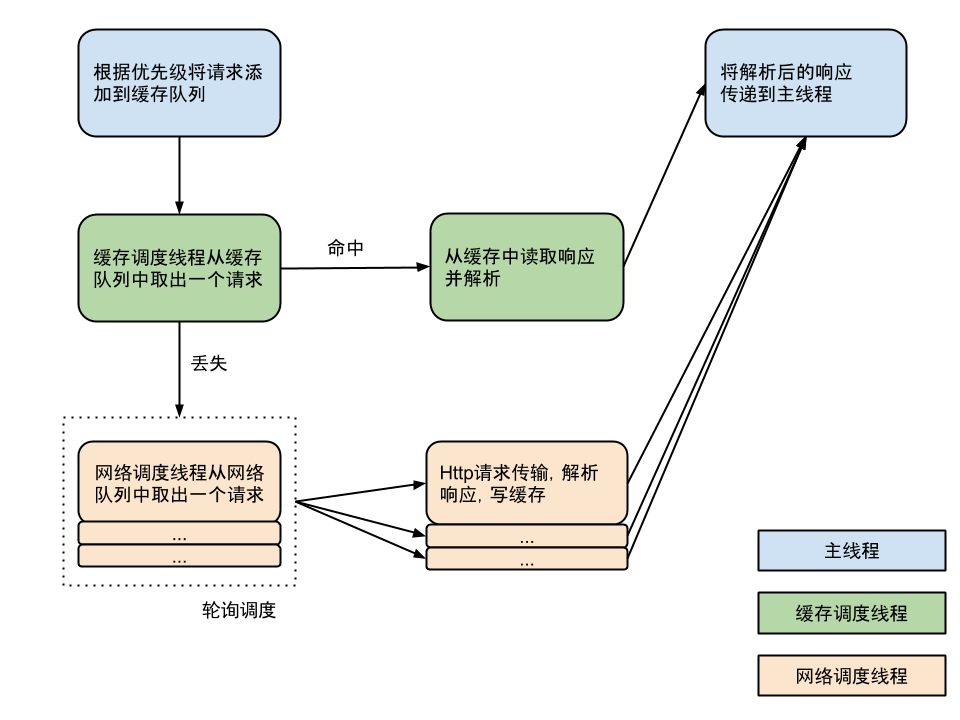 Volley 原始碼解析:請求佇列、緩存與網路調度
Volley 是 Android 上常見的網路請求框架,其設計重點在於請求佇列、緩存策略與多執行緒調度。本文從原始碼角度梳理 Volley 的執行流程,幫助開發者理解請求
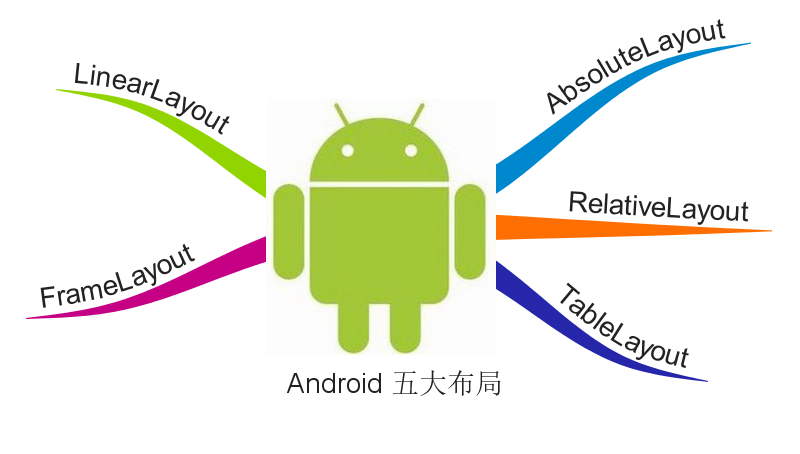 Android 五大布局完整解析:LinearLayout、FrameLayout、RelativeLayout 等應用
Android 的版面配置由多種 Layout 組成,不同布局適合不同介面結構。常見的有 LinearLayout、FrameLayout、RelativeLayout、
 Android 客戶端與 Java 服務端整合支付寶的完整流程
行動端整合支付,幾乎是每個 App 遲早都要面對的事。所有專案都在談商業模式,而直接向 C 端收取現金流,是其中最直接的一條路。 目前主流選擇是微信支付與支付寶。官方雖然
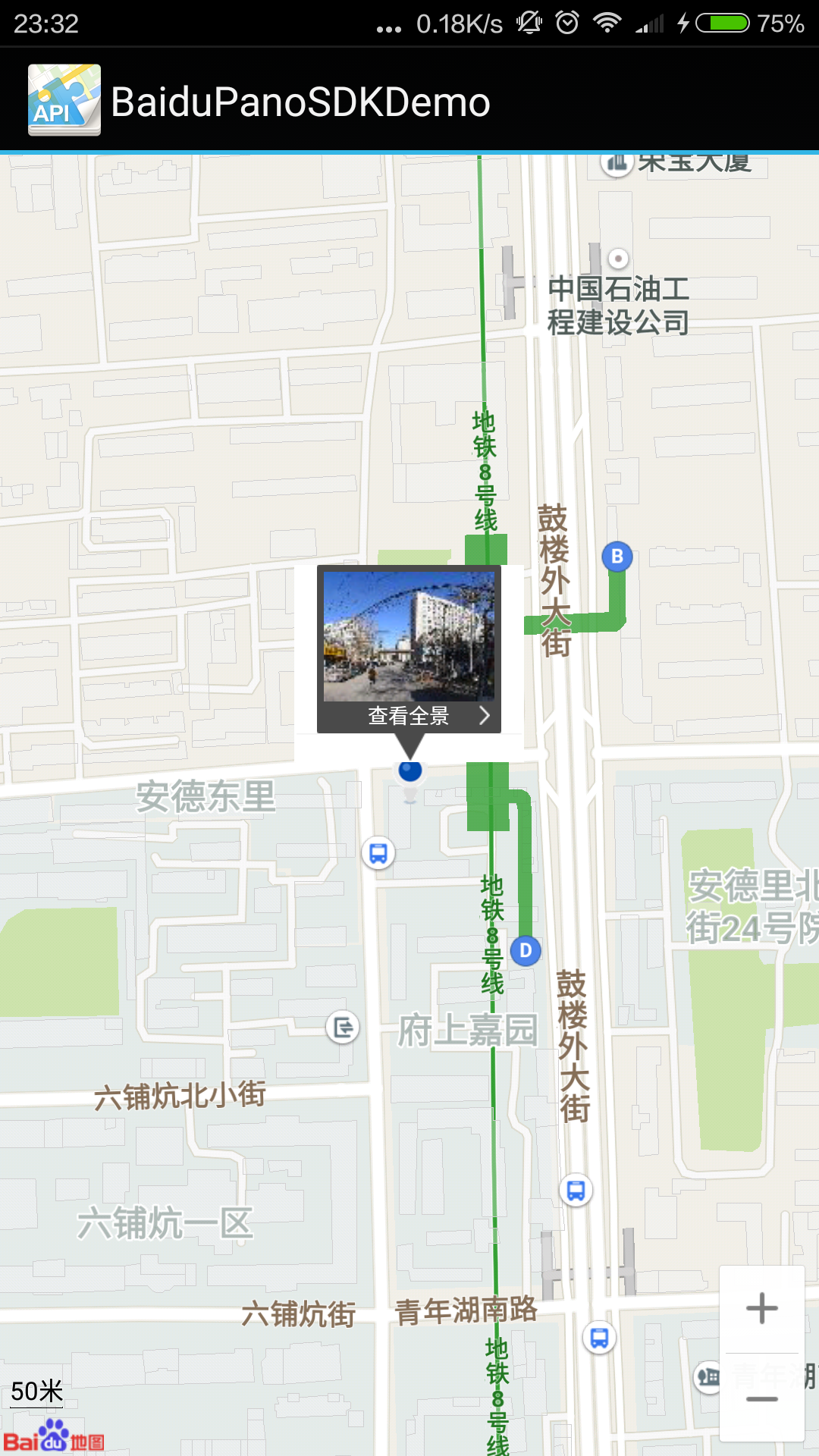 仿百度地圖街景效果實現:MapView 與 PanoView 的聯動
用過百度地圖的同學應該都熟悉街景功能——能看到不少地方的實景畫面。本文就以街景效果的實現為線索,走一遍完整流程。 百度在開放平台為開發者準備了豐富的 SDK 與文檔。關於