

編輯:關於 Android 程式設計
寫這篇的時候我正在參與一個網絡調用密集的項目。回想剛接觸 Android 時也卡在這個問題上,網上搜到的不少示例直接把網絡請求寫在 onCreate 裡——那個思路是有問題的。網絡訪問必須異步進行,不能阻塞主線程,否則在 Honeycomb 之後會直接物流成本 ANR 或 NetworkOnMainThread 異常。
下面把示例改寫為線程化的正確版本。
public class MainActivity extends Activity {

    private ImageView imageView;
    private String picturePath = "https://content.52pk.com/files/100623/2230_102437_1_lit.jpg";

    @Override
    protected void onCreate(Bundle savedInstanceState) {
        super.onCreate(savedInstanceState);
        setContentView(R.layout.activity_main);
        initView();

        new Thread(new Runnable() {
            @Override
            public void run() {
                final Bitmap bitmap = returnBitMap(picturePath);
                // 不能在子線程直接操作 UI,post 回主線程
                imageView.post(new Runnable() {
                    @Override
                    public void run() {
                        imageView.setImageBitmap(bitmap);
                    }
                });
            }
        }).start();
    }

    private Bitmap returnBitMap(String url) {
        URL myFileUrl = null;
        Bitmap bitmap = null;
        HttpURLConnection conn = null;
        InputStream is = null;
        try {
            myFileUrl = new URL(url);
            conn = (HttpURLConnection) myFileUrl.openConnection();
            conn.setDoInput(true);
            conn.connect();
            is = conn.getInputStream();
            bitmap = BitmapFactory.decodeStream(is);
        } catch (IOException e) {
            e.printStackTrace();
        } finally {
            if (is != null) {
                try { is.close(); } catch (IOException e) { e.printStackTrace(); }
            }
            if (conn != null) conn.disconnect();
        }
        return bitmap;
    }

    private void initView() {
        imageView = (ImageView) findViewById(R.id.picture);
    }
}
<LinearLayout xmlns:android="https://schemas.android.com/apk/res/android"
    android:id="@+id/display_image"
    android:layout_width="match_parent"
    android:layout_height="match_parent"
    android:gravity="center"
    android:orientation="vertical" >

    <ImageView
        android:id="@+id/picture"
        android:layout_width="wrap_content"
        android:layout_height="wrap_content" />
</LinearLayout>
另外必須在 AndroidManifest.xml 中加入 android.permission.INTERNET 權限。
Android 有一條鐵律:只有創建某個 View 的線程才能修改它。子線程拿到 Bitmap 後不能直接 setImageBitmap,常見的三種切換方式:
view.post(Runnable):最輕量,適合單次更新;runOnUiThread(Runnable):Activity 提供的便捷方法;Handler:需要頻繁通信或跨組件時更靈活。它能跑,但離生產可用還差幾步:
inSampleSize 降採樣;這些問題,正是成熟圖片加載庫(Glide、Fresco、Picasso)替你解決的事情。理解原理之後,實戰中直接用它們即可。
 仿影片 App 首頁輪播圖:SuperIndicator 使用介紹
前言首頁推薦位輪播圖是許多影片與內容平台常見的首屏元素。SuperIndicator 是一個可套用到 ViewPager 與 Banner 的輪播圖元件庫,常用於模擬愛奇
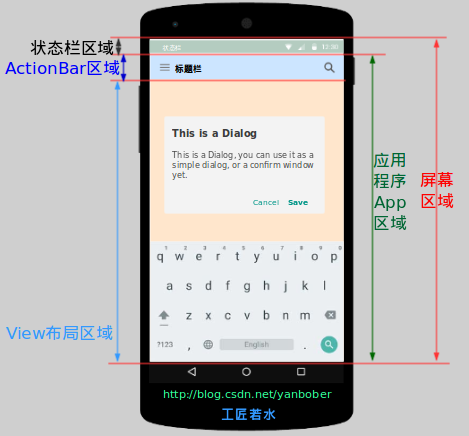 深入淺出 Android 座標系統:自定義 View 的地基知識
網路上談自定義控件的文章很多,但多半停在「怎麼畫出來」,很少系統性地談「怎麼算對位置」。而重寫 View 的那些 onXXX() 方法,本質上處理的幾乎都是座標運算。所以
 MotionEvent 完全解析:座標、事件類型與多點觸控
瞭解了 Android 的觸摸事件分發機制之後,接下來該仔細認識一下承載這些事件的主角——MotionEvent。這個類看似簡單,卻隱藏了不少容易踩坑的細節:座標的相對與
 Android Studio 教學:用 Vector Asset Studio 加入多密度向量圖形
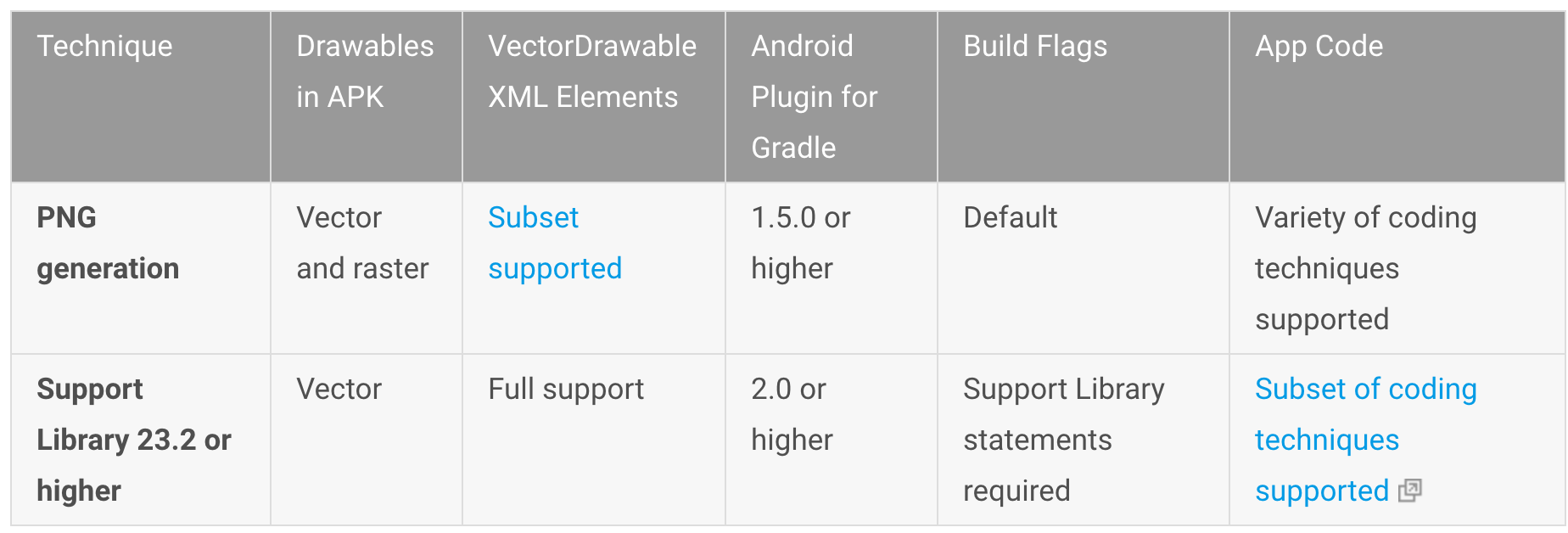
Android Studio 裡有個常被忽略的好用工具——Vector Asset Studio(向量工具)。它能幫你加入各種圖示,也能把可縮放的向量圖形檔匯入專案,作為