

編輯:關於 Android 程式設計
開發中有時候會拿到一份現成的 db 檔(例如離線字典、預設資料表),需要把它放進專案,再由程式複製到 App 的資料目錄中使用。
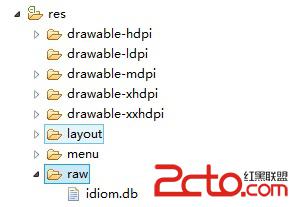
整個流程分兩步:先把檔案丟進 raw 資源目錄,再寫一段程式在首次啟動時把它複製出去。
public class DBOpenHelper {

    private final int BUFFER_SIZE = 400000;

    public static final String DB_NAME = "idiom.db";        // 保存的數據庫文件名
    public static final String PACKAGE_NAME = "cn.edu.bzu.happy";  // 應用的包名

    // 在手機裡存放數據庫的位置
    public static final String DB_PATH = "/data"
            + Environment.getDataDirectory().getAbsolutePath()
            + "/" + PACKAGE_NAME + "/databases";

    private Context context;

    public DBOpenHelper(Context context) {
        this.context = context;
    }

    public SQLiteDatabase openDatabase() {
        try {
            File myDataPath = new File(DB_PATH);
            if (!myDataPath.exists()) {
                myDataPath.mkdirs();   // 目錄不存在則建立
            }
            String dbfile = myDataPath + "/" + DB_NAME;

            if (!(new File(dbfile).exists())) {
                // 數據庫不存在,執行一次導入
                InputStream is = context.getResources().openRawResource(R.raw.idiom);
                FileOutputStream fos = new FileOutputStream(dbfile);

                byte[] buffer = new byte[BUFFER_SIZE];
                int count = 0;
                while ((count = is.read(buffer)) > 0) {
                    fos.write(buffer, 0, count);
                }
                fos.close();
                is.close();
            }

            return SQLiteDatabase.openOrCreateDatabase(dbfile, null);
        } catch (FileNotFoundException e) {
            Log.e("Database", "File not found");
            e.printStackTrace();
        } catch (IOException e) {
            Log.e("Database", "IO exception");
            e.printStackTrace();
        }
        return null;
    }
}
public class TestDao {

    private DBOpenHelper dbHelper;

    public TestDao(Context context) {
        dbHelper = new DBOpenHelper(context);
    }

    public List<Test> getAllTests() {
        List<Test> tests = new ArrayList<Test>();
        SQLiteDatabase sqLiteDatabase = dbHelper.openDatabase();
        Cursor cursor = sqLiteDatabase.rawQuery("select * from test", null);

        while (cursor.moveToNext()) {
            // 在這裡取出各欄位資料,組裝成 Test 物件
        }
        cursor.close();   // 別忘了關閉
        return tests;
    }
}
TestDao test = new TestDao(context);
test.getAllTests();
路徑選擇。範例中的 DB_PATH 指向內部儲存空間。註解裡也保留了 sdcard 的寫法,但在 Android 4.4(KitKat)之後,由於儲存權限模型收緊,寫入外部儲存的效果會與早期版本不同,檔案可能實際落在別的位置。若要在 4.4 以上寫入外部儲存,記得加上 WRITE_EXTERNAL_STORAGE 權限,並考慮改用 getExternalFilesDir() 取得 App 專屬目錄。
raw 資源的檔案格式。Android 的 aapt 在打包 raw 資源時,對某些副檔名會做壓縮處理,而 SQLite 檔一旦被壓縮就可能損壞。常見解法是把副檔名改為 aapt 不壓縮的形式,或在 build.gradle 中透過 aaptOptions { noCompress "db" } 明確排除。
版本升級。這個寫法只在檔案不存在時才複製,因此 App 升級換了新的 db 檔時不會生效。若需要支援,得額外比對版本號(例如用 SharedPreferences 記下上次複製的版本),版本不同時先刪除舊檔再重新複製。
 Android AIDL 跨進程傳遞自訂對象:Parcelable 打包與解包完整實作
黑夜給了我黑色的眼睛,我卻用它尋找光明。 跨進程傳值的幾種選擇 AIDL 天生支援跨進程傳值,實務上常見三類做法: · 廣播:最常見,傳小數據合適,缺點是承載量有限
 OpenSSL 自簽 CA 證書與雙向認證,Windows 證書批量導出與 CER 轉 BKS
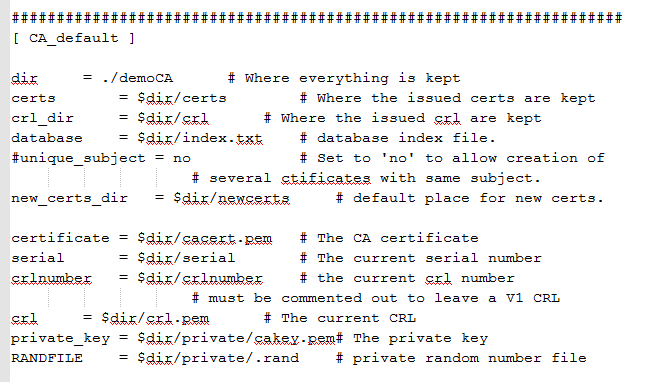
過程中遇到了一些小問題,例如 openssl.cnf 從哪裡來。這個檔案在編譯完 OpenSSL 後,通常位於根目錄的 apps/demoCA 下,把它複製到與 open
 Android 應用逆向:兩個真正好用的無原始碼調試器
要逆向分析並修改一個 Android 應用,第一步是解包與打包,這部分網路上的資料已經多到不能再多,不再贅述。唯一值得補充的是:如果 apktool 解包或打包失敗,可以
 動手做一個 ButterKnife:注解與編譯期處理的入門實踐
ButterKnife 幾乎人人用過,最直接的收益就是省下一堆 findViewById。既然原理不複雜,那我們就自己刻一個,取名 BBKnife。 先看 Butter